
WhatsApp MCP Extended
An extended Model Context Protocol (MCP) server for WhatsApp with a toolset-gated, agent-facing surface for messaging, search, media, group management, webhooks, presence, and more.
Built on AdamRussak/whatsapp-mcp (webhooks, containers) which forked lharries/whatsapp-mcp (original). Extended with reactions, message editing, polls, group management, presence, newsletters, and more.
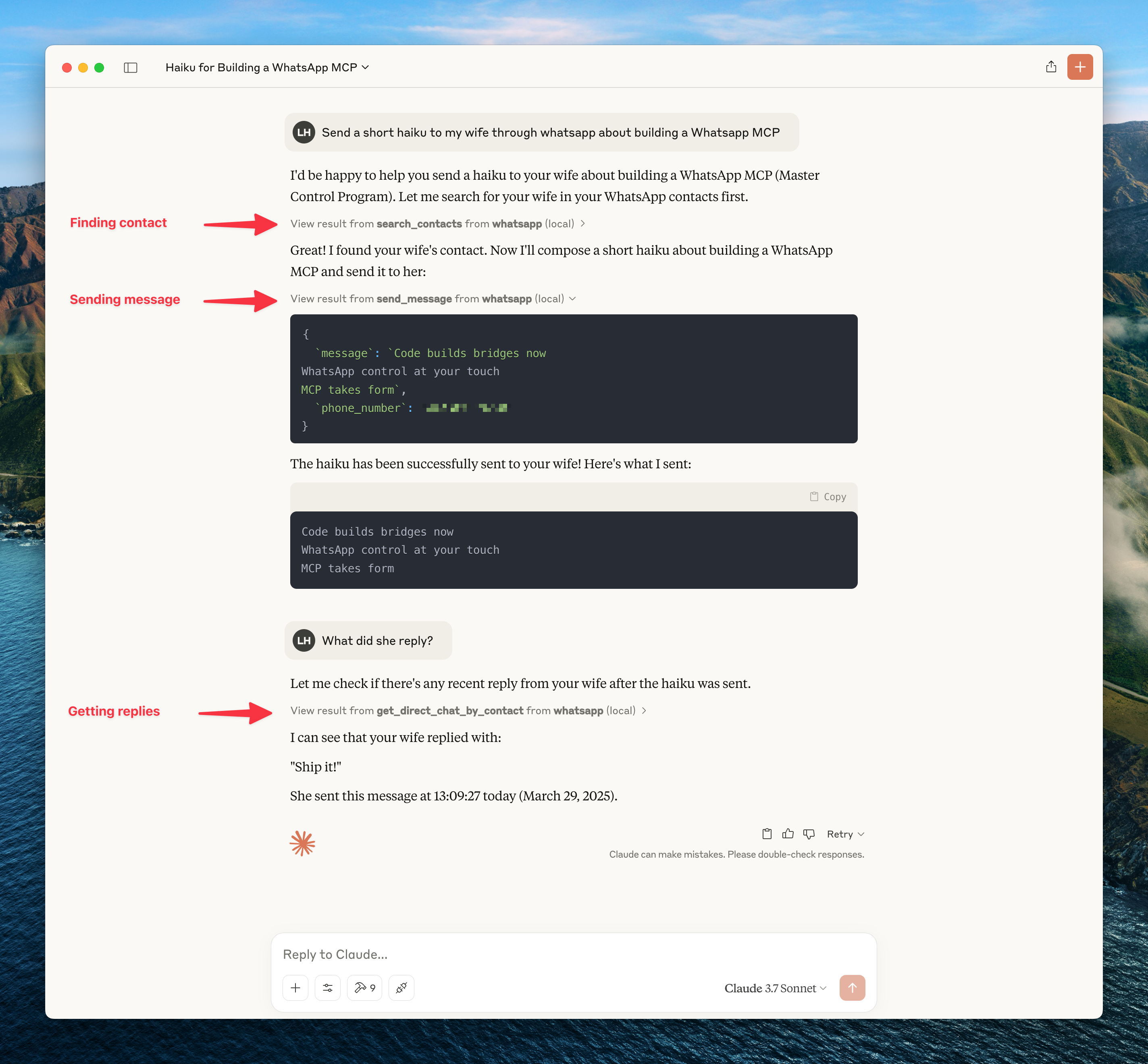
What's New (vs Original)
| Feature | Original | Extended |
|---|---|---|
| MCP Tools | 12 | 26 default / 15 lean |
| Reactions | - | ✅ |
| Edit/Delete Messages | - | ✅ |
| Group Management | - | ✅ |
| Polls | - | ✅ |
| History Sync | - | ✅ |
| Presence/Online Status | - | ✅ |
| Newsletters | - | ✅ |
| Webhooks | - | ✅ |
| Custom Nicknames | - | ✅ |
Architecture
┌─────────────────────┐     ┌─────────────────────┐     ┌─────────────────────┐
│   whatsapp-bridge   │     │   whatsapp-mcp      │     │   whatsapp-web-ui   │
│   (Go + whatsmeow)  │◄────│   (Python + MCP)    │     │   (HTML/JS SPA)     │
│   Port: 8080        │     │   Port: 8081        │     │   Port: 8090        │
└─────────────────────┘     └─────────────────────┘     └─────────────────────┘
         │                           │
         ▼                           ▼
    ┌─────────────────────────────────────┐
    │           SQLite (store/)           │
    │  messages.db │ whatsapp.db          │
    └─────────────────────────────────────┘
Quick Start
Docker (Recommended)
git clone https://github.com/felixisaac/whatsapp-mcp-extended
cd whatsapp-mcp-extended

docker network create n8n_n8n_traefik_network
docker-compose up -d

# Scan QR code to authenticate
docker-compose logs -f whatsapp-bridge
Claude Desktop / Cursor Integration
Add to your MCP config (claude_desktop_config.json or Cursor settings):
{
  "mcpServers": {
    "whatsapp": {
      "command": "uv",
      "args": ["run", "--directory", "/path/to/whatsapp-mcp-extended/whatsapp-mcp-server", "python", "main.py"]
    }
  }
}
MCP Tools
Version 0.3.0 exposes the full curated MCP surface by default for compatibility. Users who want a leaner agent context can opt into smaller toolsets.
Default toolsets:
WHATSAPP_MCP_TOOLSETS=all
Lean recommended toolsets:
WHATSAPP_MCP_TOOLSETS=core,send,media
Toolsets:
| Toolset | Default | Tools |
|---|---|---|
core |
Yes | Search/read tools, contact context, group info, profile picture |
send |
Yes | send_message, send_reaction, create_poll |
media |
Yes | send_file, send_audio_message, download_media |
history |
No | request_history |
contacts_write |
No | manage_nickname |
message_admin |
No | edit_message, delete_message, mark_read |
groups |
No | manage_group |
presence |
No | set_presence, subscribe_presence |
account_admin |
No | get_blocklist, manage_blocklist |
newsletter |
No | manage_newsletter |
You can also expose individual tools with WHATSAPP_MCP_TOOLS=manage_group,delete_message.
Breaking change in 0.2.0: older narrow tools are no longer exposed to the agent. Use the merged replacements below.
Migration:
| Prefer | Replaces |
|---|---|
get_contact_context |
get_contact_details, get_direct_chat_by_contact, get_contact_chats, get_last_interaction |
manage_nickname |
set_nickname, get_nickname, remove_nickname, list_nicknames |
manage_group |
create_group, add_group_members, remove_group_members, promote_to_admin, demote_admin, leave_group, update_group |
get_blocklist, manage_blocklist |
get_blocklist, block_user, unblock_user |
manage_newsletter |
follow_newsletter, unfollow_newsletter, create_newsletter |
Messaging
| Tool | Description |
|---|---|
send_message |
Send text message |
send_file |
Send image/video/document |
send_audio_message |
Send voice message |
download_media |
Download received media |
send_reaction |
React to message with emoji |
edit_message |
Edit sent message |
delete_message |
Delete/revoke message |
mark_read |
Mark messages as read (blue ticks) |
Chats & Messages
| Tool | Description |
|---|---|
list_chats |
List all chats |
get_chat |
Get chat by JID |
list_messages |
Search messages with filters |
get_message_context |
Get messages around a specific message |
request_history |
Request older message history |
Contacts
| Tool | Description |
|---|---|
search_contacts |
Search by name/phone |
list_all_contacts |
List all contacts |
get_contact_context |
Full contact info, related chats, and last interaction |
manage_nickname |
Set/get/remove/list custom nicknames |
Groups
| Tool | Description |
|---|---|
get_group_info |
Group metadata & participants |
manage_group |
Create/update/leave groups and manage members/admins |
create_poll |
Create poll in chat |
Presence & Profile
| Tool | Description |
|---|---|
set_presence |
Set online/offline status |
subscribe_presence |
Subscribe to contact's presence |
get_profile_picture |
Get profile picture URL |
get_blocklist |
List blocked users |
manage_blocklist |
Block/unblock users |
Newsletters (Channels)
| Tool | Description |
|---|---|
manage_newsletter |
Follow/unfollow/create channels |
API Design Philosophy
Response data prioritizes complete context with minimal interpretation. See METADATA_PHILOSOPHY.md for:
- Why we include raw data instead of pre-computed signals
- How we reduce token waste for consuming LLMs
- Response structure examples (Messages, Chats, Contacts)
- Design rules: raw facts, countable metrics, exclude nulls
TL;DR: Get all contact info in one response instead of repeated queries. LLM infers tone, urgency, relationships from raw data + metrics.
Webhook System
Real-time HTTP webhooks for incoming messages with:
- Triggers: all, chat_jid, sender, keyword, media_type
- Matching: exact, contains, regex
- Security: HMAC-SHA256 signatures
- Retry: Exponential backoff
Access the web UI at http://localhost:8090
Development
Manual Setup
# Bridge (Go 1.25+)
cd whatsapp-bridge && go run main.go

# MCP Server (Python 3.11+)
cd whatsapp-mcp-server && uv sync && uv run python main.py

# Web UI
cd whatsapp-web-ui && npm install && npm run dev
Pre-build Checks
cd whatsapp-mcp-server
uv run python check.py  # Catches errors before docker build
Updating whatsmeow
When you see Client outdated (405) errors:
cd whatsapp-bridge
go get -u go.mau.fi/whatsmeow@latest
go mod tidy
docker-compose build whatsapp-bridge
docker-compose up -d whatsapp-bridge
Ports
| Service | Port | Description |
|---|---|---|
| Bridge API | 8080 (→8180) | REST API |
| MCP Server | 8081 | Streamable HTTP transport |
| Web UI | 8090 | Chat, contacts, and webhook management |
Configuration
Environment variables for the bridge (set in .env or docker-compose.yaml):
| Variable | Default | Description |
|---|---|---|
API_KEY |
(required) | Bearer token for all authenticated API calls |
PRESENCE_PING_ENABLED |
true |
Set false to stop broadcasting "online" to contacts |
PRESENCE_PING_INTERVAL |
20m |
How often to ping presence. Accepts Go duration strings (20m, 1h). Keep ≥20m to avoid bot fingerprinting |
HISTORY_SYNC_DAYS_LIMIT |
365 |
Days of history to sync on first link |
HISTORY_SYNC_SIZE_MB |
5000 |
Max history sync size |
STORAGE_QUOTA_MB |
10240 |
Device storage quota |
API_PORT |
8080 |
Bridge HTTP port (internal) |
Quick Commands
After running setup.ps1 once, use the Makefile for day-to-day operations:
make status          # check connection state (connected, needs_pairing, jid)
make pair PHONE=+60123456789   # pair via 8-digit phone code — no QR scan needed
make pairing-status  # check pairing code progress
make reconnect       # force reconnect (no re-pairing)
make logs            # tail bridge logs
make sync-venv       # re-sync Python venv (fix missing module errors)
make open-ui         # open web UI in browser (QR scan, webhooks, contacts)
Session Reliability
Session lifetime rules (WhatsApp-enforced, cannot be changed):
- Primary phone must connect to WhatsApp at least every 14 days
- The bridge companion device must be active at least every 30 days
- WebSocket idle disconnects after ~30 min (auto-reconnects, no re-pairing needed)
What causes permanent logout (requires re-scanning QR):
- Phone offline >14 days
- Manual unlink from phone (Settings → Linked Devices)
- WhatsApp detects suspicious activity / protocol fingerprinting
- WhatsApp app update that forces re-authentication
Account risk: This is a third-party bridge using an unofficial API. Use a dedicated non-personal number. WhatsApp has been aggressively detecting and banning automation tools since 2025. For business-critical use, the WhatsApp Business API is the only compliant path.
If the bridge goes unhealthy (needs re-pairing):
make status          # check: needs_pairing=true means re-pair required
make pair PHONE=+60123456789   # preferred: 8-digit code, no QR scan
# or: open http://127.0.0.1:8090 and scan QR
You can also configure a webhook to receive logged_out events so you're alerted immediately when the session is revoked.
Troubleshooting
Bridge needs re-pairing after restart
The bridge stores credentials in store/whatsapp.db. If that file exists but the bridge still shows QR, WhatsApp revoked the session server-side (check your phone → Settings → Linked Devices). Re-pair using make pair PHONE=+60... or open http://127.0.0.1:8090.
Messages Not Delivering
If API returns success but messages show single checkmark:
docker-compose restart whatsapp-bridge
docker-compose logs --tail=10 whatsapp-bridge
# Should see: "✓ Connected to WhatsApp!"
QR Code Issues
# Option 1: phone number code (no QR scan needed)
make pair PHONE=+60123456789

# Option 2: scan QR via web UI
open http://127.0.0.1:8090

# Option 3: terminal QR
docker-compose logs -f whatsapp-bridge
MCP server fails to start (missing module)
make sync-venv # re-runs uv sync in whatsapp-mcp-server/
Check bridge health
curl http://127.0.0.1:8180/api/health
# connected: true/false
# needs_pairing: true means QR/code scan required (not just a reconnect)
# disconnected_for: how long it's been offline
Credits
Fork chain:
- lharries/whatsapp-mcp - Original MCP server (12 tools)
- AdamRussak/whatsapp-mcp - Added webhooks, container split, webhook UI
- This repo - Added reactions, edit/delete, groups, polls, presence, newsletters, and a curated MCP tool surface
Libraries:
Community Acknowledgements
Several forks independently solved real problems and their ideas have been incorporated into this repo. Credit where it's due:
| Contributor | What they figured out |
|---|---|
| simonseifert | First to track the direct_path DB column needed for CDN fallback during media download; whatsmeow-native Download() approach in /api/download; correct DB path resolution across Docker/local environments; inline Image content blocks in download_media |
| laudite | Media captions were silently dropped for images/video/docs — fixed in ExtractTextContent(); quoted/reply context in webhook payloads; @mention auto-detection; request_history peer-message target bug (was sending to group JID instead of own device JID) |
| kasperpeulen | Contact name resolution priority chain (FullName > PushName > FirstName > Business) and the phone-number-cache bug; full call event pipeline (offer/accept/terminate/reject with duration); LID → phone JID resolution via GetAltJID() |
| Coriatel | First working /api/download implementation with manual HKDF/AES-CBC decryption |
| jedijashwa | Reactions silently failing fix (wrong sender JID lookup); extended MIME type support for audio/document types |
| slarrain | LID JID normalization — diagnosed the silent conversation-splitting bug where WhatsApp's new LID format caused messages to land in separate chat threads |
If you've forked this repo and built something useful, open a PR or issue — good ideas deserve to flow upstream.
License
MIT License - see LICENSE file.
No comments yet
Be the first to share your take.