
Veil
A stealth automation runtime for AI agents. Drives real Chrome over raw CDP — no Playwright, no Puppeteer, no WebDriver, zero runtime dependencies.




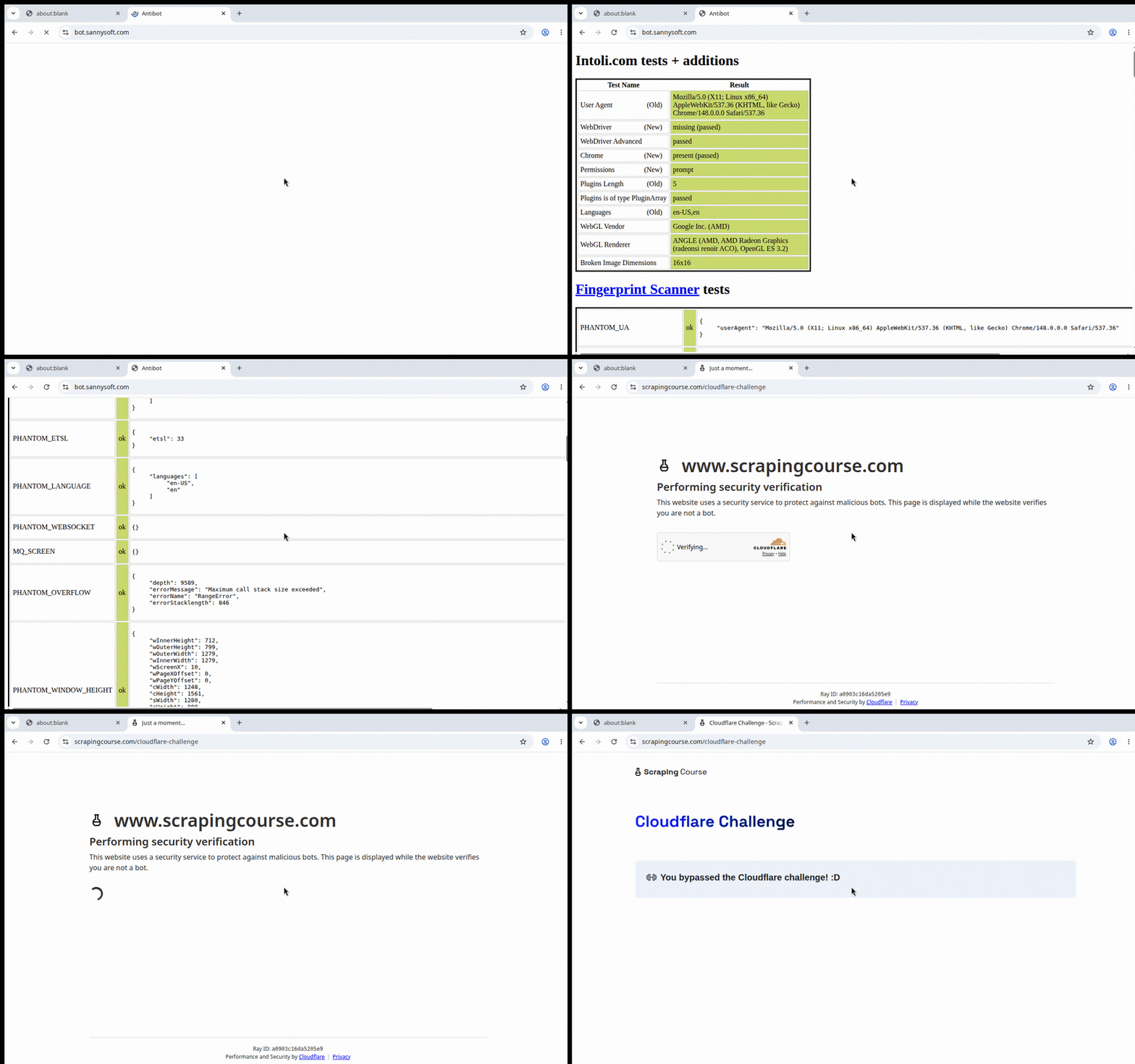
Veil driving real Chrome: bot.sannysoft.com all-green, then straight through Cloudflare's JS challenge — no patches, no plugins.
To Instagram, Google, Reddit, Cloudflare — Veil is Chrome. Same binary, same TLS, same JS engine, same canvas/WebGL/font fingerprint a human's browser has. We don't reimplement the browser (that's Chromium's 20-year, 1000-engineer job, and a hand-rolled engine is easier to fingerprint, not harder). We replace the part that gets you caught: the automation layer.
Why not Playwright / Puppeteer?
They're powerful and great for scripted QA. For agents on hostile sites they have three structural problems:
| Problem | Playwright/Puppeteer | Veil |
|---|---|---|
| Detectable | navigator.webdriver=true, --enable-automation, the Runtime.enable CDP tell, HeadlessChrome UA |
webdriver scrubbed, no automation switches, no Runtime.enable, UA + client-hints normalized |
| Robotic input | instant teleport clicks, fixed-cadence typing → behavioural detection | curved Bézier mouse paths, eased timing, human keystroke cadence |
| Brittle for agents | CSS/XPath selectors that break constantly | accessibility-tree snapshot → stable integer refs; agents never write a selector |
Veil is dependency-free — Node 24 / Bun ship a global WebSocket, so the entire
CDP transport is ~120 lines we own. Nothing to patch, nothing to leak.
How Veil compares (honest)
The "real Chrome over raw CDP" idea isn't new — Python's nodriver
pioneered it, and Camoufox (a C++-patched Firefox) scores even
better on pure stealth. Veil isn't claiming to out-stealth them. Its wedge is where it
lives and how agents use it:
- TypeScript-native. The JS/TS agent ecosystem (Vercel AI SDK, LangChain.js, MCP) has
no strong raw-CDP stealth driver — it's stuck on Playwright + stealth plugins, or
shelling out to Python
nodriver. Veil is that missing piece. - MCP-native. Ships an MCP server, so any agent gets stealth browsing as tools with zero glue.
- Agent-first, not scraper-first. Accessibility-tree refs and human input are built for an LLM driving the browser, not for a scraping script.
- Does two things the others don't. Drives the native "Sign in with Google" (FedCM)
account chooser over CDP — agents are otherwise walled out of Google-SSO apps entirely —
and blocks visited sites from port-scanning your localhost/LAN (on by default). Neither
nodriver, Camoufox, nor Playwright-stealth does either.
If you're in Python and just want raw stealth, use nodriver or Camoufox — they're great.
Veil is for TypeScript agents and MCP hosts.
Quick start
Prerequisites: Chrome/Chromium on PATH (or VEIL_CHROME=/path/to/chrome), and Bun.
bun install
bun run examples/selftest.ts   # launches real Chrome, runs the full chain
In your own project — bun add @achamm/veilbrowser (or npm install @achamm/veilbrowser):
import { Browser } from "@achamm/veilbrowser";

const browser = await Browser.launch({ headless: false });   // headful = stealthiest
const page = await browser.newPage();
await page.goto("https://example.com");

// Accessibility-tree snapshot → stable integer refs (no selectors).
const snap = await page.snapshot();
console.log(snap.text);
//  [1] textbox "Search"
//  [2] button "Sign in"

await page.fill(1, "hello");          // act by ref — human typing, jittered timing
await page.click(2);                  // curved Bézier mouse path, real CDP input
const png = await page.screenshot();  // PNG buffer for a vision model

await browser.close();
How the stealth works
- Launch (
launcher.ts) — a real Chrome with the flags a normal profile uses, minus the automation switches Playwright adds.--disable-blink-features=AutomationControlledflipsnavigator.webdrivertofalseat the engine level. PersistentuserDataDirso the profile looks used (history, cookies), not freshly minted. - Transport (
cdp.ts) — raw WebSocket, flat session mode. We never callRuntime.enable— that command is a primary CDP detection vector.Runtime.evaluateworks without it. - Page patch (
stealth.ts) — injected viaaddScriptToEvaluateOnNewDocumentbefore any site code, on every frame. Every patch is self-gating: it fires only when a value is genuinely anomalous (a stripped/headless env leakedwebdriver === true, 0 plugins, an emptylanguages, or a missingwindow.chrome), and is a no-op on a healthy real Chrome. That's the whole default surface — awebdriver/window.chrome/plugins/languagesbackfill, nothing more. It deliberately does not touchpermissions.query: a patchedpermissions.queryis itself a signature deep fingerprinters score as "stealth detected". WebGL-vendor spoofing (and the native-lookingtoString()mask that hides it) is opt-in viamaskWebgl— off by default, used only to disguise SwiftShader on GPU-less hosts; with a real GPU the authentic vendor is left untouched. Kept deliberately small; over-patching is its own fingerprint. - UA / client hints (
page.ts) — strips theHeadlessChrometoken from the UA and theSec-CH-UAbrand headers. - Human input (
human.ts) — seedable PRNG drives curved mouse paths and jittered keystroke timing.
Coherent fingerprints / profiles
By default Veil ships your real Chrome fingerprint — the strongest identity there
is, because nothing is spoofed. When you instead need to present a specific
identity (a Windows profile from a Linux server, a fixed profile across a pool),
apply a Fingerprint. The design rule is coherence, not spoof-count: a
half-spoofed profile is worse than none — if the UA says Windows but the client
hints, navigator.platform, or WebGL vendor disagree, that contradiction is itself
a detection signal. So a Fingerprint is applied as one internally-consistent set,
and every derived value (client-hint platform, brand versions, Accept-Language) is
computed from the profile so nothing can drift out of agreement.
import { Browser, type Fingerprint } from "@achamm/veilbrowser";

const fp: Fingerprint = {
  userAgent: "Mozilla/5.0 (Windows NT 10.0; Win64; x64) AppleWebKit/537.36 " +
             "(KHTML, like Gecko) Chrome/131.0.6778.86 Safari/537.36",
  platform: "Win32", platformVersion: "15.0.0", architecture: "x86", model: "", mobile: false,
  hardwareConcurrency: 16, deviceMemory: 8, languages: ["en-US", "en"],
  screen: { width: 2560, height: 1440, availWidth: 2560, availHeight: 1400, colorDepth: 24 },
  devicePixelRatio: 1,
  webglVendor: "Google Inc. (NVIDIA)",
  webglRenderer: "ANGLE (NVIDIA, NVIDIA GeForce RTX 3060 Direct3D11 vs_5_0 ps_5_0, D3D11)",
  timezone: "America/New_York", locale: "en-US", seed: 12345,
};

const browser = await Browser.launch({ headless: false, fingerprint: fp }); // applied to every page
// or at runtime, before the first navigation:
await page.applyFingerprint(fp);
Don't want to hand-build one? Use a preset or a self-consistent random profile:
import { Browser, Fingerprint, PRESETS } from "@achamm/veilbrowser";

await Browser.launch({ fingerprint: PRESETS["mac-chrome"] });   // windows/mac/linux/android-chrome
await Browser.launch({ fingerprint: Fingerprint.random() });    // fresh coherent identity
await Browser.launch({ fingerprint: Fingerprint.random(42) });  // deterministic given a seed
Fingerprint.random(seed?) picks a platform first, then derives a matching UA,
client hints, WebGL, screen and timezone — so a random profile is as internally
consistent as a preset. Each preset is a real Chrome-131 identity for its OS (an
Apple-Silicon Mac still reports the frozen Intel Mac OS X 10_15_7 UA + MacIntel
platform with an arm architecture and an Apple Metal renderer — exactly as a real
one does).
How it's applied (two layers). The bulk goes through Chrome itself — UA +
the full userAgentMetadata client hints + the legacy navigator.platform, the
screen size + devicePixelRatio, and the timezone / locale / geolocation —
all via CDP Emulation.*. These are set by the browser, so there is no JS getter
to unmask — the strongest kind of spoof, and they resolve natively
(Intl.DateTimeFormat().resolvedOptions().timeZone, navigator.language,
navigator.geolocation). A US profile should carry a US timezone/locale (and
optional US coordinates) — a region that disagrees with the UA is a contradiction
detectors score. Only
the values CDP can't set are injected as page-level overrides — hardwareConcurrency,
deviceMemory, languages, screen.avail*/colour depth, the WebGL vendor/renderer
(the two UNMASKED_* parameters), and deterministic canvas + audio noise. Every
one is defined on the prototype (inherited, so no own-property tell) with its
toString() masked to [native code] by a single Function.prototype.toString proxy
that hides itself and leaves genuine native/user functions untouched — the same
discipline the base stealth uses.
The canvas/audio noise is seeded, not random per call: repeated reads of the same
canvas or audio buffer return identical bytes (a per-call random is itself a tell),
while a different seed yields a different — but equally stable — hash. So a profile
carries its own consistent canvas/audio fingerprint instead of leaking the host's.
Honest scope: this is coherent fingerprint control, not a magic bullet. It lets
you present a consistent identity; it does not by itself defeat any particular hard
target. navigator.oscpu is deliberately left unset (it's Firefox-only — a Chrome
profile exposing it would be an anomaly); screen.colorDepth follows the profile but
the rendered pixels still come from the host GPU, so keep webglVendor/webglRenderer
plausible for the platform you're claiming; and WebGL-canvas read-back (toDataURL on
a WebGL canvas) is left to the vendor override, not noised.
Agent tooling (the other half of the product)
The selling point isn't only stealth — it's that agents drive it well:
snapshot()returns the page as a flat numbered index from the accessibility tree (the semantic layer screen readers use). The #1 cause of agent breakage — guessed CSS/XPath selectors — is gone. The agent acts on a stableref.screenshot()returns a PNG buffer, ready for vision grounding — the viewport, the whole{fullPage}, a single element{ref}, or an explicit{clip}rectangle.click/fill/typedrive real CDP input with human dynamics.waitFor(expr)replaces flaky fixed sleeps — and, likeevaluate(), is timeout-bounded, so a wedged page rejects cleanly instead of hanging the agent.goto()returns{ status, ok }for the main response, so callers can detect a 4xx/5xx wall instead of only seeing a rendered error page.blockResources(types, {urls})drops image/font/media/etc. and URL-matched requests — a big speed and footprint win for scraping (shares one Fetch handler with the private-network guard, so both are active at once).
Federated sign-in (FedCM)
"Sign in with Google" one-tap and the newer navigator.credentials.get({identity})
flows render their account chooser as native browser UI — the button is a
cross-origin IdP iframe and the chooser is browser chrome, so no synthetic click can
reach either. That's a wall for agents logging into Google-SSO apps. Veil drives it
over CDP's FedCM domain instead:
// Passive / one-tap (fires on load once you're signed in to the IdP):
await page.enableFedCm();          // autoSelectFirst — picks account 0 for you
await page.goto("https://app.example.com/");
await page.waitForFedCmDialog();   // chooser intercepted + auto-selected
await page.disableFedCm();

// Active "Sign in with Google" button, one call:
const account = await page.signInWithFedCm({ triggerRef: btn.ref });
enableFedCm also resetCooldowns (Chrome silently suppresses the dialog after
repeated dismissals) and binds account selection to the page's own CDP session — pick
the wrong target and the dialog, plus the page's credentials.get(), hangs forever.
Enable it on demand, right before the sign-in: turning it on globally hangs any
site that silently probes FedCM at load. End-to-end run against the canonical demo IdP:
bun run examples/fedcm.ts.
No localhost / LAN leak (private-network block)
Fingerprinters (iphey, pixelscan, …) don't read your process list — they can't.
They port-scan 127.0.0.1 from page JavaScript, timing which local ports answer,
and map open ports to software: VNC on :5900, an antidetect API on :3001, a dev
server on :3000. That both fingerprints you and leaks your LAN to every site you
visit. Most stealth stacks (nodriver, Camoufox, Playwright-stealth) don't stop it.
Veil does, on by default. Every HTTP-family request (fetch/XHR/EventSource/
<img>/<script>) from a page to a loopback or private (127.0.0.0/8, 10/8,
172.16/12, 192.168/16, ::1, .localhost) address is failed uniformly and
instantly — the same error whether the port is open or closed — so a scan can't tell
them apart and comes back empty. (That's the vector real detectors use; the :3001
antidetect API and :5900 VNC probes are plain HTTP.)
const browser = await Browser.launch();                 // block is on
const browser = await Browser.launch({ blockPrivateNetwork: false }); // opt out
// per-page, toggle at runtime:
await page.blockPrivateNetwork();
await page.unblockPrivateNetwork();
Still allowed: the agent's own top-level navigation to a private host
(page.goto("http://localhost:3000")), and a localhost page loading its own localhost
resources — only a public page reaching a private host is blocked. Known gaps (honest):
raw WebSocket to a private host isn't interceptable via CDP's Fetch domain, so those
fall back to Chrome's own Private Network Access (a timeout, not a uniform block); and
exotic IP encodings (decimal/hex) aren't matched — real-world scanners use the canonical
forms above.
Detection scorecard (measured, Chrome 148)
Run it yourself: bun run examples/detect.ts (headless) or VEIL_HEADFUL=1 bun run examples/detect.ts (headful — Veil auto-starts its own Xvfb, no wrapper needed).
Measured on an AMD Radeon (Renoir APU) host, real hardware GL via ANGLE/EGL:
| Detector | Mode | sannysoft | CreepJS "headless" | CreepJS "stealth" |
|---|---|---|---|---|
| Veil — headful + auto-Xvfb + real GPU | recommended | 57/57 | 0% | 0% |
| Veil — headless + real GPU | server/fast | 57/57 | 33% | 0% |
| (earlier: SwiftShader + heavy stealth) | superseded | 57/57 | 67% | 20% |
Live targets — the full scrapingcourse.com challenge
suite, reproducible with bun run examples/scrapingcourse.ts (residential IP, headful):
| Target | Result |
|---|---|
| Antibot Challenge | Bypassed — "You bypassed the Antibot challenge" (~3s auto-solve) |
| Cloudflare JS Challenge | Bypassed — "You bypassed the Cloudflare challenge" |
| Cloudflare Antibot + login | Bypassed — cleared the wall, rendered the real login form |
| Cloudflare Turnstile + login | Passed — managed Turnstile issues its token to real Chrome (a 700+ char cf-turnstile-response); the form submits. We don't solve a captcha — the real browser earns the token |
| Demo suite — JS rendering, infinite scroll, pagination, table parsing, load-more, CSRF/login | all served clean |
| Reddit — incl. its JS challenge | served clean (challenge auto-solved) |
| Instagram — public profile | served clean |
12/12 cleared on a clean residential IP. Two honest caveats, not hidden: Cloudflare's JS interstitial difficulty scales with IP reputation — hammer one IP and it escalates (that's IP rep, not a browser tell; use proxies at volume). And what we do not yet claim: an interactive checkbox reCAPTCHA/Turnstile that demands a human click, enterprise DataDome/Kasada, and high-volume behavioural trust on logged-in sessions. We test before we claim.
What moved the needle (each verified by re-running the suite):
- Real GPU, not SwiftShader.
--use-gl=angle --use-angle=gl-egldrives the actual AMD GPU → an authentic, self-consistent WebGL fingerprint. No vendor spoof = no lie for CreepJS's pixel-hash to catch. - Headful on a server. Veil manages its own Xvfb display, so "headful" needs no desktop. Eliminates the headless render quirks + tiny-screen tell (33% → 0%).
- Slim, self-gating stealth. The biggest surprise: the stealth patches themselves
were the "20% stealth" signal. A correctly-launched Chrome already reports
webdriver === false(the right human value — forcingundefinedis worse), 5 plugins, a realchromeobject. So each patch now fires only when the value is genuinely anomalous; on healthy Chrome it's a no-op. Smaller surface = nothing to detect.
Use from an AI agent (MCP)
Veil ships an MCP server (src/mcp.ts) — already wired into persoje
(~/.config/persoje/mcp.json), exposing 33 tools: goto, reload, back, forward,
snapshot, click, fill, type, select, press, scroll, set_viewport,
set_user_agent, set_fingerprint, block_resources, unblock_resources, wait_for, wait_for_selector,
click_at, get_cookies, text, attribute, screenshot, eval, upload,
upload_via_picker, pdf, fedcm_enable, fedcm_signin, drag, frames, use_frame,
close. Tool-execution failures come
back as isError results (the model reads and self-corrects) rather than JSON-RPC errors.
Verified end-to-end through persoje's own MCP client (discover → goto → snapshot). Any MCP host works.
The package ships a veil-mcp bin, so an installed user can launch the server without a
checkout — copy-pasteable into any MCP host:
{ "servers": { "veil": {
  "command": "npx",
  "args": ["-y", "-p", "@achamm/veilbrowser", "veil-mcp"],
  "env": {}                          // headful + auto-Xvfb + real GPU (0% CreepJS).
                                     // Set VEIL_HEADLESS=1 for the faster server mode.
} } }
Smoke-check the bin (returns the tools list, no browser launched):
echo '{"jsonrpc":"2.0","id":1,"method":"tools/list"}' | npx -y -p @achamm/veilbrowser veil-mcp
Local dev alternative (from a checkout, no build step):
{ "servers": { "veil": {
  "command": "bun",
  "args": ["run", "src/mcp.ts"]      // run from the repo root
} } }
Testing
bun run examples/selftest.ts   # end-to-end: launch, stealth, snapshot, interact
bun run examples/detect.ts     # bot-detection scorecard (bot.sannysoft.com, etc.)
bun test                       # unit tests (browser-launching ones skip under CI)
Unit tests cover:
- PRNG (
human.test.ts): xorshift32 determinism, range/int bounds, keystroke cadence, mouse timing - Snapshot refs (
snapshot.test.ts): ref numbering (1-based, sequential, no gaps), AX-tree filtering - CDP framing (
cdp-messages.test.ts): JSON-RPC structure, sessionId routing, command/response correlation - Private-network classifier (
private-host.test.ts): loopback/RFC1918 vs public host detection (the block's decision) - Lifecycle (
lifecycle.test.ts, local only): launch/close, process-group reaping, profile-lock refusal
Status
Working today (verified against Chrome 148):
- Zero-dep CDP runtime (raw WebSocket, flat session mode)
- Stealth launch + page-script injection (
--disable-blink-features=AutomationControlled) - UA/client-hint scrub (no "HeadlessChrome" token)
- WebGL backend selection (hardware GPU via ANGLE/EGL, or SwiftShader + vendor masking)
- AX-tree snapshot → stable integer refs for agent-friendly interaction
- Human-like input: curved Bézier mouse paths, jittered keystroke timing, real CDP input
- PNG screenshots (vision-model ready)
- Headful-on-server via auto-managed Xvfb — "headful" with no desktop (best fingerprint scores)
- FedCM sign-in — drives the native "Sign in with Google" /
credentials.get()account chooser over CDP (examples/fedcm.ts) - No localhost/LAN leak — blocks visited sites from port-scanning your private network (on by default)
- Clean process lifecycle — detached process groups + a reaper, so Ctrl-C/crash never orphans Chrome
- MCP server (
src/mcp.ts) — stdio JSON-RPC; persoje, Claude, any MCP host drives Veil natively
Roadmap toward production:
- Adversarial fingerprint suite — continuous scoring (CreepJS, sannysoft, Datadome demo)
-
Runtime.enable-leak hardening via isolated worlds for all eval - Profile + residential-proxy pools (the "Veil Cloud" layer)
- Vision-based element grounding fallback (sparse AX-trees, canvas apps)
- Response-body capture; session persistence & profile warm-up
- Per-tab concurrency (many tabs, one socket — transport already supports it)
License
MIT.
No comments yet
Be the first to share your take.