
Subfloor is a forkable shell substrate that brings a complete AI development system to any code repository, with DB-backed identity, memory, and roadmap management across multiple coding harnesses. It provides durable browser conversations, inter-shell messaging, and sandboxed tool access while keeping credentials and routing logic on the host.
Forkable shell substrate for a single code repository — DB-backed identity, memory, roadmap, content; harness-agnostic boot. We build the data layer, we rent the harness.
28Stars
2Forks
359Open issues
Python MIT Updated 3 hours ago
README
title: subfloor tags: [substrate, shells, agentic-coding, harness-agnostic, sqlite] date: 2026-07-20 project: subfloor purpose: Forkable shell substrate for a repo




subfloor
Quick start · Full documentation
Overview
What is subfloor?
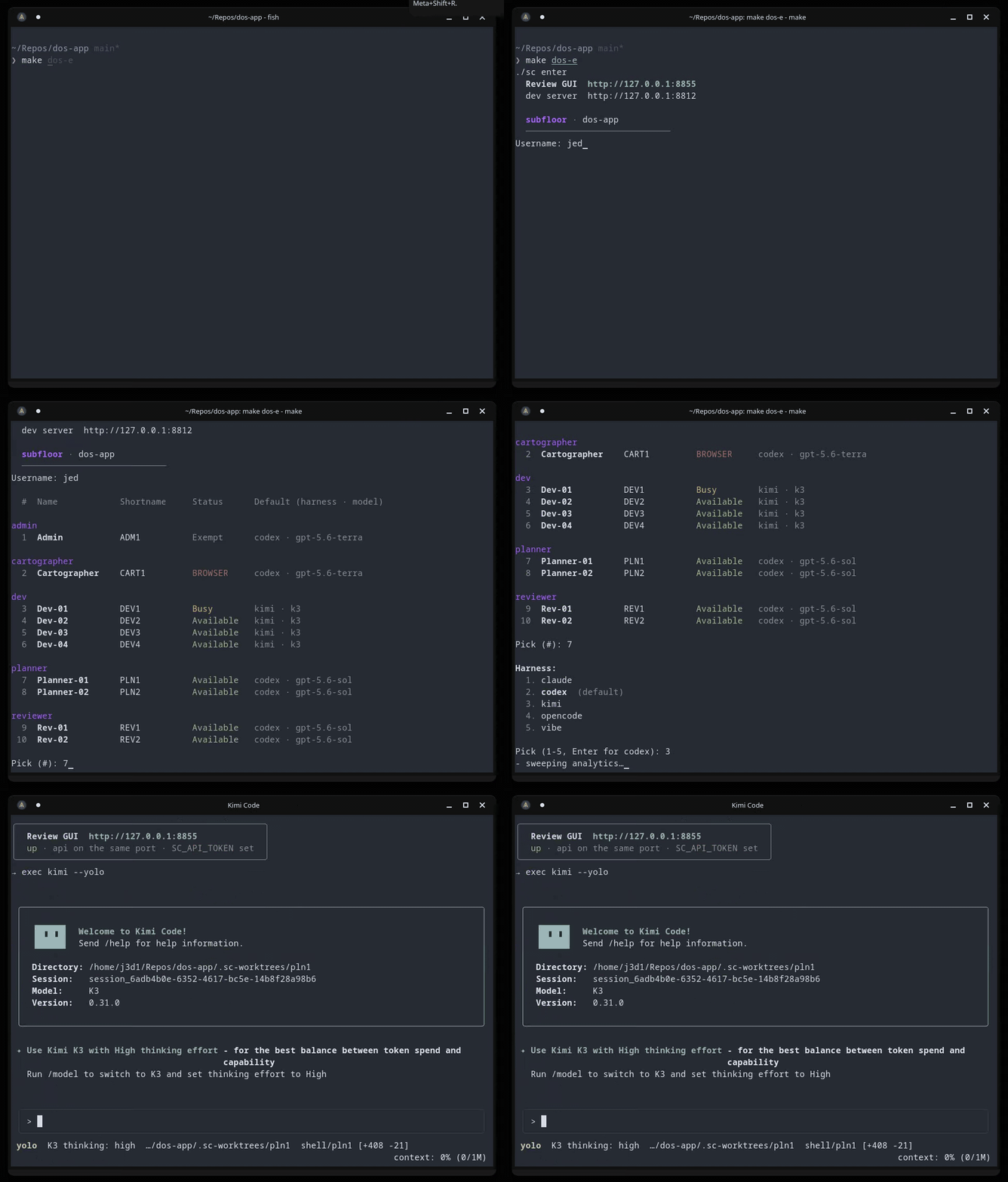
In everyday terms, subfloor is an AI development system — a whole AI development team in a box. Add it to an existing project from the command line, install it, launch it, and start working with a Shell (subfloor's name for an AI agent). Launching also prints the address of the local Review GUI: a friendly home base where you can see your team, roadmap, specs and docs, open flags, repo map, worktrees, and token use — and, in the Chats tab, hold a durable browser conversation with any available Shell.
Getting Started
A good first run starts with the Cartographer Shell. It maps your repository and adds short descriptions so every other Shell can get oriented without re-reading the whole project.
Next, start a Planner Shell and work through your first feature and its spec. Specs and docs make the handoff smoother, so for anything complex, send the spec through a fresh reviewer or QA session before development begins.
When the spec is ready, ask the planner to message a Dev Shell. subfloor has native messaging between Shells: boot the dev, tell it to check its inbox, and watch it implement the spec and open a pull request. Send complex work through review; simple work can go straight to your merge approval. Booting each Shell manually is a good way to learn the system, and you can always ask the Shell you're with what should happen next — every role knows the workflow.
If you are ever unsure what is happening, open the Review GUI or boot the
Admin Shell. Admin works from main and looks after the system as a whole:
it can check the team's health and update Subfloor. A Planner Shell designs
skills tailored to the repository through the DB-canonical local-skill tools.
The technical details
Subfloor is a forkable shell substrate for a single code repository. You install it into a project repo; it brings the shell system — DB-backed identity, memory, seed/L&S, decisions, flags, a roadmap, and spec/doc content — and runs that repo through whatever coding harness you point at it — Claude Code, OpenCode, Codex, Mistral Vibe, and Kimi Code, all sandbox-integrated (or run on the no-docker host path). Free to use, open source, MIT License.
[!class2] Repo: github.com/jedbjorn/subfloor — source, issues, and releases.
The headliners
- Durable browser conversations. The Chats tab provides normal multi-turn conversations with exact harness-session resume, queued messages, streamed state, explicit Stop/Close recovery, history, stars, and a read-only Diff view for the same worktree. No harness credential reaches the browser. (Browser conversations)
- Generic headless work. Shell-to-shell
taskandresultmessages, session-surviving jobs, and exact model-route resolution support bounded automation without inventing a second conversation or memory system. (Messages, jobs & headless launch) - A standing team, not a session. Shells are DB rows — identity, memory, decisions, skills — that survive every session and boot on any of four harnesses; the same shell can run Claude Code today and OpenCode tomorrow. (The loop · Harnesses & models)
- Sidecars + brokers: capability without credentials. A sandboxed shell tests against real Postgres, drives a real Windows VM, reaches tailnet hosts, bounces the host's pm2 stack, and reads the live app DB — while the DSN, the SSH key, the tailnet identity, and every route stay on the host, behind unix-socket brokers with fail-closed allowlists. (Opt-in features)
- Worktrees + guardrails. Every shell boots into its own git worktree on
a base pinned to
origin/main; a branch-guard blocks work onmainin every harness; merging stays the operator's gate. Parallel shells, no clobbering, no surprise commits. (Shells & worktrees) - Self-updating, in place.
./sc updatepulls the new engine and migrates the DB under the fork's feet — memory intact, sound./sc rollback, and./sc ejectthe day you'd rather own it outright. (Update a fork)
The bet: we build the data layer, we rent the harness. The agent loop, the tools, the model API are the harness's job. We own identity + memory + content and render a boot artifact the harness reads natively.
graph TD
  DB[(shell DB)]:::class1 --> REN[render chain]:::class2
  REN --> BOOT[CLAUDE.md / AGENTS.md]:::class2
  BOOT --> H[harness loop]:::class3
  H --> REPO[your repo]:::class4
  DB -.local snapshot.-> SQL[.sc-state/local/content.sql]:::class2
How the overlay works — every property injected through an extension point the harness already ships, nothing patched, nothing forked: Architecture.
Install quickstart
[!class4] The bar: Linux, Python 3.14.x with
sqlite3, a reachable docker daemon, and one signed-in harness CLI on PATH. SetSC_PYTHON=/absolute/path/to/python3to select a specific interpreter. Ubuntu LTS, stable Fedora, and Arch-compatible Linux (including CachyOS) are tested examples, not an exclusive list. On macOS or Windows, create a Linux VM and run this flow inside the guest. Full Linux prerequisites, the guest-filesystem recommendation, docker modes, and the no-docker escape hatch: Install.
Drop subfloor into an existing git repo and boot a shell:
cd your-repo                                                  # an existing git repo

# 1. Pull in the engine + entry script (files only, main branch only, no history merge):
git remote add -t main super-coder https://github.com/jedbjorn/subfloor.git
git fetch super-coder
git checkout super-coder/main -- .super-coder sc

# 2. Bootstrap the fork — installs harness CLIs, builds the DB, seeds your starting team:
./sc install

# 3. Commit the install before creating shell worktrees:
git add -A && git commit --no-verify -m "chore: install subfloor"

# 4. Launch through the normal Make aliases:
make dos-l

# 5. Sign in to your harness once, in Linux (not inside the sandbox), then enter:
claude                          # or:  opencode auth login  ·  codex login  ·  vibe --setup  ·  kimi login
make dos-e
That's the happy path — you're talking to a planner shell in your repo, with a whole team behind it. Installer internals and harness sign-in, step by step: Install. First boot and the daily loop, guided: Quick start.
Installation intentionally activates the universal branch guard before the first commit. The command above is the operator-owned bootstrap exception on the repository's default branch. Later direct operator commits there require the same deliberate bypass; launched shells remain branch-first and receive no bypass recipe. The protected-default-branch update is:
./sc update
git add .sc-state/engine.ref sc && git commit --no-verify -m "chore: update subfloor"
Docs
One page, eleven sections — docs/README.md, or tab through it themed: open the docs in md-converter.
| Section | What's in it |
|---|---|
| Architecture | The harness-overlay model, the engine/fork boundary, the repo layout |
| Install | Prerequisites, install & launch, installer internals, harness sign-in |
| The loop | The everyday cycle: map → spec → build → review → freeze → verify |
| Harnesses & models | Plans over API keys; which model each role runs, and why |
| Shells & worktrees | How a whole team shares one repo without clobbering it |
| Browser conversations | Durable Chat and Diff, exact resume, queues, Stop/Close, history and stars |
| Messages, jobs & headless launch | Generic shell handoffs, detached jobs, model routes, and sc run |
| Update a fork | ./sc update / rollback; customize vs upstream vs eject |
| CLI & dev kit | Every ./sc command, the make dos- aliases, the sandbox toolchain |
| Opt-in features | optional infrastructure plus the fork-local guidance boundary |
| Review GUI | The localhost GUI's ten tabs + token & session analytics |
[!class2] Reading the docs. The docs are themed markdown — GitHub renders the page fine, and the md-converter link above serves the intended render: one tab per section, arrow keys to move between them.
License
MIT © 2026 jedbjorn.
Comments (0)
Sign in to join the discussion.
No comments yet
Be the first to share your take.