
🎨 Style Consistency for Visual AI
Agent skills for keeping AI-generated visuals on-model — same character, same style, same world, across every generation.




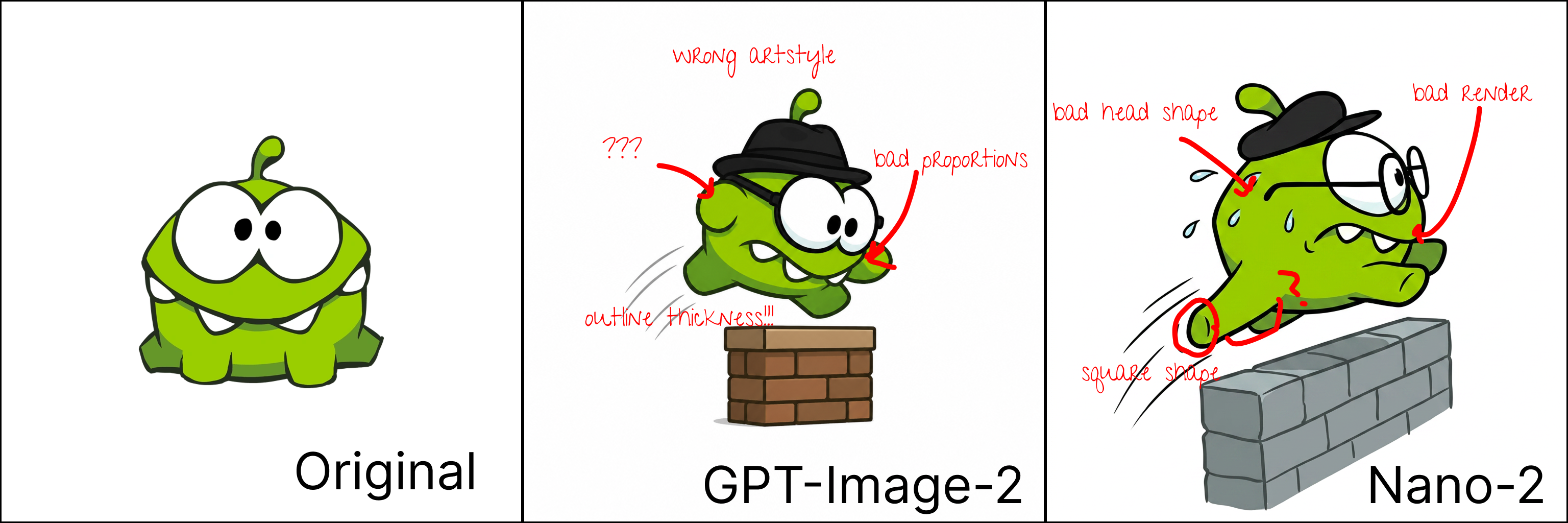
This is the 30% problem: two frontier multimodal models, one well-known character, and every generation drifts — art style, proportions, outlines, head shape, render quality.
AI image generation is OK for about 70% of use cases — generic styles the models have seen a million times. But what about the other 30%? What happens when your style sits in a region the multimodal models were never trained on?
Usually: massive style drift. Wrong proportions, wrong colors, wrong art style, wrong lighting — and hallucinated details that were never part of the design. The model quietly pulls your character back toward the generic styles it knows.
Training a LoRA is the reflex answer, but it comes with real downsides: it trades away the model's creativity, it locks you to one identity per adapter — mixing several brand assets in one scene gets hard fast — and every style tweak means retraining. Most teams reach for it far earlier than they need to.
These skills encode a different path: a disciplined, training-free workflow that holds visual identity steady — for a character, an object, a background, or a full video shot — and escalates to heavier machinery only when the cheap fixes demonstrably fail.
🔬 Genielabs — Pioneering Brand-Consistent Generative AI
We are actively researching brand consistency for AI generation.
Genielabs is at the forefront of brand-consistent generative AI — keeping every generated asset true to your brand's characters, art style, colors, and world, at the scale game studios and creative teams actually produce.
This repository is a direct product of that research: open-source skills that bring production-grade brand consistency into Claude.
📬 Want to collaborate, license, or learn more?
👉 genielabs.tech 👈
Reach out — we'd love to hear from you.
💡 The approach
Everything in this repo follows a few core ideas:
🔍 The smallest possible edit. Generation models preserve identity best when they have to invent the least. So never generate from scratch when you can edit from close: start from the reference nearest to the target, and prompt only the delta — what should change, never a re-description of the style the reference already carries. Long style prompts don't reinforce a reference; they fight it.
🗺️ A representative atlas. One great image beats a paragraph of description; a well-built reference sheet beats one great image. An atlas that covers the identity's key views, expressions, and details gives the model an anchor for any request — and when you have several references, the workflow always picks the closest one to the pose and situation being asked for, shrinking the edit again.
📏 Accurate, corrective guidelines. Not a style bible — a short list of rules targeting exactly what the model gets wrong for this identity ("always four fingers", "the scar is over the left eye"). One precise corrective line often fixes what an entire dataset can't. Guidelines earn their place by fixing observed failures, not by describing everything.
🧭 The right model for each task. Models are not interchangeable: some excel at following reference images, others at rendering text inside the image, masked edits, or motion. The workflow detects what's available, routes each job to the model that wins that job — and when one model can't hold identity and nail a complex scene, splits the work into an identity stage and a composition stage.
🪜 Escalate only when forced. The approaches form a ladder — from a one-line guideline, to references and atlases, to curated datasets, to multi-stage pipelines, to training. Each rung costs more than the last. Start at the cheapest rung that plausibly solves the problem, and climb only when the current rung demonstrably falls short. Most "we need to fine-tune" problems are actually a bloated prompt or the wrong reference.
🧰 The skills
| Skill | Status | What it does |
|---|---|---|
character-consistency |
✅ Available | Keep a recurring character on-model across generations and edits — triage, the ladder of approaches, and a per-generation verify-and-fix loop |
model-integration |
✅ Available | The execution layer: detect available providers (Gemini / Nano Banana, fal.ai, Replicate, OpenAI, xAI), route each job to the right model, invoke it reproducibly, recover from failures |
background-consistency |
🚧 Planned | Consistent environments, settings, and world details |
object-consistency |
🚧 Planned | Recurring props and products that stay on-model |
video-consistency |
🚧 Planned | Style and identity across frames and shots in AI video |
The consistency skills decide what to prompt and which reference to condition on; model-integration turns that decision into an actual API call.
🚀 How to use
Option A — Install as a skill
Drop a skill into any skills-aware agent (Claude Code, Claude Projects, or anything that reads the SKILL.md convention):
# Claude Code: personal skills directory
git clone https://github.com/GenielabsOpenSource/style-consistency-ai
cp -R style-consistency-ai/skills/character-consistency ~/.claude/skills/
cp -R style-consistency-ai/skills/model-integration ~/.claude/skills/
Or paste the contents of a SKILL.md into a Claude Project's instructions. The skill auto-triggers whenever a conversation involves generating a recurring character — no configuration needed. Reference files load on demand, so the skills stay cheap in context.
Option B — Build an agent around it
For a dedicated character-generation product or internal tool, use the skills as the brain of a purpose-built agent (e.g. with the Claude Agent SDK):
- Load
character-consistency/SKILL.mdas (part of) the system prompt; keepreferences/fetchable as files or tools. - Give the agent your image-generation tools — an MCP server, or direct provider APIs following
model-integration's patterns. - Store each character's assets (atlas, guidelines, dataset) where the agent can read them — the recommended layout is in the skill.
- The agent runs the full loop autonomously: classify the request → pick the closest reference → prompt the delta → generate → verify against the identity checklist → fix drift at the cheapest level.
The skills are plain Markdown with no runtime dependencies, so they port to any framework that can follow instructions.
🤝 Contributing
PRs welcome — see CONTRIBUTING.md. All PRs require maintainer approval. Especially:
- ✍️ The planned skills —
background-consistency,object-consistency,video-consistency - 🔌 New provider references for
model-integration(Midjourney, Ideogram, local ComfyUI/SD…) - 📊 Before/after examples showing a rung of the ladder fixing a real drift problem
- 🧪 Eval ideas — how do you measure on-model?
Open an issue to discuss bigger changes first.
📁 Repo structure
skills/
├── character-consistency/    # SKILL.md + 5 approach references (the ladder)
├── model-integration/        # SKILL.md + per-provider references + routing rubric
├── background-consistency/   # planned
├── object-consistency/       # planned
└── video-consistency/        # planned
Each skill follows the Agent Skills convention: a SKILL.md with YAML frontmatter (name, description) that controls auto-triggering, plus reference files the agent reads only when needed.
📜 License
PolyForm Noncommercial 1.0.0 — free for all non-commercial use. For commercial use, reach out at genielabs.tech.
Made with ✨ by Genielabs · Star if useful!
No comments yet
Be the first to share your take.