
Overview
skill-up is an evaluation and evolution tool for Agent Skills.
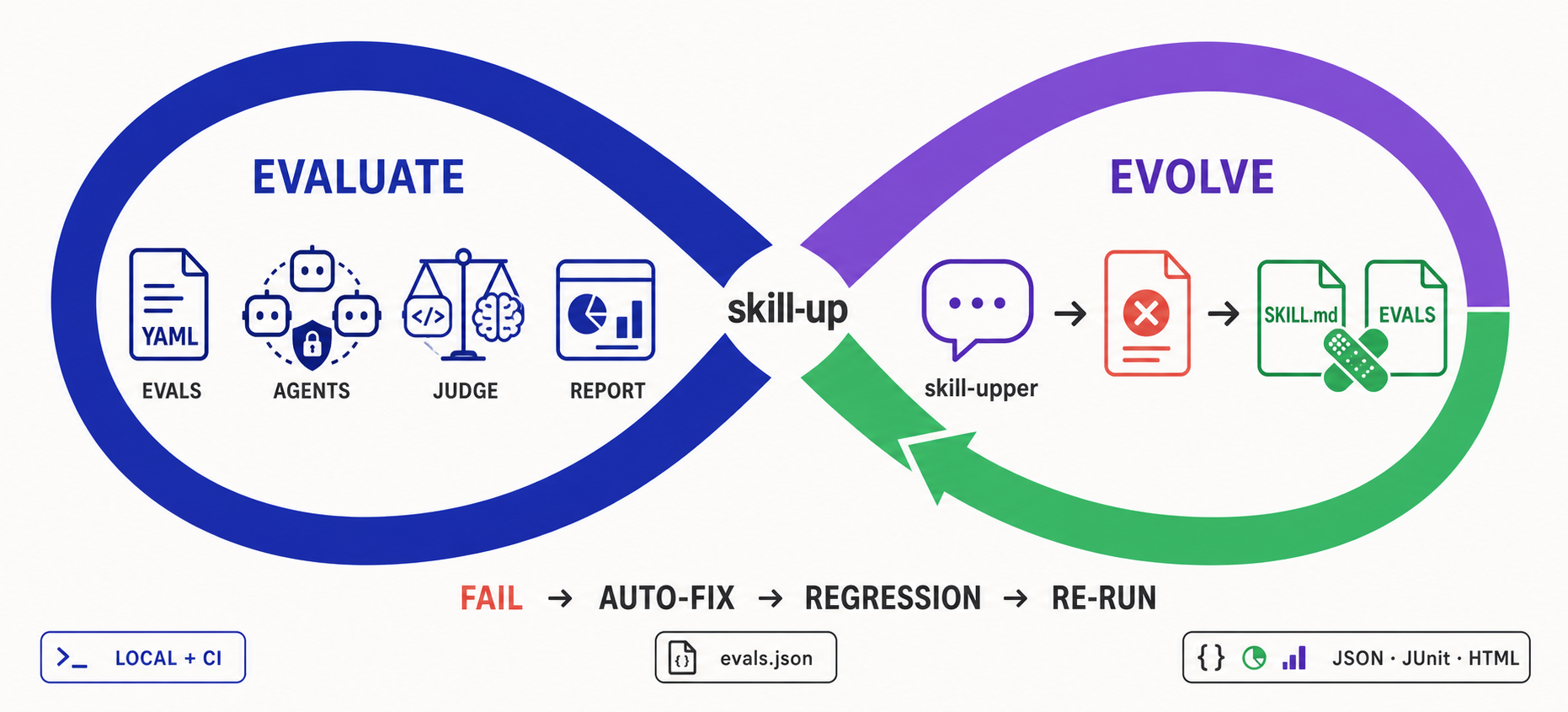
- Evaluation makes Skill quality measurable and repeatable: declarative YAML cases run across multiple Agent Engines, use rule, script, or Agent judges, and produce structured reports locally or in CI.
- Evolution turns those results into the next improvement: through conversation, skill-upper reads failures, automatically repairs or expands the eval suite, reruns skill-up, and keeps iterating with you.
Features
- Eval-to-Evolution Loop with skill-upper: Create evals through natural conversation, diagnose failures, automatically repair or expand cases, and rerun skill-up until the eval suite evolves.
- Declarative Eval Config: Define evaluation environment, engine, model, and cases through YAML (
eval.yaml+cases/*.yaml). - Multi-Engine Support: Works with Qoder CLI, Claude Code, and Codex as built-in Agent Engines, plus user-defined agents via
engine.custom(local transport — see docs/design/custom-engine.md). - Flexible Judging: Supports
rule_based,script, andagent_judgeevaluation strategies. - Structured Reports: Outputs Anthropic-compatible
grading.json,benchmark.json,benchmark.md, plusresult.json, JUnit XML, and HTML reports. - Anthropic Compatible: Import
evals.jsonviaskill-up import, or auto-detect with--auto. - CI-Ready: Designed for local development and continuous integration pipelines.
Why skill-up
The official Agent Skills evaluation guide describes the right evaluation loop: write realistic cases, run with and without the Skill, grade outputs, aggregate results, and iterate. skill-up turns that workflow into a reusable CLI:
- Replaces ad hoc run folders with a declarative
eval.yaml+cases/*.yamlformat. - Closes the improvement loop: skill-upper can interpret failed reports, repair or add eval cases, and drive the next skill-up run through conversation.
- Automates workspace setup, Skill installation, Agent Engine invocation, judging, and report generation.
- Supports multiple engines (
claude_code,codex,qodercli,qwen_code) instead of tying the workflow to one client. - Keeps compatibility with Anthropic-style
evals.jsonwhile adding richer judges, CI-friendly commands, and structured reports.
Quick Start: Evolve a Skill with skill-upper
The recommended way to use skill-up is through skill-upper, the Agent Skill shipped in this repository. It lets your AI agent create evals, run skill-up, understand failures, fix the Skill or its evals, add regression coverage, and repeat the loop through conversation.
1. Install skill-upper
# Codex, global install
npx skills add https://github.com/alibaba/skill-up/tree/main/skills/skill-upper -g -a codex -y

# Claude Code, global install
npx skills add https://github.com/alibaba/skill-up/tree/main/skills/skill-upper -g -a claude-code -y
You normally do not need to install skill-up first. skill-upper checks for the CLI when it runs and guides the agent through installation if needed.
2. Create and run the first evals
Open a project that contains your Skill's SKILL.md in Codex, Claude Code, or
another compatible Agent, then ask:
Use skill-upper to evaluate this Skill.
Read SKILL.md, identify its most important behaviors, create realistic eval
cases with appropriate judges, validate the configuration, and run skill-up.
Summarize the results and the highest-impact failures.
skill-upper creates the declarative eval suite and drives the CLI for you:
my-skill/
  SKILL.md
  evals/
    eval.yaml
    cases/
      <case-id>.yaml
my-skill-workspace/
  iteration-1/
    result.json
3. Fix, regress, and iterate
Continue in the same conversation:
Review the latest skill-up results. For each failure, determine whether the
Skill or the eval is wrong. Fix SKILL.md and supporting files, or repair the
eval case and judge as appropriate. Add regression cases for the bugs you
found, rerun skill-up, and continue until the important behaviors pass.
This is the evolution loop: reports become fixes, fixes become regression cases, and every iteration makes the Skill and its eval suite stronger.
Prefer manual setup?
You can still install the CLI directly and hand-write eval.yaml and case
files:
curl -fsSL https://raw.githubusercontent.com/alibaba/skill-up/main/install.sh | bash
See the official documentation for Getting Started, Writing Evals, CLI Reference, and User Configuration. Windows-specific setup and limitations are covered in the Windows guide.
User config
skill-up auto-loads an optional user-level config that supplies default OpenTelemetry env vars and per-environment runtime kwargs. The embedded defaults are empty; downstream consumers maintain their own config file.
Discovery chain (lowest to highest precedence)
embed (empty) < user (~/.config/skill-up/config.yaml) < project ($PWD/.skill-up.yaml) < explicit (--config)
| Source | Path |
|---|---|
embed |
empty Config{} — no vendor defaults baked in |
user |
$SKILL_UP_CONFIG, else $XDG_CONFIG_HOME/skill-up/config.yaml, else ~/.config/skill-up/config.yaml |
project |
$PWD/.skill-up.yaml |
explicit |
--config <path> (must exist) |
Missing files at the user and project layers are silently skipped; a missing --config path is a hard error. A corrupt config at any layer also fails the run.
Quickstart
skill-up init                            # writes a template to ~/.config/skill-up/config.yaml (XDG-aware)
skill-up init --local                    # writes a template to $PWD/.skill-up.yaml
skill-up init --print                    # prints the template to stdout
skill-up init --force                    # overwrite an existing file
skill-up init --config foo.yaml          # reads foo.yaml, writes it to ~/.config/skill-up/config.yaml
skill-up init --config foo.yaml --local  # reads foo.yaml, writes it to $PWD/.skill-up.yaml
With --config <path>, init reads that file (validating it as a skill-up
config) and writes its raw bytes to the target — comments and formatting are
preserved. Without --config, init writes a commented YAML template.
Schema
schema_version: v1alpha1
kind: SkillUpConfig

telemetry:
  service_name: skill-up                              # OTEL_SERVICE_NAME
  traces_exporter: otlp                                 # OTEL_TRACES_EXPORTER
  traces:
    endpoint: http://localhost:4317                     # OTEL_EXPORTER_OTLP_TRACES_ENDPOINT (4317 for grpc, 4318/v1/traces for http/protobuf)
    protocol: grpc                                      # OTEL_EXPORTER_OTLP_TRACES_PROTOCOL (grpc | http/protobuf); skill-up defaults to grpc
  resource_attributes:                                  # serialized into OTEL_RESOURCE_ATTRIBUTES
    deployment.environment: local
  verbose: false                                        # if true, also enables OTEL_LOG_* payload capture

env:                                                    # arbitrary defaults, applied only-if-unset
  OTEL_EXPORTER_OTLP_HEADERS: authorization=${OTLP_TOKEN}

runtime_kwargs:                                         # keyed by environment.type
  opensandbox:
    base_url: http://localhost:8080
    # extensions: '{}'
Precedence
For environment variables: any value already set in the process environment wins; the config only fills in missing keys.
For runtime_kwargs: explicit --runtime-kwarg on run > eval.yaml environment.kwargs > user-config runtime_kwargs[environment.type].
Secrets
Prefer ${ENV_VAR} references inside the config file rather than baking secret literals. The redaction mechanism (userconfig.Redact) masks fields tagged secret:"true" when printing; currently no Config field carries the tag, but the mechanism is in place for future fields.
Importing evals.json
Use skill-up import to migrate an Anthropic-compatible evals.json into the YAML layout used by this repo:
skill-up import ./evals/evals.json --output ./evals
CLI Overview
| Command | Description |
|---|---|
skill-up run [path] |
Run evaluation cases and produce reports |
skill-up validate [path] |
Validate eval.yaml and case files |
skill-up list-cases [path] |
List all cases referenced by the config |
skill-up report <result.json> |
Generate reports from a previous run |
skill-up import <evals.json> |
Import Anthropic evals.json to YAML cases |
skill-up debug judge <input.json> |
Debug judge module with a JSON input |
skill-up debug report <input.json> |
Debug report module with a JSON input |
GitHub Action
Run your Agent Skill evals in CI on every pull request — and check the same skill
across engines (claude_code / codex / qodercli / qwen_code) in one step. This repo
ships an action at its root (action.yml):
# .github/workflows/skill-eval.yml
name: Skill Eval
on:
  pull_request:
    paths: ['skills/**', 'evals/**', '**/SKILL.md']
jobs:
  eval:
    runs-on: ubuntu-latest          # Docker container action — Linux only
    steps:
      - uses: actions/checkout@v4
      - uses: alibaba/skill-up@main  # see "Versioning" below
        with:
          engine: claude_code        # or codex / qodercli / qwen_code; empty = let eval.yaml decide
          api-key: ${{ secrets.ANTHROPIC_API_KEY }}
          base-url: https://api.anthropic.com   # your model endpoint
          skill-target: evals/eval.yaml
Requirements for the caller: a Linux runner (it's a Docker container action), and your model credential stored as a repo secret. The runner image is public, so no extra registry auth is needed.
Key inputs: engine, model, provider, api-key, base-url, skill-target,
parallelism. The action prebuilds skill-up + the three engine CLIs into its
runner image, so a run is just "pull image, eval". See action.yml
for the full input/output reference.
Bundled skill-up version
The container image includes a deliberately pinned skill-up CLI version. The
version is not resolved from latest when a workflow starts, so a given image
digest always runs the same CLI.
The skill-up-version input is only a fallback for a custom image that does not
already contain the skill-up binary. The official image contains the binary,
so this input cannot override its bundled version. To find the effective
version, check the skill-up --version line in the Action log.
Publishing a new skill-up CLI release does not automatically update the GitHub
Action image. Maintainers must synchronize the pinned version, publish and test
a new runner image, and update the image digest in action.yml. The complete
maintainer procedure is documented in the
CI maintenance runbook.
The production Action must use an immutable sha256: image digest. Do not
replace it with skill-up-runner:latest; a mutable tag would allow existing
Action references to change behavior without a repository commit.
Versioning
uses: points at any git ref that contains action.yml. Pin a release tag
(the first release that includes the action onward) or a commit SHA for stability;
@main always tracks the latest. Release tags published before the action was
added do not contain action.yml and cannot be used as the ref.
A CLI release tag captures the action.yml and runner-image digest that existed
when that tag was created. Because the current runner image is refreshed
manually after CLI release assets become available, do not assume that a CLI tag
automatically contains an Action image with the same CLI version. Until a
separate Action release tag process is introduced, use a post-refresh commit SHA
for an immutable reference or @main when intentionally following Action
updates.
License
Apache License 2.0 — see LICENSE.
No comments yet
Be the first to share your take.