
Retro Web UI


An open-source desktop application, deterministic CLI, and Codex Skill that convert an existing web application's interface into one of four desktop-era styles while preserving the application's behavior.
- Windows 98
- Windows XP
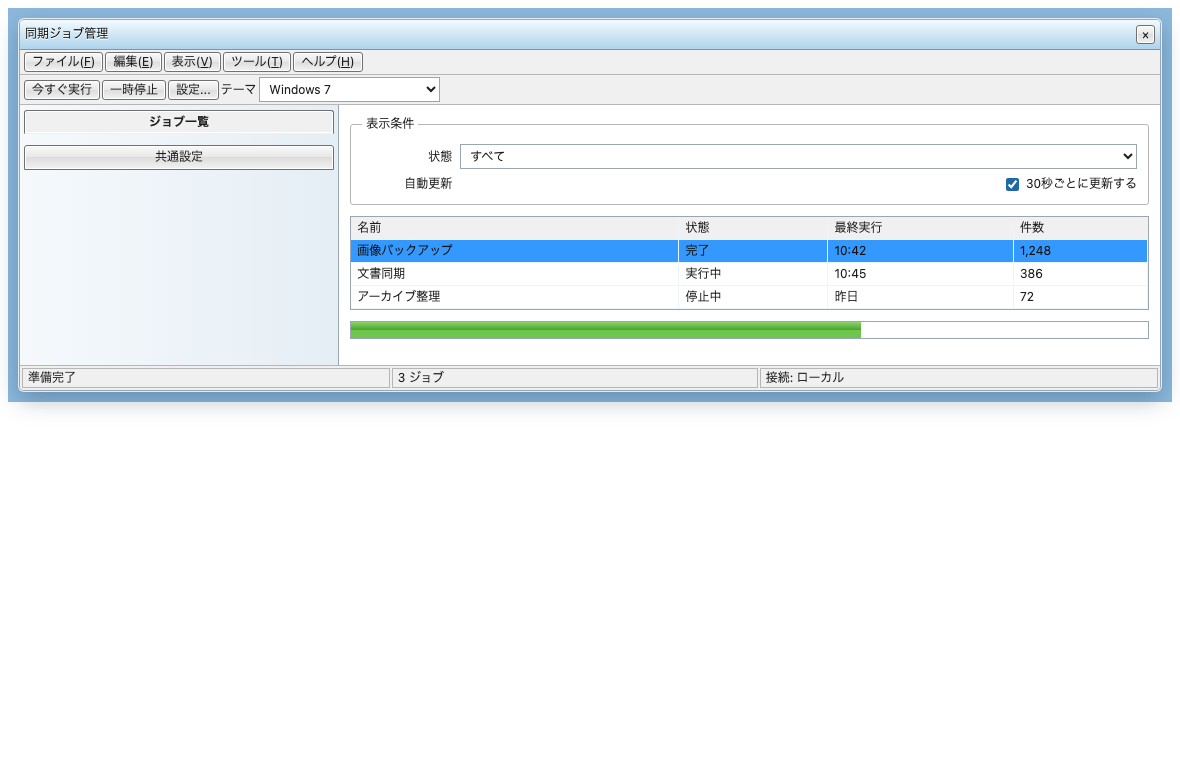
- Windows 7
- Japanese Freeware 2000s
Desktop GUI
The Windows XP-style PySide6 desktop application is a safe orchestration layer. It lets a user select a repository/application and theme, inspect deterministic analysis, start a bidirectional Codex App Server session with the user's own ChatGPT sign-in, answer approval requests, interrupt/reconnect, and review verification, Git diff, and Before/After evidence. It does not ask for or store an OpenAI API key, and it does not replace the Core/CLI/Skill conversion logic.
Version 2.1.0 adds a local Project/Session workspace. It registers canonical project paths without copying source, gives each conversion an independent lifecycle, preserves hashed baseline/Core/Git evidence, restores interrupted work honestly after restart, and compares recorded sessions. A recovered Codex thread is loaded for review only; it is not an automatic turn resume or source rollback. Missing or changed artifacts remain visible, and historical evidence is never relabeled as the current working tree. This workspace ships in the v2.1.4 native archives.
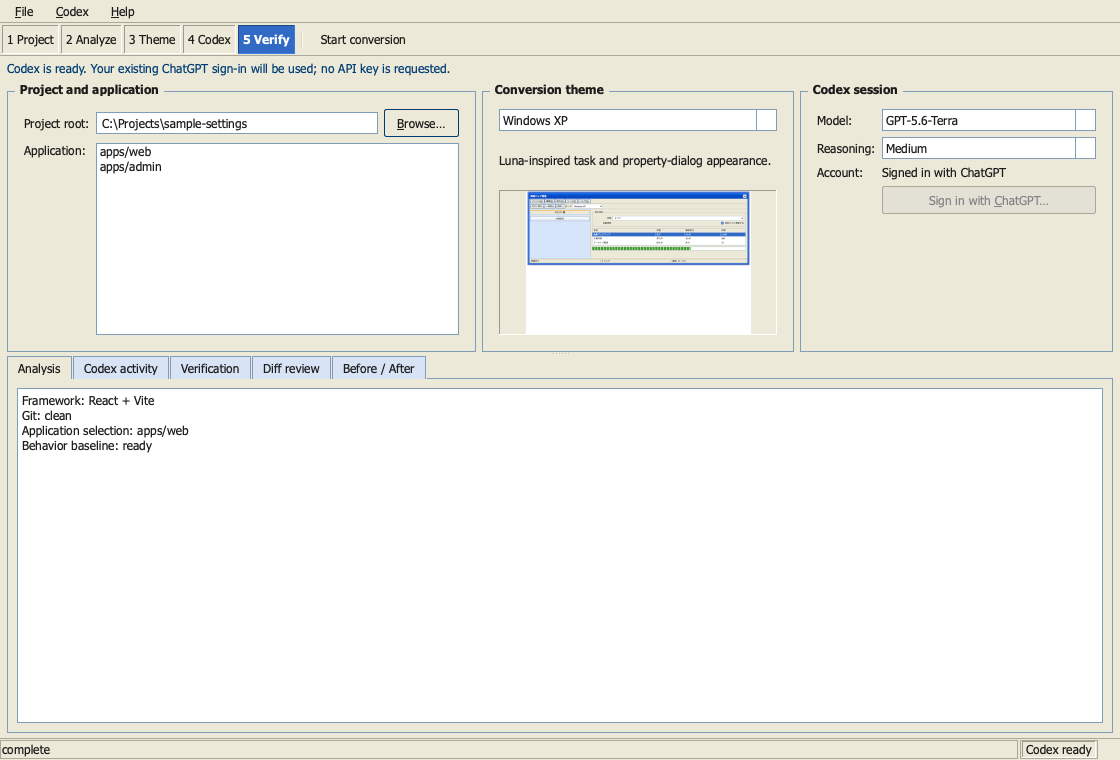
Download the native archive for macOS arm64, Windows x86_64, or Linux x86_64 from the v2.1.4 release. Python and Qt are included; Codex remains an external prerequisite. The macOS archive has a verified ad-hoc signature but is not notarized, the Windows archive is unsigned, and the v2.1.4 Linux archive is built on Ubuntu 22.04 and gated at GLIBC 2.35 plus a conventional desktop display stack. Verify the adjacent SHA-256 file before opening an unsigned package.
Run from a source checkout instead:
python3 -m venv .venv-gui
.venv-gui/bin/python -m pip install '.[gui]'
.venv-gui/bin/retro-web-ui-gui
On Windows, use .venv-gui\Scripts\retro-web-ui-gui.exe. Codex must already be
installed and signed in with ChatGPT; the GUI starts codex app-server locally
over stdio and never asks for an API key. Published v1.1.0 remains the
immutable pre-GUI CLI + Skill baseline. See the desktop architecture
and v2 engineering evidence. Phase C workspace
architecture and candidate evidence are recorded in the
workspace validation report. Exact per-platform
extraction, signing boundaries, Codex troubleshooting, and portable uninstall
steps are in the desktop distribution guide.
This is not a color preset and not a component library tied to React. The CLI makes repeatable inspection, behavior signals, theme assets, diagnostics, and verification evidence machine-readable. The Skill uses that evidence to choose a framework-aware integration strategy, map modern UI structures to desktop-era semantics, and perform the contextual/runtime/visual review that a deterministic tool cannot safely replace.
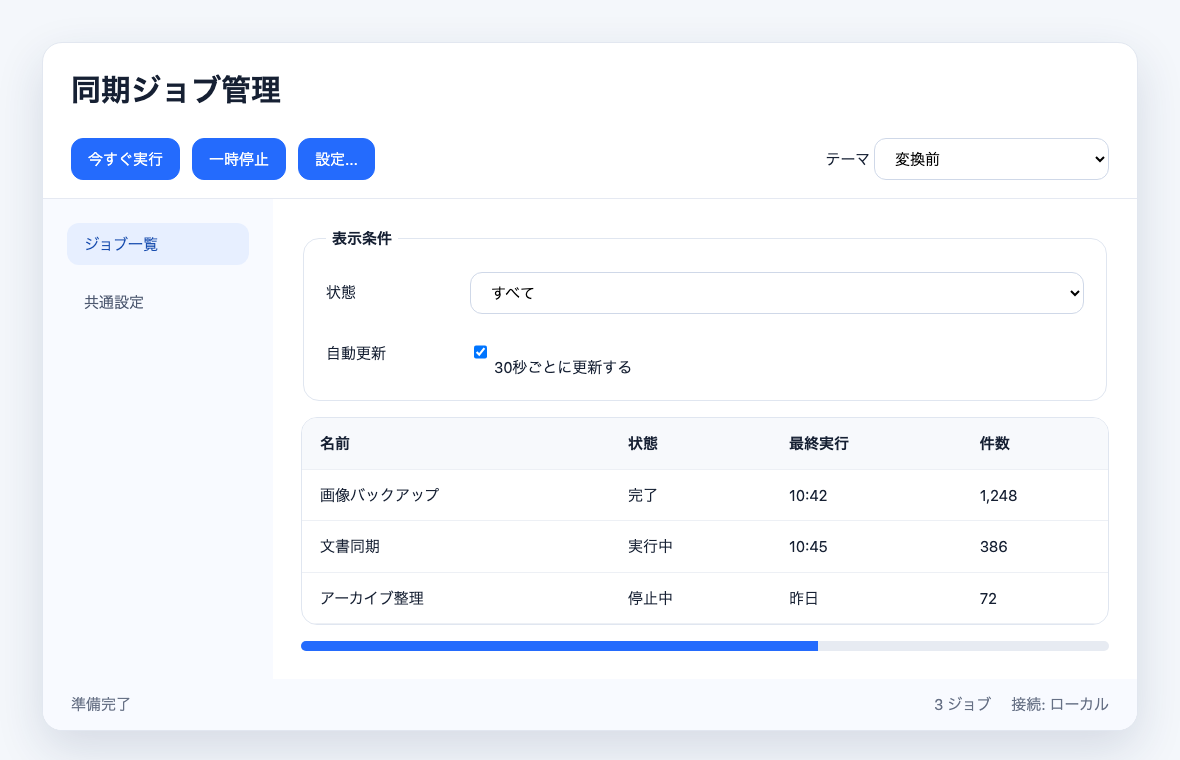
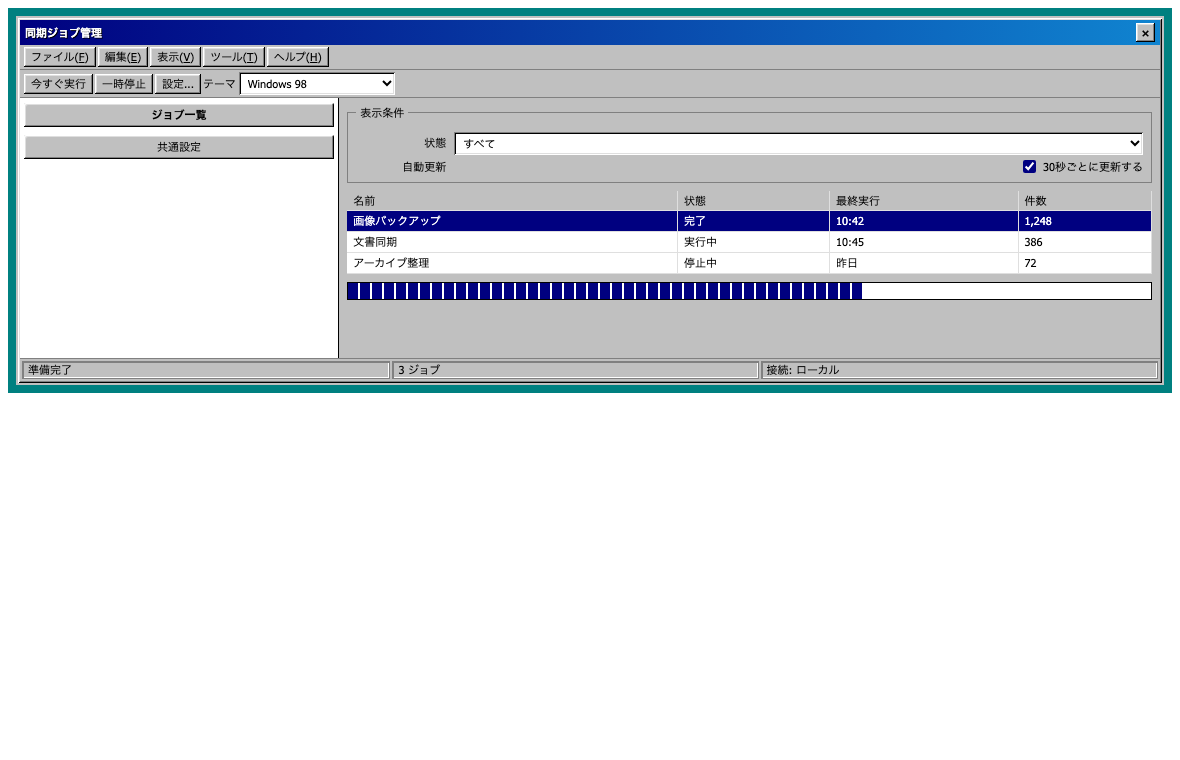
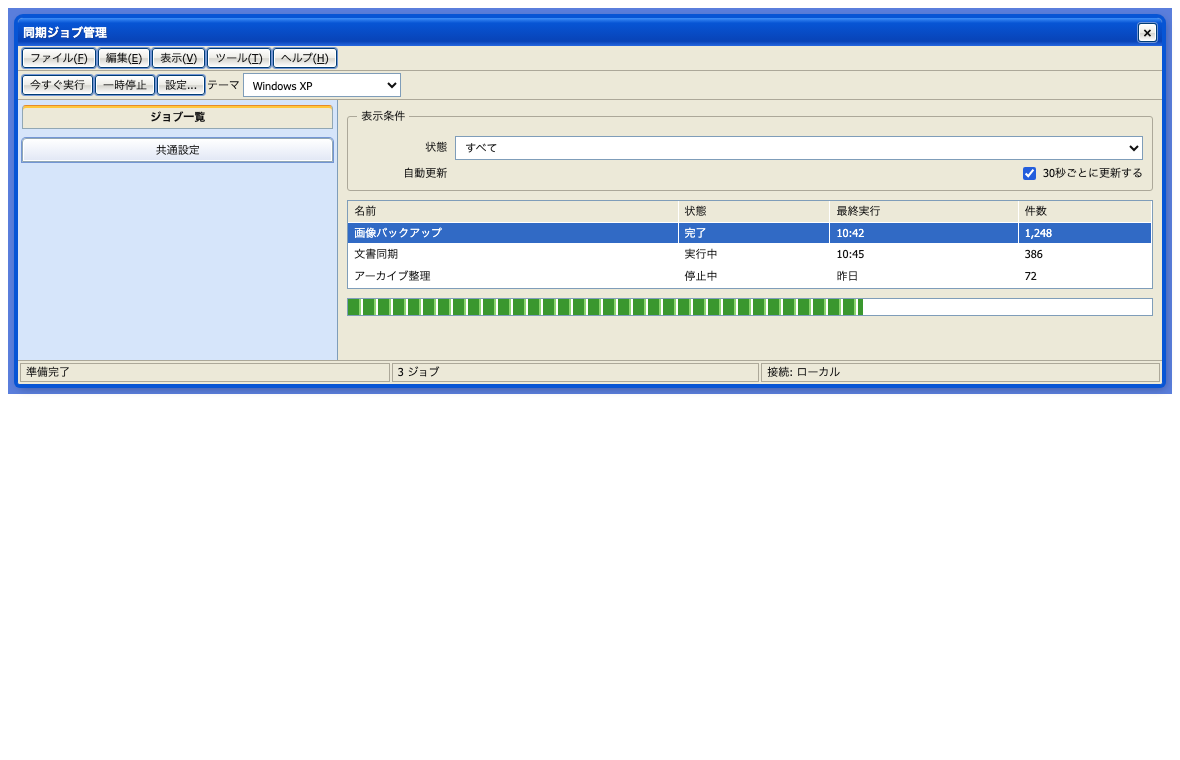
| Windows 98 | Windows XP |
|---|---|
 |
 |
| Windows 7 | Japanese Freeware 2000s |
|---|---|
 |
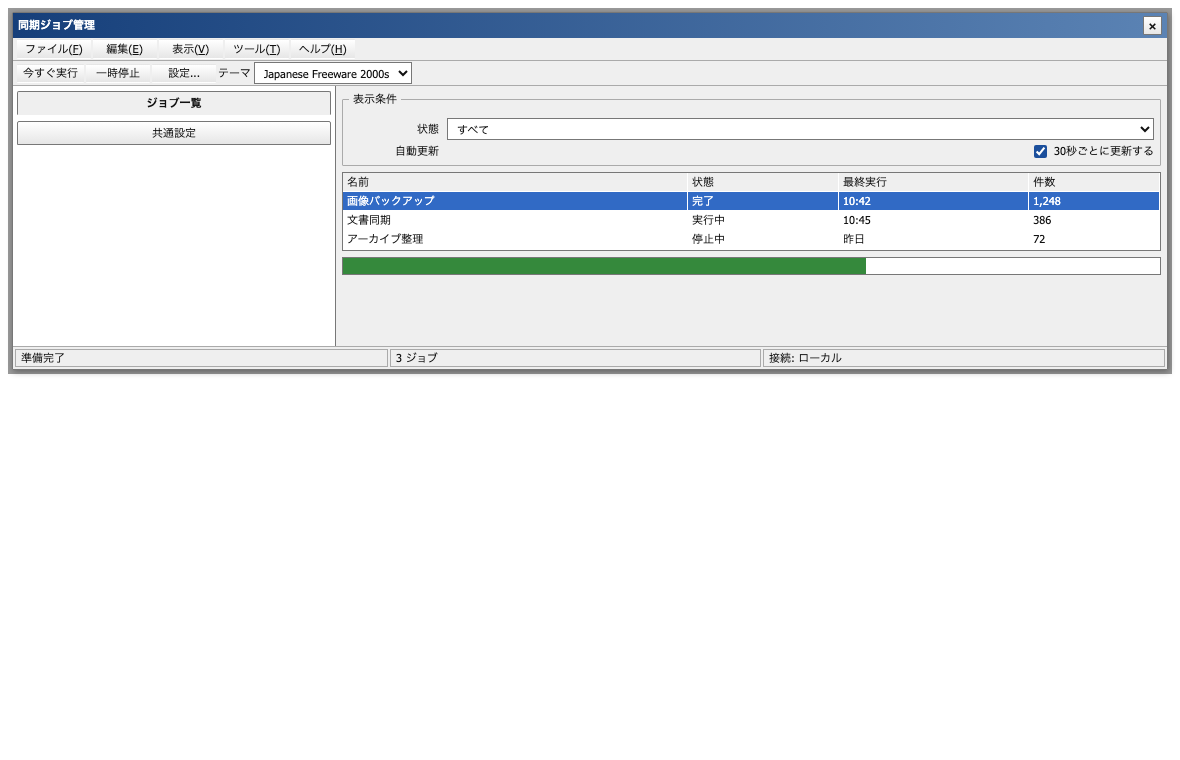 |
The screenshots use the same HTML and JavaScript. Only the theme root and CSS change. They demonstrate the bundled primitives; a real conversion also restructures cards, navigation, dialogs, and feedback according to meaning.
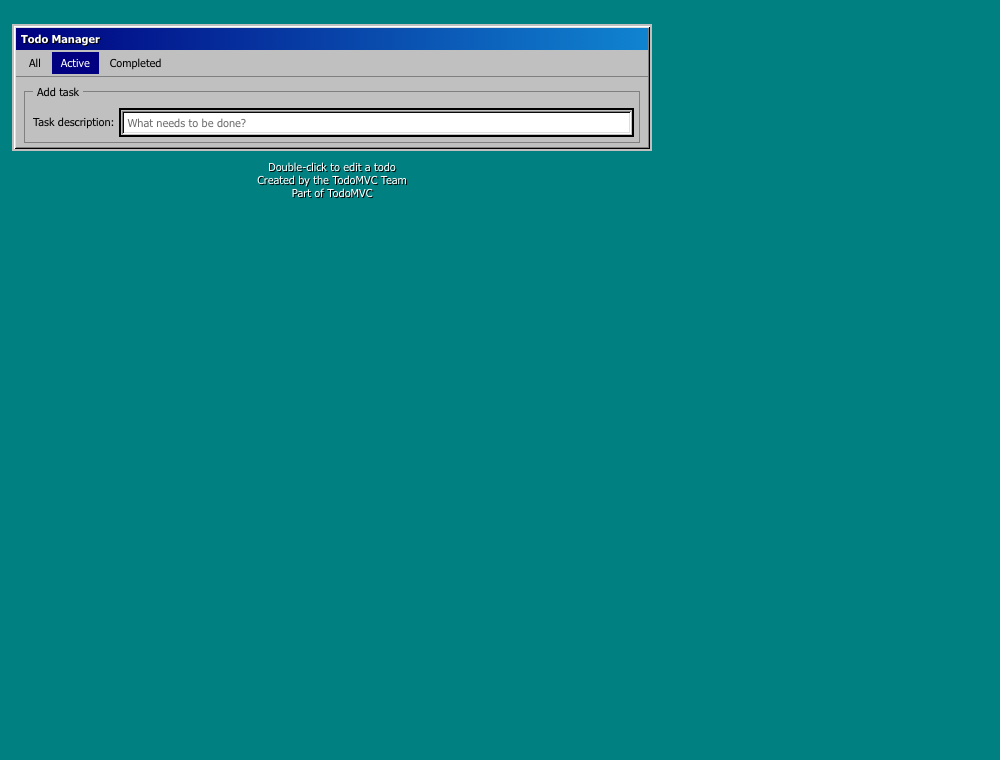
Two structurally different conversion checks exercise that semantic step:
| TodoMVC Vanilla ES6 → Windows 98 | React/Vite → Japanese Freeware 2000s |
|---|---|
 |
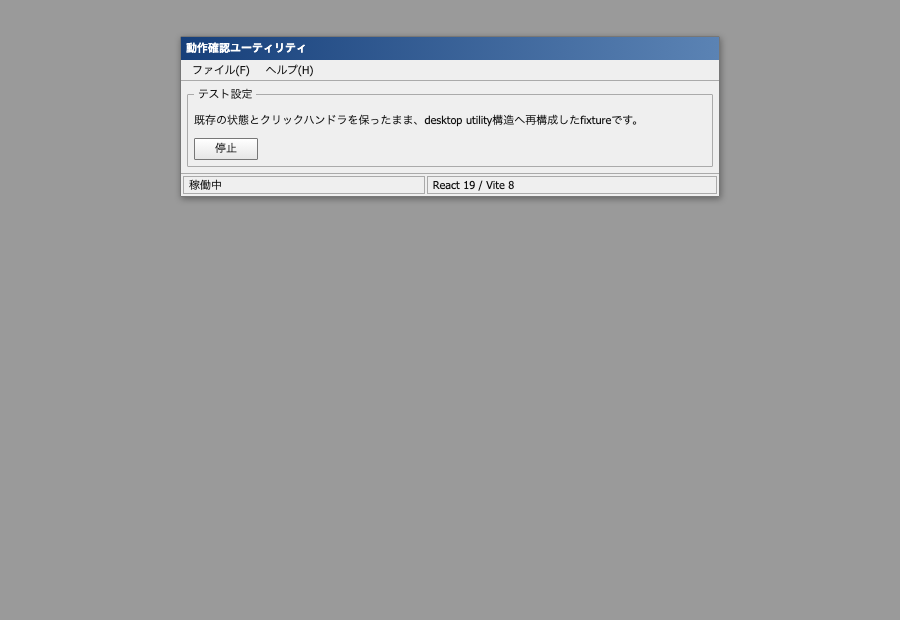 |
The TodoMVC result is from a pinned MIT-licensed upstream checkout used temporarily for validation; the repository stores only the screenshot and evidence, not a vendored copy. The React result is the repository's production-built interaction fixture.
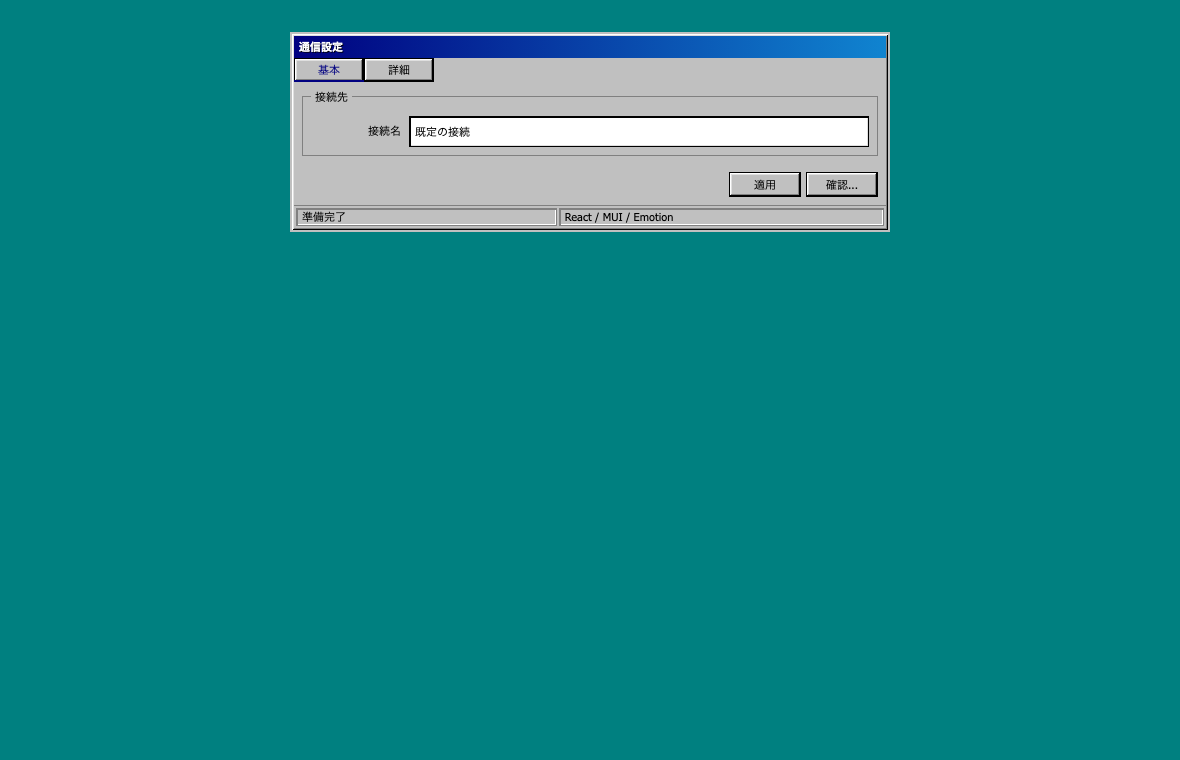
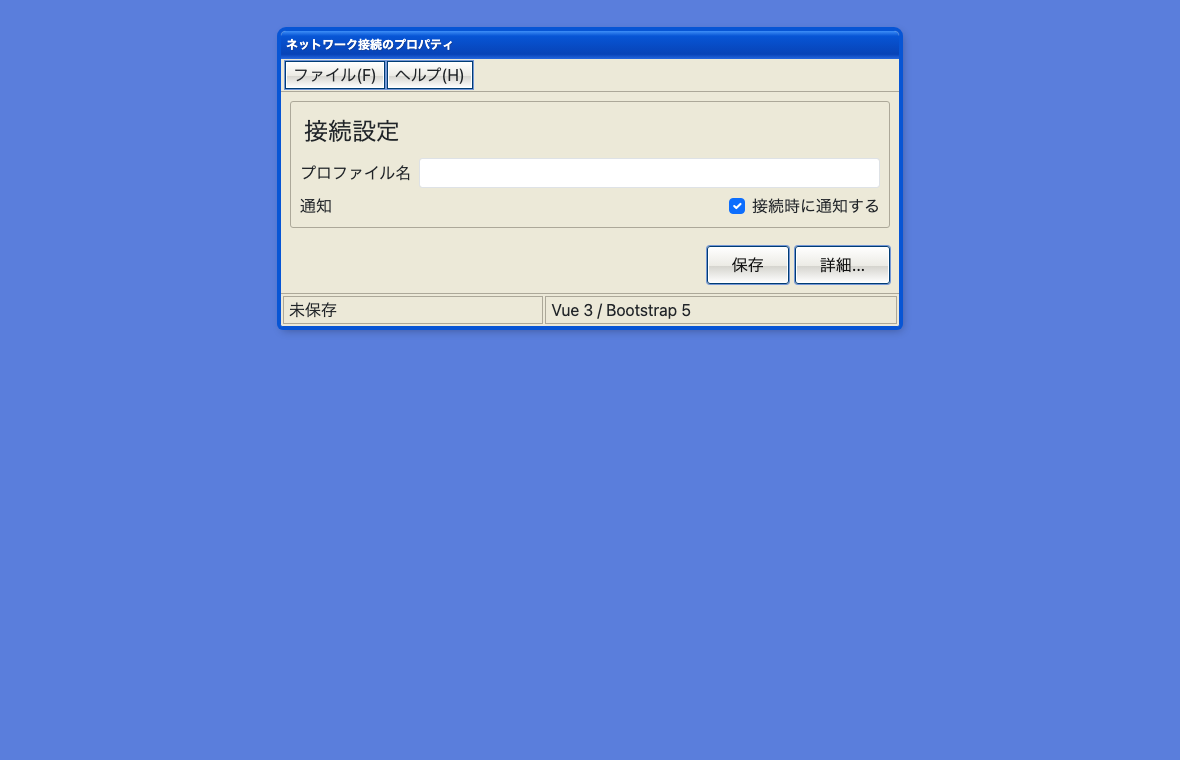
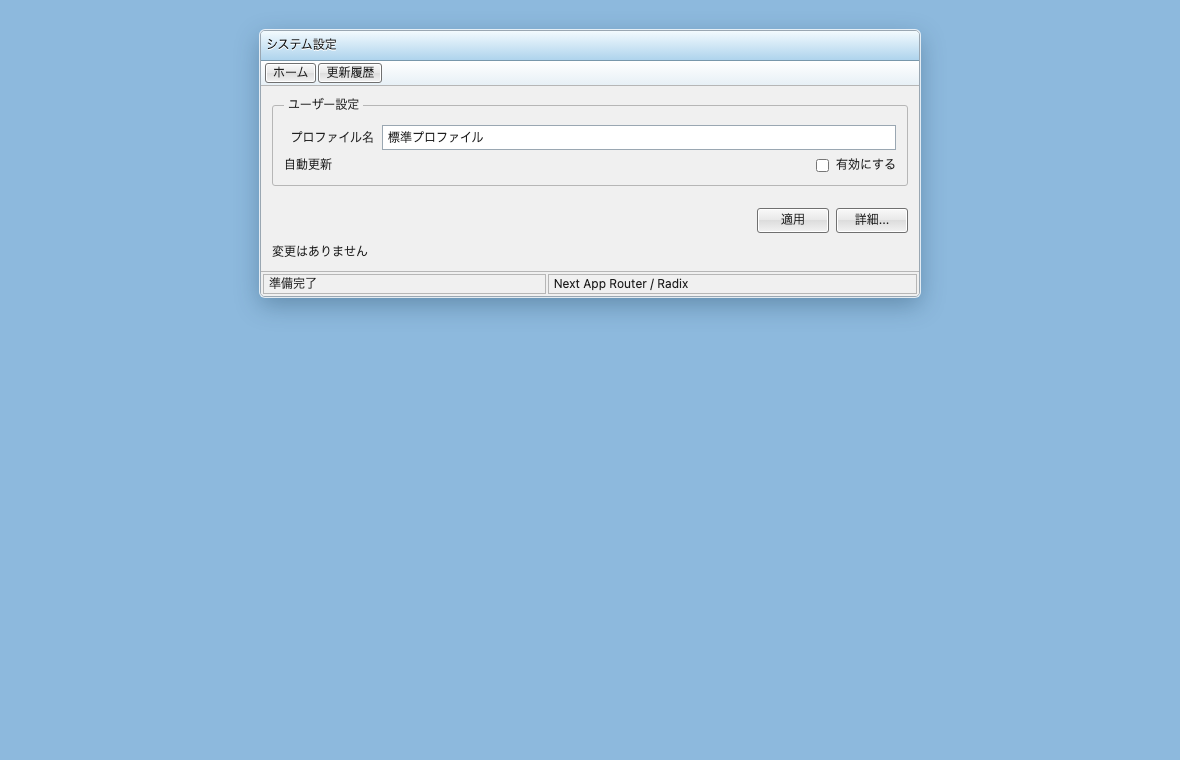
Current main also exercises component-library and rendering-model boundaries in production builds:
| React/MUI/Emotion → Windows 98 | Vue/Bootstrap → Windows XP |
|---|---|
 |
 |
| Next SSR/Radix/Tailwind → Windows 7 | SvelteKit hydration → Japanese Freeware 2000s |
|---|---|
 |
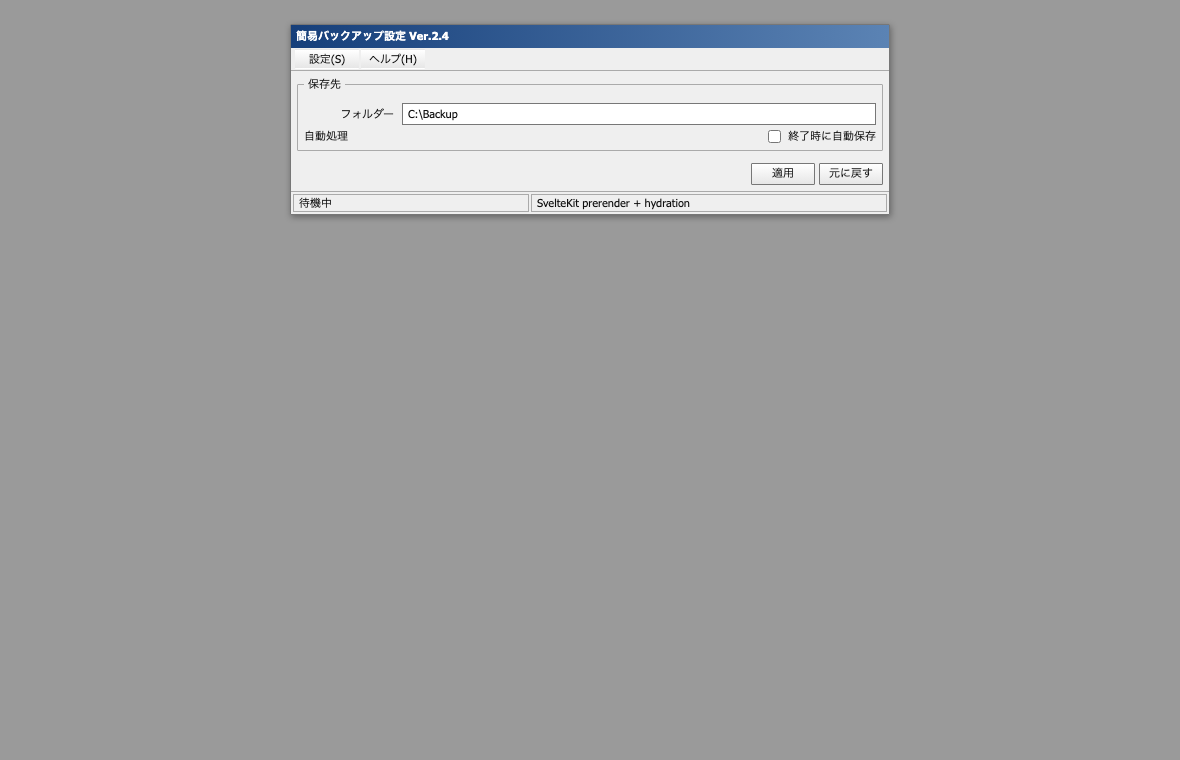 |
The tests verify more than screenshots: controlled state, forms/live regions, initial server HTML, hydration, library lifecycle events, portal theme scope, Escape closing, focus return, and targeted computed styles. These are bounded fixtures, not claims that every component in each ecosystem is supported.
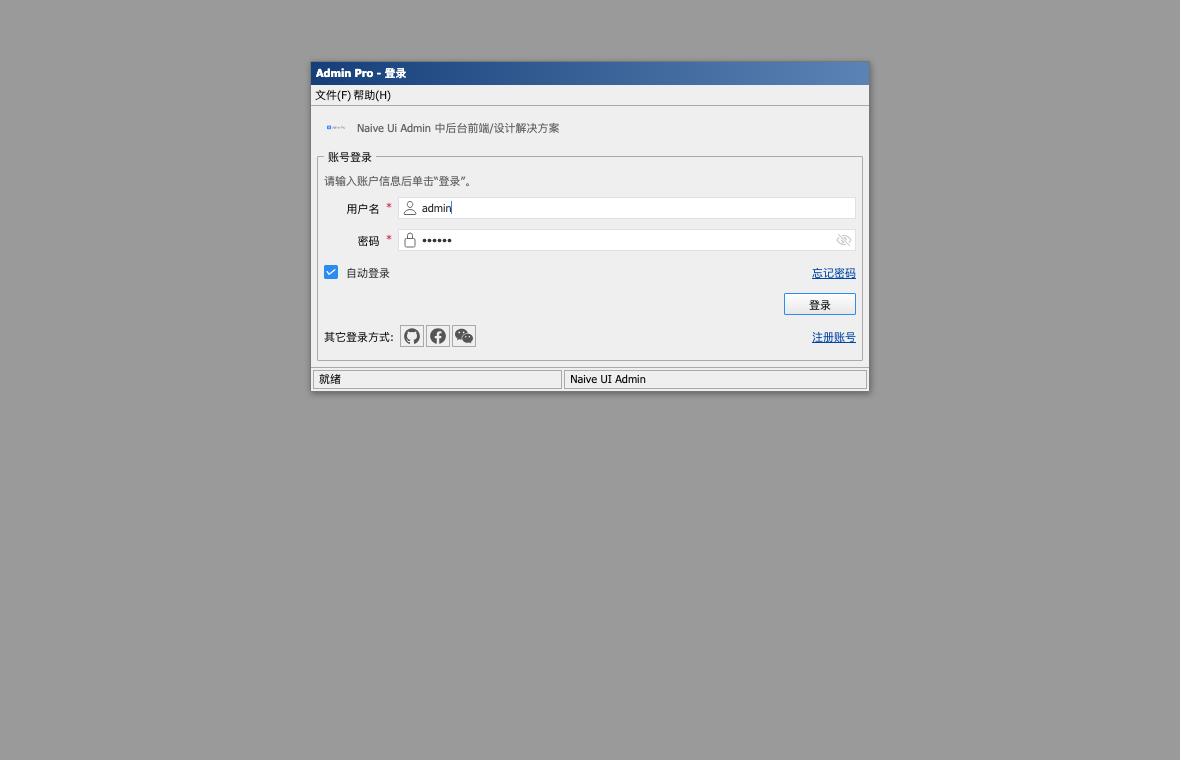
A second real-OSS case records a 2026-08-27 manual conversion of the authentication surface of pinned MIT-licensed naive-ui-admin: it performs the demo login, follows its real Vue Router transition, and confirms that temporary portal-host theming does not leak into the unconverted dashboard. This heavy checkout is not rerun in CI.
Install
Ask Codex's $skill-installer to install the versioned Skill directory from GitHub:
$skill-installer install https://github.com/ririri-rgb/retro-web-ui/tree/v2.1.4/skills/retro-web-ui
Or clone the tagged release and copy the Skill into the current user location:
git clone --branch v2.1.4 --depth 1 https://github.com/ririri-rgb/retro-web-ui.git
mkdir -p "$HOME/.agents/skills"
cp -R retro-web-ui/skills/retro-web-ui "$HOME/.agents/skills/"
For a repository-scoped installation, copy it to the repository's .agents/skills/retro-web-ui/ directory. Codex also follows symlinked Skill folders. Restart or reload the Codex session if an update does not appear. The core Skill and helper scripts require Python 3.9+ and no third-party Python packages. Visual verification requires an installed Chrome/Chromium-compatible browser only when screenshots are requested. The repository's cross-framework regression harness additionally requires Node.js 22+ for its dependency-free external browser driver.
Version 2.1.4 is the current desktop + CLI + Skill release. It retains the standalone Skill layout, installable deterministic CLI, and the v1.0.0 legacy helper entry points.
Install the CLI from a checkout
The CLI has no third-party runtime dependency. Install the current checkout into an isolated environment:
python3 -m venv .venv
.venv/bin/python -m pip install .
.venv/bin/retro-web-ui info --json
On Windows, use .venv\Scripts\python and .venv\Scripts\retro-web-ui. A release wheel and source distribution are built from the same Skill source tree and contain the matching manifest, theme assets, instructions, and shared core. Codex discovery still requires the Skill installation above; installing the CLI alone does not copy it into .agents/skills.
Use from Codex
Invoke it explicitly or describe the target style naturally:
Use $retro-web-ui to convert this app to Windows 98 style without changing its behavior.
このアプリを2000年代の日本製Windowsフリーソフト風にして。API、ルーティング、フォームの挙動は維持して。
The Skill supports these canonical theme IDs:
| Theme | UI language |
|---|---|
windows-98 |
hard raised/sunken edges, compact property sheets, menus, list views, status segments |
windows-xp |
Luna-like themed states, blue window chrome, task/property panes, slightly increased spacing |
windows-7 |
restrained Aero-era frame, command bar/link patterns, thin borders, Explorer/control-panel hierarchy |
japanese-freeware-2000s |
dense Japanese utility layout, toolbars, detailed settings, split/list/log panes, conventional command rows |
How it preserves behavior
The Skill treats API calls, authentication, routes, state transitions, event handlers, form contracts, validation, persistence, data formats, accessibility state, and test selectors as protected. It prefers scoped CSS and additive markup. Structural changes are made only when needed for semantic fidelity.
The unified CLI reduces avoidable repeated reasoning and gives Codex one versioned JSON contract:
python3 -m venv .venv
.venv/bin/python skills/retro-web-ui/scripts/retro_web_ui.py info --json
.venv/bin/python skills/retro-web-ui/scripts/retro_web_ui.py analyze /path/to/app --json
.venv/bin/python skills/retro-web-ui/scripts/retro_web_ui.py behavior snapshot /path/to/app --output /tmp/before.json --json
.venv/bin/python skills/retro-web-ui/scripts/retro_web_ui.py verify /path/to/app --theme windows-7 --baseline /tmp/before.json --json
On Windows, use .venv\\Scripts\\python for the interpreter path.
The guard stores hashes and counts rather than source excerpts or literal values. It catches many changed event, request, route, storage, form, and framework bindings, but it does not prove semantic equivalence. Existing tests and runtime interaction checks remain required. Exit 1 means review is required, 2 is invalid input or a refused unsafe write, and 3 is a schema/version mismatch.
Generate a namespaced starter bundle:
.venv/bin/python skills/retro-web-ui/scripts/retro_web_ui.py theme bundle windows-7 --output src/retro-web-ui.css --json
Then put the matching data-retro-theme on an application root and adapt the markup deliberately. The generator does not mass-rewrite source and refuses to replace a different existing file unless --force is passed after review.
CLI capabilities and boundary
| Command | Deterministic capability | Writes target files? |
|---|---|---|
info |
CLI/Skill/behavior/theme contract compatibility | No |
analyze |
project/app candidates, framework/style/rendering/risk evidence, verification argv | No |
doctor |
Python, Git, package-manager, app-selection, and manifest diagnostics | No |
behavior snapshot / compare |
explicit hashed baseline artifact and protected-signal comparison | Snapshot only |
theme list / bundle |
theme IDs, digests, and deterministic namespaced CSS | Bundle only with --output |
audit |
static modern-style residue and integration heuristics | No |
verify |
read-only aggregation of analysis, doctor, audit, and behavior evidence | No |
--json emits one envelope with stable schema_version, tool/API version, command, status, result, diagnostics, and read-only metadata. Monorepos with several plausible frontend applications return APP_SELECTION_REQUIRED until --app is explicit. The CLI never installs dependencies, silently runs inferred project scripts, or performs semantic conversion. See the CLI contract and boundary rationale.
Compatibility
Claims below reflect tests in this repository, not theoretical support.
| Application shape | Evidence | Status |
|---|---|---|
| Static HTML + Vanilla JS | detector, behavior baseline/compare, real Chrome interactions, all four rendered themes | Verified |
TodoMVC javascript-es6 real OSS |
pinned MIT checkout, semantic markup conversion, original/themed build, identical JS bundle, behavior guard, hash routes, visual inspection | Semantic Windows 98 conversion verified; upstream todo-add baseline failure remains |
| React 19 + Vite 8 + Tailwind 4 | locked production build, semantic Japanese freeware conversion, unchanged handler/state signals, real click smoke | Converted build and interaction verified; broader React ecosystems remain conditional |
| React 19 + MUI 9 + Emotion | production build, controlled input, real portal dialog, Escape/focus return, final DOM/computed style | Semantic Windows 98 fixture verified; selected controls only |
| Vue 3 SFC + Vite 8 + Bootstrap 5 | production build, v-model, validation/form flow, actual Bootstrap modal lifecycle, computed style, screenshot |
Semantic Windows XP fixture verified |
| SvelteKit 2 + Svelte 5 | static prerender production build followed by real hydration, bindings/form/live status, screenshot | Semantic Japanese freeware fixture verified; request SSR untested |
| Next.js 16 App Router + Tailwind 4 + Radix Dialog | request-time SSR HTML, client-island hydration, controlled form, portal/Escape/focus, desktop/dialog/narrow screenshots | Semantic Windows 7 fixture verified |
naive-ui-admin real OSS login |
pinned MIT checkout, build, Naive UI/Pinia/router flow, real demo login, route/theme cleanup, normal/narrow visual review | Dated manual authentication-surface record; not CI, dashboard not converted |
| Nuxt, Angular, Astro, other CSS-in-JS and complex libraries | detector or documented scoped fallback only | Best-effort until tested in the target project |
See Compatibility evidence for exact coverage, the v1 Validation report, the Final validation report supporting v1.0.0, and the CLI + Skill validation report supporting v1.1.0.
Known limitations and unsupported cases
- A safe general-purpose script cannot infer every card-to-group-box or sidebar-to-property-sheet mapping. Codex performs those meaning-dependent edits.
- The CLI is not an automatic converter. Runtime behavior, target-native command selection, application-specific CSS/portal/SSR repair, accessibility review, and visual fidelity remain Skill responsibilities.
- Closed Shadow DOM, canvas/WebGL-only interfaces, cross-origin iframe contents, binary/generated bundles without source, and native desktop apps cannot be safely transformed by this Skill.
- Portals, virtualized lists, generated class names, CSS-in-JS specificity, Bootstrap data bindings, and SSR hydration always need target-specific runtime verification even where one representative fixture now passes.
- The static audit uses heuristics and can report false positives. A clean audit is not visual proof.
- The static audit excludes dependency and generated directories; dependency CSS can retain modern styling, so computed-style/screenshot inspection is mandatory.
- The CSS kit intentionally does not reproduce proprietary Windows icons, fonts, wallpapers, sounds, or extracted system bitmaps.
- Responsive behavior is preserved where practical, but a fixed-window visual composition may need target-specific narrow-screen compromises.
- Native packages are not Developer ID-notarized or Authenticode-signed in v2.1.4, and there is no auto-updater. Verify checksums and use the operating system's explicit local-app approval flow.
- The GUI does not infer or install a target application's browser/runtime. Before/After capture remains explicit evidence from an authorized existing runtime.
Verification
Create the repository-local virtual environment, install the locked JavaScript fixture graph, then run the full gates:
python3 -m venv .venv
npm ci
npm run build:fixtures
npm audit --omit=dev --audit-level=moderate
.venv/bin/python -m unittest discover -s tests -v
.venv/bin/python scripts/quick_validate_compat.py skills/retro-web-ui
.venv/bin/python -m pip install "setuptools>=69" "build>=1.2,<2"
.venv/bin/python scripts/package_cli.py --output /tmp/retro-cli-a
.venv/bin/python scripts/package_cli.py --output /tmp/retro-cli-b
.venv/bin/python tests/package_smoke.py /tmp/retro-cli-a --compare /tmp/retro-cli-b
.venv/bin/python tests/visual_smoke.py --check-only
.venv/bin/python tests/runtime_smoke.py --check-only
The Python unit/Skill helpers have no third-party runtime dependency. npm ci installs only the locked framework validation harness. The runtime smoke combines in-app assertions with an external dependency-free Chrome DevTools Protocol driver and fails on browser warnings/errors. CI generates and uploads current browser renders for review. Generate the seven showcase screenshots locally when shared theme CSS changes:
npm audit --omit=dev --audit-level=moderate reports zero production vulnerabilities. The full development-tree audit currently reports low-severity GHSA-pxg6-pf52-xh8x through SvelteKit's [email protected]; npm offers no non-breaking resolution for the locked SvelteKit line. This fixture-only dependency is not included in the Skill ZIP, wheel, or source distribution.
.venv/bin/python tests/visual_smoke.py
When using the Skill on another app, also run that app's existing build, typecheck, lint, tests, and representative interactive flows. Review git diff, git diff --check, the behavior guard report, browser console output, focus order, keyboard access, clipping, overflow, and screenshots.
Repository layout
skills/retro-web-ui/
  SKILL.md                 agent-facing workflow and routing
  manifest.json            Skill/CLI/behavior/theme compatibility contract
  __init__.py, core/       installable shared Python API
  agents/openai.yaml       Codex UI metadata
  references/              behavior, framework, licensing, mapping, and theme guidance
  scripts/                 unified CLI plus backward-compatible deterministic helpers
  assets/theme-kit/        original namespaced CSS primitives and four themes
  assets/showcase/         same-behavior visual example
tests/                     unit, fixture, and browser smoke tests
docs/                      research, architecture, evidence, and validation records
screenshots/               generated Before/After documentation images
scripts/package_cli.py     reproducible wheel/sdist builder
retro_web_ui_gui/          PySide6 desktop controller, widgets, and CodexBridge
scripts/build_native.py    host-native build, smoke, notices, and archive gate
Licensing and trademarks
Project code and original CSS are licensed under the MIT License. No proprietary Windows assets are used. Native archives include Qt/PySide and CPython under their own licenses with component inventories and corresponding notices; see Third-party notices.
Microsoft and Windows are trademarks of the Microsoft group of companies. This independent project is not affiliated with, endorsed by, or sponsored by Microsoft. Theme names are descriptive compatibility/style references.
Troubleshooting
- The Skill is not discovered: confirm the folder is exactly
retro-web-uiand containsSKILL.md; reload Codex. - Styles leak or do not apply: keep the CSS after the target framework's base layer and verify the
data-retro-themeroot. Avoid global resets. - A library widget ignores the theme: use its provider/token API or a narrowly scoped adapter; do not add a repository-wide
!importantflood. - Behavior guard reports changes: inspect every listed file and signal. Added signals can be regressions too.
- CLI reports
APP_SELECTION_REQUIRED: rerunanalyze,doctor, orverifywith the intended app path or package name via--app; do not let it guess in a monorepo. - CLI reports a contract mismatch: use the CLI bundled with the same Skill checkout and create a fresh baseline only after
info --jsonreports compatibility. - Screenshot test cannot find a browser: pass
--browser /absolute/path/to/chromeor perform the visual pass manually. npm cicannot use a system cache: avoid a system-wide permission change and runnpm ci --cache .npm-cache; the cache path is ignored by Git and can be deleted after validation.
Contributions are welcome; read CONTRIBUTING.md and SECURITY.md.
No comments yet
Be the first to share your take.