
reimagine-it
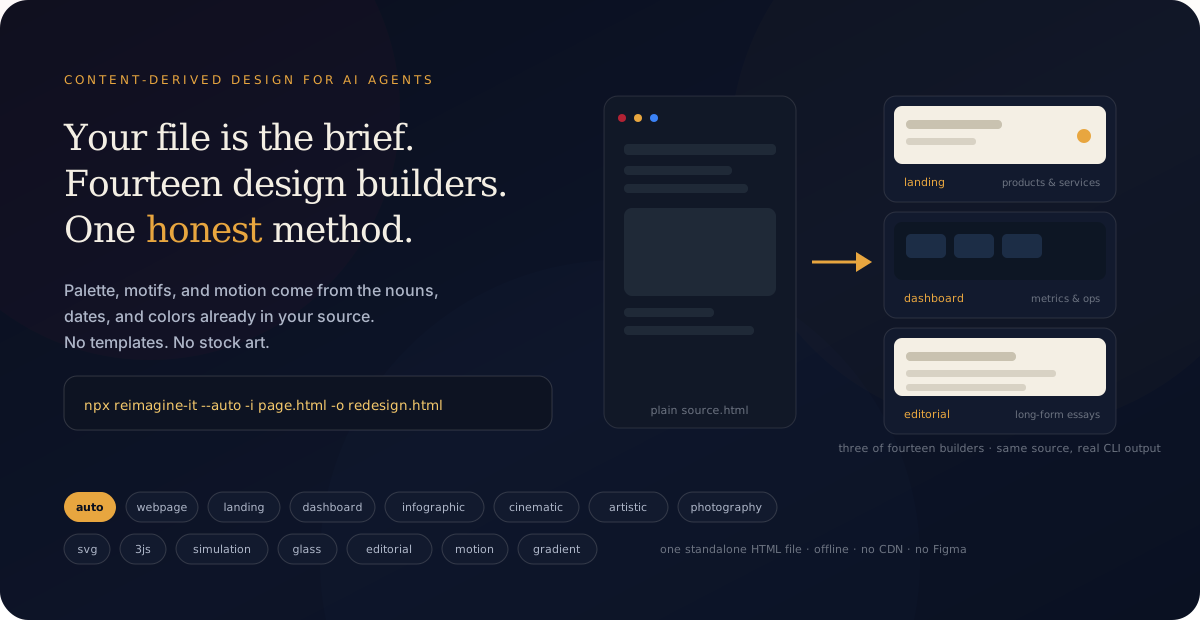
The source file is the design brief. Turn existing HTML into a beautiful, usable page — without losing its meaning.





Try the live playground · See the proof · Run it locally · Install it
One command. One inspectable result.
reimagine-it redesigns an existing HTML page from the content already inside it. It extracts the real headings, facts, links, names, dates, numbers, and colors, then builds a stronger visual system around them — without replacing the page with invented filler.
npx reimagine-it --auto -i page.html -o redesign.html
Source in. Beautiful, usable HTML out. The source stays untouched. The result is one standalone HTML file — offline, no CDN, no Figma, no build step.
See it work
Real sources, real CLI output — seven committed journeys, each with the plain source, the command, and the result on desktop and phone:
One command, three furnished designs — point /reimagine-it at a building page and it ships an editorial feature, an orbitable 3D object, and a living SVG diagram from the same source: npx reimagine-it --auto -i meridian.html. See the suite →
The 60-second proof
Start with a real page — not a generic prompt:
<!-- before.html -->
<h1>A Letter to the Night Tide</h1>
<p>Field notes from the coast, written after the last light.</p>
<h2>Three things the water taught us</h2>
<ul>
  <li>Patience · 12 minutes of stillness</li>
  <li>Distance · 4 miles offshore</li>
  <li>Return · notes from 2026</li>
</ul>
Generate a direction:
npx reimagine-it --auto -i before.html -o redesign.html
Open redesign.html. It is a standalone artifact: no server, CDN, API key, Figma file, or build step is required.
For a reviewable client handoff, keep the decision report too:
npm run auto -- \
  -i before.html \
  -o review/auto.html \
  --report review/auto.json \
  --seed 42
The report records the selected direction, candidate scores, seed, rationale, source anchors, and source-fidelity checks. The input file is never overwritten.
Fifteen design builders
Every token is a real generator in the engine — each one reads the same extracted content and builds a structurally different composition. Layouts are generated, not pasted from a design kit; source facts are not invented. Every builder also ships with a content-derived art layer: anchor initials become monogram tiles, source numbers become donut and bar charts, and the palette shades isometric 3D prisms — all inline SVG, all offline.
| Builder | Real output (same source) | Best for | Character |
|---|---|---|---|
webpage |
Articles and source documents | Measured reading hierarchy | |
landing |
Products and services | Hero and action rhythm | |
dashboard |
Metrics and operations | Console, KPIs, and status | |
infographic |
Facts and comparisons | Shared scales and timelines | |
cinematic |
Narrative moments | Depth and paced chapters | |
artistic |
Posters and expressive pages | Asymmetric type and layered fields | |
photography |
Portfolios and collections | Folio plates and captions | |
svg |
Marks and diagrams | Inline geometric illustration | |
3js |
Spatial stories | Offline orbitable canvas | |
simulation |
Time and process | Playable timeline and scrubber | |
glass |
Modern panels and cards | Frosted backdrop-filter depth | |
editorial |
Long-form text and essays | Magazine layout with drop caps | |
motion |
Scroll-driven stories | Animated reveals and parallax | |
gradient |
Bold brand presentations | Gradient mesh cards and text | |
showcase |
Capability demonstrations | Motion-forward capability cards, timeline, and stats |
List the registry from the CLI:
npx reimagine-it --list
The committed examples are reproducible references, not promises about an unknown input. Run the command on your own page to see what its content produces.
Why this exists
Generic design prompts begin with adjectives — modern, premium, minimal, bold. That is why unrelated pages often converge on the same cards, gradients, and invented SaaS copy.
Content-Derived Design begins with evidence:
source signals → design decisions → working artifact → human approval
A restaurant menu can become a warm typographic folio. An observability page can become a pulse-led console. A personal essay can become a quiet narrative field. The content gives the redesign a reason to look the way it does.
What is guaranteed
- Meaning stays anchored. Titles, headings, dates, numbers, links, emails, and source anchors are extracted and checked in generated output.
- The artifact is usable. Generated pages are standalone HTML with inline CSS/SVG/canvas where needed.
- The choice is inspectable. Auto ranks up to three directions and reports why it selected one.
- Variation is controlled. No seed explores;
--seed 42reproduces an approved direction. - The craft floor is explicit. Every token includes reduced-motion, focus-visible, and selection styling.
Design Auto
Use Auto when you know the outcome you want but do not want to choose a token first:
npx reimagine-it --auto -i page.html -o reimagined/auto.html
Auto reads the source, scores the directions that fit its evidence, generates candidates, rejects candidates that fail its craft checks, and writes the strongest result. It is deterministic when seeded and model-agnostic: a host agent may add judgment, but the artifact still comes from the source.
Every run now carries a design decision report: a typographic voice picked from the source's profile (editorial, grotesque, techno, serif-classic, high-contrast, expressive, mono-forward), a harmonious OKLCH palette (the source accent rotated into two role colors), the art primitives used, and a 136-point design-QA score (type scale, art direction, motion system, palette constraint, source fidelity, landmarks). Auto re-rolls weak first draws for its top directions before shipping, and --emit writes design-token.json + quality-report.json beside the artifact so the "why this design" answer is inspectable.
Use a specific direction when the medium is already clear:
npx reimagine-it -i page.html -t webpage -o reimagined/article.html
npx reimagine-it -i page.html -t dashboard -o reimagined/ops.html
npx reimagine-it -i page.html -t infographic -o reimagined/poster.html
Preview the extracted evidence before generating:
npx reimagine-it -i page.html --dry
npx reimagine-it -i page.html --json
A client-ready workflow
- Start with the real source. Do not flatten the page into a vague prompt.
- Generate two or three defensible directions. Change the composition and visual register, not just the hex values.
- Show the live artifact. Let the client inspect the page, not only a screenshot.
- Approve one direction. Keep its report beside the artifact.
- Pin the decision. Use a seed for a reproducible page; use the agent skill's lock workflow for a reusable design language.
- Run the quality gate. A page is not done if it clips content, loses focus visibility, or invents facts.
The intended outcome is fresh when requested, consistent when approved — not accidental repetition and not random chaos.
Case studies
- Live playground — paste HTML, select a direction, preview the result, and share the input.
- Seven journeys — crypto battle royale, music festival, skate brand, juice bar, streetwear drop, living building, observability platform. Each bundle has source HTML, Auto output, two alternatives, a report, and a before/after WebP. Palettes come from hex colors already in the source.
- Case study index — commands, fidelity, and how to read a bundle.
- Horizon — SLO/uptime page → navy dashboard.
- Full suite — one building source → editorial feature, orbitable
3jsobject, and living SVG. - Infographic · Gaming
Install
CLI (npm)
npx reimagine-it --auto -i page.html -o redesign.html
Or install once:
npm install -g reimagine-it
reimagine-it --auto -i page.html -o redesign.html
Package: npmjs.com/package/reimagine-it · current release 2.4.4.
Agent Skill
npx skills add Kayforkind/reimagine-it
Works with Agent Skills hosts including Cursor, Codex, Claude Code, Copilot, Gemini CLI, Windsurf, and Factory Droid. The skill is the orchestration layer; the dependency-free CLI is the artifact layer.
Claude Code
/plugin marketplace add Kayforkind/reimagine-it
/plugin install reimagine-it@reimagine-it
Codex and Factory Droid
codex plugin marketplace add Kayforkind/reimagine-it
codex plugin add reimagine-it@reimagine-it

droid plugin marketplace add https://github.com/Kayforkind/reimagine-it
droid plugin install reimagine-it@reimagine-it --scope user
Design Health in CI
Design Health now lives in its own repository: Kayforkind/design-health-action — 
- uses: Kayforkind/design-health-action@v1
  with:
    path: "**/*.html"
    fail-on-warnings: "false"
Design Health reports CLEAN, WARNINGS, or FAIL and checks typography, palette, motion, content, structure, and performance heuristics. It needs no LLM or API key. Pin a release tag in production rather than depending on main.
CLI reference
The core path accepts a file or stdin:
# File in, file out
npx reimagine-it -i page.html -t webpage -o redesign.html

# HTML through a pipeline; stdout contains only the artifact
cat page.html | npx reimagine-it -t webpage -o - > redesign.html

# Inspect extraction
npx reimagine-it -i page.html --dry
npx reimagine-it -i page.html --json

# Before/after summary without writing a file
npx reimagine-it -i page.html --auto --diff

# Reproduce an approved draw
npx reimagine-it -i page.html -t webpage --seed 42 -o approved.html

# Opt in to Google Fonts for the chosen voice (default output is fully offline)
npx reimagine-it -i page.html -t landing --web-fonts -o redesign.html

# Force a voice or a direction from a harness plan
npx reimagine-it -i page.html --voice expressive -o redesign.html
npx reimagine-it -i page.html --auto --plan '{"token":"landing","voice":"grotesque"}' -o redesign.html

# Also write the design decision report next to the output
npx reimagine-it -i page.html --auto -o reimagined/auto.html --emit
Use -o - when another tool should receive only generated HTML; progress stays on stderr.
MCP server
Expose the same engine to an MCP-compatible host:
{
  "mcpServers": {
    "reimagine-it": {
      "command": "npx",
      "args": ["-y", "--package", "reimagine-it", "reimagine-it-mcp"]
    }
  }
}
Tools:
reimagine— generate a selected direction from raw HTMLdesign_auto— choose, generate, verify, and explain a directionextract_content— inspect source evidencelist_tokens— discover directionsaudit_html— run the craft-floor audit
Browser extension and DeepSeek Harness
- The browser extension adds local redesign to Chrome, Edge, and Firefox. It does not upload the page or require a server.
- The optional DeepSeek Harness adapter exposes
design_autowhile leaving model access, approvals, sandboxing, and persistence to the host runtime.
Measured quality
Every direction is benchmarked against the same bar Auto itself applies — standalone HTML, source title and anchors retained, focus-visible, reduced-motion, ::selection, no placeholder copy, no external asset fetch. All 15 tokens × 4 representative sources score 100/100 usability and full fidelity, with 19.9% mean pairwise output diversity between directions on the same source (no two tokens produce the same page).
| Direction | Fidelity (title kept) | Usability (quality /100) | Content art |
|---|---|---|---|
landing |
18/18 | 100/100 | 8.0 |
dashboard |
18/18 | 100/100 | 6.8 |
photography |
18/18 | 100/100 | 6.0 |
svg |
18/18 | 100/100 | 6.0 |
artistic |
18/18 | 100/100 | 6.0 |
motion |
18/18 | 100/100 | 6.0 |
webpage |
18/18 | 100/100 | 5.0 |
infographic |
18/18 | 100/100 | 5.0 |
cinematic |
18/18 | 100/100 | 5.0 |
simulation |
18/18 | 100/100 | 5.0 |
glass |
18/18 | 100/100 | 5.0 |
gradient |
18/18 | 100/100 | 5.0 |
showcase |
18/18 | 100/100 | 5.0 |
editorial |
18/18 | 100/100 | 2.0 |
3js |
18/18 | 100/100 | 2.0 |
Content art counts inline glyph tiles, donut charts, bars, and prisms — 3js and editorial score lower there by design (WebGL scene / text-forward layout). Regenerate the full table anytime: node scripts/benchmark-tokens.js. The --gate flag makes it exit non-zero if any token drops below 100/100, and CI enforces it weekly (and on engine changes).
Quality and limits
Run the project checks locally:
npm test
npm run check:docs
Current repository checks include:
- 59 unit tests covering extraction, generation, Auto, CLI behavior, and color science.
- 32 curated gold HTML files audited; warnings are advisory and failures block shipping.
- Intentional failing-fixture coverage to ensure the audit exit code catches real craft-floor failures.
- Browser bundle freshness checks for the landing page and extension.
- Token audits in CI: every generated direction is structurally checked and headless-rendered for visible text, overflow, and headings.
The audit is deterministic and heuristic. It is not a claim of full WCAG conformance, visual taste, or universal browser compatibility. Review the generated page before shipping it to a client.
Contributing
The best contribution is a real source with a defensible transformation:
- add source HTML and a generated artifact;
- explain why the palette, motif, type, and motion come from the source;
- provide a regenerating command or script;
- run
npm testand inspect the result in a browser.
See CONTRIBUTING.md, ROADMAP.md, and CHANGELOG.md.
License
MIT — see LICENSE.
No comments yet
Be the first to share your take.