
product-swimlane-drawio



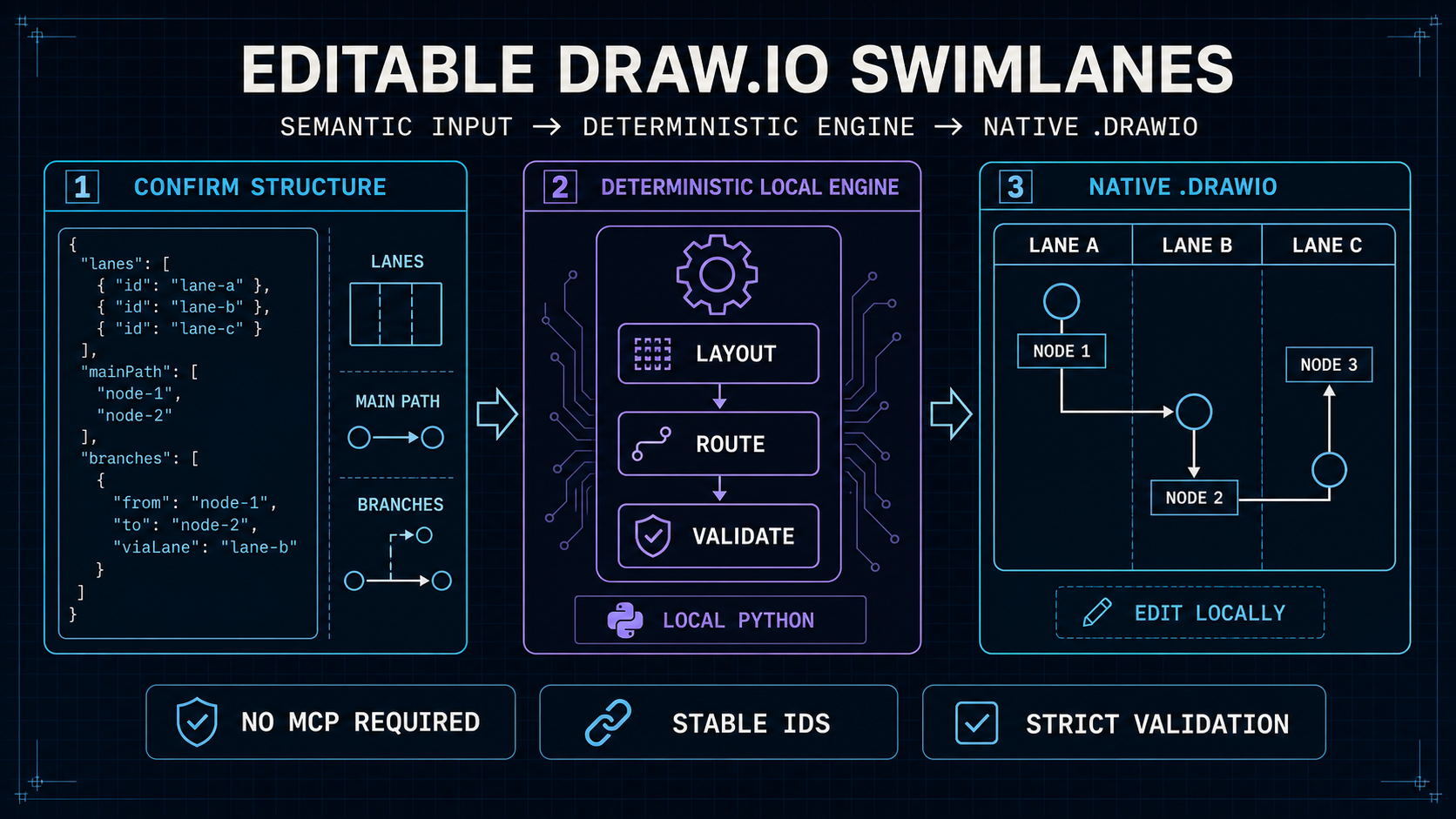
Turn a confirmed process into a native .drawio file, then keep editing it locally.
This Agent Skill creates and incrementally updates vertical swimlane diagrams in which each participant, role, or system owns a lane. The agent handles process semantics; a deterministic local engine handles layout, routing, validation, and editable Draw.io output. Generation does not require Draw.io MCP.
Quick navigation: Why this skill · Workflow · Install · Use with an agent · Local tool · Incremental editing · Validation · Output reliability
Why this skill
Directly generated Draw.io XML often produces tangled connectors, unclear return paths, and fragile edits. This skill uses a neutral JSON model and a deterministic local tool to make the result easier to review and continue editing.
- Native, uncompressed
.drawiooutput - Full-height vertical swimlanes
- Global top-to-bottom process ranks
- Schema v2 with an explicit confirmed main path and optional horizontal phases
- Decisions, branches, returns, retries, and cross-lane flows
- Semantic port allocation and orthogonal routing
- Stable IDs for incremental changes
- Semantic inspection, explicit deletion, and affected-edge repair for existing diagrams
- Strict structural and routing-quality checks
- Structured diagnostics and atomic output receipts with SHA-256
- No Draw.io application or Draw.io MCP dependency for generation
- Local editing in Draw.io Desktop or diagrams.net
Workflow
Natural-language process
        ↓
Confirm lanes, main path, branches, and assumptions
        ↓
Strict v2 JSON specification
        ↓
Build native .drawio
        ↓
Strict validation and capability-aware visual review
        ↓
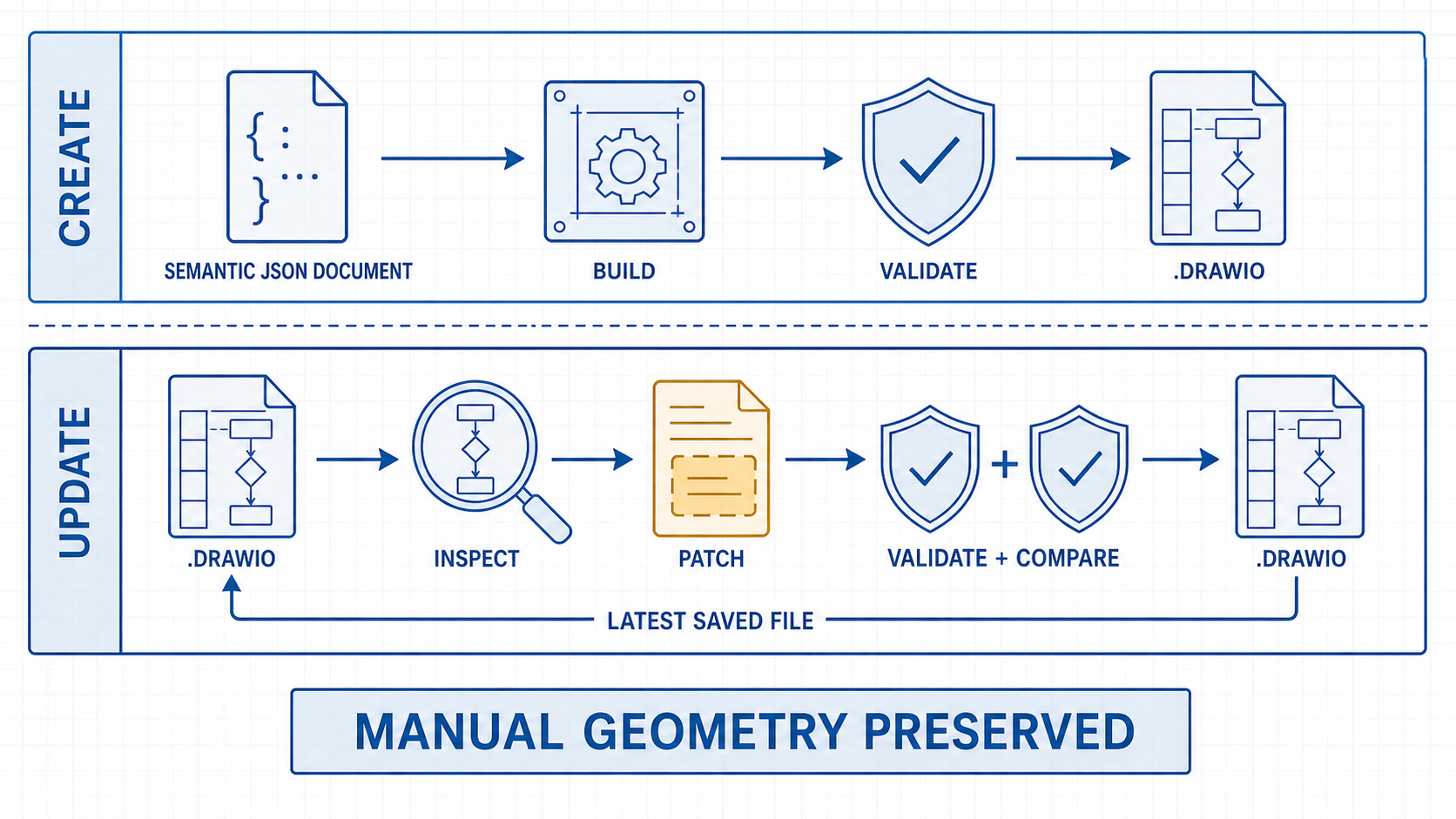
Edit locally, inspect the saved file, or apply a semantic patch
Supported agents
The package follows the Agent Skills directory format and targets:
- OpenAI Codex
- Claude Code
- Other Agent Skills-compatible tools on a best-effort basis
Agent-specific metadata is isolated under agents/; the workflow and Python tool do not depend on a single agent runtime.
Requirements
- Python 3.10 or later
- An Agent Skills-compatible coding agent
- Optional: Draw.io Desktop or diagrams.net for visual editing and export
The bundled Python tool uses only the standard library. Draw.io MCP is not required.
Install
Installing with npx skills requires Node.js and npm. The Skill itself runs locally with Python and does not require Node.js after installation.
Quick install (recommended)
Run this command in your terminal:
npx skills add zz-zed/product-swimlane-drawio
The installer detects supported agents and guides you through the installation scope. The repository contains only one Skill, so --skill is unnecessary.
For a shared user-level installation, add -g:
npx skills add zz-zed/product-swimlane-drawio -g
Ask an agent
Tell Codex, Claude Code, or another Agent Skills-compatible coding agent:
Please install the
product-swimlane-drawioSkill fromgithub.com/zz-zed/product-swimlane-drawio.
The agent may ask which installation scope and supported agents to use, and may request permission before running npx.
Verify installation
List project-level Skills:
npx skills list
For a global installation, add -g:
npx skills list -g
Use with an agent
Ask the agent to confirm the structure before generating the file:
Use product-swimlane-drawio to create an editable vertical swimlane diagram.
First confirm the lane order, main path, branches, returns, and assumptions.
Do not generate the file until I approve the structure.
For an existing compatible diagram:
Use product-swimlane-drawio to update this .drawio file.
Preserve existing node geometry and manual layout changes.
Apply only the requested semantic changes, then validate and compare the result.
Use the local tool directly
Build and validate:
python3 skills/product-swimlane-drawio/scripts/drawio_swimlane.py \
  build --spec process.json --output process.drawio

python3 skills/product-swimlane-drawio/scripts/drawio_swimlane.py \
  validate --input process.drawio --strict
Patch and compare:
python3 skills/product-swimlane-drawio/scripts/drawio_swimlane.py \
  patch --input process.drawio --changes changes.json --output process-updated.drawio

python3 skills/product-swimlane-drawio/scripts/drawio_swimlane.py \
  compare --before process.drawio --after process-updated.drawio --changes changes.json
Inspect the latest locally edited file before preparing a patch:
python3 skills/product-swimlane-drawio/scripts/drawio_swimlane.py \
  inspect --input process.drawio
The semantic input format is documented in references/schema.md.
Incremental editing boundary
Safe patching depends on semantic metadata and stable IDs produced by this skill. A manually created or incompatible .drawio file may require migration or a controlled rebuild before semantic patching is reliable.
By default, patching preserves existing node geometry and manual waypoints. Geometry updates require an explicit command-line flag. If movement or resizing invalidates an incident connector, only the affected connector is rerouted and recorded in the patch receipt.
Nodes, edges, and phases can be deleted by stable semantic ID. Node deletion fails unless every incident edge is explicitly included, and deleting a main-path node requires a replacement main path.
Validation
Strict validation checks structural integrity and routing heuristics, including:
- Main-path continuity, reachability, decision outcomes, retry direction, and phase ranges
- Missing endpoints and duplicate semantic IDs
- Nodes outside their lanes
- Likely multilingual node-label overflow
- Fixed-aspect start and end node geometry
- Unlabeled solid end nodes and excessive process-node padding
- Unintentional port reuse
- Connectors aligned with or too close to lane boundaries
- Connectors crossing nodes
- Overlapping, crossing, or non-orthogonal connector segments
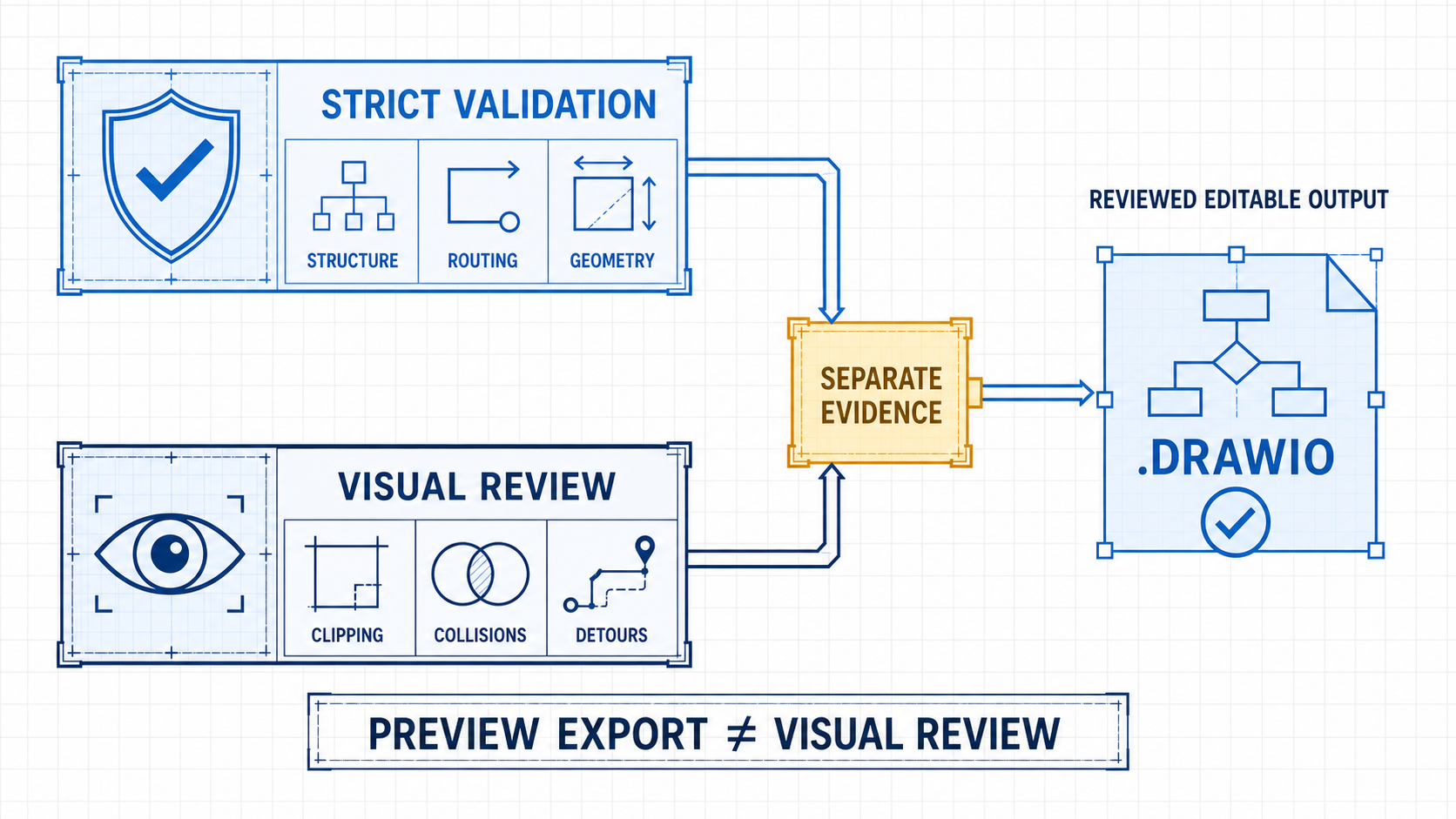
Automated validation does not replace visual review. Always validate the final saved .drawio file. If Draw.io opens, edits, moves, or saves the diagram, run strict validation again before handoff.
Validation returns stable diagnostic codes, evidence, affected semantic IDs, and supported fixes. Build and patch commands write atomically and return the output path, byte count, and SHA-256 digest. Existing output files are not replaced unless --force is supplied intentionally.
Model capability and output reliability
This project does not claim a measured accuracy percentage for model-produced diagrams. Deterministic validation and model visual review provide different kinds of evidence.
| Agent capability | Relative output confidence | Required disclosure |
|---|---|---|
| Text-only model | Structural and routing confidence comes only from strict automated validation. Visual defects can remain. | Report that model visual review was not performed. |
| Multimodal model | Higher confidence for visible clipping, collisions, hidden arrowheads, and excessive detours. The review is non-deterministic and can still miss defects. | Report automated validation, preview export, and model visual review separately. |
| Multimodal model plus human review | Recommended for important diagrams before publication or operational use. | Keep the editable .drawio file and review the final exported preview. |
A successful preview export does not mean that a model inspected the preview. A multimodal model improves visual quality assurance, but it does not replace strict validation or guarantee a perfect diagram.
Design scope
Use this skill for editable vertical swimlane process diagrams. It is not intended to provide strict BPMN conformance, infrastructure topology, or free-form presentation graphics.
Development
Run the neutral test suite:
python3 -m unittest discover -s tests -v
Verify local Skill discovery:
npx skills add . --list
See CONTRIBUTING.md for contribution requirements.
Security and privacy
The skill runs local scripts with the permissions available to the invoking agent. Review the Skill instructions and scripts before installation.
The published package contains no user data, organization names, proprietary terminology, generated diagrams, or domain-specific sample flows. Keep task inputs and outputs outside the Skill directory.
See SECURITY.md for vulnerability reporting.
License
Released under the MIT License.
Draw.io and diagrams.net are third-party products. This project is not affiliated with or endorsed by their maintainers.
No comments yet
Be the first to share your take.