
pp-terminal - The Analytic Companion for Portfolio Performance


A powerful command-line interface (CLI) that allows programmatic access to Portfolio Performance data to offer a whole new level of insights into your assets.
pp-terminal is a lightweight tool for all the nice-to-have features that won't make it into the official Portfolio Performance app. This can be because of country-specific tax rules, complex Java implementation, highly individual requirements, too many edge-cases, etc.
Use Cases
You can run the single commands individually or pp-terminal can act as an MCP server to give AI models like Claude Opus, Gemini or Qwen access to your (anonymized) portfolio to help you answer questions like:
- "Give me an overview of my portfolio"
- "What do you think about my portfolio allocation? Am I overweight anywhere?"
- "Do I have enough cash to cover the upcoming Vorabpauschale taxes?"
- "I need 1k EUR after tax. Which securities should I sell to minimize taxes?"
Thís application supports specific tax concepts like FIFO, Sparer-Pauschbetrag, Grundfreibetrag, Günstigerprüfung and Teilfreistellungen.
[!IMPORTANT] I am not a tax consultant. All results of this application are just a non-binding indication and without guarantee. They may deviate from the actual values.
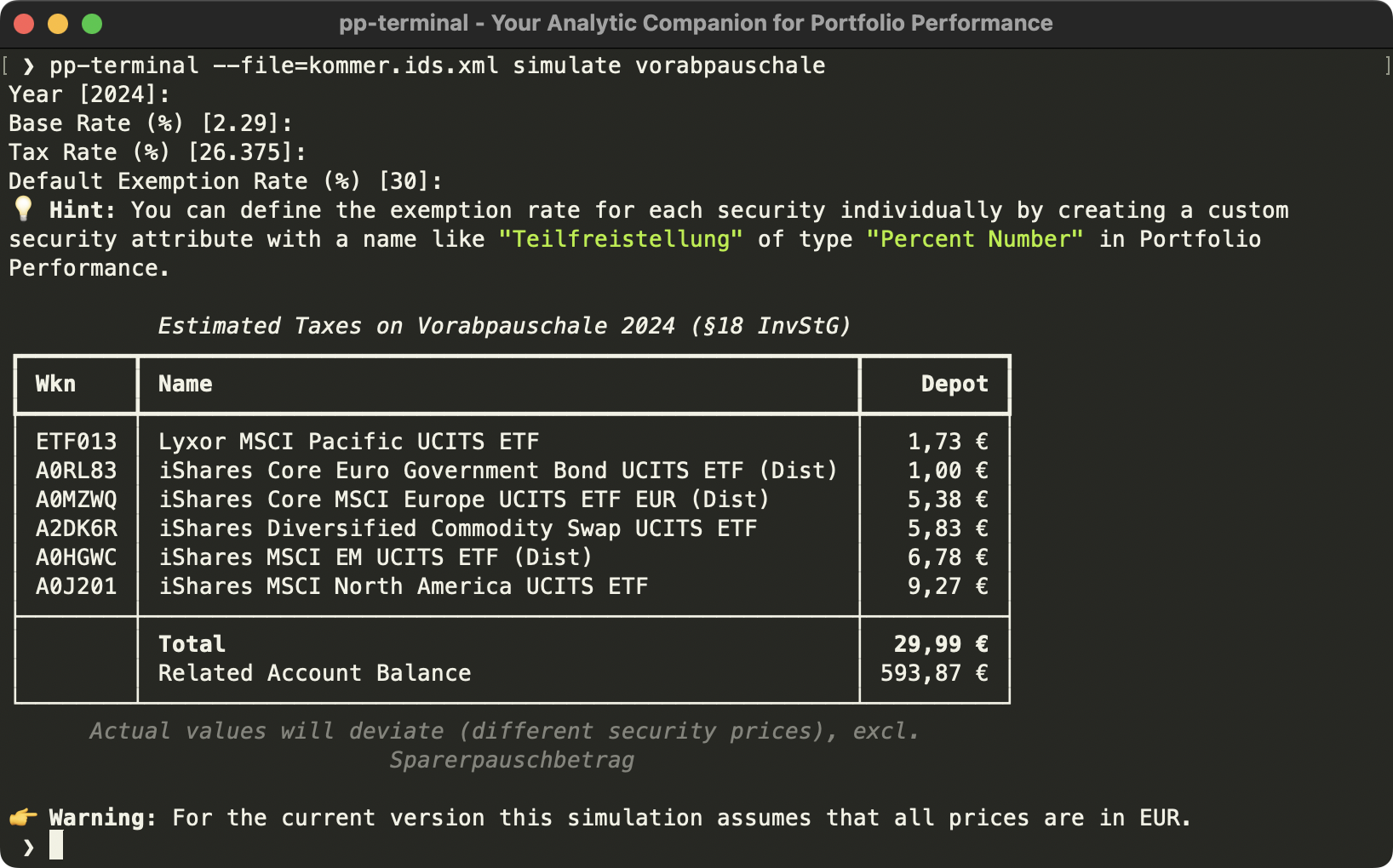
For example, pp-terminal includes a CLI command to calculate the Vorabpauschale (preliminary taxes) for Germany:
[!TIP] Using MoneyMoney for managing your finances? Check out how to export Sankey Charts.
Available Commands
Code completion for commands and options is available.
You can choose between different output formats like JSON, CSV or Excel with the --output option.
In addition to the standard set, you can easily create your own commands and share them with the community.
By default, pp-terminal --help provides the following commands:
MCP Server
The application can be used to access Portfolio Performance data using an MCP server.
This has several advantages over directly working on the XML file, e.g.
- Safely access sensitive financial data by e.g. anonymization and only exposing relevant portfolio information
- Significantly reduce context length and token usage
The MCP server can be started with the following command:
pp-terminal mcp
Inspect Portfolio
| Command | Description |
|---|---|
view accounts |
Get detailed information about the balances per each deposit and/or securities account |
view securities |
Get detailed information about the securities |
view taxonomies |
Get detailed information about the taxonomies |
The displayed columns are configurable via [commands.view.accounts] / [commands.view.securities] in the
configuration file — run pp-terminal init for the field reference, and call a command with
--fields=xx to list all available fields.
Simulate Scenarios
| Command | Description |
|---|---|
simulate interest |
Calculate how much interest you should have been earned per account and compare with actual values |
simulate pmt |
Calculate this year's net (after German tax) withdrawal so the portfolio lasts exactly N years at an assumed real return (amortization / annuity, recompute yearly) |
simulate share-sell |
Calculate gains and taxes if a security would be sold in future (based on FIFO capital gains) |
simulate vap |
Run a simulation for the expected German preliminary tax ("Vorabpauschale") on the portfolio |
Tax parameters ([tax]) and per-command assumptions ([commands.simulate.*]) live in the
configuration file; run pp-terminal init for the fully annotated reference (CLI options take precedence).
For simulate pmt, each returns entry is one scenario. An entry may be a fixed rate, or a per-category
table that is blended over your current asset allocation into a single rate (holdings not assigned to a
category in the taxonomy weigh in at 0%). The reserved "*" key sets a default rate for every category you
do not list explicitly, so you only override the ones that differ. Mixing entries lets you compare fixed
rates against your allocation:
taxonomy = "Asset Allocation"  # the Portfolio Performance taxonomy representing your asset allocation

[commands.simulate.pmt]
# fixed scenarios plus one blended from the allocation; keys are taxonomy category names
returns = [2, 4, 6, { "*" = 4.0, "Eigenkapital" = 5.0, "Fremdkapital" = 1.9 }]
Any such per-category returns are shown as a Expected Return column (one per scenario) in view taxonomies, next to the
category's assignment counts, so you can cross-check them against your allocation.
simulate share-sell reuses the global taxonomy as the default for --preserve-allocation, and
[commands.simulate.share-sell] min-amount sets a per-order floor below which small holdings are consolidated or left unsold.
Validate Data
| Command | Description |
|---|---|
validate |
Run all validation checks on the portfolio data |
Use the repeatable --rule option to run only specific rule types:
pp-terminal --file depot.xml validate --rule price-staleness --rule balance-limit
Rules are configured under [commands.validate.accounts] / [commands.validate.securities] as [[...rules]] arrays;
pp-terminal init lists every rule type and field. Each rule has a type and an optional severity (error default,
or warning), and rules run in the given order, triggering once per entity:
[[commands.validate.securities.rules]]
type = "price-staleness"
value = 30
severity = "warning"
Built-in rule: negative-share-balance runs by default (severity warning, tolerance 0.001 shares) and flags
securities with a negative share balance in any account — a sign of missing or inconsistent transactions, since short
positions aren't supported by Portfolio Performance. Configuring the rule yourself replaces the built-in default; set
valid-months = [] to disable it.
Temporal constraints: every rule accepts valid-months (e.g. [12, 1]) to run only in the given calendar months —
useful for seasonal checks like VAP liquidity in December/January.
Export
| Command | Description |
|---|---|
export |
Save the Portfolio Performance XML file to a different location |
Use the --anonymize flag to export an anonymized version:
pp-terminal --file depot.xml --anonymize export anonymized.xml
Per-attribute anonymization is configured under [anonymize.attributes."<uuid>"] — a provider from
Faker plus optional args; the section's presence alone enables
anonymization. Run pp-terminal init for the format.
Requirements
- pipx to install the application (without having to worry about different Python runtimes)
- Portfolio Performance version >= 0.70.3
- Portfolio Performance file must be saved as "XML with id attributes"
Installing
pipx install pp-terminal
Once installed, update to the latest with:
pipx upgrade pp-terminal
Usage 💡
Portfolio Performance XML File
[!TIP] The application does not modify the original Portfolio Performance file and works completely offline.
All commands require the Portfolio Performance XML file as input.
You can either provide that file as first option to the command
pp-terminal --file=depot.xml view accounts
or use a configuration file (see below).
To view all available arguments you can always use the --help option.
Configuration File
To persist the CLI options you can pass a configuration file in TOML format with pp-terminal --config=config.toml --help.
If no --config is given, the tool automatically loads $XDG_CONFIG_HOME/pp-terminal/config.toml (defaulting to ~/.config/pp-terminal/config.toml) when that file exists.
The CLI options always overwrite the settings in the configuration file.
pp-terminal init prints the complete annotated reference — every option, commented out. The quickest start is to
write it to the auto-loaded location and uncomment what you need:
mkdir -p ~/.config/pp-terminal && pp-terminal init > ~/.config/pp-terminal/config.toml
Customize Number Formats
If you want another formatting for numbers, assure that the terminal has the correct language settings, e.g. for Germany
set environment variable LANG=de_DE.UTF-8.
Disable Colored Output
To disable all colors in the console output for a better readability, you can set the NO_COLOR=1 environment variable.
Contributing
Propose Changes
To contribute improvements to pp-terminal just follow these steps:
- Fork and clone this repository
- Run
make - Verify build with
uv run pp-terminal --version - Create a new branch based on
master:git checkout master && git pull && git checkout -b your-patch - Implement your changes in this new branch
- Run
maketo verify everything is fine - Submit a Pull Request
Create Your Own Command ⚒️
Developers can easily extend the default pp-terminal functionality by implementing their own commands. Therefore, the Python
entry point pp_terminal.commands is provided.
To hook into a sub-command, e.g. view, you have to prefix the entry point name with view..
The most basic pp-terminal command looks like this:
from pp_terminal.output import Console
import typer

app = typer.Typer()
console = Console()


@app.command
def hello_world() -> None:
    console.print("Hello World")
This will result in the command pp-terminal hello-world being available.
For more sophisticated samples take a look at the packaged commands in the pp_terminal/commands directory,
e.g. a good starting point is view_accounts.py.
The commands must be grouped by action, e.g. view accounts or simulate share-sell.
Plugins can also contribute their own configuration section below [commands]. Register a Pydantic
model via the entry point pp_terminal.config_model, named after the command path:
# pyproject.toml
[project.entry-points."pp_terminal.config_model"]
"simulate.safe-withdrawal" = "my_plugin.config:SafeWithdrawalConfig"
# my_plugin/config.py
from pp_terminal.utils.config import ConfigModel

class SafeWithdrawalConfig(ConfigModel):
    years: int = 40
Users can then configure [commands.simulate.safe-withdrawal] in their config file, and the command reads the validated,
typed values via command_config(config, SafeWithdrawalConfig).years. Because the model extends ConfigModel, unknown keys are
rejected and TOML-native types (dates, datetimes) are parsed automatically. Redefining a section that pp-terminal itself or
another plugin already provides — or mounting inside one — is rejected. Entry point names have at most two segments (<command>
or <group>.<command>).
The app uses Typer for composing the commands and Rich for nice console outputs. The Portfolio Performance XML file is read with ppxml2db and efficiently held in pandas dataframes.
If your command makes sense for a broader audience, I'm happy to accept a pull request.
Issues 🚧
[!IMPORTANT] The script is still in beta version, so there might be Portfolio Performance files that are not compatible with and also public APIs, config or option names may change.
In case you are experiencing any problems:
- Create an anonymized version of your portfolio (verify!) or use the kommer sample
- Add the
--verboseoption to the command that is causing the issue - And submit a new issue and include the results from steps 1. and 2.
License
This project is licensed under the GNU General Public License v3.0 (GPL-3.0). See the LICENSE file for more details.
No comments yet
Be the first to share your take.