
🧩 Poster Grid Inspector
Model-agnostic AI poster grid analysis · 海报网格系统分析
Detect the underlying layout grid system of any poster / design image with a vision model — then view the grid overlaid on the image and export it as SVG guides or CSS Grid / Tailwind code.
The installable skill defaults to the host model's native vision capability. It does not upload conversation images or call a remote API. The web UI and CLI remain available as explicit, opt-in remote-provider tools.



Table of Contents
- What it does
- Features
- Architecture
- Project structure
- Quick start
- Usage
- Configuration
- Grid export
- Model providers
- Install as a skill
- For AI agents
- Security
- Troubleshooting
- FAQ
- Contributing
- License
What it does
Upload (or point an agent at) a poster image, and the tool uses a multimodal vision model to deconstruct the image's layout:
- Grid system type — Swiss modular, 12/6/3-column, asymmetric, baseline grid, golden ratio, rule of thirds, diagonal/isometric, radial, freeform/organic.
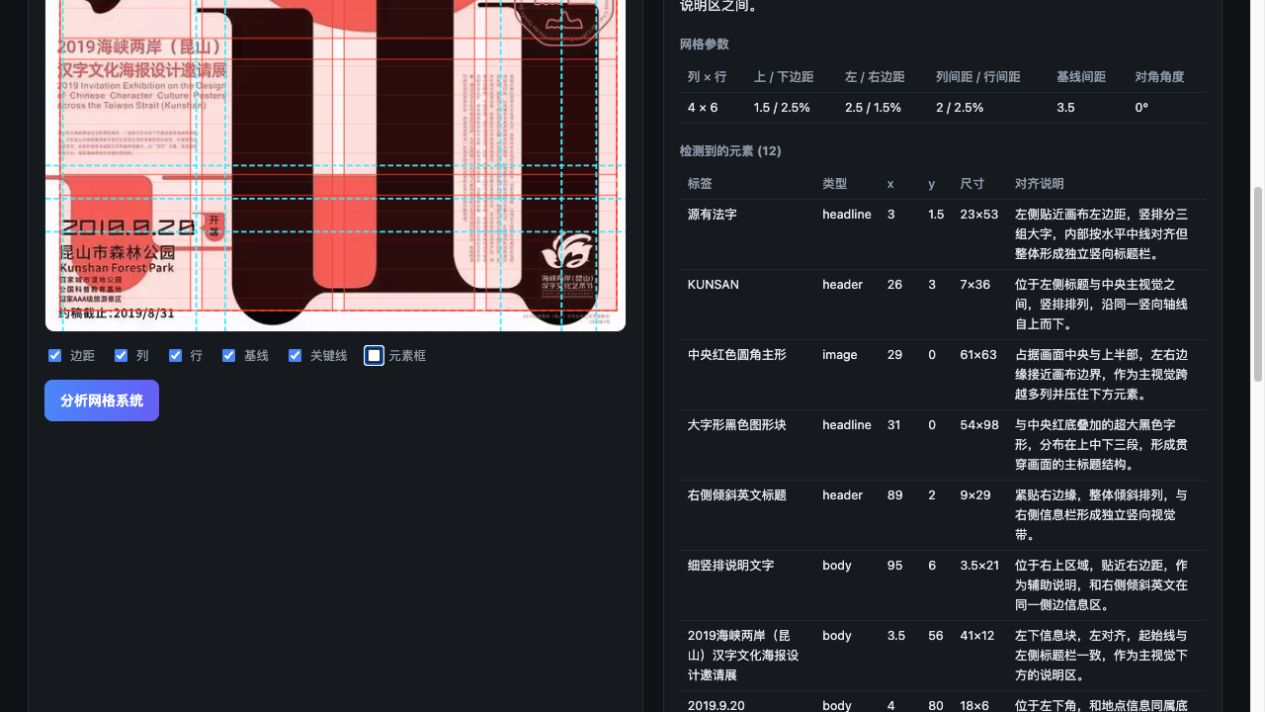
- Grid parameters — columns, rows, margins, gutters, baseline spacing, diagonal angle (all as percentages of the image).
- Detected elements — headline, body, image, logo, accent, header, footer with bounding boxes and per-element alignment notes.
- Keylines — the horizontal / vertical alignment axes the layout snaps to.
- Extra analysis — Swiss principles applied, type hierarchy rating, whitespace ratio, color palette.
Then it draws the grid overlaid directly on the poster and lets you export it:
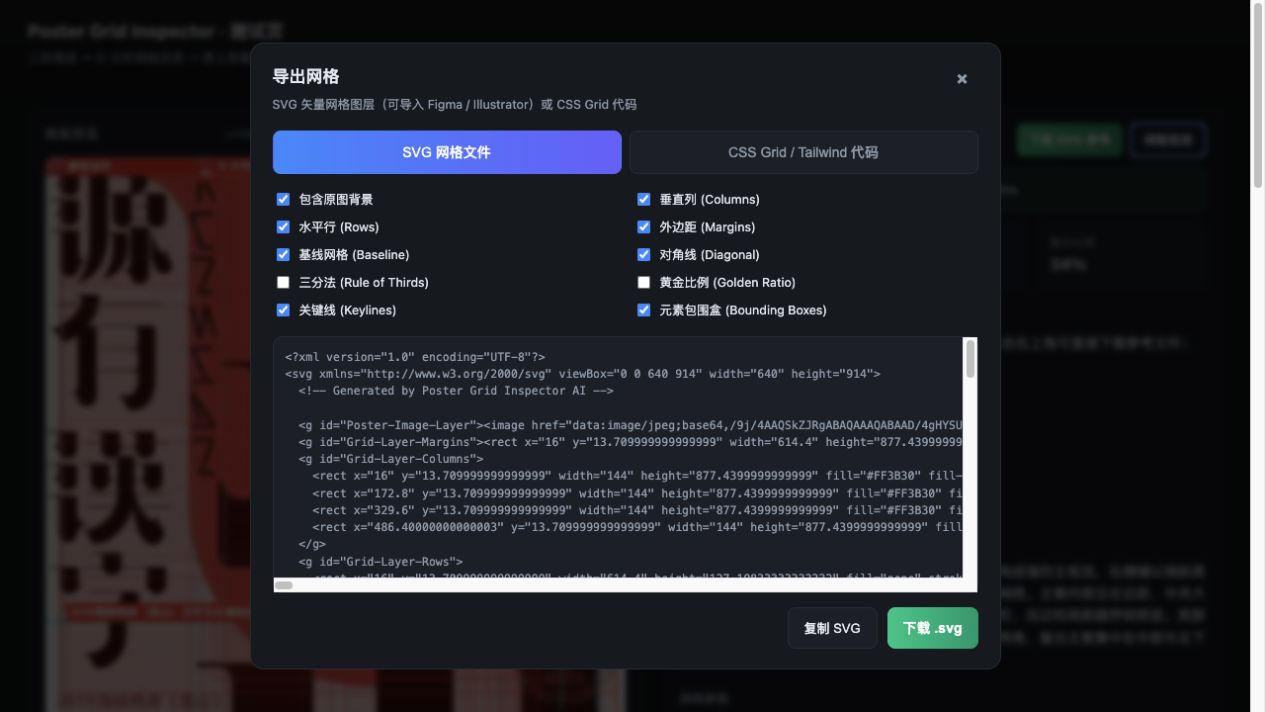
- SVG guide with individually toggleable layers (columns, rows, margins, baseline, diagonal, golden ratio, rule of thirds, keylines, element boxes) — importable into Figma / Illustrator.
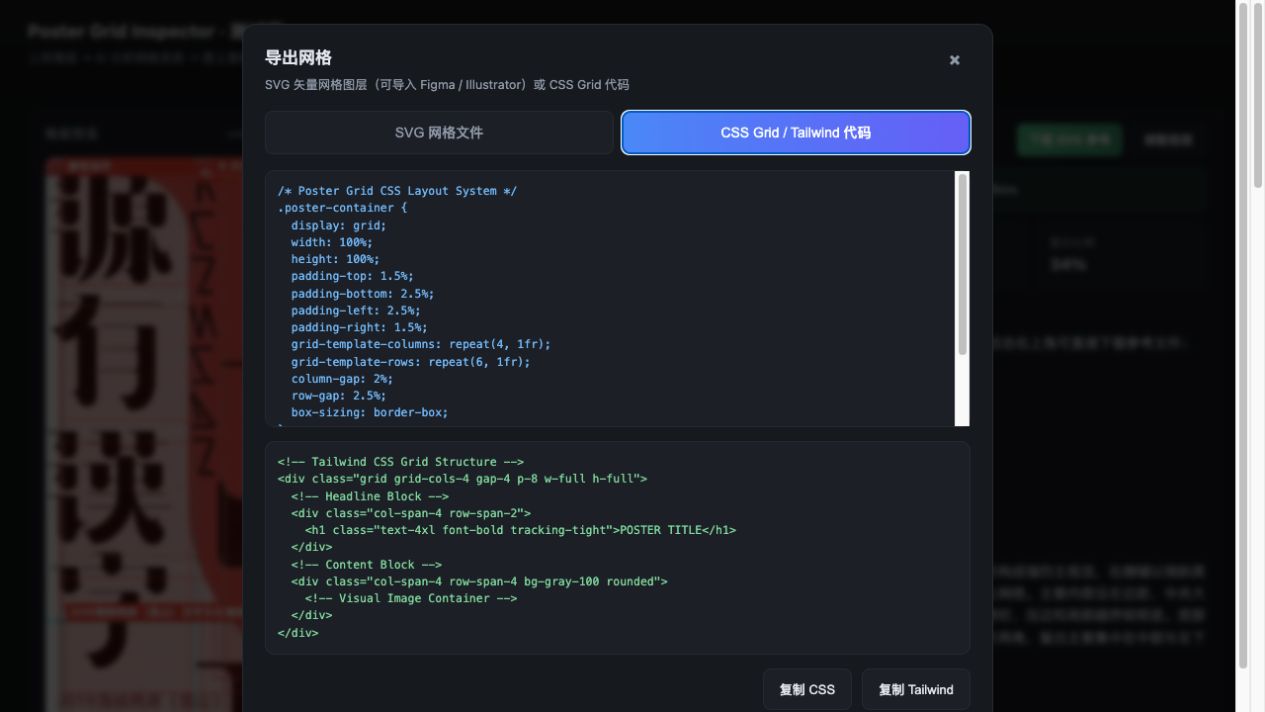
- CSS Grid and Tailwind scaffold code — copy-paste to start building.
It is model-agnostic: it works with OpenAI or any OpenAI-compatible multimodal model
(Qwen-VL, etc.), and requires no AI SDK — just native fetch.
⚠️ The skill itself uses the host model and needs no API key. The optional web UI / CLI mode requires a local
.env; no API keys are bundled or committed.
Features
- 🖼️ Vision-model analysis of grid systems, elements, keylines, palette.
- 🎨 Web UI with live grid overlay, layer toggles, and an export dialog.
- 📐 Export SVG grid guides (Figma/Illustrator ready) or CSS Grid / Tailwind code.
- ⚡ CLI (
npm run analyze -- ./poster.jpg --summary) — no server required. - 🔌 Provider-agnostic — OpenAI Responses API + OpenAI-compatible Chat Completions.
- 🛡️ Robust pipeline — timeout, one retry, schema validation, normalization, in-memory cache (cache keyed by image + provider + model + prompt/schema version).
- 🧩 Agent-ready — ships as an installable skill (
SKILL.md) +AGENTS.md.
Architecture
                        ┌───────────────────────────────────────────────┐
   poster image ───────▶│  Web UI (public/)   or   CLI (scripts/)        │
                        │  prepareImageForVisionApi (1600px JPEG 0.9)    │
                        └───────────────────────┬───────────────────────┘
                                                │ POST /api/analyze-grid
                                                ▼
                        ┌───────────────────────────────────────────────┐
                        │  Express (server.ts)                          │
                        │  analyzeGridRouter (server/routes/)           │
                        └───────────────────────┬───────────────────────┘
                                                ▼
                        ┌───────────────────────────────────────────────┐
                        │  analyzePoster (server/ai/analyzePoster.ts)   │
                        │   · cache check → miss → provider call        │
                        │   · timeout + 1 retry · deadline              │
                        │   · normalize → validate (schema)             │
                        └───────────────────────┬───────────────────────┘
                                                ▼
              ┌─────────────────────────────────┴─────────────────────────────────┐
              ▼                                                                     ▼
  OpenAI provider (server/ai/providers/openai.ts)          OpenAI-compatible (server/ai/providers/openaiCompatible.ts)
  · Responses API  /responses                             · Chat Completions /chat/completions
  · input_image + json_schema                             · image_url + json_object / json_schema
The analysis returns a JSON object where all coordinates are percentages (0–100)
of the image. UI drawing fields (color, opacity, strokeWidth, show-* toggles) are filled by
the frontend, never by the model.
Project structure
poster-grid-inspector/
├── SKILL.md                 # Agent skill entry (frontmatter + usage guide)
├── AGENTS.md                # Onboarding file for AI coding agents
├── README.md                # This file
├── package.json             # Run scripts (setup / start / analyze / typecheck)
├── server.ts                # Web server entry (Express + static + API + /health)
├── public/                  # Frontend UI (vanilla HTML/JS, no bundler)
├── server/
│   ├── ai/
│   │   ├── config.ts        # .env → AiConfig
│   │   ├── providers/       # openai.ts, openaiCompatible.ts, http.ts, index.ts
│   │   ├── analyzePoster.ts # orchestration: cache → provider → normalize → validate
│   │   ├── schema.ts        # JSON Schema + runtime validation
│   │   ├── normalize.ts     # coordinate/field cleanup + systemName migration
│   │   ├── cache.ts         # in-memory cache (keyed, LRU-ish)
│   │   └── errors.ts        # AiError + HTTP error classification
│   └── routes/analyzeGrid.ts
├── src/                     # Types + client-side helpers (visionImage, analyzeGridApi, gridScoring)
├── api/index.ts             # Vercel/Serverless Express example
├── scripts/                 # setup.sh, run.sh, analyze.mts (CLI)
├── prompts/                 # human-readable system prompt
└── .env.example             # env template (empty keys)
Quick start
Prerequisites for optional remote mode: Node.js ≥ 18 (native fetch) and a
vision-capable model API key. Host-model skill use needs neither.
git clone https://github.com/Ygria/poster-grid-inspector.git
cd poster-grid-inspector
npm run setup        # install deps + create .env from .env.example
# edit .env — set AI_REMOTE_ANALYSIS=1 and the provider variables
npm start            # open http://localhost:8787
Or run without the web server:
npm run analyze -- ./poster.jpg --summary
Usage
1. Web UI (recommended)
- Set
AI_REMOTE_ANALYSIS=1in.env. npm start→ openhttp://localhost:8787.- Click / drag a poster image onto the drop zone.
- Click 分析网格系统 (analyze). The grid overlays the image live — toggle columns, rows, margins, baseline, keylines, and element boxes above the preview.
- Click 下载 SVG 参考 for the automatic reference artifact, or click 调整图层 to choose SVG layers and copy CSS Grid / Tailwind code.
The frontend preprocesses images to ~1600px JPEG (quality 0.9) before sending
(src/utils/visionImage.ts), and protects against out-of-order responses
(src/services/analyzeGridApi.ts).
分析完成后,界面会自动生成一份基于已校验坐标的 SVG 参考层。点击“下载 SVG 参考”可直接 下载默认图层;点击“调整图层”可以选择是否包含原图、列、行、基线、关键线和元素包围盒, 并导出 Figma / Illustrator 可用的分层 SVG。
Runtime result
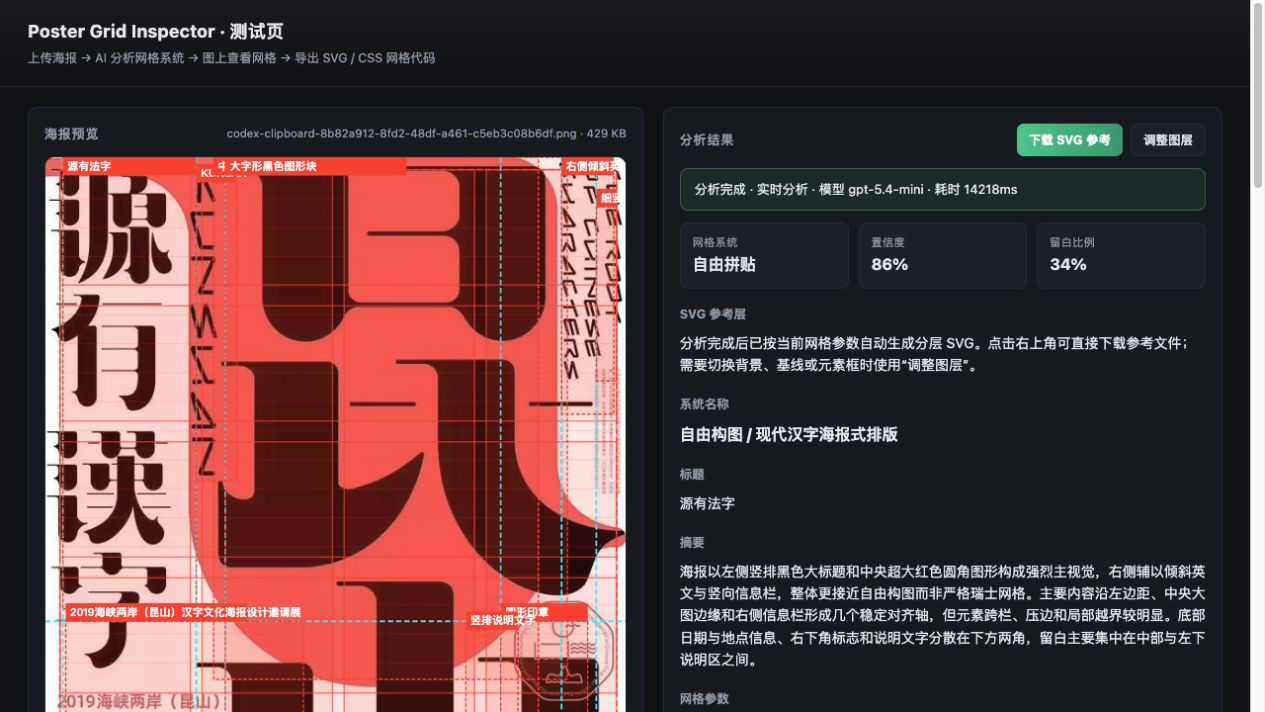
网格叠加层会直接显示在原海报上,便于判断模型推断出的栏、行、基线和元素边界是否合理:
SVG 和 CSS / Tailwind 导出分别提供可复制、可下载的参考结果:
2. CLI
AI_REMOTE_ANALYSIS=1 npm run analyze -- ./poster.jpg --summary   # concise result
AI_REMOTE_ANALYSIS=1 npm run analyze -- ./poster.png             # full JSON
The CLI calls the analysis pipeline directly (no server needed). It sends the file as-is; very large images should be pre-resized.
3. API
POST /api/analyze-grid
Content-Type: application/json

{ "imageBase64": "<base64, no data: prefix>", "mimeType": "image/jpeg" }
Example:
IMG_B64=$(base64 < ./poster.jpg)
curl -s http://localhost:8787/api/analyze-grid \
  -H 'Content-Type: application/json' \
  -d "{\"imageBase64\":\"$IMG_B64\",\"mimeType\":\"image/jpeg\"}"
Response:
{
  "success": true,
  "data": {
    "systemType": "swiss_modular",              // grid system type
    "systemName": "瑞士模块化网格",              // localized system name
    "confidence": 87,                            // 0–100
    "title": "…", "summary": "…",
    "gridParams": {                              // all percentages 0–100
      "columns": 12, "rows": 8,
      "marginTop": 8, "marginBottom": 6,
      "marginLeft": 5, "marginRight": 5,
      "columnGutter": 2, "rowGutter": 2,
      "baselineSpacing": 2.5, "diagonalAngle": 0
    },
    "detectedElements": [
      { "id": "e1", "label": "…", "type": "headline",
        "x": 46, "y": 3, "width": 49, "height": 10,
        "alignmentNote": "…" }
    ],
    "keylines": [
      { "id": "k1", "type": "vertical", "position": 50, "label": "…" }
    ],
    "swissPrinciples": ["…"],
    "typeHierarchyRating": "A级:…",
    "whitespaceRatio": "24%",
    "colorPalette": ["#161012", "#F0D93B"]
  },
  "meta": {
    "provider": "openai", "model": "gpt-4o-mini",
    "latencyMs": 13313, "cached": false,
    "promptVersion": "poster-grid-v2", "schemaVersion": "poster-grid-schema-v2",
    "requestId": "…"
  }
}
Error response shape (with HTTP status):
{ "success": false, "code": "AI_RATE_LIMIT", "error": "…", "retryable": true }
| Code | Meaning |
|---|---|
INVALID_IMAGE |
missing / non-string imageBase64 (400) |
AI_AUTH_ERROR |
bad API key (401/403) |
AI_TIMEOUT |
request timed out (504) |
AI_RATE_LIMIT |
provider rate limit (429, retryable) |
AI_UPSTREAM_ERROR |
provider 5xx (502, retryable) |
AI_INVALID_OUTPUT |
unparseable / failed validation (422) |
AI_REQUEST_ERROR / AI_NETWORK_ERROR |
generic / network failure |
INTERNAL_ERROR |
unexpected server error |
Also available: GET /health → { ok, provider, model }.
Configuration (.env)
| Env var | Default | Notes |
|---|---|---|
AI_REMOTE_ANALYSIS |
0 |
Must be 1/true/yes/on to allow remote image analysis |
AI_PROVIDER |
openai |
openai or openai-compatible |
AI_API_KEY |
— | required |
AI_BASE_URL |
https://api.openai.com/v1 |
for compatible providers |
AI_MODEL |
gpt-5.6-terra |
use a vision model available to your key |
AI_RESPONSE_FORMAT |
json_schema |
json_schema or json_object (Qwen) |
AI_IMAGE_DETAIL |
original |
low / high / auto / original |
AI_ENABLE_THINKING |
false |
Qwen enable_thinking |
AI_TIMEOUT_MS |
35000 |
per-request timeout |
AI_TOTAL_DEADLINE_MS |
50000 |
total deadline incl. retry |
AI_MAX_RETRIES |
1 |
capped at 1 |
PROMPT_VERSION |
poster-grid-v2 |
cache key component |
SCHEMA_VERSION |
poster-grid-schema-v2 |
cache key component |
PORT |
8787 |
web server port |
OpenAI example:
AI_PROVIDER=openai
AI_API_KEY=sk-...
AI_BASE_URL=https://api.openai.com/v1
AI_MODEL=gpt-4o-mini
AI_RESPONSE_FORMAT=json_schema
Qwen / OpenAI-compatible example:
AI_PROVIDER=openai-compatible
AI_API_KEY=...
AI_BASE_URL=https://your-endpoint/v1
AI_MODEL=qwen3-vl-plus
AI_RESPONSE_FORMAT=json_object
AI_ENABLE_THINKING=false
Grid export
The export dialog (or the SVG generator behind it) builds layered guides:
| Layer | <g id> |
Description |
|---|---|---|
| Poster background | Poster-Image-Layer |
embeds the original image |
| Margins | Grid-Layer-Margins |
outer content rectangle + margin labels |
| Columns | Grid-Layer-Columns |
per-column fills + C1…Cn labels |
| Rows | Grid-Layer-Rows |
per-row strokes + R1…Rn labels |
| Baseline | Grid-Layer-Baseline |
typographic baseline lines |
| Diagonal | Grid-Layer-Diagonal |
angled axes (rotated group) |
| Golden ratio | Grid-Layer-GoldenRatio |
φ divisions |
| Rule of thirds | Grid-Layer-RuleOfThirds |
1/3 divisions |
| Keylines | Grid-Layer-Keylines |
detected alignment axes |
| Element boxes | Detected-Poster-Elements |
detected element bounding boxes |
Exported SVG groups have stable IDs so they land as named layers in Figma / Illustrator.
CSS / Tailwind output generates a .poster-container grid scaffold.
Model providers
| Provider | Endpoint | Images | Output format |
|---|---|---|---|
openai |
POST {base}/responses |
input_image |
json_schema (strict) |
openai-compatible |
POST {base}/chat/completions |
image_url |
json_object or json_schema |
Implementation notes:
- Uses native
fetch— no AI SDK dependency (package.additions.json). - Compatible vendors differ on
enable_thinking,json_schema, and image field support; adapt withinserver/ai/providers/*.tsif needed. - The provider must accept image input. Text-only APIs (e.g. DeepSeek
deepseek-chat) fail withunknown variant 'image_url'. - Not all keys have access to all models — a key may return
429 insufficient_quotafor some models and work fine for others (e.g.gpt-4o-minivsgpt-5.6-terra).
Install as a skill
The whole repo is a skill directory. Copy or clone it into your agent's skills folder:
| Agent | Location |
|---|---|
| Claude Code (project) | .claude/skills/poster-grid-inspector/ |
| Claude Code (user) | ~/.claude/skills/poster-grid-inspector/ |
| Cursor / Windsurf / others | your editor's skills directory convention |
The SKILL.md frontmatter (name + description) is what agents read to decide when to invoke
the skill. Copy the folder (optionally without .git/) to install.
For AI agents
SKILL.md— the skill contract: when to use it, setup, usage, API, env reference, troubleshooting. Read this first.AGENTS.md— how to work inside this repo: commands, architecture, conventions, gotchas. Read this before modifying code.package.jsonscripts are the source of truth forsetup/start/analyze/typecheck.- Never commit
.envor real API keys — the repo ships.env.examplewith empty placeholders.
Security
- The host-model skill does not read or transmit API keys. Optional remote mode reads keys
only from your local
.env(git-ignored); no key is committed or bundled. - The frontend never receives or sends your key; all AI calls go through the local server.
.claude/settings.local.json(which may record command history) is git-ignored too.- Before pushing, the repo is audited for secrets; see
.gitignore.
Troubleshooting
| Symptom | Cause / Fix |
|---|---|
AI_API_KEY is required |
.env not configured. Run npm run setup, fill it in. |
unknown variant 'image_url' |
Provider/model is text-only. Use a vision model (DeepSeek text models fail like this). |
429 insufficient_quota |
Your key has no credits for that model. Pick a model your plan covers. |
429 AI_RATE_LIMIT after retry |
Rate limited. Back off or raise AI_TOTAL_DEADLINE_MS. |
AI_INVALID_OUTPUT |
Model returned something that failed schema validation. Retry; occasionally switch model. |
| Port already in use | Set PORT=xxxx in .env. |
FAQ
Which models work? Any multimodal model reachable via OpenAI or an OpenAI-compatible API: GPT-4o / GPT-4.1 / GPT-5 family, Qwen-VL, etc. The provider must accept image input.
Why percentages? Grid params, elements, and keylines use 0–100 coordinates so results are resolution-independent and easy to overlay on any canvas size.
Does it cost money? Only your API provider's usage. The in-memory cache avoids re-billing for identical images during a session.
Can I deploy it? Yes — api/index.ts is a Vercel Express entry using the same analysis
service. Note the in-memory cache is per-instance on Serverless.
Is it a full reimplementation of the upstream project? It reimplements the analysis layer of the Poster Grid Inspector concept model-agnostically; UI/export flows reference the upstream UX.
Contributing
PRs welcome. Keep it simple:
npm run typecheckmust pass.- Follow existing conventions (percent coordinates, frontend-filled UI fields,
.jsESM imports). - Never add secrets. Update
.env.example, never.env. - If you touch providers, verify against both
openaiandopenai-compatiblepaths.
License
MIT © Ygria
Keywords: poster grid analysis, layout grid detection, Swiss grid, design analysis, vision model, OpenAI-compatible, Qwen-VL, multimodal, AI skill, Claude Code skill, Figma grid export, CSS grid, Tailwind grid, agent tool.
No comments yet
Be the first to share your take.