
PDF to Editable Word Skill - Layout-Preserving PDF-to-DOCX for AI Agents


A portable Agent Skill that converts PDF to editable Word (.docx) without throwing away the original page layout. Install one reusable SKILL.md in Codex, Claude Code, or other Agent Skills-compatible tools; the included local CLI performs the deterministic conversion and validation.
这是一个跨 Agent 的 PDF 转可编辑 Word Skill:尽量保持原始排版,文字可搜索、可编辑,支持 Codex Skill、Claude Code Skill 和通用 Agent Skills,全程本地处理。
- Layout-preserving: keeps page borders, tables, images, QR codes, and visual structure in the background.
- Editable text: rebuilds PDF text as searchable, editable Word text boxes.
- Private and local: never uploads your document to an online conversion service.
- Agent-ready: one reusable
SKILL.mdfor Codex, Claude Code, or any agent that can run the CLI.
Alpha software. Best for text-based PDFs and desktop Microsoft Word. Scanned PDFs need OCR, which is not included yet.
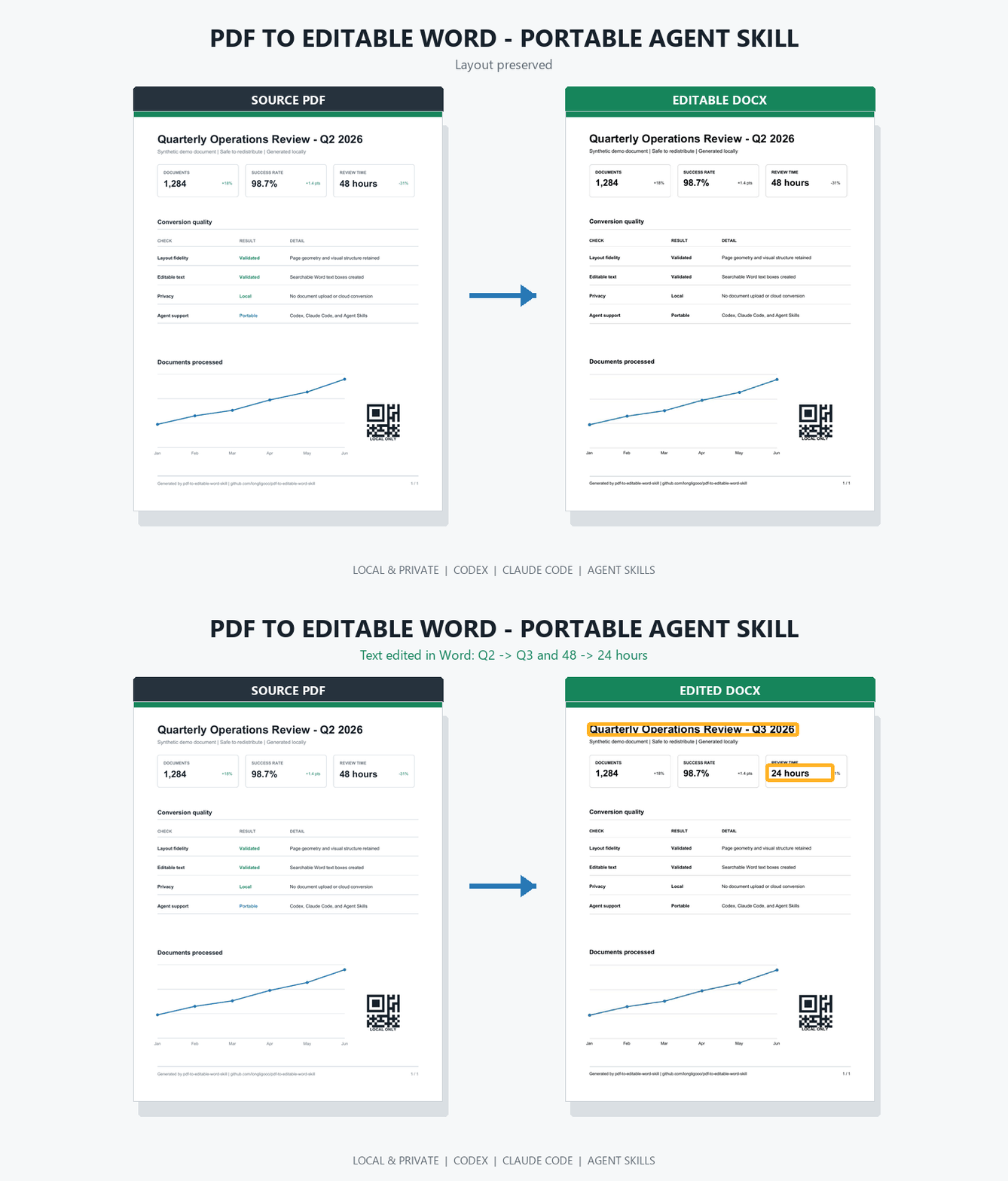
The demo is generated from redistributable synthetic data and rendered with Microsoft Word. It preserves the one-page layout, creates 37 editable text boxes, and then changes Q2 to Q3 and 48 hours to 24 hours inside the DOCX.
Download the source PDF | Download the editable DOCX | Download the edited DOCX
Install the Skill in 60 seconds
Install Python 3.10+, pipx, and Poppler (pdftoppm), then run:
pipx install https://github.com/longligooo/pdf-to-editable-word-skill/releases/download/v0.1.0/pdf_to_editable_word-0.1.0-py3-none-any.whl
pdf2word doctor

# Choose your agent
pdf2word skill install --agent codex
pdf2word skill install --agent claude
On Debian or Ubuntu, install Poppler with sudo apt-get install poppler-utils. On Windows, add pdftoppm.exe to PATH or set the PDFTOPPM environment variable.
Without pipx, install directly from GitHub:
python -m pip install "https://github.com/longligooo/pdf-to-editable-word-skill/releases/download/v0.1.0/pdf_to_editable_word-0.1.0-py3-none-any.whl"
For another Agent Skills-compatible tool, install to its skills directory:
pdf2word skill install --destination /path/to/agent/skills
Then ask your agent:
Convert report.pdf to an editable Word document, preserve the layout,
validate the result, and tell me which pages need visual review.
Agents without Skill support can call pdf2word directly.
Use the standalone CLI
The same conversion engine works without an AI agent:
pdf2word inspect input.pdf
pdf2word convert input.pdf output.docx
pdf2word validate output.docx --pdf input.pdf
How it preserves the layout
Most PDF-to-Word converters choose between editable text and visual fidelity. This project combines both:
- Extract words, positions, font sizes, and colors from the PDF text layer.
- Render each source page and remove the original glyph areas from the page image.
- Rebuild the DOCX with the cleaned page as a background and editable, absolutely positioned text boxes above it.
- Validate the generated DOCX structure before delivery.
Non-text graphics remain visually faithful because they stay in the page background. Text remains searchable and editable in Word.
For interrupted long documents, resume with:
pdf2word convert input.pdf output.docx --work-dir .pdf2word-work/input --resume
The cache is reused only when the source fingerprint, page range, and conversion settings match.
Commands
pdf2word inspect INPUT.pdf [--json]
pdf2word convert INPUT.pdf OUTPUT.docx [--dpi 144] [--resume]
pdf2word validate OUTPUT.docx [--pdf INPUT.pdf] [--json]
pdf2word doctor [--json]
pdf2word skill install [--agent codex|claude] [--scope user|project]
Use --pdftoppm PATH when Poppler is not on PATH. Use --start and --end for a zero-based page range.
Known limitations
- PDFs without a text layer require OCR, which is not included in v0.1.
- Text is editable; tables, diagrams, images, and other page graphics remain part of the background image.
- Colored or textured backgrounds behind text may show erased regions.
- Mixed page sizes are detected and rejected instead of silently producing incorrect output.
- The DOCX uses VML text boxes for broad Microsoft Word support. LibreOffice may reposition or omit them.
- Font substitution can change line width when the source fonts are unavailable.
Development
python -m pip install -e ".[dev]"
python scripts/sync_bundled_skill.py
python -m unittest discover -s tests -v
Tests generate synthetic PDFs at runtime; no copyrighted sample documents are committed.
Roadmap
- Visual diff reports rendered through Microsoft Word
- Optional OCR backends for scanned documents
- Better background reconstruction for colored pages
- Mixed-size and mixed-orientation documents
- Asynchronous MCP server for long-running conversions
- Reproducible benchmark corpus and quality dashboard
License
MIT. Poppler is an external runtime dependency and is not distributed by this repository.
No comments yet
Be the first to share your take.