
Ontology Atlas
In 30 seconds
Source code shows how a system works. It rarely preserves which product
capability the code serves, why its boundaries exist, or what a change could
affect. Atlas keeps those answers beside the code, in an atlas/ folder of
Markdown files inside the repository itself — so the meaning is cloned,
branched, reviewed, and shared with the code rather than alongside it.
The gap is most obvious after an AI agent finishes a change. A Git diff is the exact record of which lines moved. The producing agent's summary is its claim about the work. Atlas preserves the product-level meaning a person can review: which capability or boundary changed, what evidence supports it, what it depends on, and what remains unknown.
Use Atlas after an agent change to review what the codebase has become, and before the next change so a person and an AI agent start from the same accepted map: what the code is for, where to begin, what else it touches, and what to verify. That map stays bounded — a list of observed capabilities is not treated as exhaustive, and unsupported scope remains visible uncertainty.
Each file's frontmatter declares what it is (project, domain, capability,
element, or a linked document) and what it points at. That folder is the
whole database.
Because the kinds and relation types are a small fixed set, the folder is not just readable — it is computable. Atlas compiles it into a graph and answers questions a note-taking tool cannot: what breaks if I change this, what is this capability's blast radius, which paths connect these two things, what is disconnected, what is stale.
Your agent asks those questions over MCP and can propose updates after code work. You read the same answers as a map, and an Atlas write does not become accepted meaning merely because an agent produced it: it lands as Markdown and a Git diff a person can correct, reject, or keep.
Architecture is a separate reviewed contract rather than another ontology layer, and unknown coverage is never shown as green. Step 4 walks it.
The exact five-kind discriminator, relation support matrix, direct is_a test,
and standards/inference boundary live in the
vault specification.
Status — read this before installing
A build tagged -rc.N is a release candidate: it walks the same signing,
notarization, installer, updater, and hosted-download checks as a final build,
but has not been widely run yet. A tag without -rc is a final release and
makes the same promises with the wider run behind it.
The download page is the release authority: it renders a generated record of the current published tag, real asset sizes, checksums, platforms, and signing state. This README does not pin a tag or copy those values, so an older document cannot contradict the files people are about to install. GitHub Releases is the second direct source.
- The unsigned Windows beta is a real risk, not a formality. SmartScreen may warn about an unknown publisher, and a managed work PC may refuse the installer outright. Security explains what is and is not promised.
- Installing the desktop app installs the agent surface. Both bundles carry the compiled MCP server. There is no npm package; Linux and every other platform runs the browser app, or the CLI and MCP server from a source checkout. The in-app updater reads a stable Pages manifest staged from the newest non-draft GitHub Release, including release candidates; every archive still has to pass the bundled updater signature check before installation.
- Screenshots demonstrate the product journey, not release availability.
Where it stands
Two tiers here, and the second is the one worth reading. Nothing below is a roadmap promise. It summarizes current product behavior documented in the feature inventory, the specification, and the decision ledger. For what is downloadable today, use the download page.
Working today
- A Markdown folder is the whole database. Point the app at one and it reads
and writes in place — no import step, no index to build, no account. Starting
from code creates that folder as
atlas/inside the project, so the map travels with the repository instead of living on one laptop. - The macOS app, Developer ID signed and notarized, with the compiled MCP server inside its own bundle.
- Agent setup starts with one button and ends with a real proof. The app
shows the exact paths before writing, creates only the missing connection
files on confirm, then guides the agent restart and
mcp-verifycheck. File presence is never presented as a live connection. - MCP over stdio for Claude Code, Cursor, VS Code, Codex, and any other MCP
client — a typed read and write surface the running server advertises through
tools/list. For a known coding task that only reads Atlas context, the measuredOATLAS_READ_ONLY=1path returns one compact current-source batch; use the full profile when that session must also write ontology Markdown. Agent guide. - A CLI carrying the same authority as the agent — scaffold, validate, dry-run writes, bounded traversal, blast radius, commit preflight, vault-scoped git snapshots, agent handoff. CLI reference.
- The workbench surfaces, all reading one folder — Map, Architecture, Docs, Insights, Projects, Agents, and Git History. Architecture is additive: the existing Git destination, change badge, and keyboard path remain available.
- Export to standard graph formats. JSON-LD and GraphML come off the same deterministic compile artifact, so the vault opens in rdflib, Protégé, Gephi, Cytoscape, NetworkX, or Neo4j without a converter of your own.
- Scaffolding puts the agent's procedures where the agent runs.
initinstalls review / grow / absorb skills into the repository root's.claude/skills/, so a coding agent started in that repository finds them in its command menu with no extra setup. It also prints the one sentence the MCP server cannot say — that this repository has a reviewed ontology and when to read it — for you to paste into your ownCLAUDE.mdorAGENTS.md. Atlas does not edit files you wrote. - The hosted web app as a gateway — a static export that opens your local folder through the File System Access API, with nothing installed.
Shipping, not settled
- Windows x64 is an intentionally unsigned public beta. It carries the same local folder and MCP surface as macOS; what it does not carry is a signature, so SmartScreen may warn and a managed PC may block it outright.
- The vault format is v2.0-rc — an RFC open for public comment. It documents behavior already enforced by contract tests in this repository, and it carries its own kill criterion: no outside engagement inside the stated feedback window and the standardization track is shelved rather than quietly maintained. Specification §0.
- Linux and other platforms have no packaged build. They run the browser app, or the CLI and MCP server from a source checkout — the same vault, fewer screens.
- Web and desktop do not promise the same screens, and that is not a backlog. Git history and offline work are desktop capabilities. The web remembers its File System Access handle in IndexedDB and restores it while browser permission remains granted, but it cannot run git or native bridges. The capability table is in the feature inventory.
A third tier — what we have decided not to build, and why — is What this is not, below.
The journey
1. Open a folder
The app's first question is a folder. Point it at a vault — a directory of Markdown — and it reads it in place. No import step, no index to build, no account.
Where that folder belongs is the part worth knowing. When you ask Atlas to start from your code, it creates exactly one folder inside the project you picked, and everything the ontology knows lives there:
your-repo/
├── src/
├── package.json
└── atlas/                 ← the whole ontology, and nothing else
    ├── project.md         one project document
    ├── domains/           what the product is made of
    ├── capabilities/      what each area can do
    ├── elements/          the implementation pieces they work with
    └── architecture/      reviewed role and dependency profiles, when you have one
The exact path is shown before anything is written, and an atlas/ folder that
is already there is reused and reported rather than overwritten. If you point
the app at the project root out of habit, it opens the map inside and says that
it did — it never silently swaps your folder for a different one.
That location is a decision, not a default. A map kept outside the repository
travels on one laptop: a colleague clones the code and gets no meaning, and a
change to the code lands in a pull request while the change to its meaning does
not. Inside the repository the two move together and are read in the same diff.
So the folder is the product's whole portable surface — commit atlas/, push
it, attach it to a pull request, or copy it to another machine, and the map goes
with it. The app, the MCP server, and the CLI all read that folder directly;
none of them keeps a second copy anywhere else.
The name is ordinary on purpose: docs/ is a crowded folder people reorganise,
and a map swept away in a docs tidy-up is worse than one nobody found — while a
dot-folder would be hidden, when the whole argument here is that a person opens
these files.
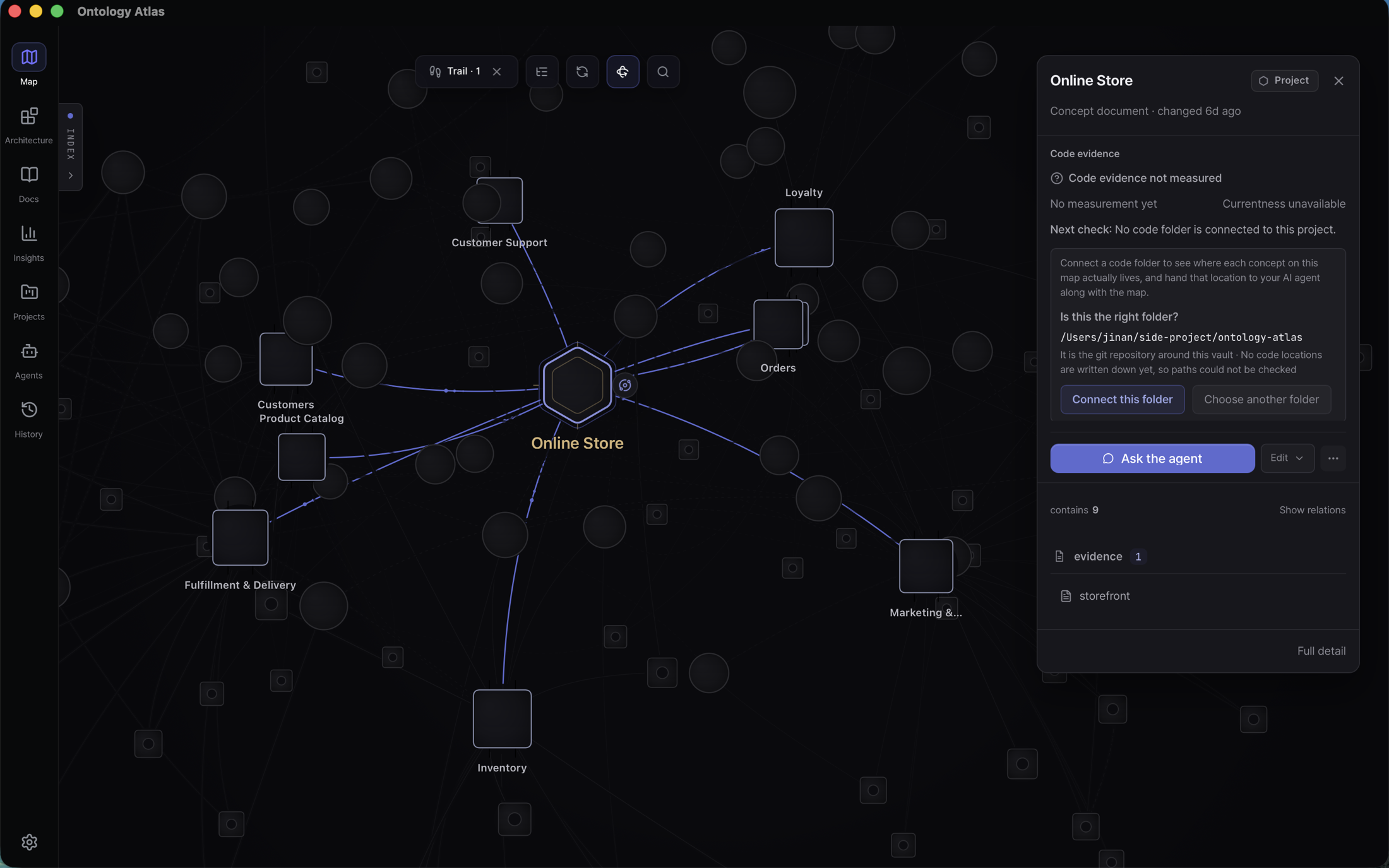
The vault in every screenshot below is
samples/storefront, a standalone example folder in this
repository: an online store described as products, inventory, orders, payments,
delivery, members, marketing and support — each with the capabilities inside it
and the things those capabilities work with. Run
node cli/src/index.mjs overview samples/storefront for the current census; no
document here writes the number, because it changes whenever anyone adds a node.
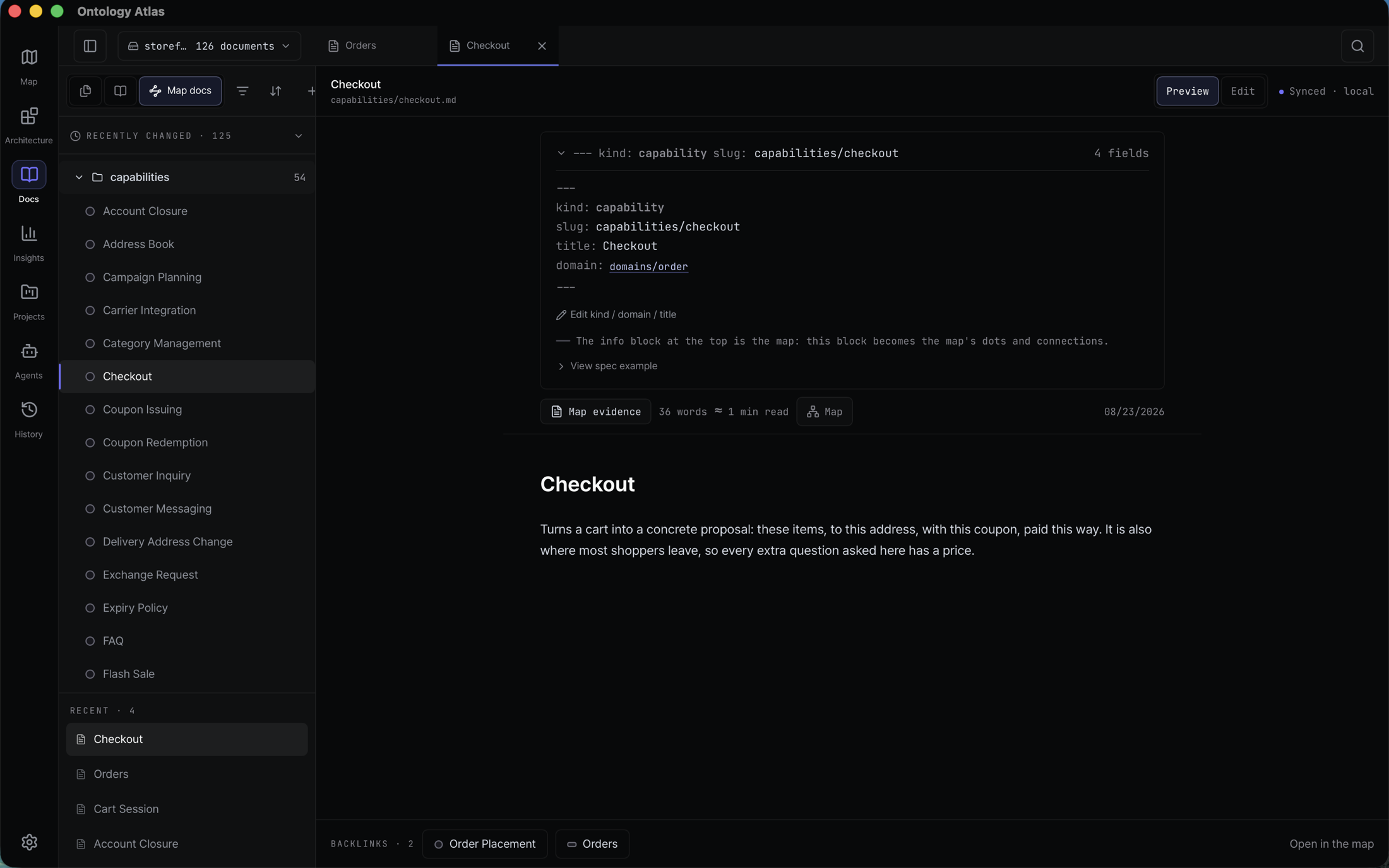
Docs is the same folder without the canvas: preview or edit Markdown, inspect the frontmatter that becomes the graph, follow backlinks, and jump back to the same concept on the map. There is no imported copy to synchronize.
2. Connect your agent
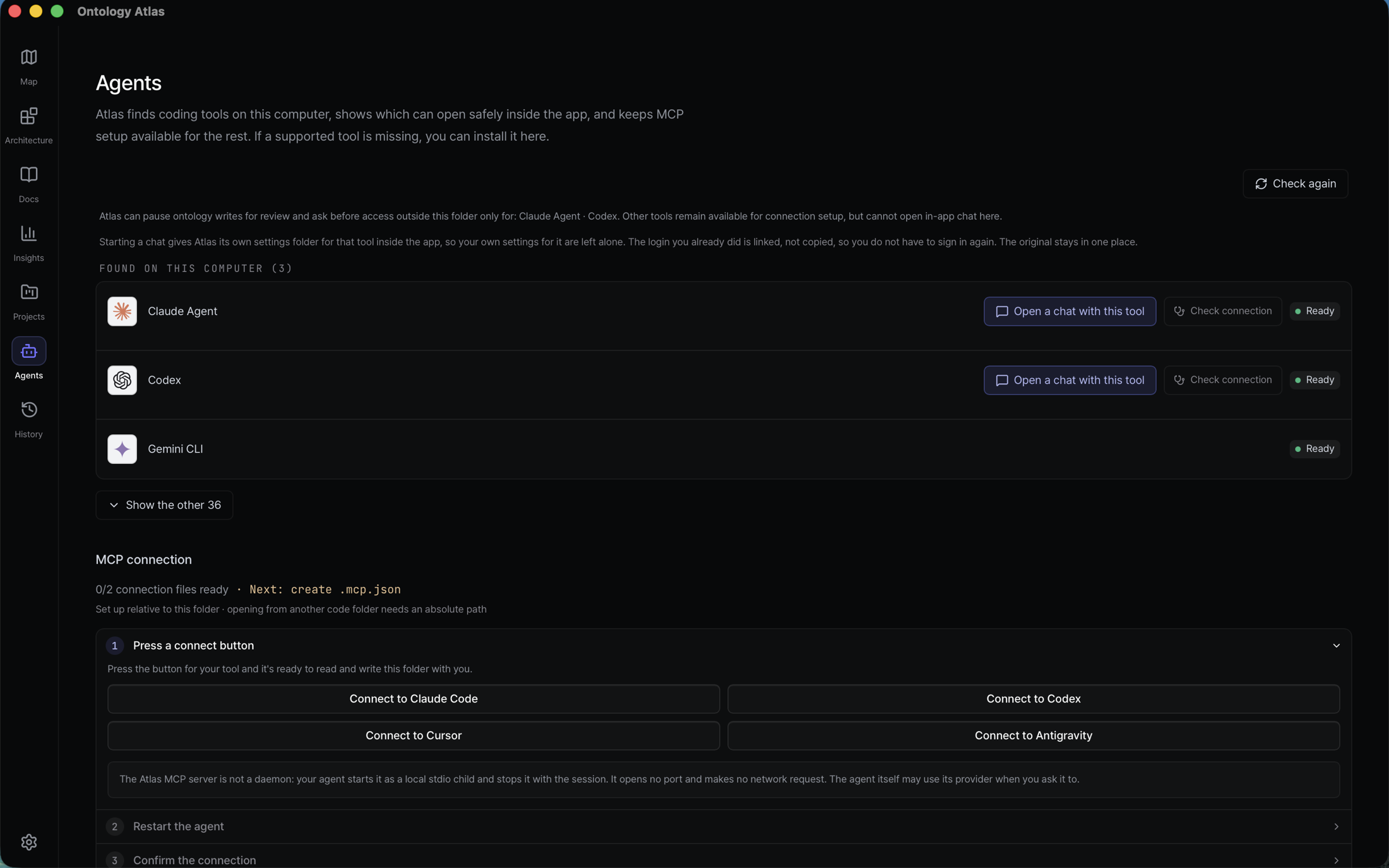
Atlas finds the coding agents already installed on this computer, lets you open the supported ones beside the map, and keeps MCP setup scoped to the selected folder.
- Connect once, with visible scope. The flow shows which folder and client config it will change. The resulting files are plain text you can inspect.
- Then prove the connection from the agent's folder. The final step gives
the exact
mcp-verifycheck; that check starts the bundled MCP server, reads the active vault, and reports the real result or failure. - The conversation does not stop at the first map. After a completed turn, up to three next steps derived from the current vault appear directly below the answer. A same-folder refresh keeps the current recommendation visible, while a completed source connection replaces the old action with the next applicable one. Choosing a row fills the composer for review and editing; it never sends or writes automatically.
- Nothing stays running. The server speaks stdio; your agent starts it when it needs it and it exits afterwards. The MCP server opens no port and makes no network request (Security); the coding agent itself may use its provider when you ask it to.
Claude Code, Codex, Cursor, and Antigravity get a direct setup path — one
button each, writing that client's own config file. Any other MCP client can use
the generated snippet.
The bundled server advertises its current read/write surface through
tools/list; the agent guide documents every tool and its
contract, and mcp-verify proves the live inventory.
3. Read the map
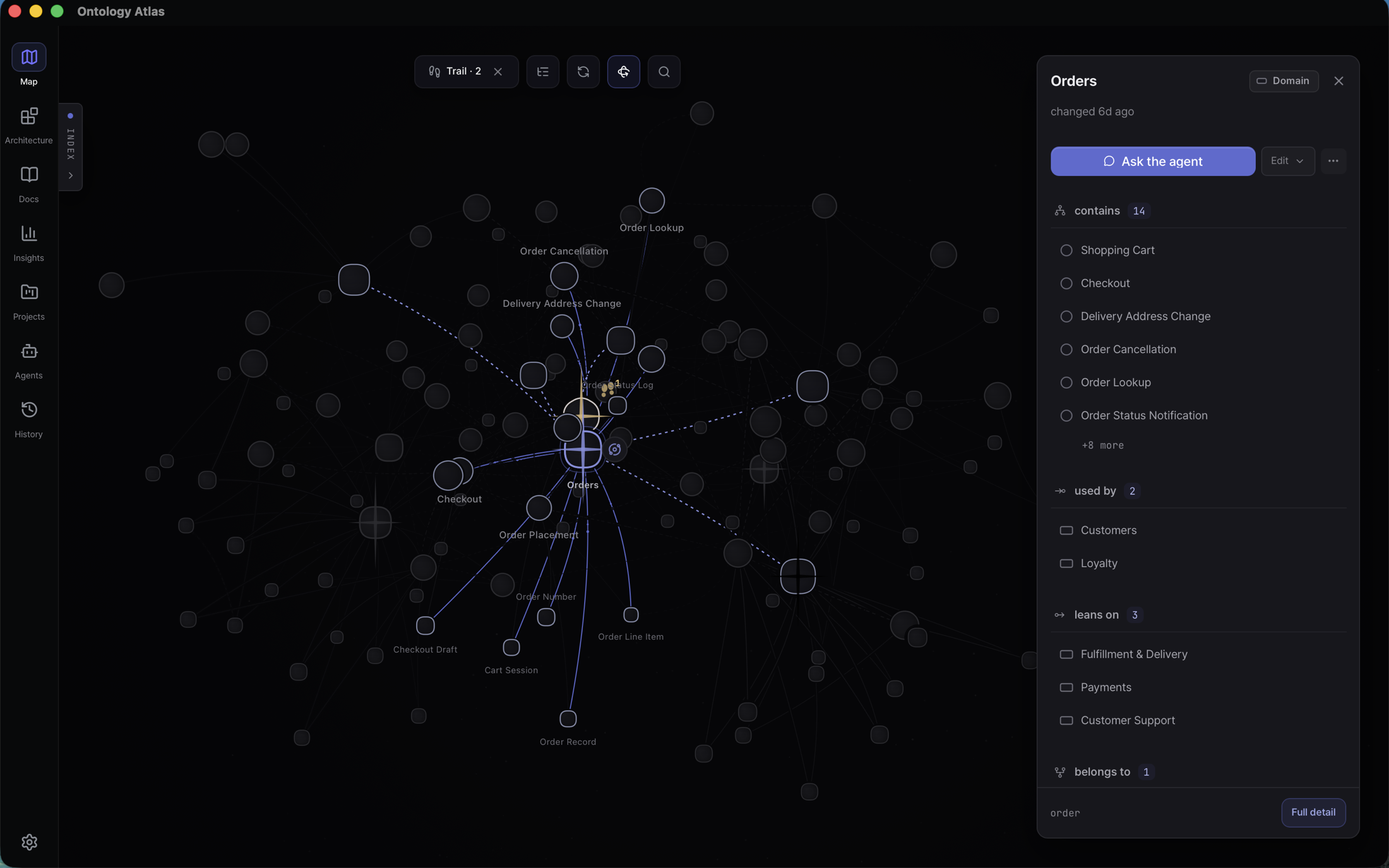
Selecting a node dims everything unrelated and opens its record without hiding the node behind the inspector. The same fact serves two readers at once: a visual hierarchy for a person and typed parents, evidence, and actions for an agent.
Recent changes can narrow the map while preserving project and domain context; Footprints record the order in which you opened concepts. Both are views over local file and session evidence, not hosted activity guesses.
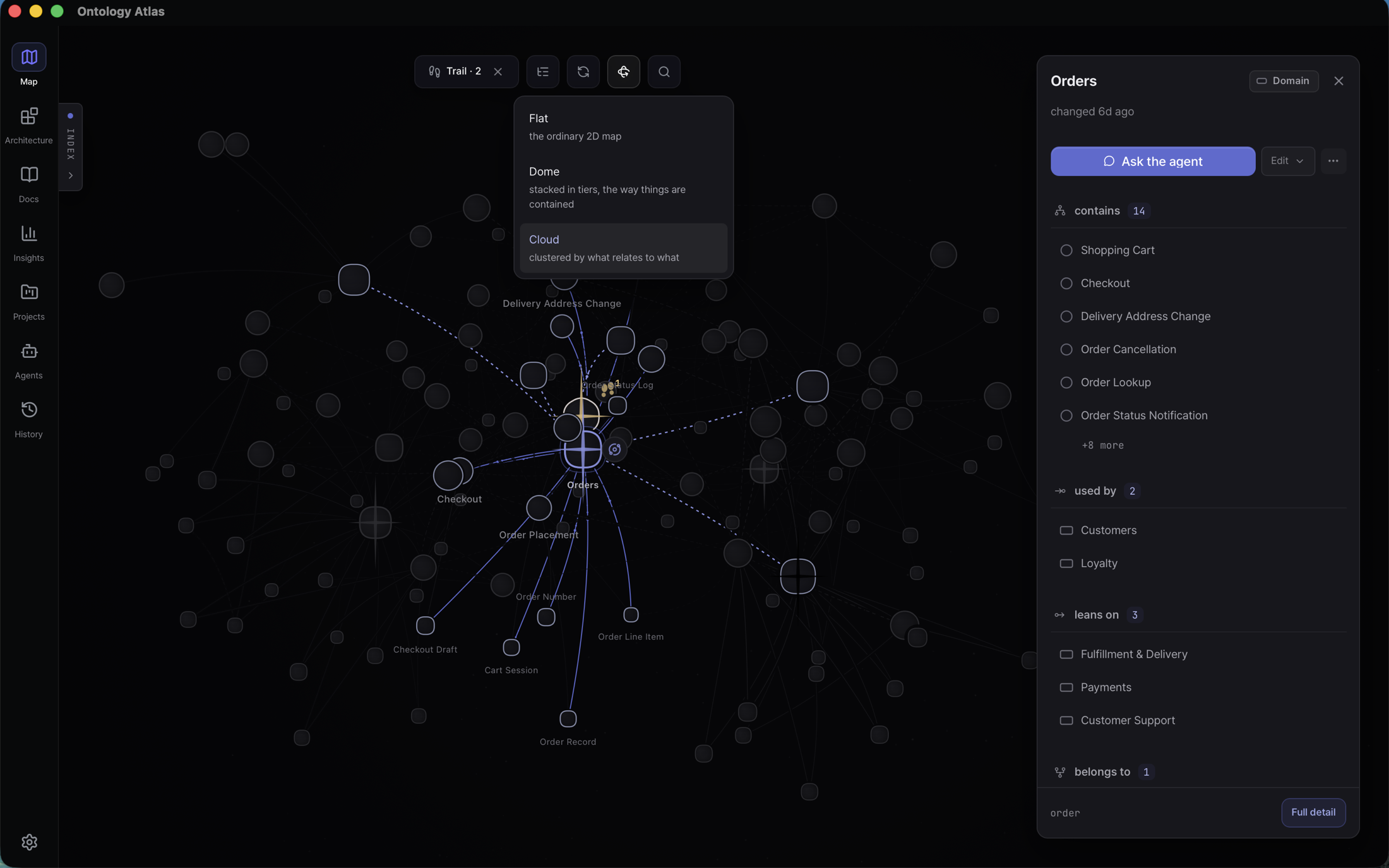
Three spatial readings are explicit rather than mixed together: Flat is the normal 2D map, Dome places containment tiers in depth, and Cloud lets relations determine all three axes. Changing the view never changes the graph.
4. Plan against reviewed architecture
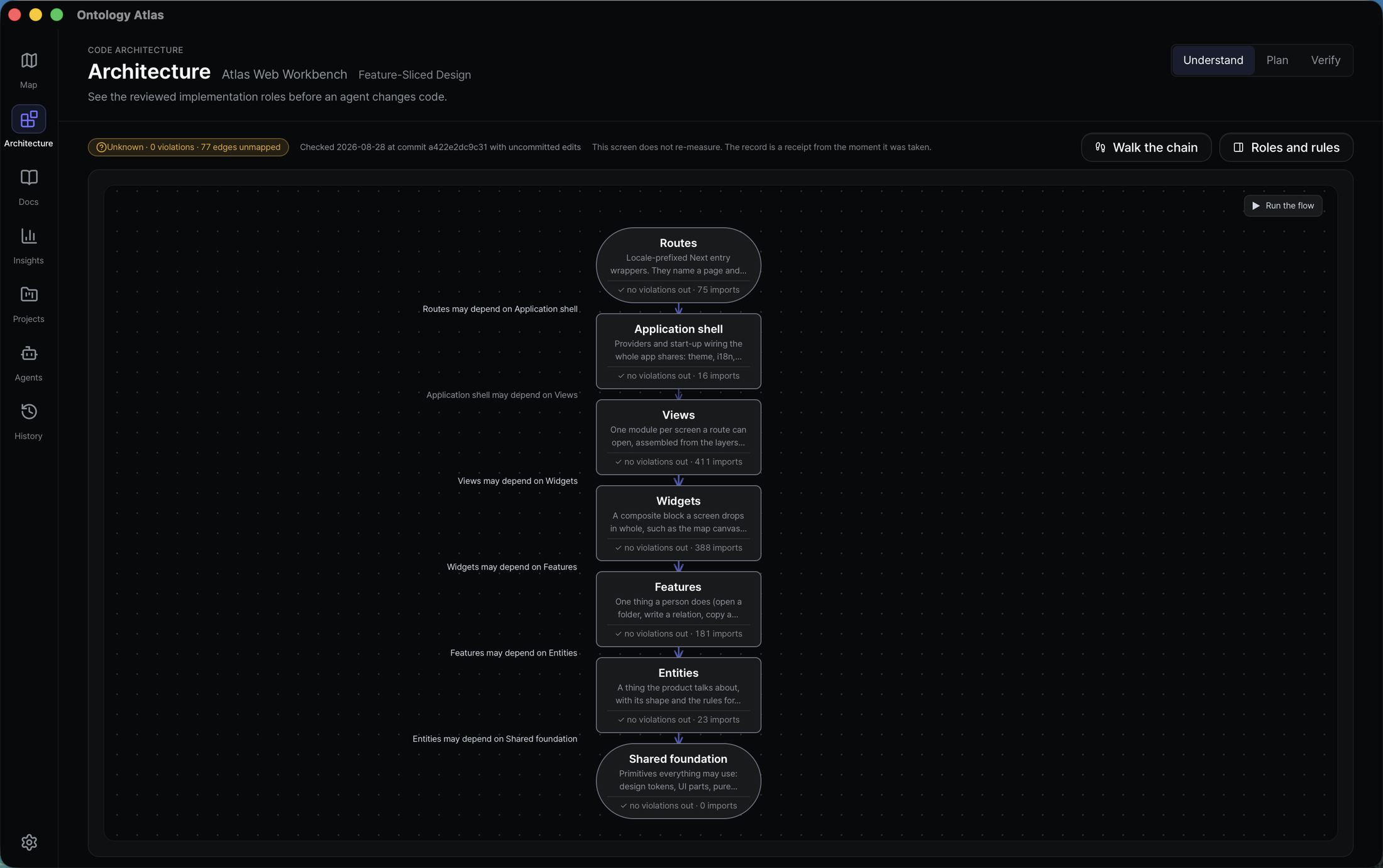
Architecture stays separate from the Ontology Map. The Living Blueprint keeps
the same role order while you move through Understand → Plan → Verify. Plan
copies an architectureChangePlan:v1 handoff; the connected agent runs
inspect_architecture before and after editing. The chain turns down the page
or runs across it depending on the width it is given, so a wide profile is never
cut in half. In a source checkout the exact fallback is:
node cli/src/index.mjs architecture . --vault docs/ontology --profile atlas-web --json
Pattern names such as Feature-Sliced Design, Hexagonal, Clean Architecture, or MVP are reviewed declarations. Atlas derives conformance from source evidence; it does not infer a fashionable label from folder names.
5. Review a relation beside its node
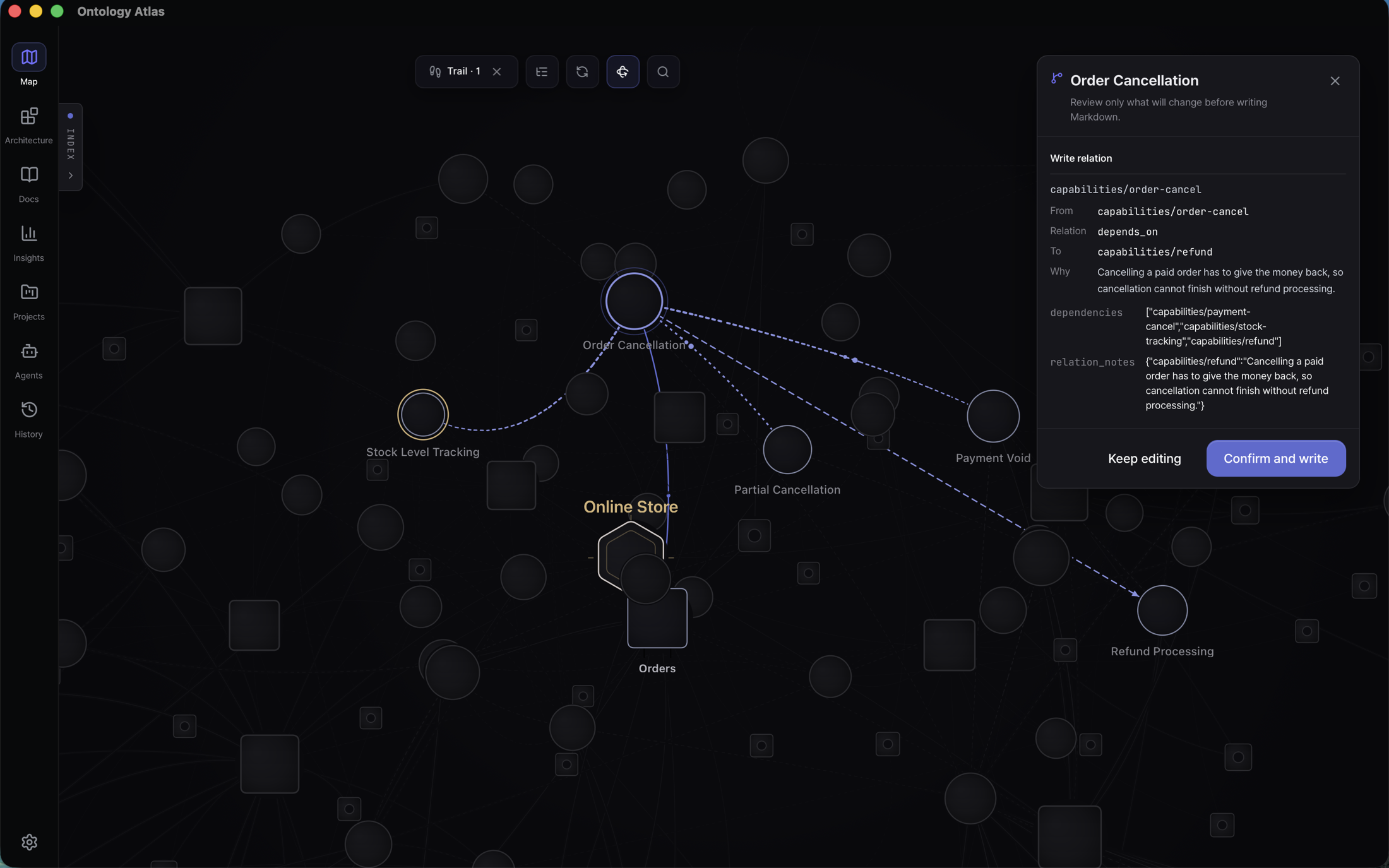
Edit one relation from the selected node. Atlas shows a directional preview on the map, then a compact review of the source, type, target, reason, and exact frontmatter fields. Confirm and write is the only point that changes the Markdown file; returning to edit or cancelling changes nothing.
6. Review the change, then record it
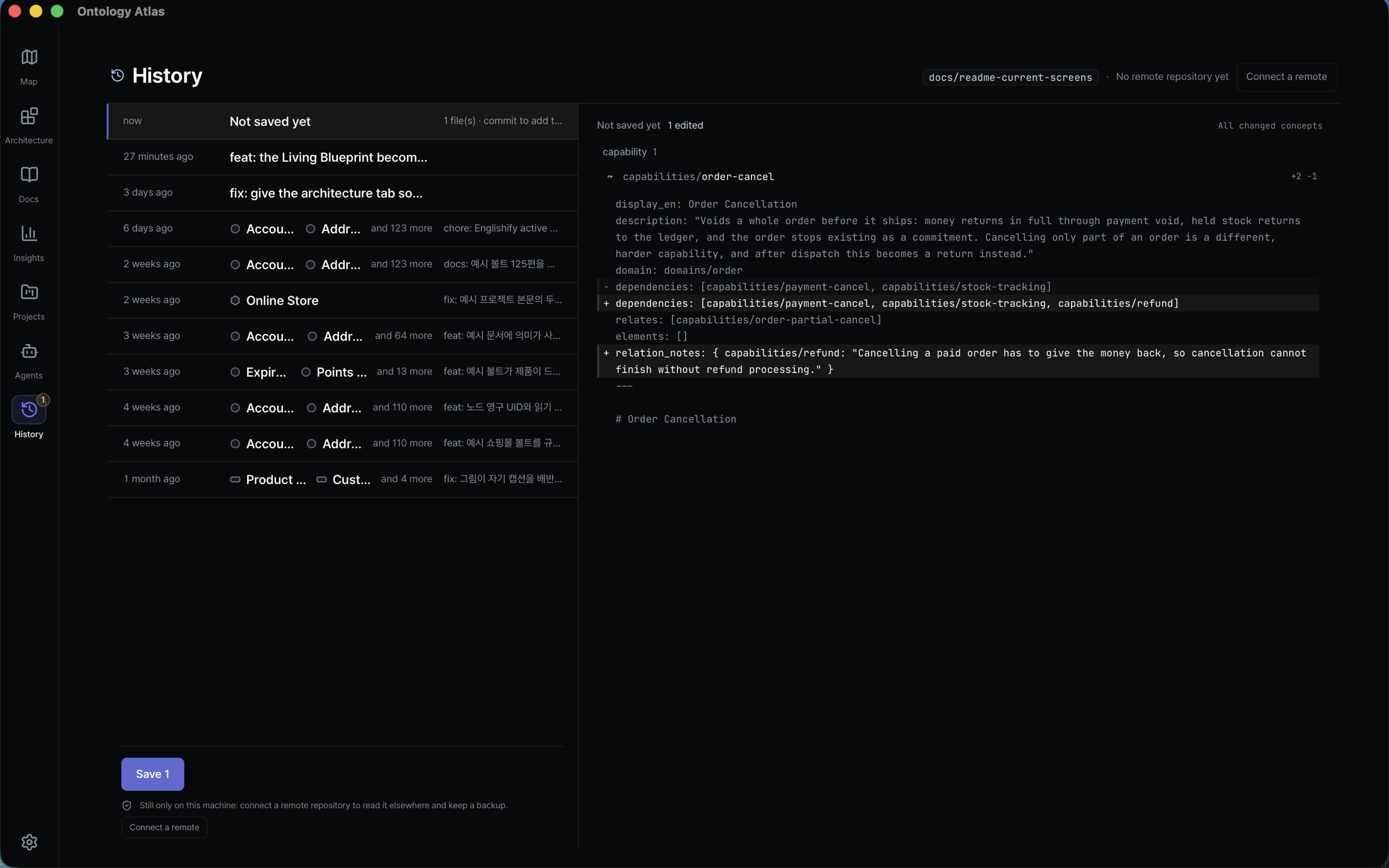
Whatever wrote — you, the map editor, the CLI, or an agent over MCP — lands here first as a diff you read before it becomes history. The change above is the one confirmed in step 5: two frontmatter lines, still unsaved, waiting for a person to look at them.
A command writes the same two lines, and it says what it would do to the graph
before touching a file — and refuses a dependency nobody explained. $ATLAS is
the CLI entrypoint set in Running from source:
$ node $ATLAS relate capabilities/order-cancel capabilities/refund dependencies ./storefront --dry-run \
    --why "Cancelling a paid order has to give the money back, so cancellation cannot finish without refund processing."

capabilities/order-cancel --dependencies--> capabilities/refund
  verdict matches_existing_schema · exists no
  schema  capability --dependencies--> capability
  pattern count 53 · resolved 53 · external 0 · unresolved 0
  recommendation safe_to_add · No exact or inverse edge found; capability --dependencies--> capability is an existing schema pattern.

nearby schema patterns
  3 · capability --dependencies--> capability (count 53)
  2 · capability --relates--> capability (count 12)
  1 · capability --domain--> domain (count 54)
  1 · capability --elements--> element (count 54)
  1 · domain --capabilities--> capability (count 54)

dry-run would write dependencies on capabilities/order-cancel → capabilities/refund (no file changed)
Drop the --why and the command stops rather than guessing one: why is
required and must be nonblank for a new depends_on relation.
An edge that would introduce a shape the vault has never used comes back as
new_schema_pattern · review_new_schema instead, so a drifting agent is visible
before it writes rather than after.
Git is scoped to the vault. Files outside the folder you picked are never touched, and the screen says so.
7. Keep it healthy
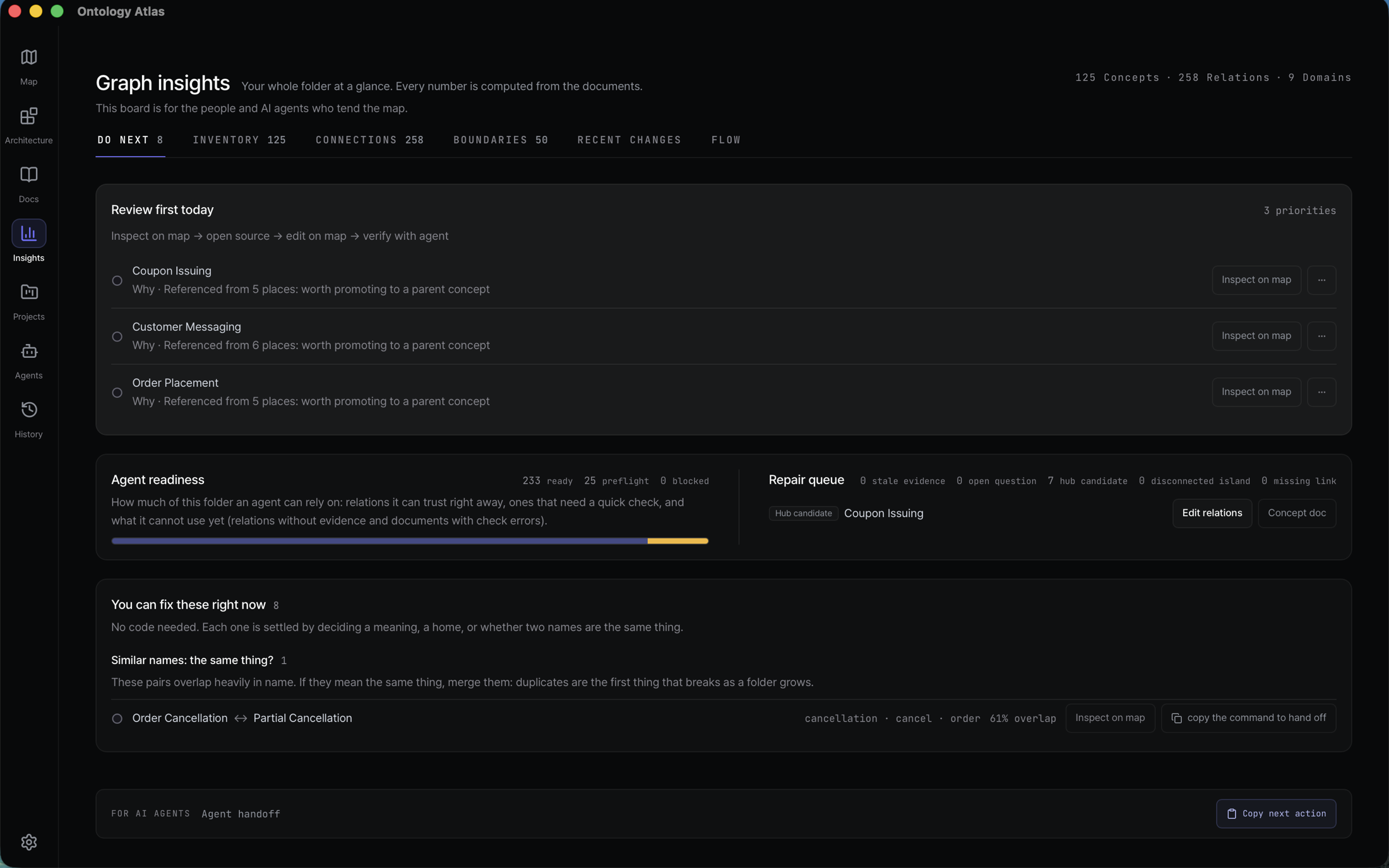
Insights opens on Do next, which is a work queue rather than a dashboard: the few things worth reviewing today, how much of the folder an agent can actually rely on, the repair queue behind that number, and the fixes that need no code at all — two names that may mean the same thing, a concept with no home. The other tabs answer the standing questions: Inventory for what the folder is made of, Connections and Boundaries for how it hangs together, Recent changes and Flow for what moved. Every number branches from the same compiled graph.
8. See the shape of the whole project
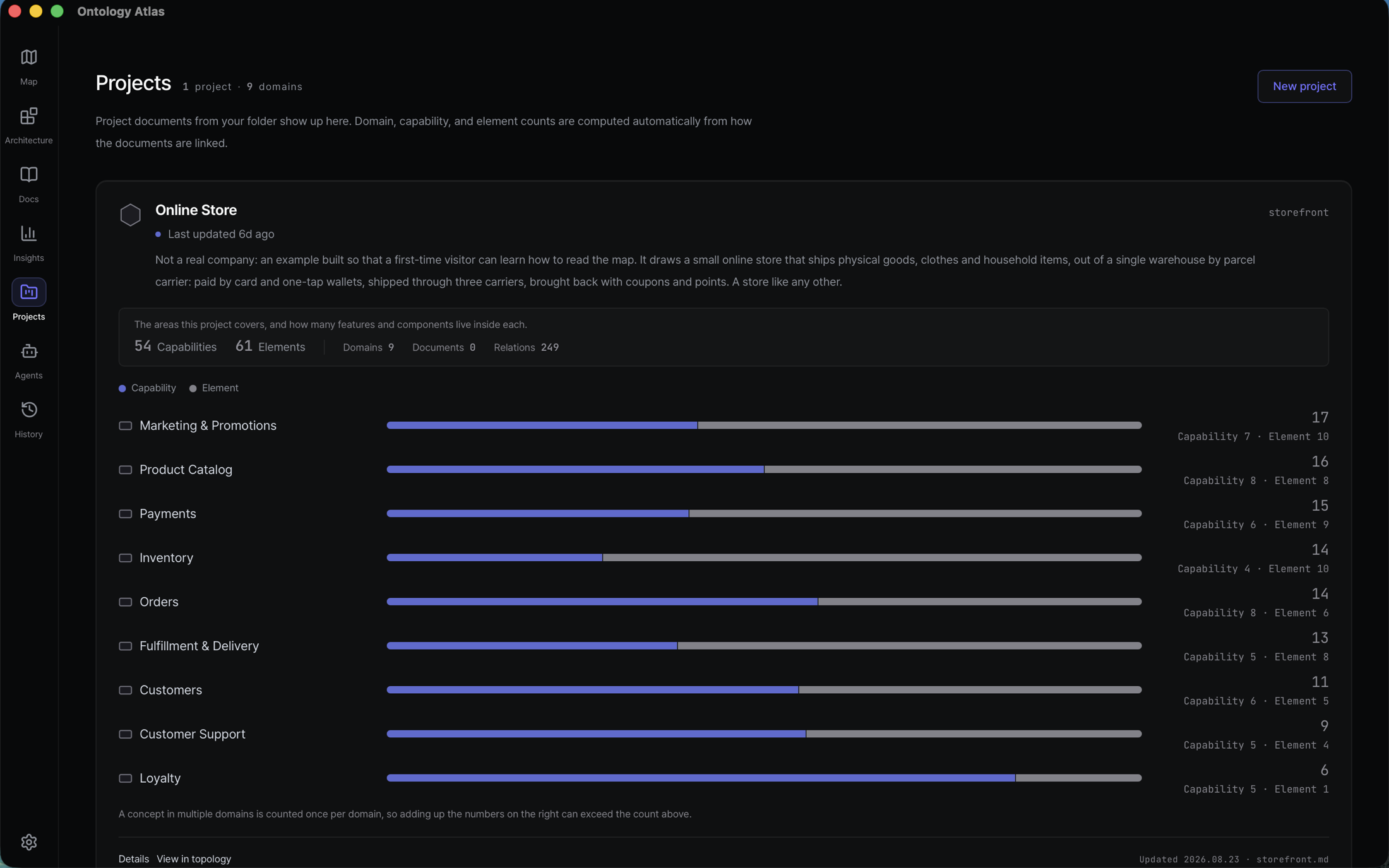
Nothing on this screen is maintained by hand. Frontmatter has no project: key
— the runtime walks the containment graph from each project root and derives
coverage from how the documents link to each other.
What your agent gets
Typed MCP tools over stdio JSON-RPC serve Claude Code, Cursor, Codex, and
any MCP client. The running server advertises the exact current read/write
inventory through tools/list; the value is that the answers are typed, so an
agent can act on them.
Ask what breaks if I change this? and Atlas follows only approved dependency declarations. It does not turn folder structure into causal confidence:
$ node $ATLAS blast-radius capabilities/mcp-server docs/ontology --depth 2
capabilities/mcp-server — blast radius (depth 2, incoming)
  risk unknown · 1 node · 1 relation · 0 cross-domain

impact certainty unknown · declared 1 · rationale 0 · source-backed 0
Counts below follow declared depends_on only. Use reachability/subgraph for structure;
do not read unknown as low risk.
- Focused context, not a repository dump. Briefs give an agent the project, domain, evidence, impact boundary, first tools, and stop conditions it needs.
- Graph questions with typed answers. Paths and reachability explain structure; blast radius follows only declared dependencies and reports qualification/completeness honestly. No graph database or hosted memory is involved.
- Writes that survive review. Analysis is side-effect free by default; destructive operations dry-run first, renames repair backlinks, and mtime guards protect concurrent human edits.
- The same authority without MCP. The CLI exposes the same local folder to sessions that cannot attach a connector.
Connect and use it through the MCP guide, or start from the CLI reference.
What Atlas is trying to earn
Atlas's long-term goal is specific: make a repository's reviewed product meaning a durable, local, queryable handoff that compounds across changes. Ownership, boundaries, evidence, bounded impact, and the next verification path should remain inspectable by both a person and an AI agent. Atlas is not making the broader claim that every source lookup becomes faster.
What we measured, and the mistake we found in it
We run a paired benchmark. Two sides get the same source code and the same question; the only difference is that one side has a prepared Atlas vault and the other has nothing. We score whether the answer named the things it should have named.
The first run looked like a large win for Atlas — 0.25 against 0.875. Then we re-scored the same saved answers and found that most of that gap was not a comparison at all.
The problem was in the answer key. Most of the things an answer was required to
name were Atlas's own concept names, like capabilities/checkout. Those names
exist only inside the vault. The side without a vault had nothing to name, so it
could never score those points however good its answer was. We had, in part,
published a vocabulary test that only one side could sit.
Splitting the score into the part both sides could earn and the part only Atlas could earn gives the honest picture:
| Subject | The part both sides could earn | The part only Atlas could earn | What we published before |
|---|---|---|---|
| Greenfield fixture | 0.75 → 1.00 | 0 → 0.83 | 0.25 → 0.875 |
| Brownfield fixture | 0.75 → 1.00 | 0 → 0.57 | 0.28 → 0.74 |
Each cell reads without Atlas → with Atlas.
In every control run, the side without Atlas named 100% of the source files it was supposed to name. And the small gap that remains rests on a single word: the answer key wanted excludes, and one control answer said "explicitly outside it" — the same boundary, correctly stated, scored zero.
So the honest status is that we have not yet measured a difference in answer quality. Atlas was also slower, by a median of 17 and 33 seconds.
What the run does show is narrower, and still worth something: only the Atlas
side returned names you can look something up by. capabilities/checkout is an
address a person or an agent can resolve next session, in another tool, months
from now. "The checkout feature" is not. That is a real property of keeping
meaning in a vault — and a different claim from "better answers".
The same re-scoring found a bug on our own side: the Atlas run dropped its own concept names in a third of the harder cases, scoring 0.57 where it should have scored 1.00. Reading the vault and then answering without the names throws away the one thing the vault uniquely supplies. That is on the fix list, not explained away.
Blind human grading of those same saved answers is the next measurement, and it is now the only route to a real quality comparison. Method, limits, every raw answer and the word behind every miss are in the paired lifecycle findings, the correction, and the benchmark log. We will make a stronger claim only when unfamiliar repositories, human grading, and the cost of building and maintaining a vault are all accounted for.
Carrying a change from end to end
We also ran the same fixed change all the way through on both sides: write the code, run focused tests, commit, push to a local remote, merge, and clean up the branch. The Atlas side additionally updated one capability record and committed it alongside the code. All four runs completed every step, including a deliberate merge conflict that both sides recovered from.
That is both sides finishing the job, not proof that Atlas made the code better. The Atlas side was slower here too — 28.2 seconds on greenfield, 51.1 on brownfield, in a single small synthetic run. The result and raw receipts are in the change-flow findings and the r7 summary. Atlas contributes the durable meaning, boundary, provenance, and handoff record; Git push/merge remains ordinary integration evidence rather than a new Atlas contract.
Why not just use a notes tool
Local Markdown, git diffs, and MCP are table stakes. Notes tools such as Basic Memory already provide them; hosted graph-memory products provide typed traversal in a database. Atlas combines a human-readable local vault with a product ontology and a workbench where people and agents judge the same facts.
| Notes with MCP | Hosted graph memory | Ontology Atlas | |
|---|---|---|---|
| Store | Markdown you own | Vendor database | Markdown you own |
| Structure | Freeform notes and links | Vendor-defined types | Project → domain → capability → element, documents, typed relations |
| Graph questions | Note traversal | Graph engine | Blast radius, reachability, cycles, paths, centrality, health |
| Evidence from code | Hand-authored | Corpus ingestion | Bounded read-only proposals; nothing lands until approval |
| Human surface | Notes app | Vendor console | Local Map, Architecture, Docs, Insights, Projects, Agents, and contextual History |
If you only need an agent to remember conversations, a notes tool is lighter. Atlas is for modeling the product your code implements. The argument and its sources live in Foundations.
A vault is just files
One Markdown file is one node. Frontmatter is the machine-readable record; the body is the explanation a person judges.
---
uid: 71890f3e-7b5d-4c0a-8f14-123456789abc
slug: capabilities/token-issue
kind: capability
title: Token issue
domain: domains/auth
path: src/auth/token-service.ts          # a path — code evidence
elements:
  - elements/jwt-signer                  # a slug — an implementation-role node
dependencies:
  - capabilities/session-refresh  # a slug — another node
---

Issues access and refresh tokens for authenticated users.
That distinction is the one thing worth learning up front: a path points at
code, a slug points at a node. Mixing them is the most common first mistake,
and node $ATLAS validate reports it as a dangling reference.
The usual business-to-code reading spine is deliberately small:
project
└── domain
    └── capability
        └── element
document is the fifth authorable kind and can describe concepts anywhere on
that spine. Typed relations add dependency, association, containment, and
descriptive meaning; implementation evidence lives in node paths and bodies,
not in an invented evidence relation.
The goal is not to index every symbol — a source artifact earns a node when it
helps a person or an agent understand a capability, trace impact, or run the
right proof. Curated, not exhaustive.
Ontology quality contract
- There is no vault-wide or project-wide node cap. Node count is an observation, never a pass condition.
- Direct fan-out is a review signal, not a limit. A wide hub is correct when its children resolve, name distinct roles, and carry clear provenance.
- Bridge nodes must earn their layer. They name one shared behavior, differ from their siblings, and actually reparent the children they group. Count alone never justifies a bridge.
- Analyzer bounds are evidence-packet bounds, not graph bounds. Each language adapter keeps one proposal readable; it does not limit ontology size or a node's number of relations.
uidandslughave different jobs. UID is permanent identity; slug is the readable current address. Source locations belong inpath:evidence.- External field trials stay isolated. Generalized measurements may improve Atlas, but a trial repository's ontology is never merged into the product's dogfood graph.
- Qualification authority is not evaluator-authored. One person approves the exact CQ set before source-hidden work, stays distinct from construction actors, and accepts the joined plan. A failed CQ blocks before that request; declared provenance is still not identity authentication.
- Imports prove source structure, not complete impact. An exact reviewed element import can support one direct source dependency; runtime, reverse, transitive, and business impact remain unknown without separate evidence.
- Repository-root directories are valid explicit paths. A reviewed
path:such as literal repository root.,src, orgenerateparticipates in source receipts and finalization;.proves the bound root, not a canonical child file, and an arbitrary relation slug still does not become file evidence.
The authority and verification path for each rule lives in the Ontology Quality Authority Map. The practical node test is What becomes a node?.
How relations are stored
There is no relation database or sync step. The declaring Markdown file owns one frontmatter line, and Atlas derives the edge and its backlink when it reads the vault:
---
slug: capabilities/vault-live-updates
kind: capability
domain: domains/local-vault-management
dependencies:
  - capabilities/topology-canvas-render   # directed: this depends on that
relates:
  - capabilities/mcp-conflict-guard       # symmetric: read these together
---
Containment is the structural layer, not a ceiling; typed meaning relations can
cross domains and branches. dependencies is directed, while relates is
symmetric, so the map never turns similarity into causality. See the
relations guide for every relation type, direction,
writing rule, and map behavior, and the vault specification
for the complete frontmatter contract.
Product destinations, one vault
Map, Architecture, Docs, Insights, Projects, Agents, contextual History, MCP, and CLI all read the same Markdown folder. The installed app is the full workbench; the hosted web app is the no-install gateway and a second-best workbench where native bridges are not available. MCP and CLI skip the screens and operate on the same files directly.
See the feature inventory for every current surface and the
architecture guide for the desktop/web boundary. The
live demo opens Atlas's
own dogfood vault in docs/ontology/; run
node cli/src/index.mjs overview docs/ontology when you need its current census.
Local-first, by construction
- Your disk is the database. Frontmatter is the graph; confirmed writes go
back to the folder you picked — normally
atlas/inside the repository the map describes. There is no other store, and no copy anywhere else. - Git is the history. Diffs stay human-readable; history and snapshots are scoped to the vault.
- No Atlas backend, account, or telemetry. The web app is a static export. The desktop app checks the public updater manifest automatically once per day. Atlas does not upload vault content; a connected coding agent communicates with its own provider only when you ask it to.
- Two ways in, one folder. The hosted web app can open a local folder through the File System Access API. The desktop app uses a Tauri bridge to your selected folder and keeps the same vault open as a workspace.
- The Tauri macOS shell is a shell, not a silo. MCP and CLI still read the selected folder directly; the app does not move it into a private store.
- The bundled MCP server is a file, not a service. It sits inside the app bundle and keeps working when the app is closed, because your agent launches it itself.
What this is not
- Not a general-purpose ontology editor. Atlas starts from a codebase. A business concept belongs when it explains what that codebase builds, why an implementation boundary exists, or what a change can affect. Unrelated knowledge management belongs in a more general tool.
- Not a source-code IDE. A useful analogy is an IDE for codebase meaning: Atlas brings construction, inspection, validation, review, and maintenance of the codebase ontology into one workbench. The analogy stops there; Atlas does not edit, build, run, or debug the code.
- Not a wiki, and not agent memory. A wiki only people write rots the week it is written; a store only agents write drifts with nobody left to judge it. Atlas is one layer both audiences read and write, and the arbiter is a git diff. The side-by-side comparison is above.
- Not a code index. Grep, language servers, AST indexes, and CodeGraph answer where a symbol lives and what calls it, and Atlas replaces none of them. It answers why that artifact matters, which capability it serves, and what to verify before changing it — it tells the agent which structural question is wo
No comments yet
Be the first to share your take.