
My AX
My AX is a single-operator agent. It acts with your authority. It works in a container, on a machine you connect, and in bounded cloud runs. You deploy it into your own Cloudflare account. You put it behind your own Access login.
You approve the agent. It is not a remote-access tool. It takes no inbound connection. You configure each path it uses. You gate each path with Cloudflare Access. You can stop each path.
The agent does these tasks:
- It writes files in a container workspace.
- It runs commands through a companion. You install the companion on a machine you choose.
- It starts bounded agent runs in the cloud.
- It opens public web pages in a headless browser.
The agent records the result when work finishes or needs a decision. You return to a check-in page. The page shows what needs you, what runs now, and what finished.
The agent acts with the authority you already hold. You approve the work. You direct the work. You stop the work. Each action writes a receipt you can read.
Security posture. My AX is single-operator. One verified Access identity owns every conversation, record, and tool call. The machine companion connects outbound only. It checks every caller at the Worker boundary. It runs as an OS account you choose. See the security posture for the trust model, the identity and network boundaries, and what My AX does not do.
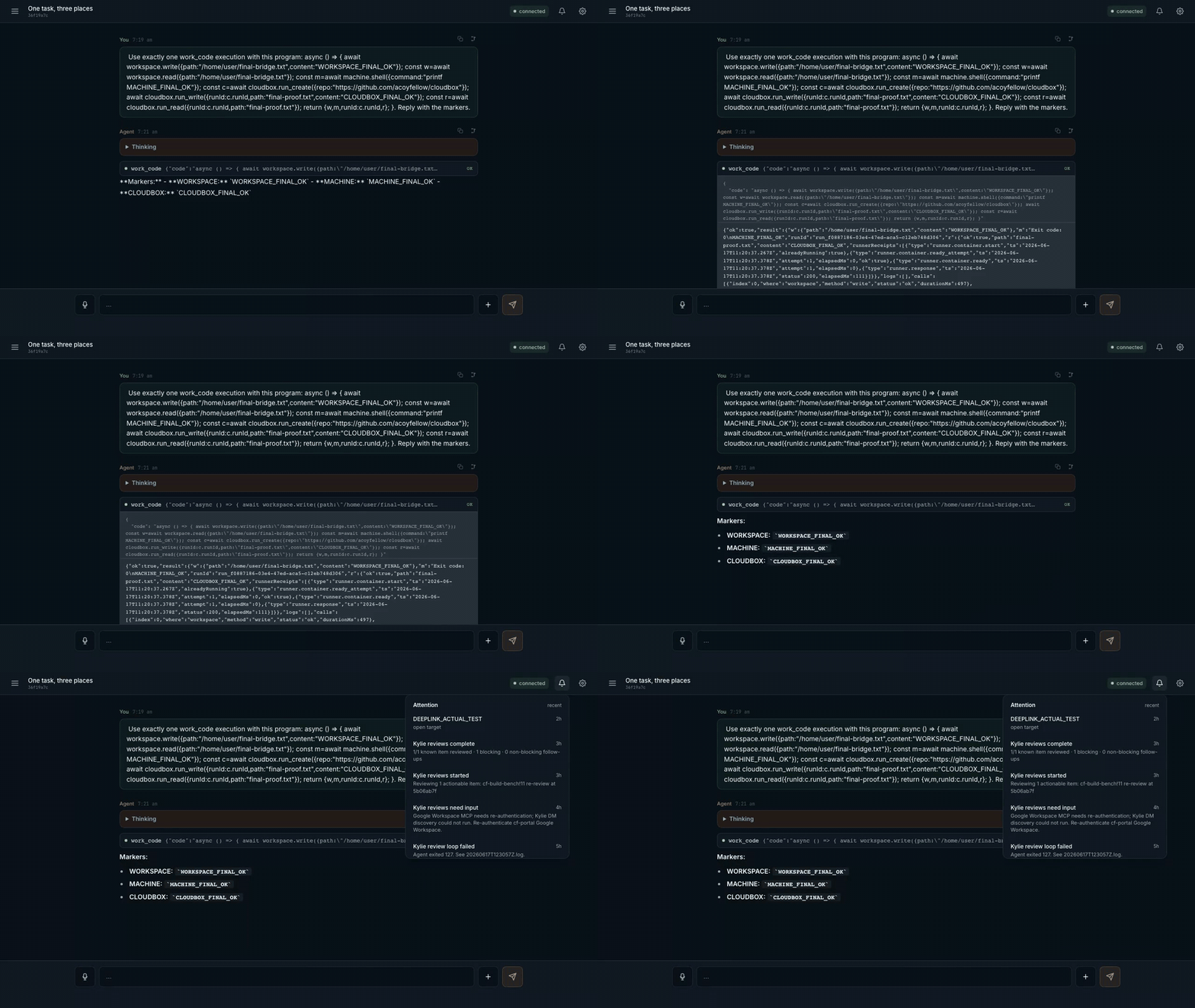
In this 3.4s clip the agent writes a workspace file. It runs a command on a connected machine. It reads a remote agent run. This is one configured path. It is not proof of every boundary. Open the MP4.
Verify before you trust.
npm run checkcovers the local build, the types, and the unit tests only. The deployment proof proves Access, containers, models, voice, push, and workspace restoration. A green local run does not prove them.
Where The Agent Acts
The agent uses more than one place. It picks the place for each task. Each place returns output you can read.
| Place | Mechanism | Authority | What you can read back |
|---|---|---|---|
| Container workspace | container-backed /home/user, snapshotted to R2 |
isolated per owner | files, command output |
| A machine you connect | machine.* over an outbound companion (machinectl) |
the companion's OS account, which you choose | the exact command, its output |
| A bounded cloud run | terrarium.spawn returns a verified receipt |
Terrarium's own container | runId, contract status, exit code |
| A public web page | browser_open in a headless browser |
no local cookies; public URLs only | rendered title, text, an rrweb replay |
| Your own live UI | page.* over the chat WebSocket |
only while your chat tab is open | session list, health, transcript tail |
| An artifact it builds | create_svelte_artifact + tools the artifact registers |
sandboxed iframe, no same-origin access | the artifact, driven in place |
A cloud run does not need you or your machine present. The agent starts it. The run returns a receipt when it finishes. The receipt holds a runId and a contract status. The machine companion is the highest-authority path. It runs as a real OS account. Give it a dedicated account with least privilege. See the security posture for the boundary on each place.
The feature tour shows each capability with a real transcript or receipt.
The Owner Loop
You do not watch the agent work. You return to it.
- Check-in is the front door.
GET /api/check-inand MCPmy_ax_check_inbuild one response from Attention, jobs, and run receipts. The response shows what needs you, what runs now, what finished or failed, and a next step. The authenticated shell shows these as owner pages at/attention,/runs, and/jobs. Each link keeps the raw API receipt href for proof. - Attention holds owner-scoped items with unread state. A finished job, an ended recovery attempt, or a question from the agent lands here. Web Push sends it when you are away. The item stays if push fails.
- Run receipts record events the agent adds. A recurring job run, a saved-recipe run, and a delegated batch each write a start event and a terminal event you can open.
What The Agent Can Do
- Schedule recurring work. Native per-session alarms run saved prompts. HTTP routes, agent tools, Code Mode, and MCP share one owner-scoped job service. D1 holds the job state and the durable history.
- Delegate bounded analysis. A parent runs at most 2 read-only child agents. It runs them one after the other, not at the same time, because they share one inference rate limit. Each child runs at depth 1 for 120 seconds. Children get no application, MCP, browser, machine, or delegation tools. The parent keeps their results and writes the summary.
- Reuse a proven procedure. You approve a successful
work_coderun as a named reusable tool. Reuse runs the exact saved code. The code does not change between runs. Each run records a receipt and shows in Check-in. - Ask you a question.
ask_userwrites an owner-scoped decision and an Attention item. It waits. It then puts your approved answer back into the source conversation. - Build a UI.
create_svelte_artifactcompiles a self-contained Svelte 5 component. It stores the component. It shows the component in a sandboxed iframe. The artifact can register its own tools. The agent calls those tools to direct the artifact on a later turn.
Important Limits
The hard bounds, so you know what the agent cannot do.
| Surface | Boundary |
|---|---|
| Delegation | At most 2 children, run one after the other (not at the same time), depth 1, 8 model or tool steps each, 120s timeout. Children make model-provider calls and create records that stay. The UI shows a final snapshot. It does not show live progress and has no cancel. |
| Recurring jobs | At most 10 active jobs per owner. Cadence 60 seconds to 30 days. Names 200 characters, prompts 4,000. D1 drives the UI. The native scheduler drives execution. The two can disagree. There is no automatic repair. If the state drifts, pause, delete, and create the job again. |
| Work Code Mode | The generated source has a limit of 32,000 bytes. Each run has a 60-second wall-clock limit and no ambient network. The limit does not reduce the authority of an allowlisted callback. |
| Workspace | All conversations for one owner share /home/user. My AX tries an R2 snapshot after a change. Recent writes can be lost with the container. Two conversations can edit the same files with no merge. |
| Machine | Commands run as the OS account that hosts the companion, with that account's permissions. My AX adds no privilege separation. |
| Terrarium | The agent starts bounded cloud runs and reads verified receipts. Runs execute in Terrarium's own containers under its authority. My AX holds a bearer control token and adds no privilege separation. |
| Page (live UI) | Works only while an owner chat tab is connected. Each verb returns page_unavailable at other times. Artifact-registered tools are per-artifact and capped. They are bound to the source window. They are checked against their schema. |
| Browser | browser_open accepts HTTP(S) URLs that pass public-address checks. It receives no local browser cookies. Authenticated local browsing works only when a connected machine gives access to it. |
| Voice and push | Need explicit browser permission and provider availability. A failed push does not remove its Attention record. |
Feature Status and Limits is the current-state inventory: what is real, where it lives, and the known limits.
Deploy
Requirements:
- Node.js 22 and npm 11
- Docker with Colima, Docker Desktop, or WSL2; native Windows shells are not tested
- Python 3, Bash, and OpenSSL
- A Cloudflare account authorized to create Workers, Containers, D1, KV, R2, Workers AI, Browser Rendering, and Dynamic Worker Loader resources; paid usage or product enablement may apply
setup.sh creates infrastructure. It does not make a verified service. Read Deploying My AX before you run it against an existing account or make the hostname public.
git clone https://github.com/acoyfellow/my-ax
cd my-ax
npm ci
npx wrangler login
npx wrangler whoami
# If more than one account is listed:
export MY_AX_ACCOUNT_ID=your_target_account_id
bash scripts/setup.sh
The script does these steps:
- It creates missing named resources.
- It binds existing resources you configured.
- It creates bridge and encryption secrets that are absent.
- It applies pending remote D1 migrations.
- It deploys.
On a fresh Worker the script replaces the historical Durable Object migration chain with one baseline. Existing deployments keep their append-only history. The script reuses keys when the secret source is still available. It does not rotate them. It cannot recover deleted keys.
Before you send a real turn:
- Put the hostname behind a Cloudflare Access self-hosted application.
- Set
CF_ACCESS_ISS,CF_ACCESS_AUD,BRIDGE_BASE_URL, andCLOUDFLARE_ACCOUNT_IDas the deployment guide describes. - Add bucket-scoped
R2_ACCESS_KEY_IDandR2_SECRET_ACCESS_KEYso workspace snapshots survive a container replacement. Without them, treat workspace files as disposable. - Confirm the default Workers AI model is available to the account.
- Redeploy, verify anonymous access is rejected, and verify authenticated
GET /api/healthreturnsok: true. - Open the hostname through Access and complete one model turn. Health proves routing and bindings only; run the documented snapshot and restore proof when workspace persistence matters.
Push needs VAPID secrets. Managed OAuth callbacks need an Access-gated HTTPS hostname. Loopback cannot complete that flow. Deploying My AX has copy-paste configuration, verification, and troubleshooting. Each installation must own separate Worker, D1, KV, R2, Durable Object, Access, and secret state. Installations can share a source revision. They must never share runtime resources.
Connect Tools
Open Settings, then Connectors, then Add. Enter an HTTPS MCP endpoint the Worker can reach. For OAuth-enabled servers, My AX tries metadata discovery. It stores grants encrypted with owner-bound context under the deployment-wide MASTER_KEY. A server with incompatible metadata or callback configuration will not connect. If you replace the key and do not keep the old value, you can never decrypt existing grants.
My AX checks connector URLs for embedded credentials and disallowed destinations. The operator allowlists exact MCP method identifiers for Code Mode. My AX does not prove that an allowlisted method has no side effect.
Optional providers:
- My Machine runs
machinectl. This gives terminal-equivalent access as the companion's OS user. Use a dedicated account with least privilege. - Terrarium needs
TERRARIUM_URLand a dedicatedTERRARIUM_CONTROL_TOKEN. Share the token only between this deployment and its Terrarium service. The agent starts bounded cloud runs and reads back verified receipts. - Web Push needs VAPID keys and browser notification permission.
- Pantry bridge needs
PANTRY_TOKENto push enabled reusable tools to a pantry. Other agents can then reuse them. You can also setPANTRY_URL; the default ishttps://pantry.coey.dev. The bridge is additive and enabled-only. It fails soft. It does nothing without the token.
Who Owns What
| Layer | Responsibility |
|---|---|
| Agents SDK | Durable identity, conversation facets, WebSockets, schedules, MCP, RPC, and child runs. |
| Think | Model and tool turns, message history, recovery, conversation memory, and compaction. |
| My AX | Single-operator authorization, UI, product policy, jobs, Attention, receipts, and work providers. |
Think is authoritative for conversation execution and history. D1 stores application records and derived indexes. R2 stores object bytes and workspace snapshots. Snapshots are not continuous backups. Code Mode has no direct database, secret, or network bindings. Its allowlisted server-side callbacks keep their normal authority.
Repository Map
src/agent.ts             canonical Think agent and tool assembly
src/user-agent.ts        owner root and conversation facets
src/check-in.ts          owner-scoped check-in read model
src/jobs.ts              native recurring schedules
src/job-service.ts       owner-scoped job CRUD and evidence
src/saved-recipes.ts     owner-approved reusable work_code tools
src/delegate-many.ts     bounded agents-as-tools delegation
src/work-tools.ts        workspace, machine, terrarium, page, and codemode catalog
src/terrarium-tools.ts   bounded cloud agent runs with verified receipts
src/routes/              authenticated HTTP adapters
proof/svelte/            product UI and allowlisted result widgets
migrations/              D1 application and projection schemas
State ownership and request flow are in Architecture.
Development
npm ci
npm run check
npm run dev
Local Development documents loopback mode and the Access-gated tunnel needed for OAuth callbacks.
Documentation
- Feature Tour
- Architecture
- Feature Status and Limits
- Deploying My AX
- Deployment Proof
- Security Policy
- Contributing
- Changelog
Report bugs and feature requests in GitHub Issues. Report vulnerabilities through the Security Policy, not a public issue.
License
MIT
No comments yet
Be the first to share your take.