
mcptoon — Cross-Agent MCP Management Tool
Listing 255 MCP tools costs 71,929 tokens. mcptoon's name index: 581.
tiktoken cl100k_base measured · reproduce it yourself: mcptoon manifest --compact --tokens
✅ Speaks the latest MCP spec (2026-07-28) — stateless auto-negotiation, structured output parsed natively, MRTR multi round-trips,
server/discoverprobing for new-spec servers with full backward compatibility.
🧩 Agent Plugins Specification 1.0.0 compatible — scan, install and sync the new cross-vendor plugin standard (Amazon / Cursor / Microsoft / OpenAI / Vercel) into every AI agent with one command:
mcptoon plugin install <dir>— including agents that have no native plugin loader.








中文文档 · Developer docs · Changelog · Report an issue
The token tax nobody sees
Connect 5 MCP servers and listing their tools burns ~10,000 tokens of pure JSON syntax. Twenty tool calls add 40,000-70,000 more — brackets, quotes and schema declarations, not thinking. On a 128K context that's 30-55% gone before the agent starts working. mcptoon replaces the dump with a name index, measured with tiktoken cl100k_base:
| Tool listing (255 tools) | tokens | vs raw JSON |
|---|---|---|
| Raw JSON schemas | 71,929 | — |
--slim (names + parameter types) |
8,282 | −88.5% |
--compact (names only) |
581 | −99.2% |
⚡ 3 steps, any OS — no configuration
# 1 · install (or the one-liners below)
pip install mcptoon

# 2 · plug in — auto-discovers tools you already configured
mcptoon quickstart

# 3 · see it work on your own machine — no trust required
mcptoon demo
One-line install (no Python wrangling — script handles everything):
curl -fsSL https://raw.githubusercontent.com/activeing123/mcptoon/main/install.sh | bash
irm https://raw.githubusercontent.com/activeing123/mcptoon/main/install.ps1 | iex
mcptoon demoruns a live comparison on your machine: watch the tool list shrink from thousands of tokens to a name index — then decide.
pip install mcptoon        # pure stdlib, ~250KB, no deps

mcptoon quickstart         # finds servers you already configured, lists their tools
mcptoon demo               # live side-by-side: JSON vs mcptoon, real token counts
99.2% fewer tokens · Windows / macOS / Linux · Free & open source (Apache-2.0)
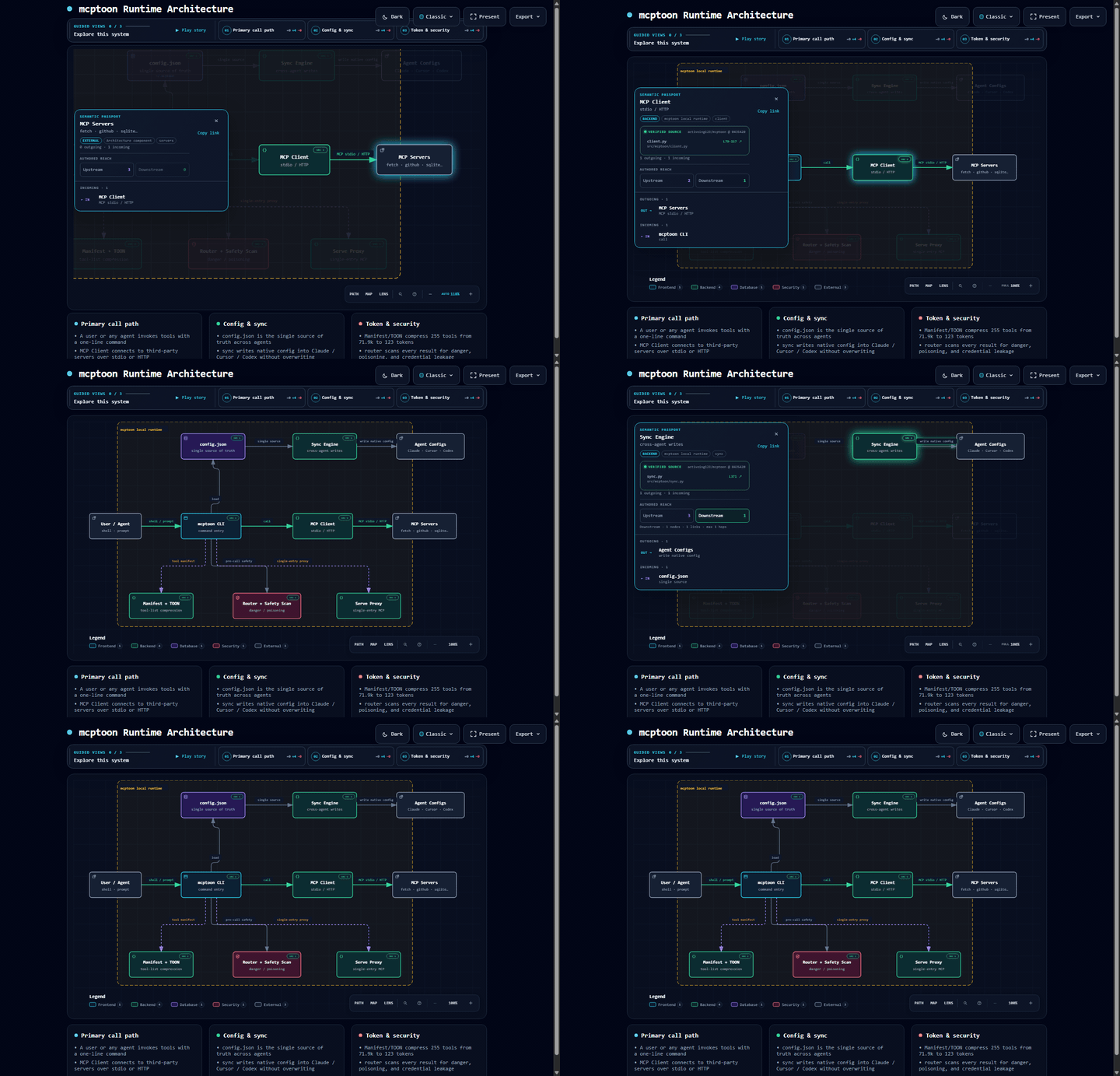
🗺️ Runtime architecture (interactive)
Below is the mcptoon runtime architecture diagram (generated from the real source;
nodes carry SRC n links back to verified code evidence). Click the preview to open
the interactive version: search nodes, trace call paths, compare semantic roles,
toggle light/dark themes, and export.
⚡ Get it in 30 seconds (beginner entrance)
mcptoon is a cross-agent MCP management tool. Install it once, and every agent — Claude Code, Cursor, Codex — works with all your tools out of the box.
| Before | With mcptoon |
|---|---|
| Configure MCP for every agent separately, waste time on mistakes | Plug each tool in once, every agent uses it |
| Restart after every change, still get it wrong | Works immediately, no restarts |
| Lose track of which agent has which tools | quickstart auto-discovers what you already have |
| Change a tool, edit every agent | Change once, effective everywhere |
3 steps to install (no coding needed):
- Install Python from python.org — check "Add Python to PATH"
- Copy, paste, Enter:
pip install mcptoon - One command:
mcptoon quickstart, thenmcptoon demoand watch it save tokens on your machine
Technical version in one sentence: mcptoon is a zero-dependency CLI that connects any agent to every Model Context Protocol server — whether or not the agent supports MCP.
🛠 Evaluate it in 30 seconds (technician entrance)
Architecture in one line: ~/.mcptoon/config.json is the single source of truth;
sync writes it into every agent, manifest serves a name index on demand,
serve composes a single-entry proxy. Zero third-party dependencies, Python 3.10+,
~6,800 lines of pure stdlib.
The part nobody else has: agents need zero setup
Native MCP means editing a JSON file for every agent, in every format:
| Agent | Config file |
|---|---|
| Claude Desktop | claude_desktop_config.json |
| Claude Code | .claude.json |
| Cursor | .cursor/mcp.json |
| Cline / Windsurf / VS Code Copilot | various JSON, various shapes |
Add a server in Cursor, forget Claude. Fix a path in Claude, break Cursor. Repeat weekly. Proxy tools mean running a service and pointing each agent at it.
mcptoon needs neither. It is a program your agent already knows how to run:
You:    "What tools do we have? Then fetch https://example.com and summarize."
Agent:  $ mcptoon manifest --compact        ← gets a name index, not schemas
Agent:  $ mcptoon call fetch fetch '{"url":"https://example.com"}'
No mcpServers entry. No plugin API. Nothing to register, nothing to restart. Want it
automatic? One line in your agent's instruction file (CLAUDE.md / AGENTS.md / system
prompt) is enough — that is prompting, not configuration.
This is also why mcptoon reaches where MCP cannot: shell scripts, CI pipelines, cron jobs, aider, terminal-only environments — anything that can execute a command.
The three moves
1 · Configure once — sync
mcptoon add fetch --stdio npx -y @modelcontextprotocol/server-fetch
mcptoon sync                # writes native config to every detected agent
Merges instead of overwriting — servers you configured manually stay put. One command gives you cross-agent tool management: a single source of truth for MCP servers across every agent on the machine, no copy-pasting JSON between Cursor, Claude and friends.
mcptoon sync --watch        # polls config files, keeps every agent aligned
mcptoon sync --dry          # preview the writes
mcptoon sync --agent cursor # target one agent
Drift detection catches external edits; merge/strict modes.
2 · Pay for names, not schemas — manifest
Your agent asks "what tools exist?" mcptoon answers with a name index. Schemas stay on
disk in ~/.mcptoon/config.json and never enter the context.
$ mcptoon manifest --compact
fetch: fetch · github: search_repos, get_file, create_issue · sqlite: query, execute
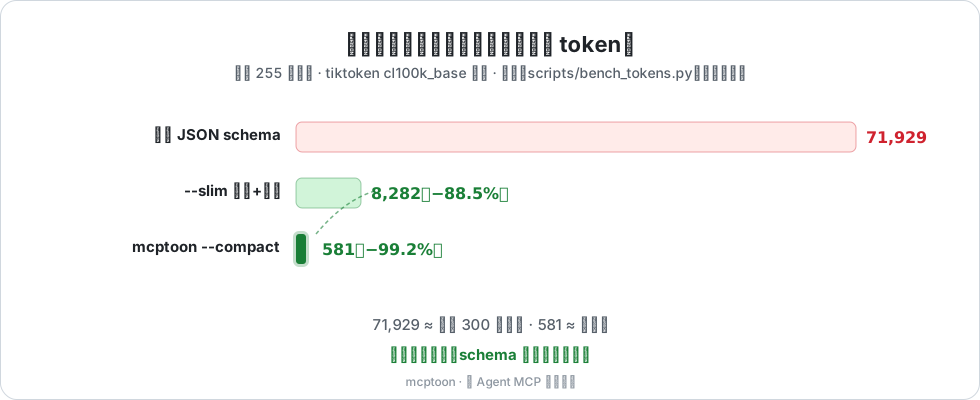
| Tool listing (tiktoken cl100k_base) | tokens | vs raw JSON |
|---|---|---|
| Raw JSON schemas, 255 tools | 71,929 | — |
--slim (names + parameter types) |
8,282 | −88.5% |
--compact (names only) |
581 | −99.2% |
Measured with tiktoken cl100k_base over a real-world 255-tool config (50 MCP servers).
Your mix will differ. Reproduce: mcptoon manifest --compact --tokens.
71,929 tokens is roughly a 300-page book; 581 tokens is a paragraph.
It is a dial, not a switch: --json is always available for zero ambiguity, and call
results default to plain text, security-checked. Choosing between approaches?
docs/comparison.md breaks down setup cost, token cost and safety.
3 · One door in front of every server — serve
Point your agent at a single entry instead of N servers:
"mcptoon": { "command": "mcptoon", "args": ["serve"] }
mcptoon serve                  # stdio — one agent
mcptoon serve --listen :8080   # HTTP — multiple agents, remote machines
Concurrency & stability
- Parallel discovery: 20 workers load the manifest; 100 servers in ≈5s (serial: 500s)
- 5-minute schema cache: repeated discovery costs nothing
- 30s timeout per call (
MCPTOON_CALL_TIMEOUT): one hung server cannot stall your session - Multiple agents at once: HTTP mode isolates concurrent requests per thread
- Concurrency-safe accounting: usage log uses thread locks + atomic writes
MCP spec compatibility (2026-07-28)
mcptoon 0.7.0 speaks the latest MCP specification, 2026-07-28 — the stateless revision — while staying fully compatible with every older server:
| MCP revision | mcptoon support |
|---|---|
| 2026-07-28 (latest — stateless) | ✅ server/discover auto-negotiation · per-request _meta protocol annotation · Mcp-Method/Mcp-Name HTTP headers · MRTR multi round-trip (resultType: "input_required" → answer and retry with --input-responses) |
| 2025-11-25 / 2025-06-18 | ✅ classic initialize handshake · structured output (structuredContent) parsed natively · --envelope passthrough |
| 2025-03-26 / 2024-11-05 (old servers) | ✅ unchanged behavior, full backward compatibility |
Version selection is automatic (spec="auto"): the client probes with
server/discover and silently falls back to the legacy handshake when the
server predates it. Pin a mode per server with spec: "legacy" or
spec: "2026-07-28" in ~/.mcptoon/config.json.
mcptoon call db query '{"sql":"SELECT 1"}' --envelope   # complete MCP result envelope as JSON
mcptoon call deploy run '{}' --input-responses '{"env":"prod"}'   # MRTR retry (2026-07-28)
No flags needed for everyday use: when a new-spec server returns structured output,
mcptoon picks it up automatically. --envelope is there when an agent needs the raw
protocol payload (audit, debugging, _meta inspection).
Agent Plugins support (1.0.0)
The Agent Plugins Specification v1.0.0
(vendor-backed by Amazon, Cursor, Microsoft, OpenAI and Vercel) defines how an AI
agent plugin is packaged — a folder with plugin.json + skills/ + mcp.json.
It deliberately does not define installation, distribution or cross-agent sync.
That is mcptoon's home turf:
mcptoon plugin scan <dir>        # validate a plugin package (read-only)
mcptoon plugin install <dir>     # install into mcptoon + every synced agent
mcptoon plugin list              # what is installed
mcptoon plugin remove <name>     # remove everywhere (data dir is kept)
- Strict spec validation — closed manifest schema, single-token commands, HTTPS-only non-loopback URLs, no credentials in headers, path-escape checks.
${PLUGIN_ROOT}/${PLUGIN_DATA}pre-expanded — mcptoon is the installer, so it writes absolute paths into every agent's native config itself; agents need no plugin-loader support at all.- Namespaced servers —
plugin:serverkeys keep plugins collision-free, and removal cleans every agent config it reached. - Persistent data —
~/.mcptoon/plugins-data/<name>/survives upgrades (spec §PLUGIN_DATA), so caches and state never vanish on--force. - Plugins land in the same
~/.mcptoon/config.jsonas every other server, somanifest,call,serve,healthand the 99.2% token savings apply to them automatically.
Everything else in the box
| Command | What it does |
|---|---|
mcptoon sync --watch |
Poll configs, re-sync MCP servers across agents continuously |
mcptoon call <server> <tool> '{…}' |
Call any tool on any server |
mcptoon call <server> <tool> --envelope |
Return the complete MCP result envelope (structuredContent, _meta) |
mcptoon call --auto <tool> '{…}' |
Route by tool name, server found for you |
mcptoon plugin install <dir> |
Install an Agent Plugin into every agent (spec 1.0.0) |
mcptoon health |
Which servers are alive, dead, and how fast — exits 1 in CI if anything is dead |
mcptoon install <name> --npm <pkg> |
Install a server, auto-discover tools |
mcptoon search <query> |
Fuzzy search across every tool you have |
mcptoon doctor |
Self-diagnose Python, config, connectivity |
Why health matters: a 2026 community audit found
52% of published MCP servers unreachable.
Configured ≠ alive.
── mcptoon health: 3/5 alive ──────────────
  ✓ fetch     [stdio]  1 tool     120ms  ok
  ✗ brave     [stdio]  0 tools  10002ms  timeout → Timed out after 10s
  ✓ github    [http]  12 tools    340ms  ok
Under the hood
- Errors that agents can act on — every failure returns a structured envelope with a
fix suggestion ("server
fetchhnot found — did you meanfetch?"), so your agent self-corrects instead of stalling until you rescue it - Continuous sync (
--watch) — drift detection with merge/strict modes - Cross-server fuzzy search — relevance scoring across every configured server
- Shell completions — bash, zsh, fish and PowerShell
- JSON or TOML config — both live in
~/.mcptoon/ - Local usage log — which tools were called when; the record never leaves your machine
Security, applied to every call
Supply-chain safety comes free with zero dependencies: no npm subtree, no postinstall scripts, nothing to audit but ~6,800 lines of readable Python.
MCP servers run code on your machine and return arbitrary text into your agent's context. mcptoon inspects every result before it gets there:
| Check | Blocks |
|---|---|
| Prompt injection | "ignore previous instructions" buried in tool output |
| Credential leak | sk-…, AKIA…, ghp_… patterns in tool output |
| Dangerous operations | delete / drop / purge tool names unless you pass --destructive |
No telemetry. No analytics. No phone-home. API keys pass through from your config or environment and are never stored by mcptoon.
Academic & Industry Validation
These independent sources validate the problem mcptoon solves:
| Citation | Source | What it says |
|---|---|---|
| SEP-1576 | modelcontextprotocol issue #1576 | Official MCP proposal for schema redundancy reduction + smarter tool selection |
| Firecrawl Benchmark (2026) | firecrawl.dev/blog/mcp-vs-cli | Same tasks cost ~200 tokens via CLI vs ~44K via MCP — 4–32× more expensive |
| Anthropic code-execution | anthropic.com/engineering/code-execution-with-mcp | Cuts context overhead up to 98.7% (150K→~2K tokens) |
| MCP-Zero (Xiamen Univ. + USTC) | arXiv:2506.01056 | On-demand tool retrieval achieves constant cost regardless of tool count |
| ProMCP (ACL ARR 2026) | arXiv | Profiling token flows and latency of MCP agents |
| Microsoft dynamic-tool-discovery | Microsoft Learn | Dynamic tool discovery as the token-efficiency pattern |
| Scalekit (2026) | scalekit.com/blog/mcp-vs-cli-use | Confirms 32× token cost difference between MCP and CLI |
Works with
Claude Desktop · Claude Code · Cursor · Cline · Windsurf · VS Code Copilot · Codex · Gemini CLI · OpenCode — plus aider, shell scripts, CI jobs and anything else that executes commands, including environments with no MCP support at all. That is what being a CLI first means.
| Per-agent configs | Tool-search proxies | mcptoon | |
|---|---|---|---|
| Agent-side setup | edit JSON per agent + restart | run a service, point agents at it | none — it is just a command |
| Files to maintain | one per agent | one per agent | one, synced everywhere |
| Discovery cost | full schemas | search first, load on demand | name index, schemas never leave disk |
| Dead-server detection | — | varies | built-in, CI-friendly exit codes |
| Output inspection | — | varies | injection + leak checks on every call |
| To adopt | native support | run a service | pip install mcptoon |
They also compose: serve mode gives you the proxy shape when you want it.
❓ FAQ
What is a cross-agent MCP management tool? A tool that manages MCP server configuration across multiple AI agents. mcptoon is one open-source implementation: one config synced to every agent, no per-agent JSON editing, no resident proxy service.
How does mcptoon save tokens? When an agent asks "what tools exist?" it gets a name index (581 tokens for 255 tools); full schemas stay on disk and never enter the context. 255 tools drop from 71,929 to 581 — a 99.2% saving.
Isn't this just compression? No. Compression ships the full payload into context and unpacks it later — the cost still lands in the window eventually. mcptoon keeps schemas on disk; they never enter the context at all.
Claude Code already defers MCP tool loading — isn't this redundant? No. Deferred loading decides when definitions load. mcptoon decides how much a listing costs, in every agent at once, and adds sync, health, and security on top. They stack fine together.
Why a CLI instead of a library or proxy?
Because the shell is the one interface every agent already speaks. No plugin API, no SDK, no per-agent config file, no service to keep alive — and agents that don't support MCP at all can still drive every MCP server through it. Prefer long-lived connections? mcptoon serve is the same tool in proxy form.
Are the savings from tricks like replacing null with symbols?
No — that misconception comes from earlier TOON-style experiments. The headline number comes from architecture: full schemas simply aren't sent. Optional --toon encoding of tool results saves a further ~30–40%, and it is off by default.
--compactlists tool names only — no descriptions or parameter details. Use--slimfor signatures,--jsonfor everything.- Token counts were measured with tiktoken
cl100k_base. Other tokenizers differ (±10–25%); the main saving — schemas not entering context — is tokenizer-independent. - Each stdio call spawns a process (~300 ms cold). Hot paths should use
servemode. - Terminal-first. There is no GUI.
👨💻 For developers
from mcptoon.client import MCPClient

with MCPClient(stdio=["npx", "-y", "@modelcontextprotocol/server-fetch"]) as c:
    tools = c.list_tools()
    result = c.call_tool("fetch", {"url": "https://example.com"})
git clone https://github.com/activeing123/mcptoon.git && cd mcptoon
pip install -e . --no-build-isolation && pip install pytest
python -m pytest tests/ -v          # 681 tests, green expected
docker run --rm -v ~/.mcptoon:/root/.mcptoon mcptoon manifest --compact
Zero third-party imports is a hard rule enforced in review. New features need tests. ~6,800 lines of Python across 14 modules — see CONTRIBUTING.md.
License
Apache 2.0 — see LICENSE and NOTICE.
Independent third-party client for the Model Context Protocol. Not affiliated with Anthropic, Cursor, or Microsoft.
If mcptoon saved you tokens today, a ⭐ helps other people find it.
No comments yet
Be the first to share your take.