
MarTech Verify
One question: what is wrong with this data? Diagnostic, read-only, after the fact, one command per question.
Give Codex or Claude Code the marketing exports you already have and get evidence you can act on: where personal data is leaking, which campaign links are broken, why conversions disagree, and where lead-routing rules fail. No SaaS account, API key, or connector.
Companion project: martech-change-guard answers the other half, is it safe to make this change? — a preflight, verification and rollback layer for bulk CRM edits. Same rules: local exports, no connectors, no dependencies.
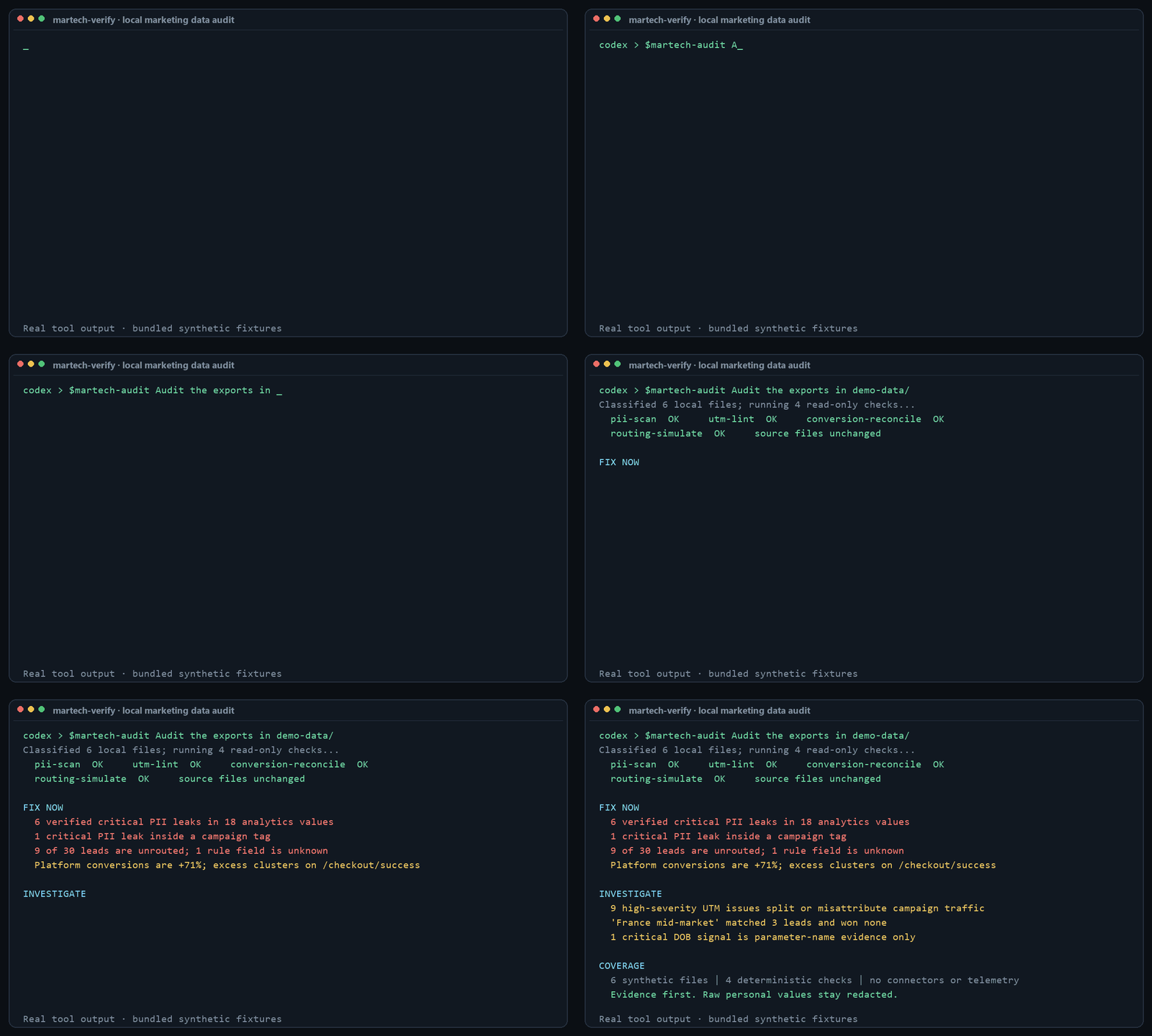
Real output from the bundled synthetic fixtures. The source exports are never modified.
The MarTech safety loop
MarTech Verify and MarTech Change Guard are designed as two halves of one workflow:
- Diagnose:
$martech-auditfinds evidence in read-only exports and produces a compact change brief. - Plan:
$martech-change-guardcompares current and proposed records, binds the audit report by SHA-256, and returnsallow,review, orblock. - Approve and execute elsewhere: a human authorizes the canary or full change through the CRM/import tool already in use.
- Verify: Change Guard checks a fresh export for partial writes, record-set changes, and side effects, then creates a receipt.
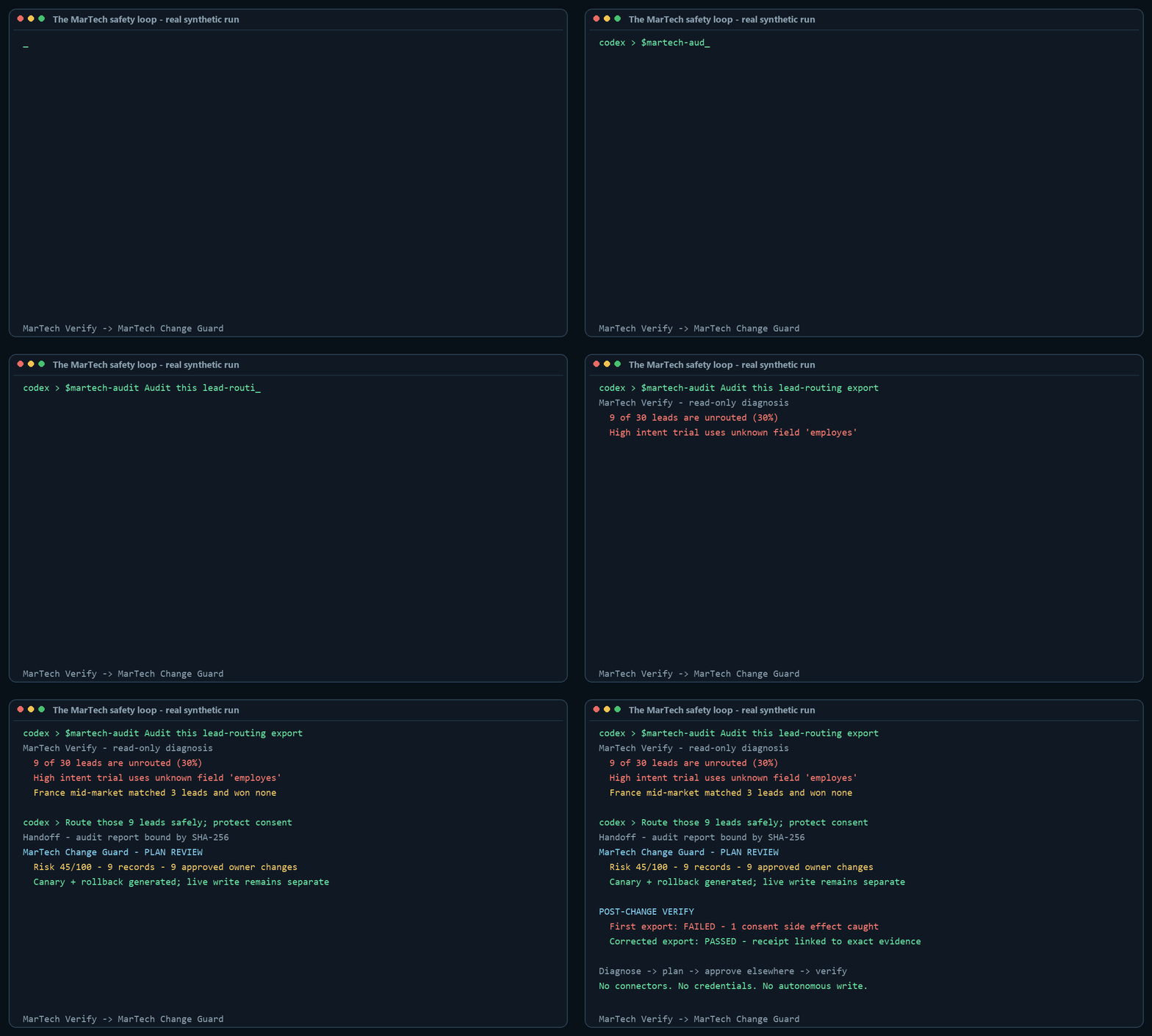
Read the connected walkthrough or watch the MP4 recording.
Start here
Install the bundle, add one or more exports to your working folder, and ask the umbrella skill to choose the relevant checks.
Codex — paste this into Codex:
$skill-installer Install all skills from https://github.com/m7mdwb/martech-verify
Then run:
$martech-audit Audit the marketing exports in this folder. Tell me what to fix first,
what needs investigation, and what the files cannot prove.
Claude Code — install from the repository's marketplace:
claude plugin marketplace add m7mdwb/martech-verify
claude plugin install martech-verify@martech-verify
Then run:
/martech-verify:martech-audit Audit the marketing exports in this folder. Prioritize the
findings and explain them without exposing raw customer data.
martech-audit is the front door, not another scanner. It inspects the supplied filenames
and headers, selects the smallest useful set of specialist skills, runs their bundled
deterministic tools, and combines the evidence into Fix now, Investigate, and
Coverage. You can also call any specialist directly.
What to provide
| Your question | Give it | What you get |
|---|---|---|
| Is customer data leaking into analytics? | A CSV, JSON, JSONL or text export containing page URLs or event values | Verified and suspected PII findings, redacted and ranked |
Why is traffic Unassigned or misattributed? |
A URL export from ads, email, analytics, or a campaign sheet | Broken, conflicting and inconsistent UTM tags with suggested fixes |
| Why does the ad platform say 400 conversions while the CRM says 260? | Two row-level CSV exports with a shared conversion ID | Join coverage, the size of the gap, ranked causes and supporting counts |
| Are leads reaching the right owner? | A lead CSV plus routing rules transcribed into the small JSON rule format | Dead, shadowed and invalid rules, unrouted leads and load imbalance |
Each specialist includes a short input guide with a minimal example and common export
sources: pii-scan,
utm-lint,
conversion-reconcile, and
routing-simulate.
Privacy and safety model
- The bundled Python tools are read-only, use only the standard library, make no network calls, and collect no telemetry.
- Findings redact sensitive values. The agent workflows explicitly avoid echoing raw rows or personal data into the conversation.
- Codex or Claude may still process selected file context according to your provider and organisation settings. Use exports you are permitted to process.
- Results describe only the supplied files and period. They are not a compliance certification or proof that every tracking path is correct.
Why another marketing skills repo
There are about 150 marketing skills published for Claude across the largest public collections. Nearly all of them share two properties:
The free ones give advice. The ones that read your data want an account. Schema references, naming conventions, checklists, templates. The moment a skill touches real numbers it needs an API key, an OAuth grant or a subscription.
Every audit stays inside one platform's own configuration. A tag manager audit reads the tag manager. A GA4 audit reads GA4 settings. Nothing looks across a boundary.
That second one is the expensive gap, because the failures that cost real money are invisible from inside a single platform:
- A tag-manager trigger with a regex that matches too broadly. The container is valid. Correct tags, no orphans, clean naming. It just fires three to four times more often than it should, and for months the top of the funnel looks healthier than it is.
- A phone system reporting 331 call records against 114 real calls.
- A cost-per-qualified-lead definition that quietly under-counts. The platform is doing exactly what it was told. The instruction was wrong.
None of those are configuration errors. They are disagreements between what a system reports and what actually happened, and you find them by putting two systems side by side.
Skills
| Skill | Role | What it answers |
|---|---|---|
martech-audit |
Start here | Which checks fit these files, what matters most, and what could not be checked? |
pii-scan |
Specialist | Is personal data leaking into our analytics URLs and event parameters? |
utm-lint |
Specialist | Which tagged URLs broke the taxonomy, and what should they be? |
conversion-reconcile |
Specialist | The platform says 400, the CRM says 260. Which likely cause fits the evidence? |
routing-simulate |
Specialist | Where does each lead land, which rules never fire, and which are shadowed? |
The four specialists are executable workflows, not prompt-only advice. The agent runs the
bundled tool, interprets its 0/1/2 result correctly, explains the evidence in plain
language, and preserves the tool's safety boundaries.
Direct command-line use
The scripts also run without an agent. They require Python 3.9+ and no packages.
git clone https://github.com/m7mdwb/martech-verify.git
python martech-verify/skills/pii-scan/scripts/scan.py your-export.csv
Try it without your own data
Every skill ships a fixture with known planted defects, so you can see the output before you point it at anything real.
python skills/pii-scan/scripts/scan.py fixtures/pii-scan/ga4_pages_sample.csv
pii-scan · 18 values read from ga4_pages_sample.csv (column 'page_location')
==============================================================================
  12 affected values — 7 critical · 3 high · 2 medium

  severity  kind            parameter                count  example
  --------- --------------- ---------------------- -------  ------------------------
  critical  email           email                        1  ! m***@g***.com
  critical  email           u                            1  ! m***@g***.com
                            └─ (found base64-encoded)
  critical  phone           phone                        1  ! +3********56
  critical  credit_card     (path)                       1  ! 45************86
  critical  iban            iban                         1  ! GB************32
  critical  jwt             token                        1  ! ey************Rh
  ...

  ! the value itself was verified   ? the parameter name says so, the value was not verified
The flagship, in one screen
  platform     420 rows
  crm          246 rows   ratio 1.71  (+71%)
  joined on 'transaction_id': 246 matched · 174 platform-only · 0 crm-only

  RANKED CAUSES
  1. trigger_matching_too_broadly   (confidence 0.90)
     The excess is not spread out. It is almost all on one value of 'page_path'.

       Evidence: 174 of 174 unmatched platform rows (100%) carry
       page_path='/checkout/success', while that value accounts for only 24%
       of rows that did match. A systemic problem inflates everything evenly;
       this does not.

       What to do: Read the trigger behind the conversion tag on that path.
       The usual cause is a 'contains' or regex condition matching more pages
       than intended — a path regex without anchors is the classic.
Four synthetic scenarios ship with the repo — clean, duplicated events, a trigger firing on one path, a one-day timezone offset. The test asserts each gets the right top diagnosis and that the three faulty ones get three different ones, because a detector that always answered "duplicate events" would pass a single-scenario test and be useless.
Non-goals
Stated because half of what a reader might call a gap here is a decision, and a repo that does not say which is which invites the same question forever.
No connectors, and this one is load-bearing. No CRM, analytics, ads or warehouse integrations, now or later. The reason this exists at all is that every free skill in this space gives advice while every skill that reads real data needs an API key or a subscription. "Point it at a CSV you already have" is not a limitation to be fixed. It is the position. Adding connectors makes this the 151st marketing skill collection, competing on someone else's terms.
No service. No auth, no multi-tenancy, no job queue, no retries, no audit log, no approvals, no rollback. These are four scripts that read a file on your machine. Every one of those features would make them worse at that.
No agent framework. No manager/worker separation, no scheduling, no memory, no privilege promotion. Interesting; different repo.
The confidence numbers are heuristic weights, not calibrated probabilities. They express how well a divergence fits a known shape. Calibrating them would need labelled production outcomes, which nobody has. Every diagnosis therefore states the counts behind it, so you can check the reasoning instead of trusting the number.
Not built for warehouse-scale files. Inputs are read into memory. A month of exports is comfortable; a hundred million rows is not, and streaming will be added when someone actually hits the wall rather than in anticipation of it.
routing-simulate models its own small DSL, not LeanData or Salesforce semantics. You
transcribe your rules into it. That transcription is deliberate — writing the rules out in
one place is where a surprising share of the findings come from.
Principles
Verified beats suspected, and the report says which. An email that parses is not the
same claim as a parameter called email. Tools that blur the two get ignored.
Never print what you just flagged. Every value is redacted, in the table, in the locations and in the JSON. The redaction test failed on the first run and caught the scanner reprinting a card number that lived in a URL path — which is exactly the bug the scanner exists to find, committed by the scanner.
A false positive is more expensive than a missed finding. One wrong alarm and nobody
opens the report again. example.com addresses, Luhn-failing order IDs and ordinary
campaign parameters stay silent.
Silence is a result. A clean run says so plainly rather than implying a clean bill of health, and the repaired routing fixture is tested for producing no output — a linter that still complains after you fixed everything it asked for is one nobody fixes anything for.
Say what the answer does not cover. These read the export you supplied. A one-month export answers a one-month question, and the tool says so rather than implying a clean bill of health.
Tests
python tests/run_all.py
No test framework, no dependencies. Each fixture has planted defects and the tests assert the skill finds exactly those and invents nothing.
test_malformed_input.py runs every skill against every way a real export is broken —
empty, header-only, ragged rows, a BOM, cp1252 from Excel, a truncated JSON-lines file, a
200,000-character field, NUL bytes, and a PNG renamed to .csv. The contract is narrow and
absolute: never traceback, exit 0/1/2 and nothing else, and if you give up say something
a human can act on. It also fails if an unreadable or ambiguous file produces a clean
verdict: empty and header-only exports, binary or NUL-containing files, malformed JSON
Lines, duplicate headers and ragged rows must exit 2. BOMs, cp1252, CRLF, long fields and
other valid edge cases must continue to work.
test_fixture_bytes.py asserts the properties Git would otherwise silently erase: the CRLF,
BOM and cp1252 bytes, missing final newline, NUL and PNG signatures, and the field exceeding
the old CSV limit. .gitattributes prevents normalisation in transit; this test proves the
stored fixtures still mean what their names claim.
The animated README demo is not a hand-edited mock-up. tools/make_demo_gif.py reruns all
four specialists over their synthetic fixtures and embeds a fingerprint of the real JSON
results. CI fails when the code, fixtures or animation disagree. Regenerating the GIF uses
Pillow as a development tool; the skills themselves remain standard-library only.
Skills have to work when someone drops a single folder into .claude/skills/, so no skill
imports from outside itself. lib/_shared.py is the source of truth and
tools/sync_shared.py vendors it into each skill; tests/test_shared_sync.py fails if a
copy has drifted. Edit the source, run the sync, commit the copies.
Contributing and security
Bug fixes and narrowly evidenced detectors are welcome. Read CONTRIBUTING.md before proposing a new check; additions must preserve the local-export, no-connector and standard-library boundaries. Use the structured bug report or detector proposal so a report arrives with the evidence needed to evaluate it.
Never open a public issue containing customer data or a vulnerability. Follow SECURITY.md and use GitHub's private vulnerability reporting instead.
Licence
MIT.
No comments yet
Be the first to share your take.