
LexForge


English · Русский
A spec-driven pipeline for coding agents, with gates the agent cannot skip. Nine skills carry
a change from the request to the archived spec, and lexforge verify answers with an exit code
whether the work is done: a completion claim with no fresh command output behind it does not pass.
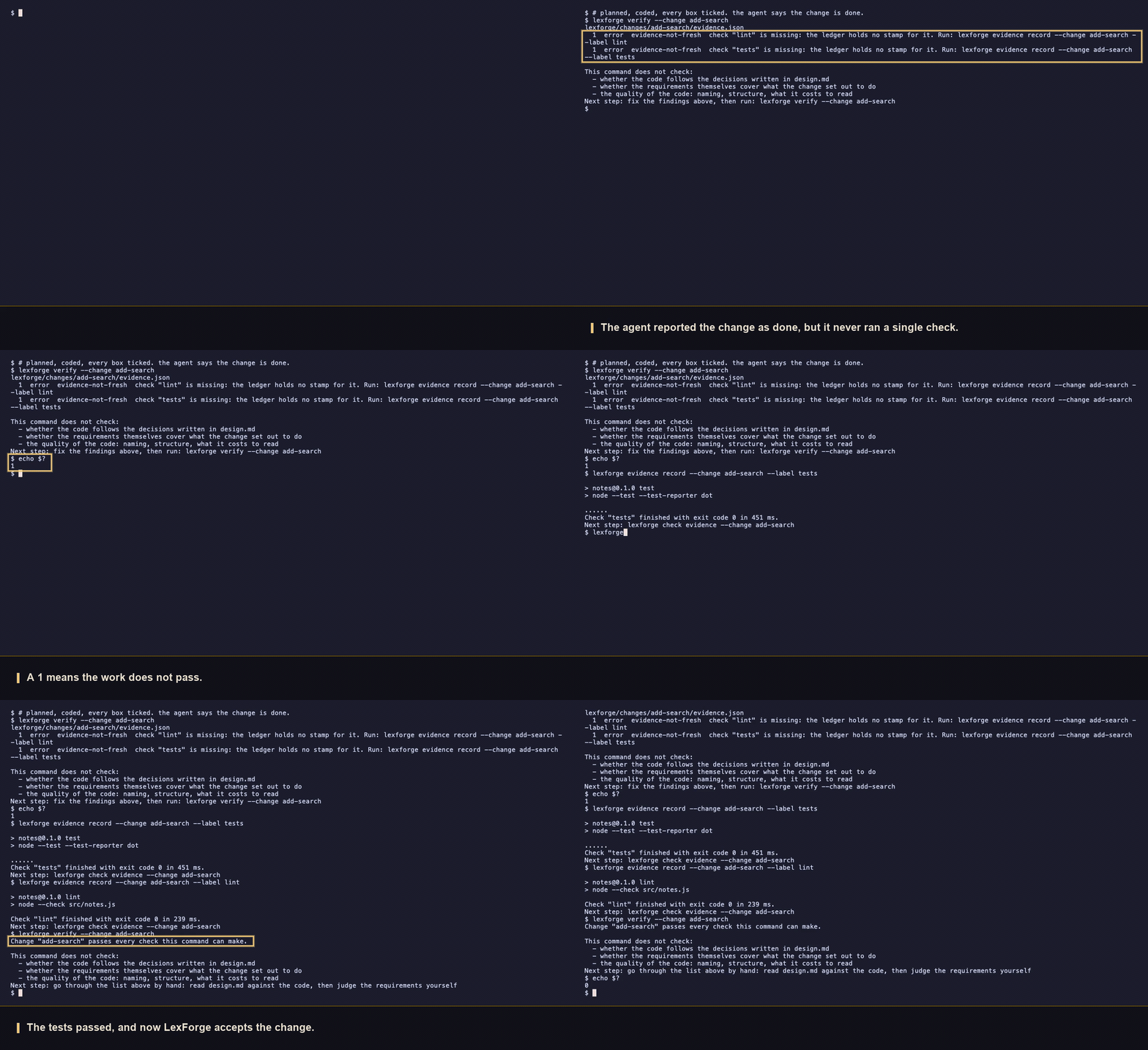
The agent has written the code and ticked every box. verify answers 1: the ledger holds no
stamp for either check. evidence record runs the command itself and writes the stamp, and only
then does verify answer 0. That change is kept in examples/notes.
LexForge is built out of two systems: the artifacts and the machine-checkable shape of requirements come from OpenSpec, the gates and behavioural rules for the agent from superpowers.
Quick start
npm install -g lexforge       # the skills call the command by this name on PATH
lexforge init --tools claude  # agents · claude · codex · cursor · opencode
lexforge doctor               # six conditions, each named with or without a finding
Then ask the agent for work in the usual words — "add X", "fix Y". The lexforge skill names the
class of work and the pipeline starts from there; the steps in full are in
First run.
What's new in 1.2.0
A project now says which model each stage of a change runs on, and the skills obey it.
- The
modelssection oflexforge/config.yamlholds adefault, overrides for the rolesanalysis,developmentandreview, and aproviderscatalogue of the names on hand. lexforge instructionsandlexforge statusanswer with the role and the model of every stage, so a skill reads the assignment from the call it already makes.- All nine skills carry the same gate: work in silence when the model matches, hand the work to a subagent on the assigned model when it does not, stop when that model cannot be reached.
- Nothing changes for a project installed earlier.
lexforge initleaves an existingconfig.yamluntouched, and a project without the section runs exactly as before. Details in Model assignment.
Supported platforms
| What | Value |
|---|---|
| Operating system | Linux, macOS and Windows — the suite runs on all three in CI |
| Node.js | 20.19.0 or newer, the version from engines; CI covers 20.19 and 22 |
| Agent runtime | agents, claude, codex, cursor, opencode |
| git | a repository with at least one commit; without it evidence record, check evidence, verify and archive answer 2. lexforge init needs none |
Windows is a first-class target, not a best effort: a file is read whatever line ending it carries,
paths come back in answers with /, doctor looks the command name up through PATHEXT, and one
healthy installation is counted as one.
What the merge buys you
Each donor solves half the problem and breaks without the other. OpenSpec describes the steps but does nothing to stop an agent from walking around them; superpowers keeps the agent disciplined, but once the branch is merged nothing is left that anyone will read later.
| Taken from | What LexForge does with it |
|---|---|
OpenSpec: the order proposal → specs → design → tasks |
the schema fixes it, status shows the queue, a blocked artifact is not written |
| OpenSpec: requirements a program can check | ### Requirement: with WHEN/THEN scenarios, checked by validate --strict |
| OpenSpec: specs that stay in the repository | the delta is merged on archive, the change moves to lexforge/changes/archive/ |
| superpowers: the class of work named before design | the lexforge skill picks the schema: spike, bounded, spec-driven |
| superpowers: TDD and subagent review | lexforge-apply runs both inside every task |
| superpowers: no completion claim without fresh output | evidence record runs the command and stamps the commit and the tree |
Neither donor had the rest. Placeholder-free plans, requirement coverage and stamp freshness are
checked by a command instead of by persuasion, and no command has a flag that turns a rule off. The
skills share state through lexforge status --change <name> --json, so none of them guesses what
is already done. Two duplications are cut: the design lives only in the change directory, and
tasks.md serves as the plan.
How it works
request: "build X", "add Y", "fix Z"
    │
    ▼
skill: lexforge — names the class of work  ──►  spike: answer only, no change
    │  bounded · spec-driven
    ▼
lexforge new change <name>
    │
    ▼
PLANNING — project code is not touched. Every skill first calls
lexforge status --change <name> --json and works only on status `ready`;
on `blocked` it names what is missing and stops.
    lexforge-propose ──► proposal.md          one question at a time
    lexforge-spec    ──► specs/<cap>/spec.md  validate --strict → 0
    lexforge-design  ──► design.md            agreed section by section
    lexforge-plan    ──► tasks.md             check plan → 0
    │
    ▼  isPlanningComplete = true
IMPLEMENTATION — lexforge-apply, one task at a time
    failing test ──► implementation ──► subagent review ──► evidence record
    task grew past the spec → stop and ask the user
    │
    ▼
lexforge-verify · lexforge verify --change <name>
    CRITICAL found → back to lexforge-apply
    zero CRITICAL  → lexforge archive <change>
                     delta  → lexforge/specs/<capability>/spec.md
                     change → lexforge/changes/archive/<date>-<name>/

off the pipeline: lexforge-debug — failing test, broken build, unexpected
behaviour; it works without a LexForge workspace too.
Artifacts, gates, archive
Every change lives in lexforge/changes/<name>/: proposal.md, the delta specs, design.md and
tasks.md, in the order the schema fixes.
The gates work out the state of the work themselves. check plan looks for work the plan has not
written down: placeholders, references to a neighbouring task, a delta requirement no task covers.
evidence record runs the verification command the project declared and stamps it with the exit
code, the commit and a fingerprint of the tree. check evidence compares the stamps against the
code on disk, so an edit after a run leaves a stamp stale. verify collects these checks, but only
reads stamps: a fresh one has to be taken before it is called.
archive merges the delta into lexforge/specs/<capability>/spec.md and moves the change
directory to lexforge/changes/archive/<date>-<name>/. The repository keeps the specs of the
shipped behaviour, plus the whole change with the stamps of its runs.
Installation
A global install from npm puts the command on PATH,
which is how the skills call it. A project install pins the version and is called through npx:
npm install --save-dev lexforge && npx lexforge --version
The two ways are not equivalent. doctor looks for the name lexforge on PATH: with
a devDependencies-only install it reports path-not-resolved, and with both installs at once
path-multiple-installs, because the call reaches a package other than the one answering.
The skills are installed by lexforge init --tools <list>, names separated by commas.
--scope project (the default) puts them in the project, --scope user in the home directory, and
--language <code> names the language the project writes its artifacts in. Every runtime keeps its
skills in its own place:
| Runtime | Project directory | User directory |
|---|---|---|
agents |
.agents/skills |
~/.agents/skills |
claude |
.claude/skills |
~/.claude/skills |
codex |
.codex/skills |
~/.codex/skills |
cursor |
.cursor/skills |
~/.cursor/skills |
opencode |
.opencode/skills |
~/.config/opencode/skills |
The name agents is the shared directory that several agents read.
First run
1. Set up the workspace and install the skills
lexforge init --tools claude
It prints what it created: lexforge/config.yaml, lexforge/specs/, lexforge/changes/archive/
and nine skill directories. Without --tools it installs no skills and lists the runtimes whose
directories already exist — the choice stays with a human.
2. Check the installation
lexforge doctor
OK    Workspace and configuration
OK    Verification labels
OK    Installed skills
OK    Command name on PATH
OK    Git repository
OK    Node version
Next step: installation is healthy. Ask your agent to start work, for example: lexforge new change <name>
Right after installation it gives two findings and exit code 1: init creates no git repository
and fills in no verification section, and the gates need both. The repository comes from
git init and a first commit; the labels are added to lexforge/config.yaml:
verification:
  tests: npm test
  lint: npm run lint
A label name is lowercase letters and hyphens, and evidence record --label tests runs its command
from the workspace root. From here the commands are called by the agent.
Model assignment
The stages of a change reward different models: cutting a proposal is not grinding through
tasks.md. The models section of lexforge/config.yaml names them once, and every stage
resolves through one of three roles.
| Role | Stages it covers |
|---|---|
analysis |
proposal, specs, design, tasks |
development |
the implementation loop and debugging |
review |
the completion check |
Archival carries no role: it merges the delta into the long-lived specs on whichever model is
at work. A role that is not named falls back to default, so one model everywhere is one
entry, and lifting review onto a stronger model is three lines more:
models:
  default:
    provider: anthropic
    model: claude-opus-5
  review:
    provider: anthropic
    model: claude-opus-5
  providers:
    anthropic:
      - claude-opus-5
      - claude-sonnet-5
lexforge init writes the whole section into a new project, providers seeded from the list
that ships with the version installed. That catalogue is yours from then on: add a provider or
a model name by editing the file, and it counts as known here without waiting for a release.
Nothing is checked against it, so a model released after your installation works the day it
ships.
lexforge instructions and lexforge status answer with the role and the model of every
stage, and the skills read the assignment from the call they already make. A skill running on
another model hands the work to a subagent started on the assigned one; a skill that cannot
reach that model stops and says so.
A project installed before this version
Nothing changes until you ask for it. lexforge init leaves an existing config.yaml
untouched, the missing models section included, and a project without the section gets an
empty assignment: no command refuses, no stage names a model, no skill demands one. Switching
the feature on is one edit — paste the block above into lexforge/config.yaml and fill in the
names you use. Removing the section puts the project back exactly as it was.
The handover in each runtime
The gate names no runtime, because the same nine skills install into five of them. Whether a skill can start a subagent on a named model is the runtime's own business.
| Runtime | Model selection for a subagent |
|---|---|
claude |
Confirmed: a subagent is started on a named model, and the handover works as described. |
agents, codex, cursor, opencode |
Not confirmed here. Until a run shows otherwise, name one model in default and write no role overrides: every stage then resolves to the same model and no handover is asked for. |
The nine skills
The agent picks a skill by the description line in its SKILL.md. Planning is carried by five.
| Skill | Fires when | Result |
|---|---|---|
lexforge |
Building, adding or fixing something no change covers | The class of work named, a change created with the right schema |
lexforge-propose |
A proposal is asked for, or proposal is ready |
proposal.md: the reason, the approach, the boundaries |
lexforge-spec |
Requirements are asked for, or validate finds a defect |
Delta specs per capability with WHEN/THEN scenarios |
lexforge-design |
Decisions are asked for, on the spec-driven schema |
design.md, agreed one section at a time |
lexforge-plan |
A plan is asked for, or validate finds a defect in it |
tasks.md, each task naming a file and a verification command |
There is no "warn and write the file anyway" branch: a deadline, the size of the edit and a request to skip an artifact do not open a closed gate.
| Skill | Fires when | Result |
|---|---|---|
lexforge-apply |
The artifacts are done, implementation is asked for | Tasks closed one at a time: failing test, implementation, subagent review, stamp |
lexforge-verify |
Implementation is finished, before archiving | A report on three dimensions; one CRITICAL finding stops archiving |
lexforge-archive |
The report has no CRITICAL findings |
The delta in lexforge/specs/, the change in the archive, a question about the branch |
lexforge-debug |
A test fails, a build breaks, code behaves unexpectedly | The cause named, a failing test for the bug, one edit at that point |
The implementation skills read isPlanningComplete: while a single artifact is neither written nor
skipped, work does not start. lexforge-debug carries no such block, because a bug also happens
where there is no LexForge workspace.
An edit to an installed skill does not survive: doctor compares the file byte for byte with what
the package ships, and the next init restores it. Project rules go into the context and rules
sections of lexforge/config.yaml, from where they reach lexforge instructions.
Commands and exit codes
Command, after lexforge |
What it does |
|---|---|
init |
Sets up the lexforge/ workspace and installs the skills; --tools, --scope, --language |
doctor |
Checks whether the local installation is healthy |
new change <name> |
Creates the change directory with .lexforge.yaml; --schema overrides the project default |
status |
Shows the artifact statuses of one change, or lists the active changes |
instructions <artifact> --change <name> |
Serves the template, the context, the rules and the instruction |
validate <change> |
Checks the artifacts and requirements; --strict adds completeness checks |
check plan --change <name> |
Looks for work the plan has not written down |
check evidence --change <name> |
Compares the stamps against the code on disk; --require narrows the labels |
evidence record --change <name> --label <label> |
Runs the command of one label and records a stamp |
verify --change <name> |
Checks a change before the work is called finished |
archive <change> |
Merges the delta into the specs and moves the change to the archive |
Every command accepts --json: a single JSON document goes to standard output and nothing else,
the lines for humans go to standard error. The wording of the human output changes between
versions; the JSON field names and the exit codes do not.
| Code | When |
|---|---|
0 |
The command ran and found nothing |
1 |
The command ran and found a violation: an unmet dependency, a requirement without a scenario, a leftover placeholder |
2 |
The command cannot run: an unknown argument, a missing change, no workspace, no git repository |
Code 1 reports a problem in the project, code 2 a wrong call, and there are no other codes.
doctor has one exception: a missing workspace is a finding for it, so it answers 1, not 2.
What to commit
| Path | Where |
|---|---|
lexforge/config.yaml |
Repository: the schema, the context, the rules and the labels are needed by the whole team |
lexforge/specs/ |
Repository: the specs describe the shipped behaviour |
lexforge/changes/<name>/ with evidence.json |
Repository: a stamp is tied to a commit, and review shows what it was taken on |
lexforge/changes/archive/ |
Repository: closed changes with their artifacts and stamps |
The runtime skill directories and lexforge-install.json |
Locally: lexforge init brings them back on another machine |
evidence.json changes on every run, so two people working on the same change in parallel will get
a merge conflict on it.
Limits
check plan looks for placeholders with regular expressions, so a phrase like "add error handling"
in the author's own words will not match. The set grows as findings come in.
A stamp is tied to the commit and a fingerprint of the working tree. An edit after a run leaves it stale, but the reverse does not hold: a stamp does not say the coverage is sufficient.
Whether the implementation follows design.md is not computed by a machine. If the agent departs
from the design, only the lexforge-verify skill will catch it — that is, the same agent.
License
MIT, © shepaland.
No comments yet
Be the first to share your take.