
Kompl
Compounding LLM-wiki — saves become interlinked wiki pages when they arrive.




What is Kompl?
Kompl is a compounding LLM-wiki. It works best as a second brain for personal use, or pointed at a project drive and queried through its MCP server. Save anything (a link, a PDF, a thread, a YouTube video, a bookmark export) and Kompl reads it as it arrives, pulls out the people, ideas, and arguments inside, and writes them into wiki pages that link to each other. Save new sources on the same topic and the existing pages update. Save a tenth and Kompl already sees the pattern across all ten without you having to ask.
That reading is split between local work and LLM calls on purpose: an LLM shouldn't be paid to do a librarian's job. Local NLP goes first. spaCy handles named entities, and a router picks keyphrase methods based on how long and how entity-dense the text is, with TF–IDF overlap against your existing pages thrown in once you have a wiki to compare against. Those outputs feed the prompt as context, narrowing what the model has to figure out. Then a single LLM call returns the typed entities, concepts, claims, relationships, contradictions, and summary for that source. Deciding whether a new mention is something you already have runs as a cascade: alias and exact-title lookup, then fuzzy string matching, then local embeddings, with an LLM reserved for the genuinely ambiguous pairs. Which pages a source should touch is ranked by TF–IDF and confirmed by a small triage call, while the page plan itself (source summaries, entity pages, concept pages, comparison pages) stays deterministic. The LLM's other real job is the one worth paying for: drafting or rewriting each affected page with the new source's contribution and its citation woven in. Wikilinks are injected by deterministic regex. Commits go through an outbox, so a source is either fully written or left for the reconciler at boot, and the previous version of every page is archived so you can see what changed.
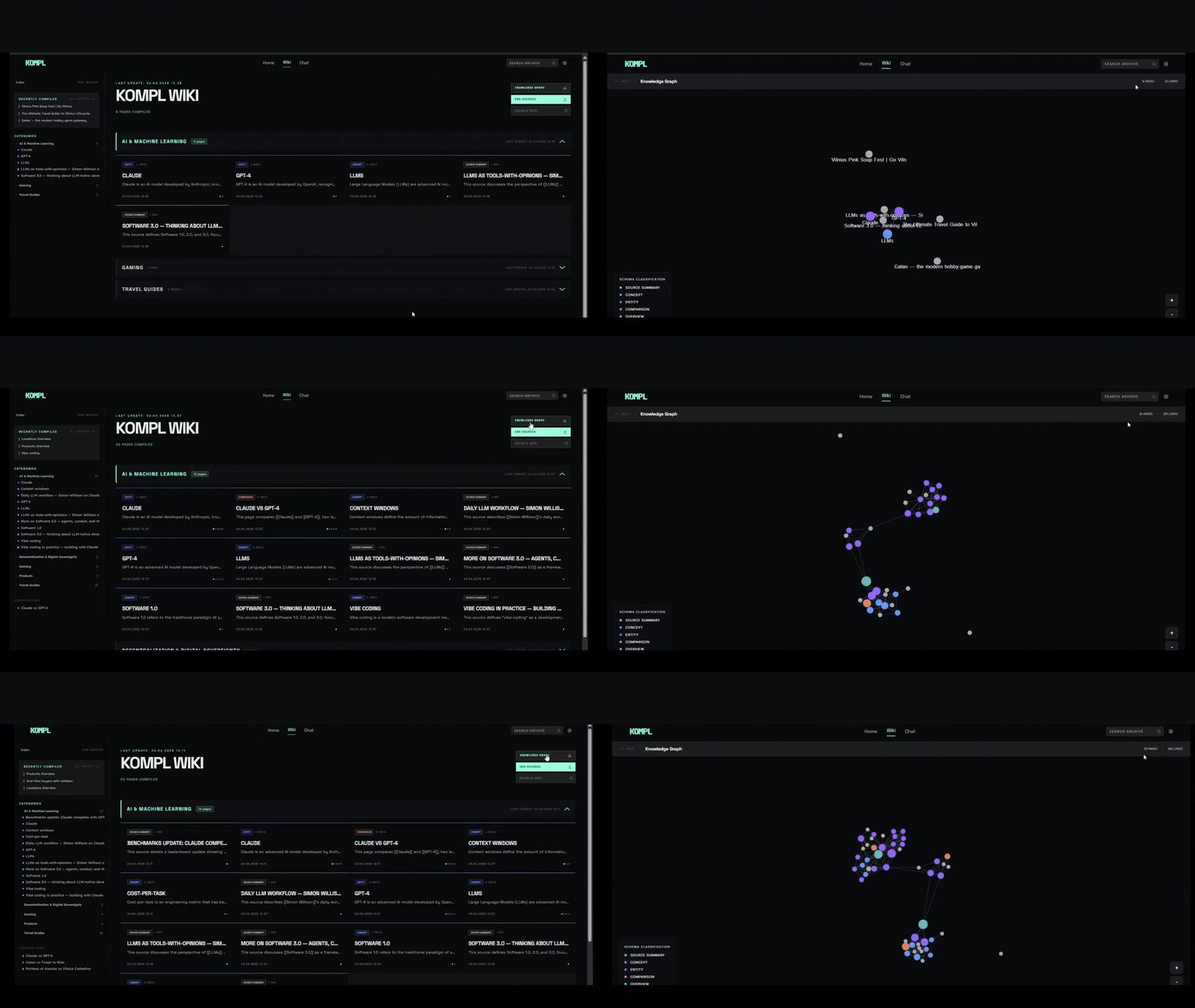
All of that runs at one specific moment, which is the thing that separates Kompl from the rest of the category: when does the synthesis happen? Most tools store what you save and leave the connecting work to you, either later when you find the time or under deadline when you actually need the answer. Kompl does that work when the source arrives. Source #50 becomes page #51 and also rewrites several pages you already have. Entities and concepts that keep showing up get promoted into their own pages. When sources disagree, the disagreement surfaces on a comparison page with provenance. Claims cite where they came from. By the time you have a question, the answer is already a page.
Kompl runs as a Docker stack on your own machine with your own API keys. You read
the wiki the way you'd read any wiki: pages and wikilinks, an entity graph view,
full-text search, history. It ships with a basic chat that retrieves over your
pages and answers with citations, a thin reference implementation you're meant to
replace with your own. The access pattern Kompl is built for is MCP: four
read-only tools for now (search_wiki, read_page, list_pages, wiki_stats),
with more planned, so
Cursor, Claude Code, Codex, or whatever agent you already run can answer from
your actual reading. The agent answers. Kompl stores and serves the compiled
pages.
Before you start
You'll need three things on your machine:
- Docker — Docker Desktop (Windows/Mac) or Docker Engine + Compose plugin (Linux). Compose v2 is required (
docker compose, notdocker-compose). Make sure Docker is running before setup. - Node.js ≥ 24 — to install and run the
komplCLI. - ~5 GB free disk and 4 GB free RAM — Kompl runs three containers (app, NLP service, n8n) plus pulls a ~90 MB embedding model on first compile.
You'll also need API keys. Firecrawl and at least one compile LLM (Gemini or DeepSeek) are required; YouTube is optional:
| Required? | Get key | Free tier | Notes | |
|---|---|---|---|---|
| Firecrawl (URL scraping) | Required | firecrawl.dev | 500 scrapes/month | Free tier covers normal personal use. |
| Gemini (wiki compilation) | One of two* | aistudio.google.com/apikey | 1500 req/day | Default compile backend if both keys are set. Free works for the demo and your first few sources. Paid Tier 1 is strongly recommended for real use — Gemini's free per-minute throttle (~10 RPM) will rate-limit a normal ingest, even though daily quota is plenty. Default rate-limiter assumes Tier 1. Has a known truncation issue on dense inputs — see issue #7. |
| DeepSeek V4 Pro / Flash (wiki compilation) | One of two* | api-docs.deepseek.com | Pay-as-you-go | Selectable in Settings alongside Gemini. Recommended for long/academic content — see Known limitations. Set DEEPSEEK_API_KEY in .env and pick a DeepSeek compile model to run without Gemini. |
| YouTube Data API v3 (YouTube ingestion) | Optional | console.cloud.google.com | 10,000 units/day (1 unit per video) | Needed for YouTube metadata at compile time (title, channel, duration). Captions use youtube-transcript-api (no key). Without this key, convert fails with youtube_metadata_unavailable and the URL lands on Saved Links — not a compiled source. Restrict the key to "YouTube Data API v3" only in the GCP console. Set YOUTUBE_API_KEY in .env. |
*At least one of Gemini or DeepSeek is required for wiki compilation.
Setup
Quick install (recommended)
macOS / Linux / WSL / Git Bash:
curl -fsSL https://raw.githubusercontent.com/tuirk/Kompl/main/install.sh | bash
Windows (PowerShell):
irm https://raw.githubusercontent.com/tuirk/Kompl/main/install.ps1 | iex
The installer pre-flights Docker, Node 24, disk, and RAM, clones the repo, and hands off to setup.js for the API-key prompts. If anything's missing it fails fast with a copy-paste fix.
Prefer to inspect the script before running it? Download with curl -fsSLO (or iwr -OutFile on PowerShell), open it in your editor, then run with bash install.sh (or .\install.ps1).
Manual install
git clone https://github.com/tuirk/Kompl.git kompl
cd kompl
node setup.js
Either path: the script handles everything — creates your config, asks for Firecrawl plus at least one compile API key (Gemini or DeepSeek), offers an optional YouTube prompt, installs the kompl CLI, and starts the stack. No other steps needed. Your system timezone is detected and written to .env as KOMPL_TIMEZONE automatically.
Your API keys land in
.envat the repo root. That file is gitignored — never commit it.
First start takes 5–10 minutes — Docker is building images (~2 GB on first start) and downloading the local AI model from HuggingFace. Make a coffee. Subsequent starts take ~15 seconds.
After setup
Check when it's ready:
kompl status
Then open in your browser:
kompl open
Or visit http://localhost:3000 directly.
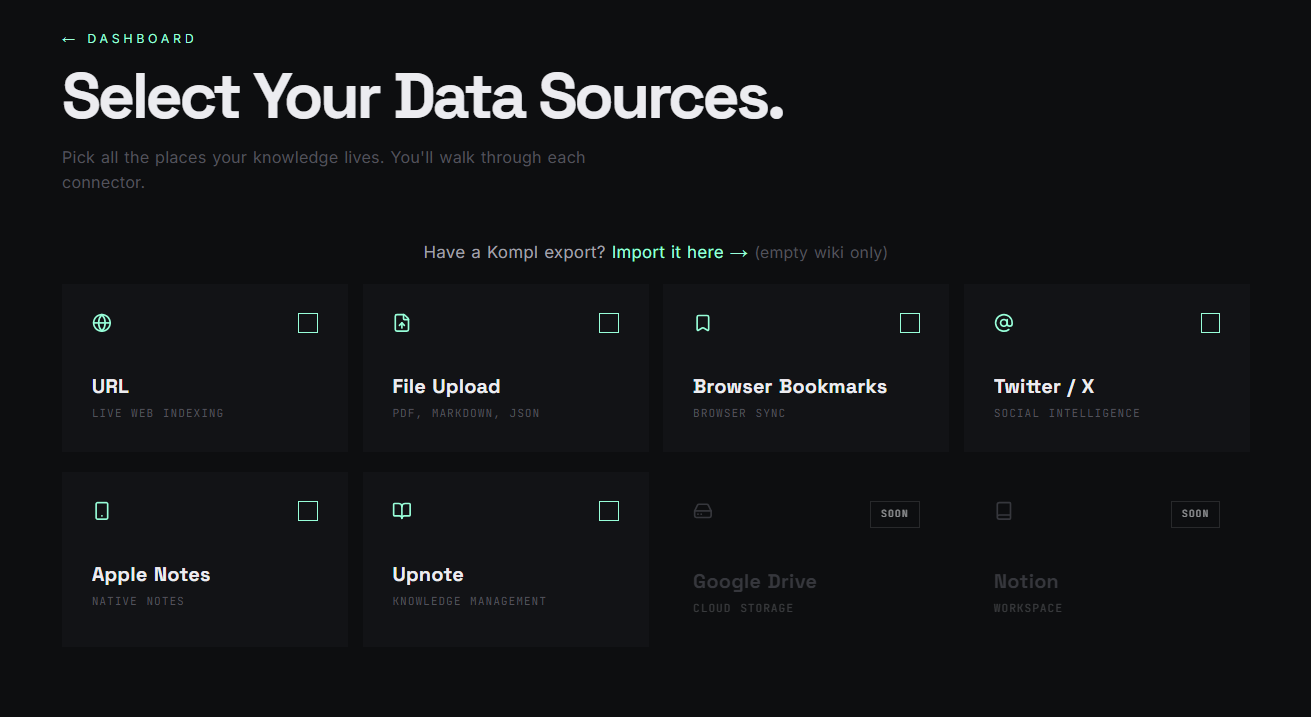
The onboarding wizard will walk you through your first sources — paste a URL, drop a PDF, or import a Twitter bookmark export.
If something looks stuck:
kompl logs       # stream service logs
kompl status     # health check
Common first-run issues: Docker isn't running, port 3000 is occupied, or the first-time image build is still pulling (~2 GB).
Day-to-day
kompl start      # start Kompl
kompl stop       # stop it
kompl restart    # stop + start in one command
kompl open       # open in browser
kompl status     # health check: page count, NLP service, vector backlog
kompl logs       # stream logs if something looks wrong
kompl update     # pull latest source, rebuild images, and restart (~5–10 min)
kompl backup     # download a full backup to ~/.kompl/backups/kompl-backup.kompl.zip
kompl init       # re-run the first-time setup wizard (rarely needed)
Updating
Pulled latest main but don't see new UI (health checks, bookmark filters, etc.)? Your Docker images are probably stale — git pull updates files on disk, but the running app and nlp-service containers are built from source at install time. Only the n8n image updates via docker compose pull.
Your wiki is safe on a normal update. Page data lives on the Docker volume kompl-data. kompl update and docker compose up --build -d rebuild containers but do not wipe that volume. Back up anyway before major upgrades:
kompl backup     # ~/.kompl/backups/kompl-backup.kompl.zip
kompl update
⚠ Never run
docker compose down -vunless you intend to delete everything. The-vflag removes volumes.bash scripts/integration-test.shis also destructive — see Backup and restore.
Recommended:
kompl update
This pulls source, refreshes the kompl CLI, pulls registry images, rebuilds app + nlp-service, and waits for /api/health (~5–10 min).
Manual fallback (same steps; use if your kompl binary predates this fix):
cd <projectDir>    # path in ~/.kompl/config.json
git pull --ff-only
cd cli && npm install && npm run build && npm link
docker compose pull
docker compose up --build -d
kompl start and kompl restart restart existing images in ~15 seconds — they do not rebuild after a pull.
Verify: onboarding should route through /onboarding/health; importing browser bookmarks should skip x.com / twitter.com URLs with a toast.
Use with AI agents (MCP)
Kompl ships an MCP server so any MCP-capable agent built on @modelcontextprotocol/sdk can query your compiled wiki. Ask "what does my wiki say about X?" and the agent gets pre-synthesized pages with provenance back to the originals, not raw chunks.
⚠ Single-tenant. Kompl assumes you own the host. There's no multi-user auth — don't expose your instance to the public internet without putting your own auth in front.
Build the MCP server
cd mcp-server && npm install && npm run build
Configure your MCP client to run node mcp-server/dist/index.js with KOMPL_URL=http://localhost:3000. Kompl must be running (kompl start) for the MCP tools to respond.
Tools
The server exposes four read-only tools for now: search_wiki, read_page, list_pages, wiki_stats. More are planned.
Direct HTTP
If you're not using MCP, hit the Next.js routes directly: /api/pages/search, /api/wiki/{page_id}/data, /api/wiki/index.
Your data
Your wiki content lives in Docker volumes on your machine. Outbound network calls fall into three buckets:
You drive these — your content goes to a third party:
- Gemini (
generativelanguage.googleapis.com) — wiki compilation when the Gemini backend is selected. Your source text is sent to Google. - DeepSeek (
api.deepseek.com) — wiki compilation when the DeepSeek backend is selected. Your source text is sent to DeepSeek. Only outbound ifDEEPSEEK_API_KEYis configured and selected as the compile model. - Firecrawl (
api.firecrawl.dev) — URL scraping fallback. The URL you pasted is sent to Firecrawl. - GitHub public API (
api.github.com) — when you paste a GitHub repo URL, Kompl fetches the README + metadata. - YouTube (
youtube.com+youtube.googleapis.com) — at compile time, captions viayoutube-transcript-api, then metadata via YouTube Data API v3 (YOUTUBE_API_KEYrequired). Missing key →youtube_metadata_unavailable→ Saved Links. No captions or blocked transcript → Saved Links too. - OG-tag preview — pasted URLs are fetched once with
User-Agent: KomplBot/1.0to grab title + description.
One-time, on first use:
- HuggingFace Hub (
huggingface.co) — ~90 MB download of theall-MiniLM-L6-v2embedding model on the first compile. After that, no further HF traffic.
Build-time only: Docker image builds pull from PyPI, npm, Docker Hub, and apt mirrors. No runtime impact.
Kompl itself sends no analytics, no error reports, and no version pings. The bundled n8n container's upstream telemetry, version checks, templates, and personalization are disabled by default in docker-compose.yml.
Backup and restore
Settings → Kompl Backup downloads a .kompl.zip containing your entire wiki: sources, compiled pages, provenance, extractions, and settings. API keys and third-party secrets are excluded. No LLM calls needed to restore.
To restore on a fresh instance: run setup, skip onboarding, go to Settings → Import Wiki, upload the .kompl.zip. All pages are immediately browsable and searchable. The search index rebuilds in the background after restore.
Automatic backup
kompl start automatically saves a local backup to ~/.kompl/backups/kompl-backup.kompl.zip (at most once every 36 hours).
⚠️ Auto-backup-on-start is an early feature, wired end-to-end but lacking regression tests on the start-time path. Flag any silent skips.
CLI backup
kompl backup                                          # save to ~/.kompl/backups/kompl-backup.kompl.zip (overwrites)
kompl backup --output ~/Desktop/my-wiki.kompl.zip     # save to a custom path
kompl backup --schedule                               # register a weekly backup schedule (Monday 11:30)
--schedule is idempotent. Platform-specific behavior:
- Windows — registers a Task Scheduler entry (requires Admin).
StartWhenAvailablemeans it runs on next login if the laptop was off at 11:30. - Linux — appends a crontab entry (
30 11 * * 1 kompl backup) for the current user. Standard cron does not catch up if the machine was off. - macOS — uses crontab, same as Linux. Same caveat applies (cron does not catch up if the machine was off). Tested on Windows and Linux only — please open an issue if you hit anything weird on Mac.
Heads up
⚠️ Integration tests wipe the database. bash scripts/integration-test.sh is destructive — it resets everything. Never run it on a wiki you want to keep. Use kompl backup first.
Known limitations:
- Single-tenant only — no user accounts or access control. Don't expose to the public internet without your own auth layer.
- Two LLM providers selectable per session: Gemini 2.5 (default) and DeepSeek V4 Pro.
- Gemini 2.5 + dense sources: structured-output truncation on inputs above ~50K chars (commonly academic PDFs and surveys) causes
extract_llm_failed. Workaround: switch the session to DeepSeek V4 Pro in Settings — it handles up to ~200K chars cleanly without this pathology. Kompl does not auto-chunk long sources; if you'd rather stay on Gemini, split the source into smaller files yourself before ingesting. Tracked in issue #7. - Current connectors: URLs (YouTube transcripts and GitHub READMEs included), file uploads (PDF, DOCX, PPTX, XLSX, TXT, MD, HTML), browser bookmarks, Twitter JSON export, Upnote, Apple Notes.
- No mobile app. The web UI works on mobile browsers but isn't optimized for small screens.
Security
Kompl runs on a personal computer behind a loopback or LAN. The security posture is calibrated for that model.
Known security debt:
- Markdown HTML output is not yet sanitized — Firecrawl-scraped content can carry XSS payloads. Even on a single-user install, an ingested bookmark can deliver a payload; needs DOMPurify in the render pipeline.
/convert/urldoes not yet share the SSRF gate that protects/metadata/peek.
CodeQL alerts. Some py/path-injection and js/path-injection alerts re-fire on every push because CodeQL's taint tracker doesn't follow cross-function sanitizers. We dismiss these individually (rather than silencing in CodeQL config) so any genuinely new sink in those files surfaces for review. The audit trail and per-alert reasoning live at docs/security/codeql-false-positives.md.
Reporting an issue. If you find something, please open a GitHub Security Advisory rather than a public issue.
License
Kompl's source is Apache-2.0 — see LICENSE. You can use, modify, fork, and redistribute it freely under those terms.
One caveat about the bundled n8n container. Kompl runs n8nio/n8n as an unmodified runtime dependency for workflow orchestration. n8n itself is licensed under the Sustainable Use License, which is not OSI-approved. In practice:
- Self-hosting Kompl for personal or internal use → fully fine.
- Forking and redistributing Kompl source → fine (Apache-2.0 covers Kompl; n8n is a runtime dep users pull themselves).
- Offering Kompl-as-a-hosted-service to third parties → this is the line. n8n's SUL restricts hosting n8n as a service for others; if your offering bundles n8n, contact n8n first.
See NOTICE for full attribution.
No comments yet
Be the first to share your take.