
jup ✨
jup is a small command-line tool for installing and syncing agent skills across the local skill directories used by supported AI assistants.
Why jup? 💊
The name is short for "jump", a nod to the Jump Program from The Matrix. Just as the program was a foundational training ground for jumping between buildings (and realizing your potential), jup helps your agents "jump" between different environments and workflows with the right skills in hand.
It helps you:
- install skills from GitHub repositories that expose a top-level
skills/folder (or.claude/skills/as a fallback) - keep installed skills organized in a lockfile so they can be synced again later
- copy or link skills into the directories used by harnesses like Gemini, Copilot, and Claude
Features ✨
- Multi-Harness Support: Sync skills for Gemini, Copilot, Claude, and Codex.
- Local-First: Works with local skill directories and global configurations.
- Git Integration: Install and update skills directly from GitHub.
Quick Start 🚀
1. Install jup 📦
The preferred way to install jup is from PyPI with uv:
uv tool install jup
jup --help
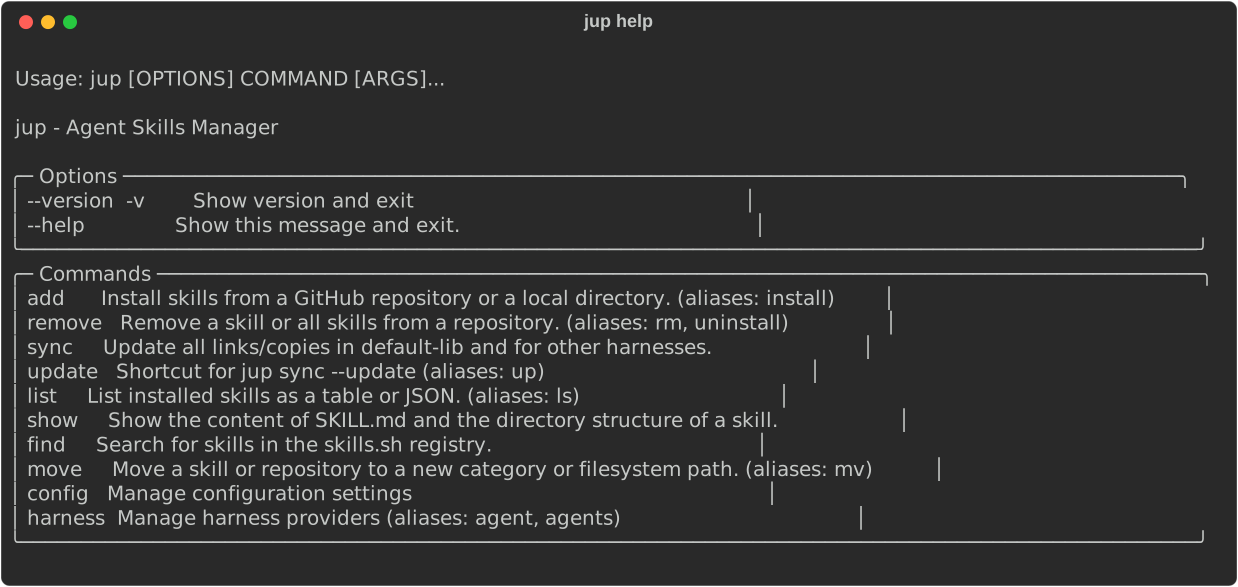
If you do not want to install it, you can run it on demand:
uvx jup --help
pip also works if you prefer a traditional install:
pip install jup
jup --help
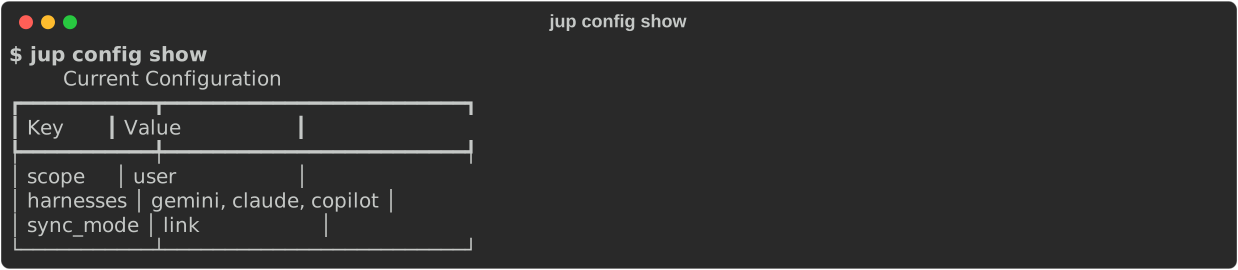
2. Check the current configuration ⚙️
jup config show
3. Choose which harness directories should receive synced skills 🤖
jup config set harnesses gemini,copilot,claude
Use none to clear the list:
jup config set harnesses none
4. Add skills ➕
jup add owner/repo --category productivity
Search for skills 🔍
Search for skills in the skills.sh registry:
jup find instagram
By default, this lists matching skills. You can filter and limit the results:
jup find instagram --limit 5 --min-installs 100
To install a skill interactively from the search results, use the --interactive (or -it) flag:
jup find instagram --interactive
Advanced GitHub Usage
You can use --path to specify a subdirectory (default: skills/), and --skills to select specific skill names (comma-separated) to add from the skills directory:
jup add owner/repo --path custom/skills/dir --skills skill-a,skill-b --category productivity
--pathand--skillsonly work with GitHub sources (not local directories).- If
--skillsis omitted, all skills in the specified path are added. - If
--pathis omitted, the default isskills/. - If the specified skills directory does not exist,
jupwill also look for.claude/skills/as a fallback.
You can also add local skills using relative or absolute paths (these ignore --path and --skills):
jup add ./local-skills --category productivity
jup add ../team-skills
jup add /absolute/path/to/local-skills
5. Review and update skills 📋
jup list
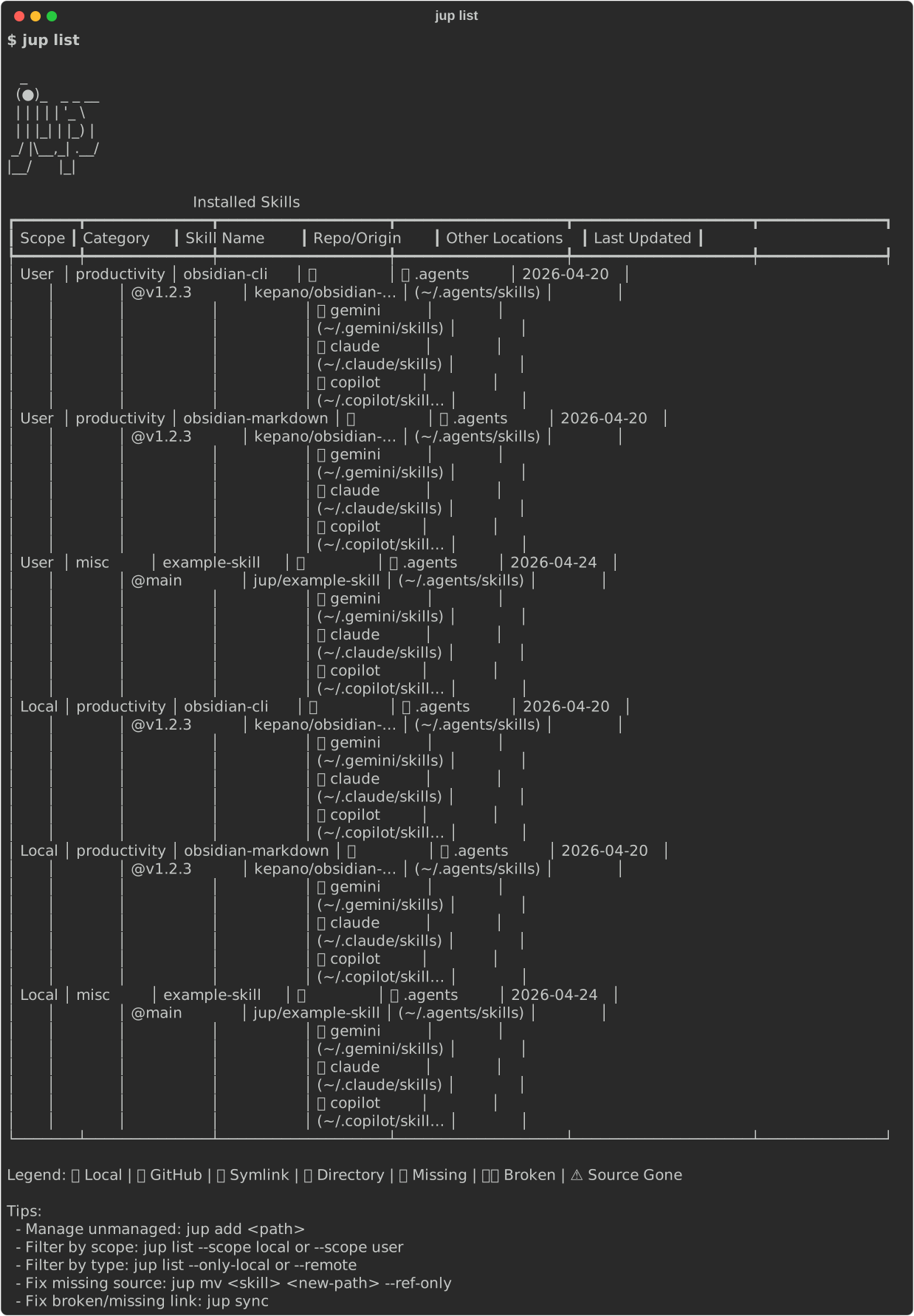
- Shows all installed skills, their source repo (with clickable links in supported terminals), install/update date, and which harness directories they are synced to.
Check for updates and apply them
jup sync --update
- Checks all installed GitHub skills for updates and applies them if available. Tracks the last update date for each source.
- You can also use
jup sync --checkto only check for updates without applying them. - The update status and last checked date are shown in
jup list.
6. Interactive TUI Dashboard (Experimental) 🖥️
For a more visual management experience, you can use the interactive dashboard:
jup ui
(Alias: jup tui)
The TUI provides a dual-pane interface with the following tabs:
- Installed: Browse managed and unmanaged skills with live status indicators and metadata.
- Discover: Search and preview skills from the
skills.shregistry. - Agents: View and manage your configured agent harnesses.
- Settings: Inspect your current
jupconfiguration.
Keyboard Shortcuts:
Tab: Switch between tabs.Up/Down: Navigate the list on the left.Right: Focus the preview pane on the right for manual scrolling.Left: Return focus to the sidebar list.PageUp/PageDown: Scroll the preview pane directly.Space: Toggle skill selection for bulk actions.d: Remove selected skills (Installed tab).Enter: Install selected skills (Discover tab).q/Esc: Quit the dashboard.
7. Push the managed skills into the configured harness directories 🔄
jup sync
Comparison with npx skills ⚖️
While Vercel's npx skills is a fantastic package manager for AI skills with a built-in search registry, jup focuses heavily on centralized lockfile management and local symlink synchronization across multiple harnesses. jup is ideal if you want to maintain a single source of truth for your skills and automatically symlink them to Gemini, Claude, and Copilot simultaneously, especially when authoring skills locally.
For a full breakdown of commands, pros, and cons, see the jup vs. npx skills comparison.
What It Does 🧭
jup works with repositories that follow a simple structure:
repo/
  skills/
    skill-name/
      SKILL.md
When you run jup add owner/repo, it clones the repository, finds every nested skill directory under skills/ (or .claude/skills/ if present) that contains a SKILL.md file, stores those skills in ~/.jup, and records them in a lockfile.
For local sources, jup add supports either of these layouts:
local-skills/
  skill-a/
    SKILL.md
  skill-b/
    SKILL.md
or a single skill directory:
single-skill/
  SKILL.md
After that, jup sync installs the managed skills into the configured target locations. By default, jup uses symlinks, but you can switch to copying with:
jup config set sync-mode copy
Skills are placed directly into the harness's skill folder (e.g., ~/.gemini/skills/my-skill/), ensuring they are correctly discovered by the harness.
Update and Check Features
jup sync --updatechecks for updates to all installed GitHub skills and updates them if new versions are available. The last update date is tracked per source.jup sync --checkchecks for updates but does not apply them.jup listshows the last update/check date and provides clickable links to the source repositories (in supported terminals).
The main configuration values are:
scope:globalorlocalharnesses: a comma-separated list of harness namessync-mode:linkorcopy
7. Manage custom harness providers 🤖
You can add your own harness providers if they use a standard skills/ directory structure:
# List all providers
jup harness list

# Add a new custom provider
jup harness add myharness --global-location ~/.myharness/skills --local-location ./.myharness/skills

# Edit an existing custom provider
jup harness edit myharness --local-location ./new-path/skills

# Remove a custom provider
jup harness remove myharness
Once a custom harness is added, you can activate it in your configuration:
jup config set harnesses gemini,myharness
Supported Harnesses 🧩
jup includes built-in locations for these harness names:
geminicopilotclaudecodex.agents
Contributing 🤝
Contributions are welcome. We use standard tools like uv, ruff, ty, just, and pre-commit.
See CONTRIBUTING.md for detailed development setup, workflow, and publishing details.
No comments yet
Be the first to share your take.