
Selora AI — Home Assistant Integration
Selora AI is a smart-home AI butler for Home Assistant. It connects to an LLM backend — Selora AI Local (our own on-device model), Anthropic Claude, OpenAI, Google Gemini, or Ollama — learns your home's patterns, and proactively generates automations, all while keeping you in full control.

Features
| Feature | Description |
|---|---|
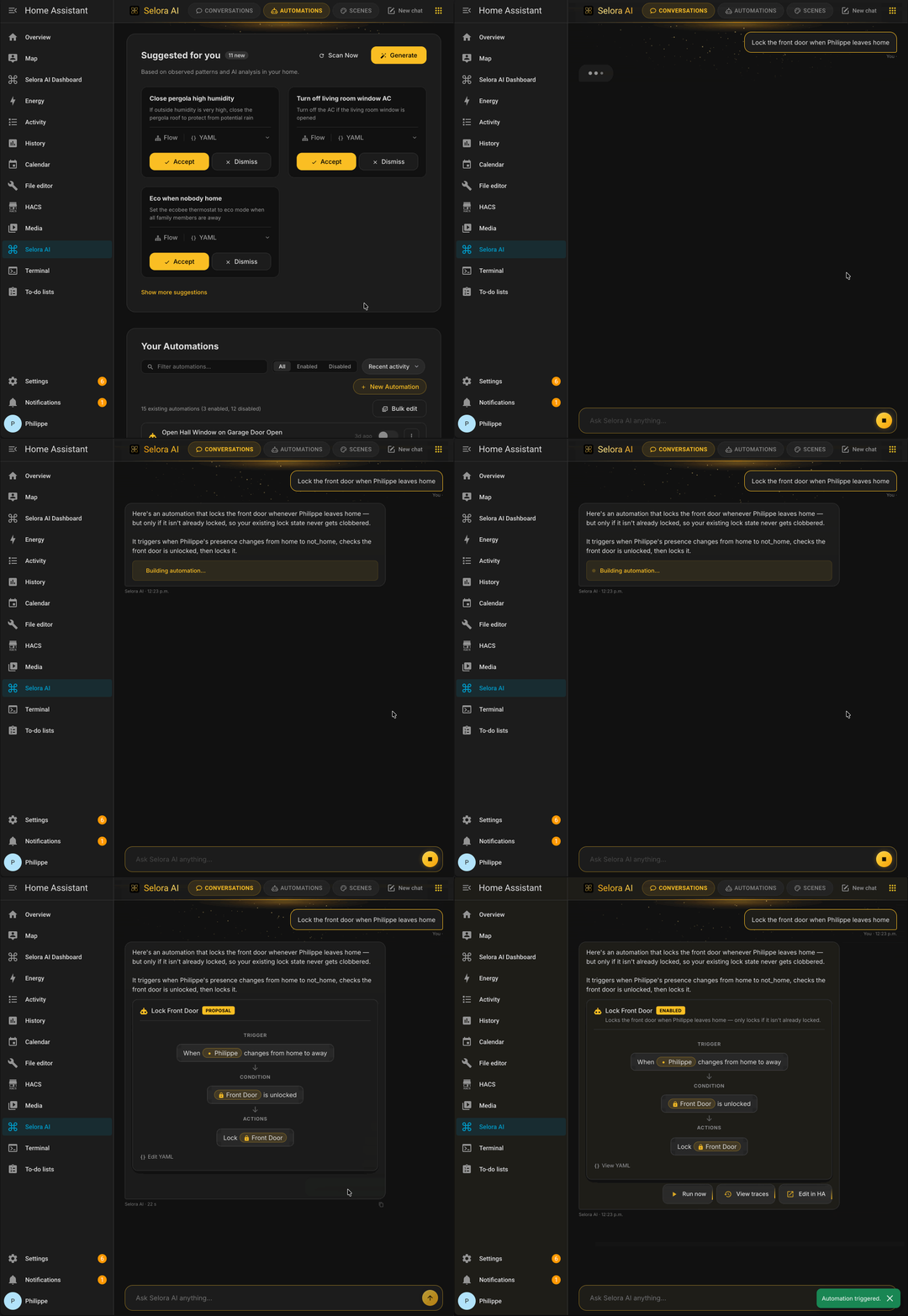
| AI Automation Suggestions | Analyzes device states and history, then writes draft automations (disabled, prefixed [Selora AI]) for your review. |
| Pattern Detection | Detects time-based routines, device correlations, and usage sequences — then converts them into automation suggestions with confidence scoring. |
| Natural Language Commands | Send plain-English commands via the Selora AI panel or Home Assistant Assist. |
| Automation Versioning | Full version history for every Selora AI automation, with diff viewer in the panel. |
| Stale Automation Detection | Flags automations referencing unavailable entities or that haven't triggered in a while. |
| MCP Server | Exposes a Model Context Protocol endpoint so external AI agents can interact with your home through Selora AI. |
| Selora AI Local (new in v0.10.0) | Our own 1.7B-parameter on-device model with four task-specific LoRA adapters (command, automation, answer, clarification). Runs entirely on your network — no API key, no cloud calls. See Selora AI Local below. |
| Multiple LLM Backends | Supports Selora AI Local (on-device), Anthropic Claude, OpenAI, Google Gemini, and Ollama. |
Requirements
- Home Assistant 2025.1 or later
- For Selora AI Local: a self-hosted llama-server serving the Selora AI model, reachable from your HA host. No API key.
- For Anthropic Claude: an Anthropic API key
- For OpenAI: an OpenAI API key
- For Google Gemini: a Google AI Studio API key
- For Ollama: a running Ollama server reachable from your HA host
Installation
See the installation guide for detailed instructions.
Selora AI Local
Selora AI Local is our own task-tuned model that runs entirely on your network — nothing leaves your home. Released in v0.10.0, it's the recommended way to use Selora AI when privacy or offline operation matters.
What it is
- Base model: Qwen3 1.7B.
- Four LoRA adapters, each fine-tuned on a specific Home Assistant task and hot-swapped per request:
command— execute natural-language commands ("turn off the kitchen light").automation— generateautomations.yamlblocks from a prompt.answer— answer questions about your home state.clarification— ask the user to disambiguate when intent is unclear.
- Weights, adapters, and trained system prompts are published at huggingface.co/selorahomes/Selora-AI.
Where the model runs
Selora AI Local talks to a llama-server instance (from llama.cpp) over its OpenAI-compatible HTTP API. You run llama-server yourself — with the base model loaded and the four LoRAs registered as slots — see Running with llama.cpp below.
During setup, the integration probes common locations (localhost and the Home Assistant Supervisor bridge network) for a reachable server and pre-fills the host URL. If none is found, point the integration at http://<host>:8080 during the Selora AI Local config step.
The integration handles LoRA-slot activation (POST /lora-adapters) per request, so the right specialist answers each call.
Running with llama.cpp
Install llama-server from llama.cpp (build from source, or brew install llama.cpp / winget install llama.cpp).
Download the files from huggingface.co/selorahomes/Selora-AI:
- Base model:
qwen3_17b_base.Q6_K.gguf. - LoRA adapters (one per specialist):
selora-v047-command.f16.ggufselora-v047-automation.f16.ggufselora-v047-answer.f16.ggufselora-v047-clarification.f16.gguf
Start the server with all four adapters registered but not applied — the integration activates the right one per request:
llama-server \
  --model qwen3_17b_base.Q6_K.gguf \
  --ctx-size 8192 \
  --ubatch-size 1024 \
  --n-gpu-layers 999 \
  --cache-reuse 256 \
  --mlock \
  --jinja \
  --reasoning off \
  --lora-init-without-apply \
  --lora selora-v047-command.f16.gguf,selora-v047-automation.f16.gguf,selora-v047-answer.f16.gguf,selora-v047-clarification.f16.gguf
Verify it's up:
curl http://localhost:8080/v1/models
Expected response:
{"models":[{"name":"selorahomes/Selora-AI","model":"selorahomes/Selora-AI","modified_at":"","size":"","digest":"","type":"model","description":"","tags":[""],"capabilities":["completion"],"parameters":"","details":{"parent_model":"","format":"gguf","family":"","families":[""],"parameter_size":"","quantization_level":""}}],"object":"list","data":[{"id":"selorahomes/Selora-AI","aliases":["selorahomes/Selora-AI"],"tags":[],"object":"model","created":1781658061,"owned_by":"llamacpp","meta":{"vocab_type":2,"n_vocab":151936,"n_ctx":8192,"n_ctx_train":40960,"n_embd":2048,"n_params":2031739904,"size":1667055616}}]}
Point the integration at http://<host>:8080 via Settings → LLM Provider → Selora AI Local → Show Advanced Options → Host. Generation parameters (temperature=0.0, stop tokens, per-intent max_tokens caps, LoRA hot-swap) are managed by the integration — no tuning required on the server side.
Privacy
| Selora AI Local | Cloud providers | |
|---|---|---|
| Data egress | None — stays on your LAN | Sent to Anthropic / OpenAI / Google |
| API key required | No | Yes |
| Offline | Yes | No |
| Quality on complex prompts | Good (task-tuned) | Best |
Languages
Selora AI is localized on two levels:
-
Interface — the config flow, entity names, and error messages ship translations for English, French, German, Spanish, Italian, Dutch, Hungarian, Portuguese, Russian, Japanese, Korean, Simplified Chinese, and Traditional Chinese. Home Assistant picks the one matching your configured language and falls back to English otherwise.
-
Conversational replies — chat and Assist responses follow your Home Assistant language. Selora AI instructs the model to answer in that language; the following are recognized explicitly:
English, French, German, Spanish, Italian, Portuguese, Dutch, Polish, Swedish, Danish, Norwegian, Finnish, Czech, Russian, Ukrainian, Turkish, Hungarian, Japanese, Korean, Chinese.
Any other language code falls back to English replies. Entity IDs, service names, and code blocks are always left untouched regardless of language.
Learn More
| Topic | Link |
|---|---|
| Configuration | Setting up LLM providers and options |
| Chat Panel & Assist | Natural language commands and voice control |
| AI-Generated Automations | How Selora AI suggests and manages automations |
| MCP Server | Connecting external AI agents to your home |
| Privacy & Support | Data privacy per provider and issue reporting |
License
MIT License. See LICENSE for details.
No comments yet
Be the first to share your take.