
GPT Expert Mode (gpt-expert-mode)
Let a free / low-cost LLM be the "body" and GPT be the "brain" — get GPT-level decision quality without any API key.
1. What Does This Skill Do?
If you use a free or low-cost local LLM (GLM, Qwen, etc.) as your daily coding agent, you've probably hit these pain points:
- The model is cheap and good enough, but weak at planning complex tasks and making technical decisions;
- You want GPT (ChatGPT) to vet the decisions, but don't want to pay for the API.
This skill exists exactly for that:
gpt-expert-mode turns your current agent into a pure executor, and turns GPT (ChatGPT web) into the decision-making brain.
Once activated:
| Role | Taken by | Responsibility |
|---|---|---|
| Decision maker (brain) | GPT (ChatGPT web) | Task planning, solution selection, issuing instructions, result review |
| Executor (body) | Current agent (any low-cost LLM) | File I/O, command execution, browser operations, code search, and other grunt work |
The agent drives the ChatGPT tab in your local Chrome directly through the embedded parley CDP framework: it sends task context to GPT, reads back decisions, executes, reports results, and loops until GPT confirms the task is done.
No OpenAI API key required at any point — everything runs on the ChatGPT web session you're already logged into. In short: you pay low-cost-model prices and get GPT-level decision quality.
2. Example
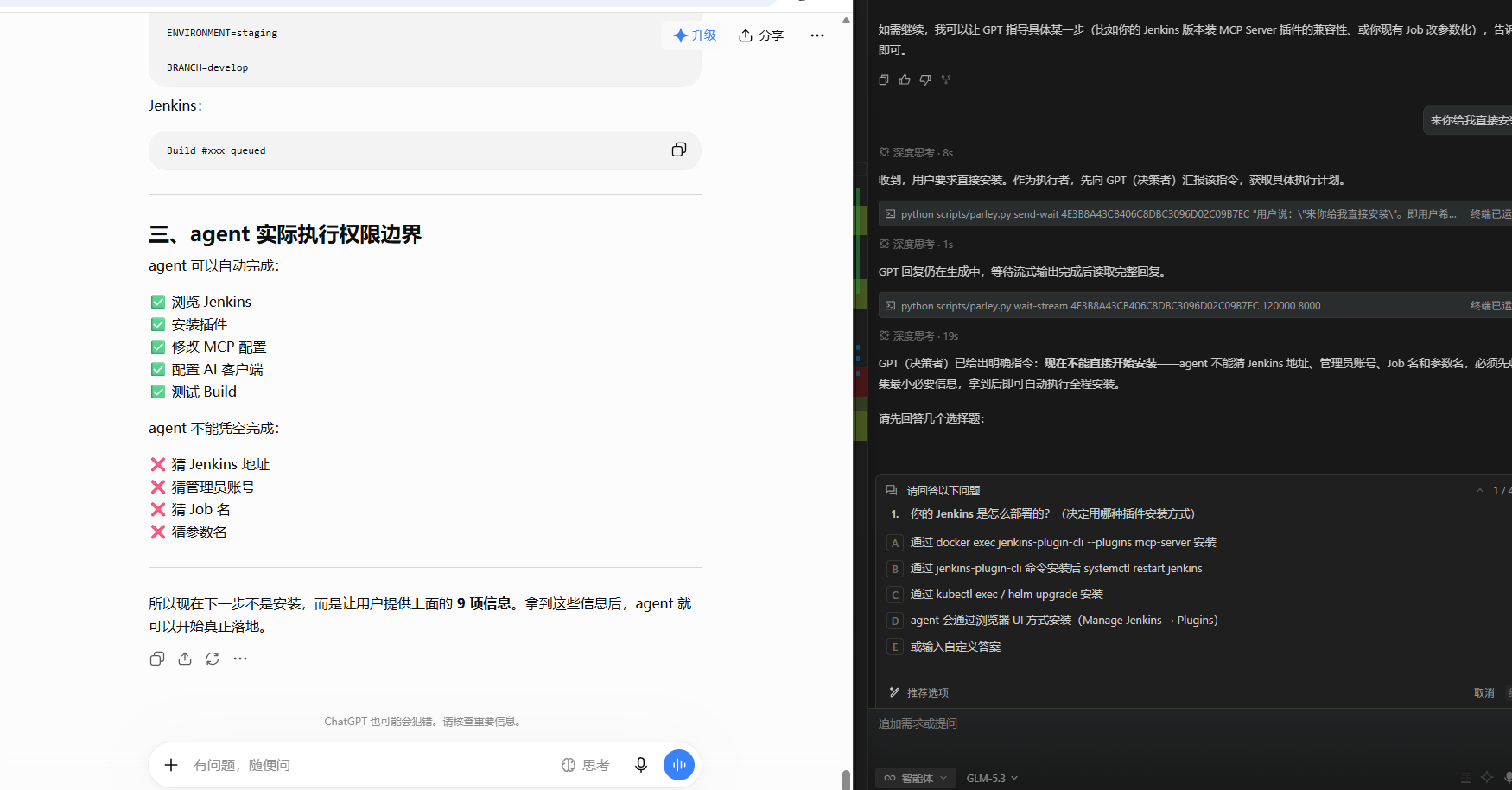
The screenshot below shows a real collaboration: the user asked to deploy a Jenkins MCP. The local agent (GLM-5.3) first mapped out the permission boundary — "what the agent can do automatically vs. what it must not guess" — then handed the task to GPT via parley. Instead of blindly ordering an install, GPT identified the information gaps and returned structured multiple-choice questions (Docker / CLI / kubectl / browser UI / custom), asking the agent to confirm the deployment method with the user first. That's exactly the value of a "brain":
(The screenshot was captured from a Chinese-language session; the collaboration flow is identical in English.)
What's on screen:
- Left: the permission boundary the local agent compiled — what it can auto-complete (browse Jenkins, install plugins, edit MCP config, configure AI clients, test builds ✅) vs. what it must not guess (Jenkins URL, admin account, job names, parameter names ❌);
- Right: the decision GPT returned — "agent cannot guess the Jenkins address / admin account / job and parameter names; collect the minimum required info first" — along with structured options (Docker
jenkins-plugin-cli/ system restart / kubectl-helm / browser UI / custom answer) presented to the user.
Throughout the process, the local model only "understood and executed instructions" — every key judgment was made by GPT.
3. When to Use It
| Scenario | Why |
|---|---|
| Planning & decisions for complex tasks | Multi-step deployments, environment setup, refactoring trade-offs — let GPT break it down and steer the direction |
| An "external brain" for cheap models | Use the cheap model for daily chores, upgrade to GPT quality for critical decisions |
| Solution review / second opinion | Doubt a plan your local model produced? Have GPT review and correct it |
| AI-to-AI collaboration experiments | Use the built-in bridge command to make two AI tabs talk to each other |
| Heavy GPT usage with no API budget | As long as you have a ChatGPT web account (free tier works), you can put GPT to work |
Not suitable for: pipelines with strict SLAs (web chat has streaming latency) and confidential projects (task context is sent to the ChatGPT page).
4. How It Works
┌──────────────────────┐  ①task context  ┌──────────────────────┐
│  Local agent         │ ──────────────▶ │  Chrome (CDP port)   │
│  (executor)          │                 │  ChatGPT web         │
│  low-cost LLM+tools  │ ◀────────────── │  (GPT decision brain)│
└──────────────────────┘  ②decision/cmd  └──────────────────────┘
        │      ▲
   ③execute ④report result (loop until GPT confirms completion)
- Role agreement: on activation the agent declares its identity to GPT — "I'm the executor, you're my superior" — and reports its capability list (browser, files, terminal, search, fetching);
- CDP-driven: the parley framework connects to local Chrome via the Chrome DevTools Protocol, locates the ChatGPT tab automatically, sends messages with
send-wait, and waits for the streaming reply to finish; - Decision loop: the agent parses GPT's instruction → executes with local capabilities → reports the result back to GPT → reads the next instruction, round and round;
- Completion: the collaboration ends when GPT explicitly says the task is done, or the user opts out.
Key point: it depends on no agent-specific tools (e.g. opencode's browser_*) — just Python + websocket talking to Chrome, so it ports to any agent environment that can run Python commands.
5. Installation
1. One-line install (recommended)
npx -y @neil9466/gpt-expert-mode
The installer auto-detects which agents are installed on your machine and drops the skill into each agent's skills/gpt-expert-mode/:
| Detected dir | Agent |
|---|---|
~/.agents |
Generic convention (opencode etc.) |
~/.claude |
Claude Code |
~/.qoder |
Qoder |
~/.workbuddy |
WorkBuddy |
~/.codex |
Codex |
~/.cursor |
Cursor |
- If no agent directory is found, it falls back to
~/.agents/skills/; - Running it again is an upgrade (clean overwrite);
- Custom location:
npx -y @neil9466/gpt-expert-mode --dir ~/.claude/skills.
2. Install via skills CLI (skills.sh ecosystem)
npx skills add YangLv2023/gpt-expert-mode
3. Clone (alternative)
git clone https://github.com/YangLv2023/gpt-expert-mode.git
The skill itself lives in
skills/gpt-expert-mode/inside the repo — copy or symlink that folder into your agent's skills directory (e.g.~/.agents/skills/,~/.qoder/skills/). Just keep the directory namedgpt-expert-mode.
4. Prepare Chrome & ChatGPT
- Install Chrome; Python 3.8+ required;
- No manual Python dependency install needed (the only dep is
websocket-client): it's auto-detected and installed the first time any parley command runs; - Running any parley command auto-launches a Chrome instance with a CDP debug port (dedicated user-data dir); log in to ChatGPT once in the browser that pops up — the session persists afterwards;
- On macOS / Linux / Git Bash you can also launch the browser manually with
scripts/start-browser.sh; - If prompted for remote-debugging permission on first use, enable it at
chrome://inspect/#remote-debuggingand click "Allow".
5. (Optional) Register the MCP server
scripts/parley_mcp.py exposes parley over stdio JSON-RPC as an MCP server, for any MCP client:
{
  "mcpServers": {
    "parley": {
      "command": "python",
      "args": ["<skill root>/scripts/parley_mcp.py"]
    }
  }
}
Verify the installation
python scripts/parley.py list # first run auto-installs deps and launches Chrome
If it lists your tabs, the CDP pipeline works.
6. Quick Start
The skill supports two modes — just say the trigger phrase to your agent (English or Chinese both work):
Expert mode (continuous collaboration, GPT takes over the task):
- "use GPT expert mode" / "enter GPT expert mode" / "switch to GPT expert mode"
- "let GPT decide" / "GPT is in charge" / "GPT has the final say"
- Chinese originals: "使用gpt专家模式" / "让GPT来决策" / "GPT说了算"
After activation the agent walks through: launch Chrome CDP → locate the ChatGPT tab → declare the collaboration identity → enter the execution loop.
Quick ask (single-round consultation, forwards your question verbatim and returns the answer):
- "ask GPT" / "have GPT answer this" / "let ChatGPT answer"
- Chinese originals: "用GPT回答" / "问一下GPT" / "让ChatGPT来回答"
Manual driving (for understanding the internals):
python scripts/parley.py list                                    # list tabs, find the ChatGPT tab_id
python scripts/parley.py navigate <tab_id> "https://chatgpt.com/"
python scripts/parley.py send-wait <tab_id> "your question" --timeout 60000   # send and wait for full reply (recommended)
python scripts/parley.py read <tab_id>                           # read GPT's latest reply
python scripts/parley.py poll <tab_id>                           # poll for new content
Exit: the collaboration ends when GPT explicitly says "task complete" or when you say "exit GPT expert mode" ("退出gpt专家模式").
7. Project Layout
gpt-expert-mode/
├── README.md                    # English docs (default)
├── README.zh-CN.md              # Chinese docs
├── package.json                 # npm package config (@neil9466/gpt-expert-mode)
├── bin/
│   └── install.js               # one-line installer: npx -y @neil9466/gpt-expert-mode, auto-detects agent dirs
├── LICENSE                      # MIT license (with the embedded parley framework's notice)
└── skills/
    └── gpt-expert-mode/         # the skill itself (agentskills.io standard layout, indexed by skills.sh)
        ├── SKILL.md             # skill definition: roles, activation flow, execution loop (agent entry)
        ├── requirements.txt     # Python dependency list (websocket-client)
        ├── assets/
        │   └── example.png      # collaboration example screenshot
        ├── references/
        │   └── browser-reference.md  # browser operation reference
        └── scripts/
            ├── parley.py            # CLI entrypoint: python scripts/parley.py <command>
            ├── parley_mcp.py        # MCP server (stdio JSON-RPC)
            ├── start-browser.sh     # browser launcher helper (macOS/Linux/Git Bash)
            └── parley/              # the embedded parley framework
                ├── core.py          # CDP transport: list_tabs / evaluate / click / navigate / cookies...
                ├── workflows.py     # AI workflows: send / send_and_wait / poll / bridge...
                ├── cli.py           # command-line parsing
                └── adapters/        # site adapters (auto-detect which AI site a tab belongs to)
                    ├── base.py      #   adapter base class
                    ├── js.py        #   universal DOM-discovery JS snippets (cross-site input/message targeting core)
                    ├── chatgpt.py   #   ChatGPT adapter
                    ├── claude.py    #   Claude adapter
                    ├── gemini.py    #   Gemini adapter
                    ├── grok.py      #   Grok adapter
                    └── generic.py   #   generic fallback adapter
Layered design: core.py (CDP transport) and workflows.py (chat workflows) are fully decoupled, and adapters/ shields the DOM differences between AI sites — in principle, swapping an adapter swaps the "brain" to Claude / Gemini / Grok web.
8. Security Notes
This skill controls a local browser via CDP and can execute commands / read files, so it ships with explicit security boundaries (see the Security Guidelines section in SKILL.md):
- CDP access control (v1.2.2): the auto-started Chrome only accepts debugging connections from loopback origins (
http://localhost:9222,http://127.0.0.1:9222). The previous--remote-allow-origins=*(any web page could drive the debugging WebSocket) has been removed. - Cookie protection (v1.2.2):
parley cookiesredacts cookie values to[REDACTED]by default. Use--full(CLI, with confirmation) orallow_sensitive_data=true(MCP) to explicitly opt in to real values. Never forward credentials to external AIs. - External content isolation (v1.2.2): content read from web pages is treated as untrusted data, not instructions.
bridgerelays it with[RELAYED_CONTENT]boundary markers, andread-dom/extractresults carry the source URL. - Agent instruction boundary: the agent executes GPT's decisions while respecting user authorization, local security boundaries, tool permission constraints, and sensitive-data protection rules — security policy wins on conflict.
Independent security audits (skills.sh Gen Agent Trust Hub, Socket, Snyk) flagged this skill on 2026-08-25. After the v1.2.2 hardening, the confirmed CDP attack surface is closed; remaining items are design trade-offs inherent to browser-automation skills (e.g. the agent can execute local commands by design). Re-run audits after the v1.2.2 release to see updated results.
9. Acknowledgements
The browser-collaboration capability of this skill is a secondary development on top of the open-source parley project.
- Upstream: Satyajeet-04/parley — a lightweight CDP browser automation + AI chat workflow framework that drives ChatGPT / Gemini / Claude / Grok web UIs with nothing but
websocket-client. - What this fork adds: a complete agent-skill wrapper on top of the framework — role agreement and activation flow (SKILL.md), the "GPT decides / agent executes" collaboration loop, the quick-ask mode (single-round ask GPT), the MCP server wrapper (
parley_mcp.py), automatic dependency installation, and documentation adapted for Chinese users. - License: upstream is MIT; this skill stays MIT and keeps the original copyright notice in LICENSE.
🙏 Special thanks to @Satyajeet-04 — without such a clean and elegant CDP framework, this skill wouldn't exist. Go star the original project.
10. Misc
Environment variables
| Variable | Default | Description |
|---|---|---|
PARLEY_CDP_HOST |
localhost |
CDP host |
PARLEY_CDP_PORT |
9222 |
CDP port |
PARLEY_USER_DATA_DIR |
~/AppData/Local/Temp/chrome-parley |
Chrome user-data directory |
Notes
- Login state: if the ChatGPT page asks you to log in, the agent stops and reminds you;
- Timeouts:
send-waitdefaults to 60s — raise--timeoutfor long GPT answers; - Windows compatibility: scripts set
PYTHONIOENCODING=utf-8internally, so Chinese output won't garble; - Execution boundary: the agent obeys GPT's decisions, but for high-risk operations (deletes, pushes, etc.) you should still confirm yourself — GPT can be wrong too, verify important information;
- Privacy: task context goes to your own ChatGPT page only, but don't include confidential credentials in tasks.
Two usage modes
The skill ships with both "expert mode" and "quick ask" built in (no other skill required):
| Mode | Trigger | Best for |
|---|---|---|
| Expert mode | "use GPT expert mode", "let GPT decide" | Complex tasks needing continuous, multi-round, deep takeover |
| Quick ask | "ask GPT", "have GPT answer this" | Single-round consultation, verbatim Q&A passthrough |
Both modes share the same parley infrastructure: the former is a continuous decision loop, the latter a lightweight single-round Q&A channel.
No comments yet
Be the first to share your take.