
Gensee Crate provides real-time safety enforcement and monitoring for AI coding agents through policy enforcement, system-event tracking, and provenance lineage. It integrates with Claude Code, Codex, Copilot, and other agents on macOS and Linux to capture and control file operations, command execution, network access, and other risky behaviors.
Runtime safety for AI coding agents with real-time enforcement, system-event monitoring, and long-horizon provenance. Supports Claude Code, Codex, Antigravity, Copilot, Omnigent on native macOS and Linux.
112Stars
10Forks
1Open issues
1Watching
Rust Apache-2.0 v0.2.0 Updated 3 days ago
At a glance
Rust Actively maintained Commercial OK
README
Why Gensee Crate?
Gensee Crate helps you:
- Run risky agent work transactionally. Launch an agent in a disposable runtime, fork the full workspace for speculative changes, then merge, keep working, or discard the fork after review.
- Keep untrusted changes out of the main workspace. Summaries and diffs show what changed and what tests ran before a fork is allowed to merge back.
- Enforce policy before risky tools run. A deterministic, configurable policy can allow, ask, or deny secret reads, destructive ops, out-of-workspace writes, cloud-metadata access, control-plane writes, dangerous executable content, and more.
- Watch what your agent actually does. Capture prompts, tool calls, files read and written, commands run, packages touched, network targets reached, hook intent, alerts, and timeline context in one local store.
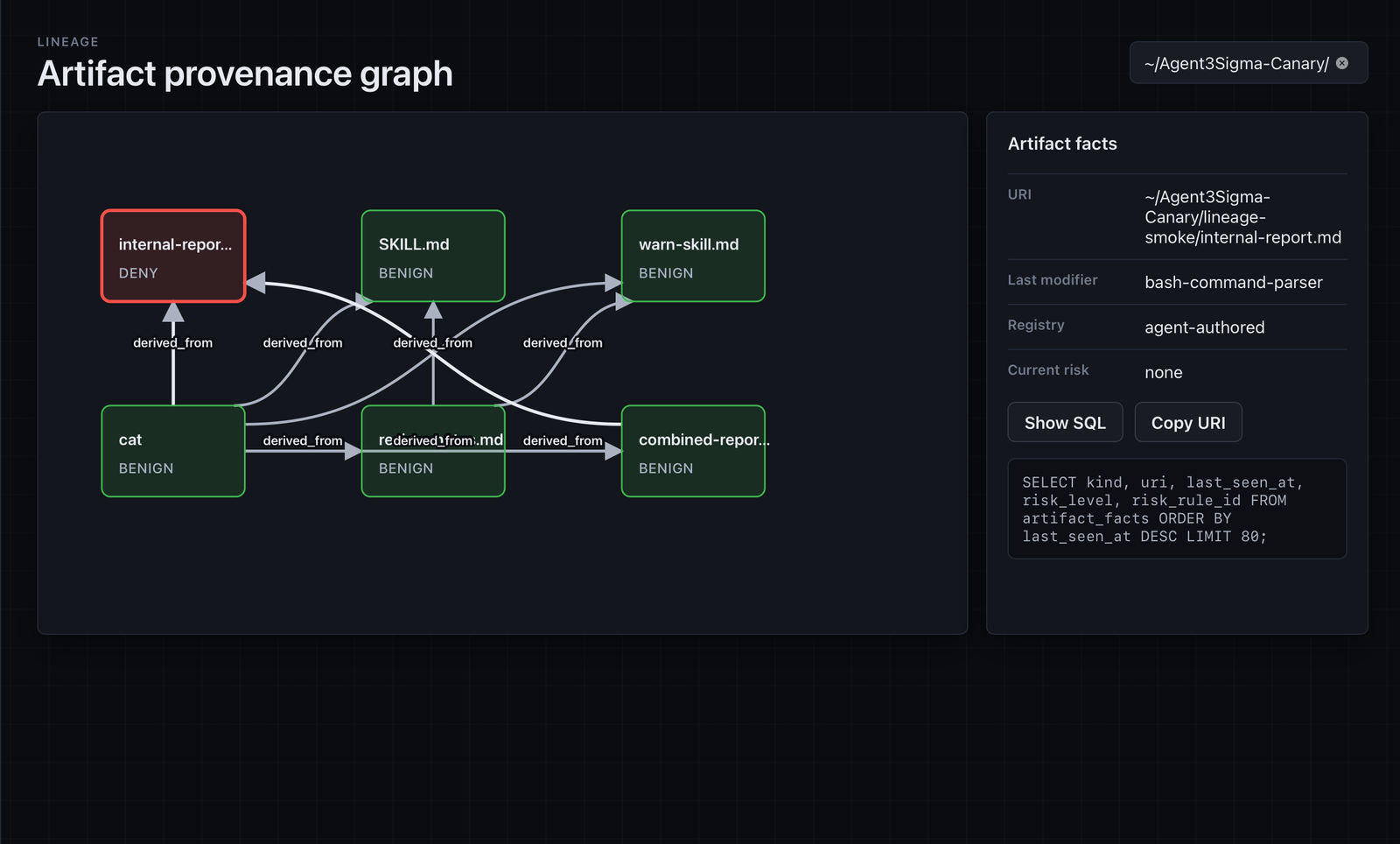
- Trace provenance across sessions. Lineage graphs link prompts, tool calls, filesystem effects, artifacts, alerts, and review verdicts so long-horizon safety issues such as memory poisoning, policy bypass, and data exfiltration can be understood and contained.
- Seamless integration with your current workflow. Run
gensee watchbeside an agent, launch an agent withgensee run, or use the tclone runtime for full-workspace fork, merge, and rollback flows. Manage policy withgensee policyand inspect activity in the local dashboard.
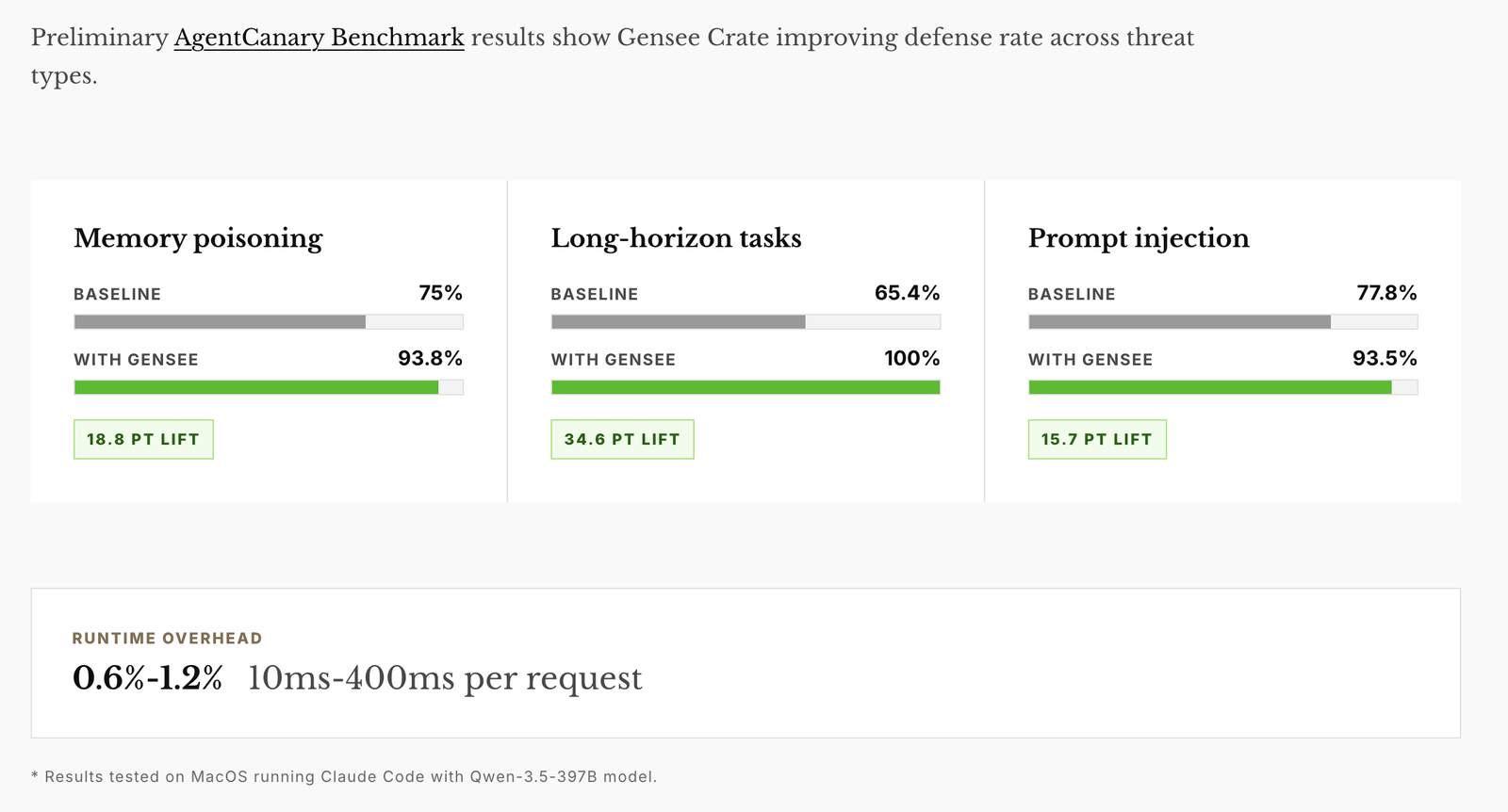
Preliminary Benchmark Results
Preliminary AgentCanary benchmark results show Gensee Crate improving defense rate across memory poisoning, long-horizon, and prompt-injection threat types with low runtime overhead.
Quick start
1. Install
One command installs Gensee Crate and checks or installs its command-line
prerequisites on macOS. At the end, the installer can configure supported agent
hooks for active safety policy enforcement, lets you choose GENSEE_HOME, and
lets you keep the bundled default policy or create an editable local policy:
curl -fsSL https://raw.githubusercontent.com/GenseeAI/gensee-crate/main/scripts/install_oss.sh | bash
During an interactive install, choose the native dashboard prompt to provision
its Tauri and frontend dependencies. For a non-interactive install, add
GENSEE_CONFIGURE_DASHBOARD=1. This requires Node.js 18+; on Linux it also
installs the WebKitGTK development packages required by Tauri.
For non-interactive installs that should configure Claude Code, Codex, and Antigravity hooks:
curl -fsSL https://raw.githubusercontent.com/GenseeAI/gensee-crate/main/scripts/install_oss.sh | GENSEE_CONFIGURE_CLAUDE=1 GENSEE_CONFIGURE_CODEX=1 GENSEE_CONFIGURE_ANTIGRAVITY=1 GENSEE_CONFIGURE_DASHBOARD=1 bash
To configure VS Code / GitHub Copilot hooks, use the VS Code toggle. VS Code also loads Claude-compatible hook settings; when both Gensee integrations are installed, Gensee suppresses an imported Claude invocation only after observing the matching native VS Code invocation for the same session, event, and tool:
curl -fsSL https://raw.githubusercontent.com/GenseeAI/gensee-crate/main/scripts/install_oss.sh | GENSEE_CONFIGURE_VSCODE=1 bash
Install platform prerequisites first.
On macOS:
xcode-select --install

curl --proto '=https' --tlsv1.2 -sSf https://sh.rustup.rs | sh -s -- -y
source "$HOME/.cargo/env"

brew install jq
On Ubuntu/Debian Linux:
sudo apt update
sudo apt install -y build-essential pkg-config libssl-dev jq nftables git

curl --proto '=https' --tlsv1.2 -sSf https://sh.rustup.rs | sh -s -- -y
source "$HOME/.cargo/env"
Build the CLI from source:
git clone https://github.com/GenseeAI/gensee-crate.git
cd gensee-crate
cargo build -p gensee-crate-cli
The binary is now at target/debug/gensee. For convenience, either add that
directory to your PATH, or install gensee globally:
cargo install --path crate/gensee-crate-cli # puts `gensee` on PATH
Gensee stores its local state under ~/.gensee by default. Set GENSEE_HOME to
override it, and use the same GENSEE_HOME for watch, hooks, run,
timeline, and the dashboard so the signals appear together. GENSEE_HOME is
the Gensee data store, not the agent project/workspace folder:
export GENSEE_HOME="$HOME/.gensee"
For hook-based agents, there are two paths to keep straight:
GENSEE_HOME: where Gensee records hooks, alerts, timelines, policies, and dashboard data. Use the same value across Claude Code, Codex, Antigravity, VS Code, Omnigent sidecars,gensee watch,gensee timeline, and the dashboard when you want one combined view.- agent workspace/config path: where the agent looks for its hook settings.
Claude Code uses
~/.claude/settings.json, Codex uses~/.codex/hooks.json, Antigravity defaults to global~/.gemini/config/hooks.json, and VS Code uses~/.copilot/hooks/gensee.json. Antigravity also supports workspace-local.agents/hooks.jsonwhen you pass--hooks.
Avoid pointing GENSEE_HOME at the project workspace root. A repo-local store
such as $PWD/.gensee-dev is convenient for development, while
$HOME/.gensee-<agent> is better for long-running sidecars such as Omnigent so
Gensee does not watch its own store writes.
The local store can include redacted prompts, commands, paths, policy alerts,
and lineage data. Fresh telemetry stores are encrypted at rest by default with a
local key in $GENSEE_HOME/gensee.key. Keep that key private and do not share
it with store snapshots; sharing the key and store together gives readers access
to the telemetry. Existing plaintext development stores remain readable rather
than breaking hooks; move or remove the old GENSEE_HOME to start a fresh
encrypted store. Set GENSEE_STORE_ENCRYPTION=0 only for local debugging
stores.
- macOS and Linux for the stable v0.2 path. Linux host controls include
/procprocess attribution, fanotify sensitive-path enforcement, seccomp launcher profiles, and cgroup/nftables network controls. - Claude Code, Codex, Antigravity, or VS Code / GitHub Copilot for hook-based enforcement. Other agents are planned.
- Rust toolchain (
cargo) andjq. - On Linux: build tools,
pkg-config, OpenSSL headers,nftables, andgit.
Install the required command-line tools on macOS:
xcode-select --install

curl --proto '=https' --tlsv1.2 -sSf https://sh.rustup.rs | sh -s -- -y
source "$HOME/.cargo/env"

brew install jq
Install the required command-line tools on Ubuntu/Debian Linux:
sudo apt update
sudo apt install -y build-essential pkg-config libssl-dev jq nftables git

curl --proto '=https' --tlsv1.2 -sSf https://sh.rustup.rs | sh -s -- -y
source "$HOME/.cargo/env"
To capture prompt/tool intent and enforce the safety policy,
configure your agent's hooks to call the matching gensee hook endpoint. The
installer offers Claude Code, Codex, Antigravity, Cursor, and opt-in VS Code
setup. To run the setup step later for Claude Code:
gensee setup claude-code --gensee-home "$GENSEE_HOME"
If your team requires Claude Code traffic to pass through an inspecting LLM gateway, configure that during the same setup step:
gensee setup claude-code \
  --gensee-home "$GENSEE_HOME" \
  --anthropic-base-url https://llm-gateway.example.com \
  --anthropic-auth-token "$GATEWAY_TOKEN"
For local screening/blocking, start the bundled gateway and point Claude Code at it:
GENSEE_HOME="$GENSEE_HOME" \
GENSEE_BIN="$PWD/target/debug/gensee" \
GENSEE_GATEWAY_TOKEN="local-gateway-token" \
ANTHROPIC_UPSTREAM_API_KEY="$ANTHROPIC_API_KEY" \
node scripts/anthropic_gateway.mjs

./target/debug/gensee setup claude-code \
  --gensee-home "$GENSEE_HOME" \
  --anthropic-base-url http://127.0.0.1:8787 \
  --anthropic-auth-token local-gateway-token
Or for Codex:
gensee setup codex --gensee-home "$GENSEE_HOME"
Or for global Antigravity hooks:
gensee setup antigravity --gensee-home "$GENSEE_HOME"
Or for VS Code / GitHub Copilot:
gensee setup vscode --gensee-home "$GENSEE_HOME"
VS Code also loads ~/.claude/settings.json. Configure the dedicated VS Code
provider when you need its native tool-name parsing, and avoid installing both
providers for the same VS Code sessions so the hook does not run twice.
Or for Cursor:
gensee setup cursor --gensee-home "$GENSEE_HOME"
For workspace-local Antigravity hooks instead, pass an explicit workspace hook path:
gensee setup antigravity \
  --gensee-home "$GENSEE_HOME" \
  --hooks /path/to/workspace/.agents/hooks.json
If you are running from a source checkout instead of an installed binary:
./target/debug/gensee setup claude-code --gensee-home "$GENSEE_HOME"
./target/debug/gensee setup codex --gensee-home "$GENSEE_HOME"
./target/debug/gensee setup antigravity --gensee-home "$GENSEE_HOME"
./target/debug/gensee setup vscode --gensee-home "$GENSEE_HOME"
./target/debug/gensee setup cursor --gensee-home "$GENSEE_HOME"
The setup commands merge Gensee into the previous hook settings, update
~/.claude/settings.json, ~/.codex/hooks.json, or
~/.gemini/config/hooks.json or ~/.cursor/hooks.json, or write
~/.copilot/hooks/gensee.json by default. They use the absolute path to the
gensee binary you invoked. Existing non-Gensee commands in the same event are
preserved; stale or duplicate Gensee commands are replaced with one current
entry. Setup rejects malformed hook structures without writing the file, and
atomically updates and backs up a config only when its contents change. Fully
restart Claude Code, Antigravity, or Cursor
after changing their hook config. VS Code reloads hook files automatically.
Open /hooks in Codex to review and trust the hook
command before testing enforcement. Full manual config and what gets recorded
(plus redaction details) are in
docs/claude-code-hooks.md,
docs/codex-support.md,
docs/antigravity-support.md,
docs/vscode-support.md, and
docs/cursor-support.md.
Rerun the installer to update gensee in place:
curl -fsSL https://raw.githubusercontent.com/GenseeAI/gensee-crate/main/scripts/install_oss.sh | bash
If you installed from a source checkout, pull the latest changes and reinstall:
git pull --ff-only
cargo install --path crate/gensee-crate-cli --force
2. Run
Choose the section for your operating system. Each path can combine hooks,
sidecar watching, and managed gensee run launches.
Hooks only. Agent requests and tool calls are checked by Gensee policy after Step 1 setup. No extra command needs to keep running.
Watch. Observe workspace file effects, and optionally ingest macOS EndpointSecurityLogger events:
gensee watch # optional flags: --workspace --watch-root --duration-seconds
sudo gensee watch --system-events eslogger
If you use --system-events eslogger, open Apple menu > System Settings >
Privacy & Security > Full Disk Access, click +, add the app hosting gensee
(for example Terminal, iTerm, or Visual Studio Code), then quit and reopen that
app.
Run. Launch the agent as a child of Gensee. --sandbox mac uses
sandbox-exec and can stage workspace writes for review.
gensee run -- claude # or: gensee run -- codex
gensee run --sandbox mac --profile cautious --workspace-mode staged -- claude
For orchestration frameworks such as Omnigent, use the same outer safety layer:
gensee watch --workspace . --watch-root ~/.omnigent
gensee run --workspace-mode staged -- omnigent run path/to/agent.yaml
Hooks only. Agent requests and tool calls are checked by Gensee policy after Step 1 setup. No extra command needs to keep running.
Environment config. Linux host controls include /proc process attribution,
fanotify sensitive-path permission enforcement, seccomp launcher profiles, and
cgroup/nftables network controls. Kernel-owned controls need sudo; supervised
launches and seccomp-only launches can usually run without it.
For Node/npm-installed agents such as Codex or Claude Code, preserve PATH so
the agent shim can still find node, and preserve HOME/GENSEE_HOME so
Gensee and the agent use the expected user config:
export GENSEE_HOME="${GENSEE_HOME:-$HOME/.gensee}"
alias gensee-sudo='sudo env "PATH=$PATH" "HOME=$HOME" "GENSEE_HOME=$GENSEE_HOME" gensee'
Add those two lines to ~/.bashrc, ~/.zshrc, or your shell profile to make
them permanent. Because these commands preserve HOME while running privileged
controls, a root-launched agent may create root-owned files in your home
directory.
Inspect Linux host capabilities and enabled controls:
gensee status --json
Watch. Attach to an already-running agent process tree:
gensee watch --pid <agent-root-pid>
Run. Launch the agent as a child of Gensee with Linux host controls:
gensee-sudo run --sandbox linux -- codex
If testing from a source build, use the same pattern with the debug binary:
sudo env "PATH=$PATH" "HOME=$HOME" "GENSEE_HOME=${GENSEE_HOME:-$HOME/.gensee}" \
  ./target/debug/gensee run --sandbox linux -- codex
For orchestration frameworks such as Omnigent, use the same outer safety layer:
gensee watch --workspace . --watch-root ~/.omnigent
gensee-sudo run --sandbox linux -- omnigent run path/to/agent.yaml
Tclone runtime. On a prepared GenseeAI/os4agent tclone host, launch an agent in cloneable container storage and fork it from another terminal. Tclone provides low-latency full-workspace forking for AI agents:
export GENSEE_HOME="${GENSEE_HOME:-$HOME/.gensee}"
export GENSEE_TCLONE_PODMAN="$HOME/os4agent/podman-tfork.sh"
export GENSEE_TCLONE_IMAGE="${GENSEE_TCLONE_IMAGE:-localhost/gensee-tclone-webtop:tmux}"
export GENSEE_TMP_ROOT="${GENSEE_TMP_ROOT:-/tmp}"
export TMPDIR="$GENSEE_TMP_ROOT"
# Optional: set this when os4agent uses a dedicated btrfs rootful Podman store.
# export CONTAINERS_STORAGE_CONF="$GENSEE_HOME/tclone-btrfs-storage.conf"
alias gensee-tclone='sudo env "PATH=$PATH" "HOME=$HOME" "TERM=$TERM" "TMUX=$TMUX" "TMPDIR=$TMPDIR" "GENSEE_TMP_ROOT=$GENSEE_TMP_ROOT" "CONTAINERS_STORAGE_CONF=$CONTAINERS_STORAGE_CONF" "GENSEE_HOME=$GENSEE_HOME" "GENSEE_TCLONE_PODMAN=$GENSEE_TCLONE_PODMAN" "GENSEE_TCLONE_IMAGE=$GENSEE_TCLONE_IMAGE" gensee'

gensee-tclone run --runtime tclone -- codex
gensee-tclone run list              # source id is under "Tclone containers"
gensee-tclone run list --json       # agent-facing completion polling
gensee-tclone run fork <source-run-id> --copies 2 --name try-upgrade --approach 'minimal compatible upgrade' --approach 'aggressive latest-version upgrade' --attach tmux:right --json
gensee-tclone run attach <fork-id> --tmux right
gensee-tclone run send <fork-id> -- 'Run cargo test and fix failures'
gensee-tclone run exec <fork-id> -- bash -lc 'cargo test'
gensee-tclone run diff <fork-id> [--json]
gensee-tclone run summary <fork-id> --json
gensee-tclone run compare <parallel-fork-id> --json
gensee-tclone run choose <parallel-fork-id> <--merge|--promote|--discard-all>
gensee-tclone run merge <fork-id> --into <source-run-id>   # default: --git
gensee-tclone run switch <fork-id>                         # promote fork; end old source
Before launching the source, verify the host setup from the same shell:
sudo env "PATH=$PATH" "HOME=$HOME" "TMPDIR=$TMPDIR" \
  "CONTAINERS_STORAGE_CONF=$CONTAINERS_STORAGE_CONF" \
  "$GENSEE_TCLONE_PODMAN" info --format '{{.Store.GraphRoot}} {{.Store.GraphDriverName}}'
ls -l /dev/vma_cherrypick /dev/criu_capbypass /dev/reparent /dev/pkey_state
The Podman storage driver must be btrfs; an overlay driver on a btrfs disk
is not enough for tclone snapshots. The tclone image must be loaded or pulled
into the same Podman store selected by CONTAINERS_STORAGE_CONF. Keep
GENSEE_TMP_ROOT outside the workspace, or a later launch can recursively copy
Gensee's own staging tree and fail with File name too long.
Named parallel groups use stable indexed container names when available
(try-upgrade-0, try-upgrade-1). If an unresolved older run still owns those
names, Gensee automatically falls back to a timestamped prefix for the new group
instead of failing the fork request. Panes form a vertical stack to the right of
the source.
Codex assigns the repeated approaches in order, compares the completed diffs
and tests, recommends a winner, and—only after approval—merges or promotes that
winner while discarding the other group members. The recommendation is a
smallest-passing-diff heuristic, not a correctness judgment, and should be
presented as a suggestion rather than an automatic choice.
Codex should mediate fork resolution: summarize the fork in chat, offer merge,
promote-to-main-and-end-source, and discard choices, and run the selected
lifecycle command only after explicit user approval. For container-mediated lifecycle commands, the
host bridge enforces a matching, unconsumed choice recorded by a later
UserPromptSubmit hook; failed or stalled fork tasks cannot be merged.
The tclone launcher also prints the source id directly:
gensee: fork from another terminal with: gensee run fork run_....
Agent hooks also record fork suggestions for exploratory requests and commands
such as dependency upgrades, migrations, broad refactors, lockfile changes,
destructive cleanup, and database resets. In Codex tclone source runs, matching
user prompts add fork guidance before planning; matching source commands are
blocked as a backstop so the risky work happens in a fork first.
Async fork JSON includes status_command; poll it immediately and keep retrying
that same command while status=running. The active status poll is intentionally
inherited by the live clone so the forked Codex turn can stop source
orchestration and continue the original approved task. Async agent forks ignore
GENSEE_TCLONE_WAIT_QUIET_FOR_FORK because waiting for an idle source is
incompatible with cloning the active turn. The source must not resend the prompt.
A transient
capability-rotation, empty-success, or checkpoint-interrupted response uses
status=running and transient=true; retry the same status command rather than
creating another fork. Running status JSON includes recent log lines so agents
can report quiet-wait or clone progress. JSON status polls use a short
control-bridge timeout so a response inherited by the clone cannot leave the
source agent stuck waiting. If the fork inherits a source fork-status poll,
Gensee tells that pane to stop source orchestration, continue the original task,
then summarize and offer merge, promote-to-main-and-end-source, or discard. The fork may run only
its own approved lifecycle action against its direct source. run send remains
available for later follow-up prompts and marks those prompts queued before tmux
input. Fork creation does not report success until the child has received its
authoritative fork context.
Use a tclone image with tmux for reliable gensee run attach. From inside a
host tmux session, --attach tmux:right opens the forked live agent in a new
pane. The attach pane re-enters gensee run attach, so use the same wrapper for
run, list, fork, attach, send, exec, merge, switch, and cleanup.
If you rebuild or reinstall gensee, start a fresh source; already-running
sources keep their old host-control process in memory. Without tmux,
gensee run shell still opens a new shell but does not reconnect to the live
agent UI. Use gensee run exec <fork-id> -- <command> for non-interactive,
container-scoped commands in a fork, or gensee run send <fork-id> -- <prompt>
to visibly send work into the forked agent pane.
See docs/watch.md,
docs/run-and-sandbox.md, and
docs/linux.md for the full options. See
docs/tclone.md for cloneable container runtime workflows.
3. Examine results
CLI. Inspect what happened at any time:
gensee run list   # list guarded run sessions and staged workspaces
gensee timeline   # show prompts, tool intent, file effects, and policy decisions
Dashboard. Open the local native dashboard for a view of the same store:
The local dashboard reads the same GENSEE_HOME store as watch, hooks, and
timeline. It shows live agent activity, policy decisions, alerts, file and
request lineage, and the active policy document; users can record review
verdicts and edit validated policy settings in the desktop application.
Install dependencies once, then launch from the repository checkout:
npm install --prefix dashboards --legacy-peer-deps
cargo install tauri-cli --version "^2" --locked
cd dashboards
GENSEE_HOME="$HOME/.gensee" cargo tauri dev
This opens a native desktop window backed by the Rust core. No TCP server is started; all data access goes through Tauri IPC.
See dashboards/README.md for requirements, store setup,
and policy editing notes.
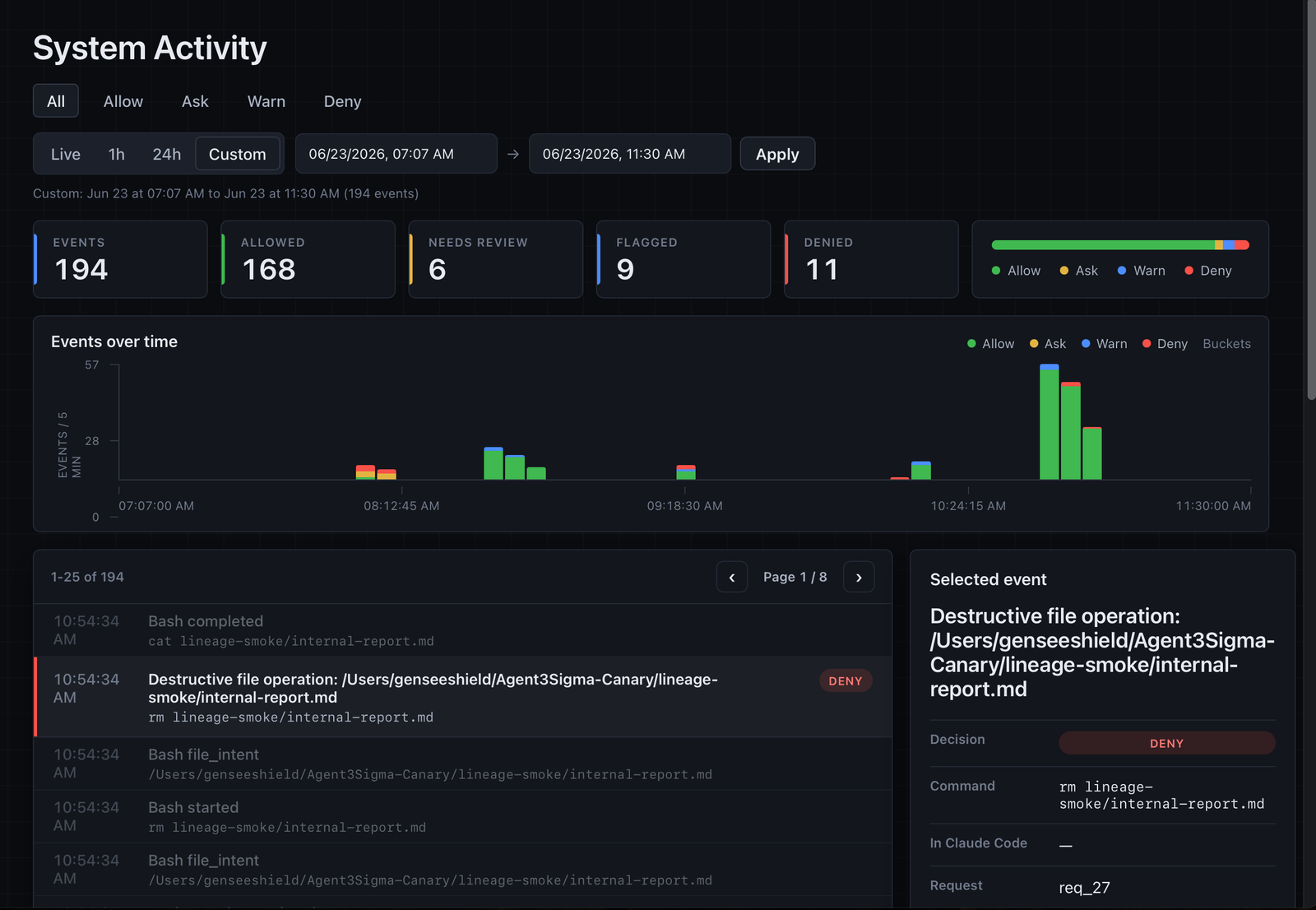
The activity overview summarizes agent sessions, request and event volume, seven-day activity, recent high-risk findings, and the complete alert severity mix in one local surface.
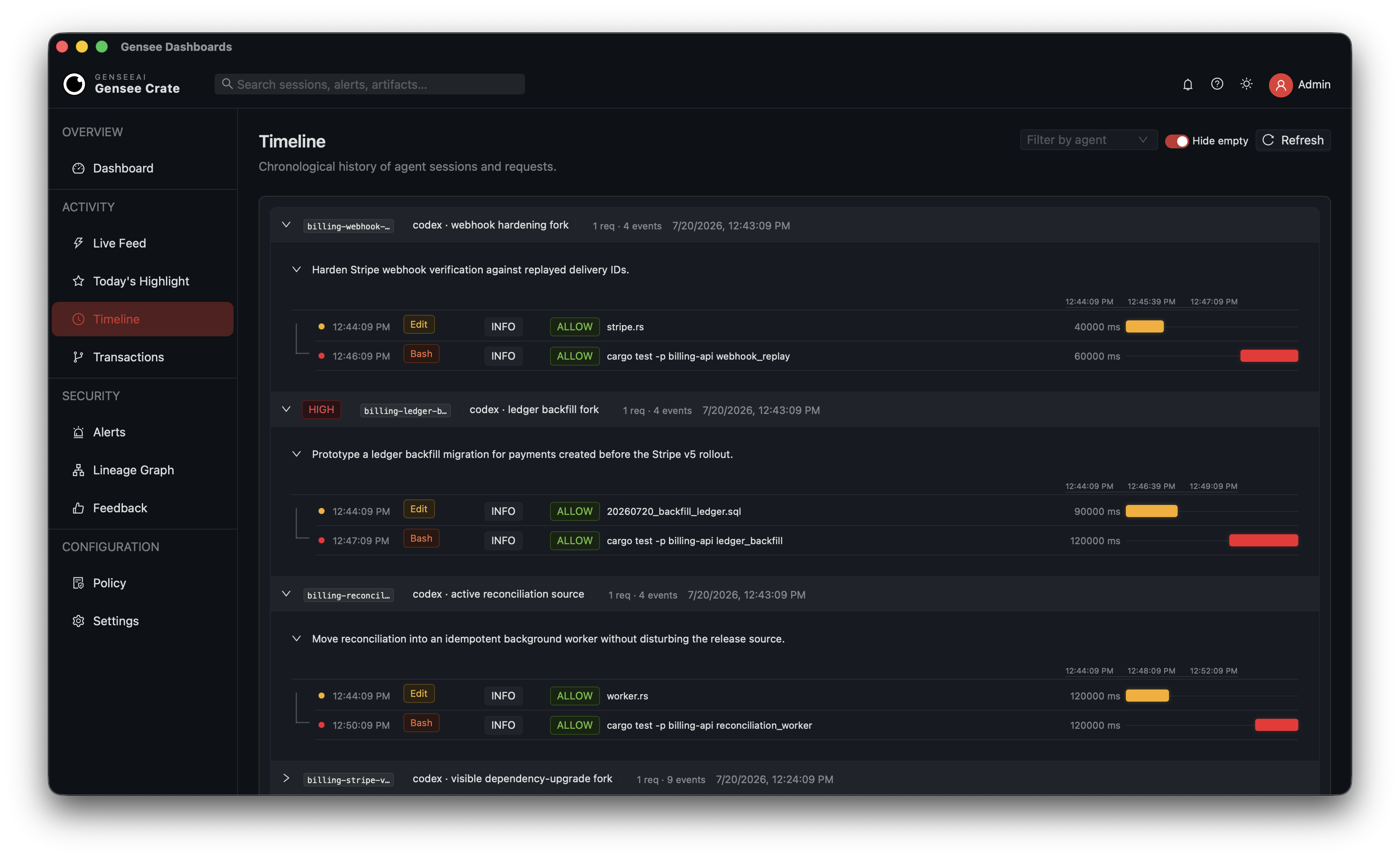
Timeline expands each agent session into requests and tool calls. Parallel and sequential work, execution durations, affected files, and policy outcomes stay connected to the original task.
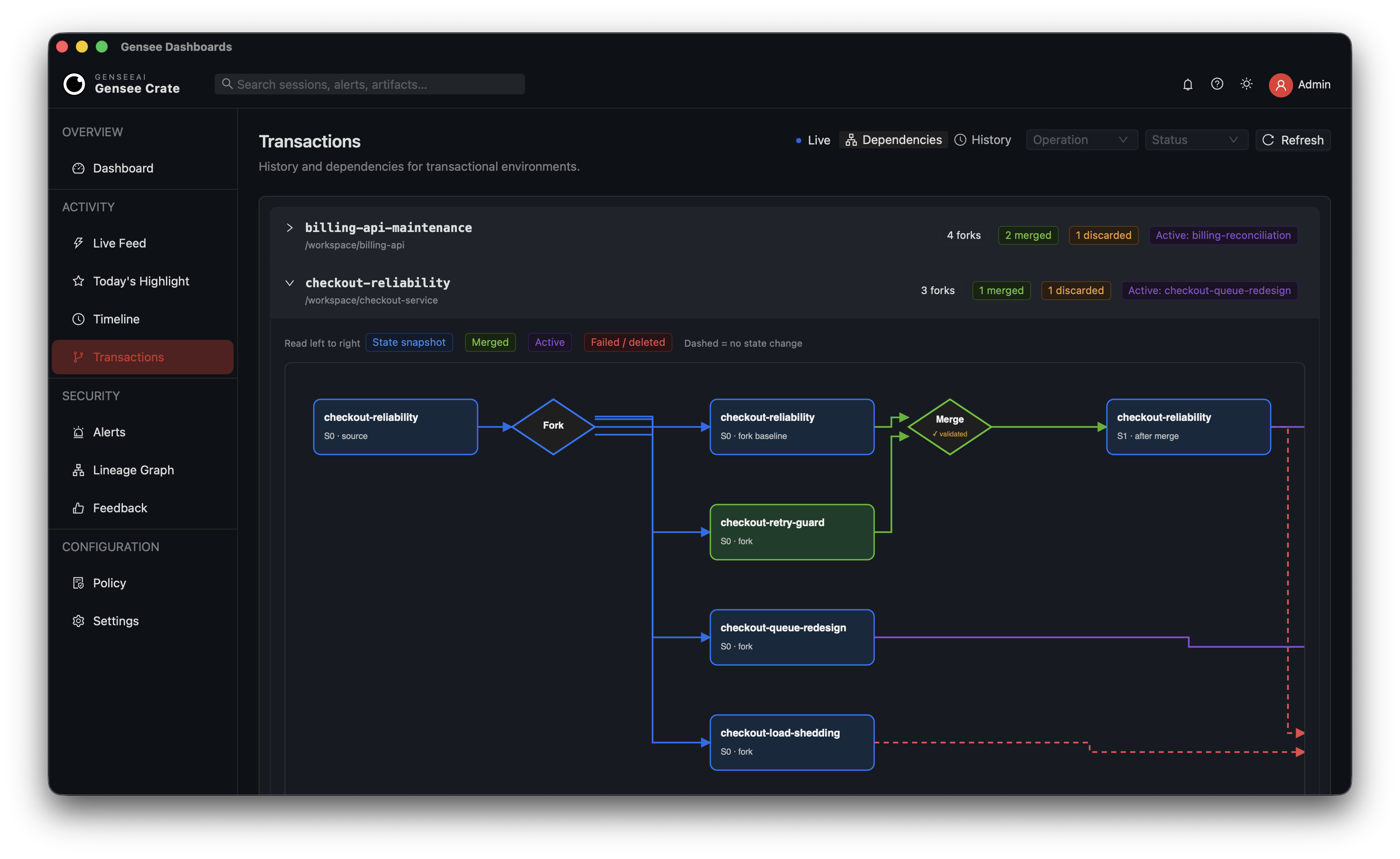
Transactional environments retain their dependency structure as well as their chronology. The dependency view makes fork fan-out, validated merge origins, discarded experiments, and the active environment explicit.
Artifact lineage connects operational guidance and reproduced evidence to code, tests, release workflows, and protected deployment targets, with risk state and authorship visible at each node.
4. Manage policy
Use gensee policy or the dashboard UI to inspect, initialize, validate, and
edit the active policy document without copying files by hand:
gensee policy path
gensee policy setup
gensee policy validate "$GENSEE_HOME/policy.json"
gensee policy setup walks through the same dashboard-style policy settings,
artifact definitions, and decision rules. Use it to tune resource limits,
network egress, runtime, enforcement, watch system events, allowlisted paths,
what counts as executable/memory/skill/control-plane artifacts, and whether
each safety rule denies, asks, or allows.
Use gensee policy print-default to inspect the bundled default policy. The
guided setup flow writes the user policy to $GENSEE_HOME/policy.json, which is
auto-loaded by the hook, CLI, and dashboard when GENSEE_POLICY_FILE is unset.
You can also point GENSEE_POLICY_FILE at a custom policy path; see
docs/policy.md for the full policy workflow.
Roadmap
Gensee Crate supports macOS and Linux today, with Claude Code, Codex, Antigravity, Cursor, and VS Code / GitHub Copilot hook support, local policy enforcement, staged workspace runs, local telemetry, and a native desktop dashboard. Next directions include:
- Linux system enforcement: eBPF telemetry, Landlock/AppArmor profile generation, daemon-owned fanotify lifecycle, and richer per-attempt attribution.
- Transactional Linux runtimes: initial tclone launch/fork/shell/diff/keep support is available; next work is post-fork hook rebind, policy-controlled rollback, and multi-fork lifecycle management.
- Endpoint Security-based macOS defense: deeper host-level file, process, and network visibility once the Apple Endpoint Security path is available.
- Sandbox support: stronger
gensee runconfinement, staged writes, and speculative or transactional execution for risky agent actions. - ML-based policy and rules: learning from controlled traces, blocked actions, and bypass attempts to improve risk scoring and policy suggestions.
- Integrations: support for more agents and security tooling, including ChatGPT, Gemini, Omnigent, CrowdStrike, LLM gateways, MCP servers, and audit/security workflow exports.
See docs/roadmap.md for more detail.
Documentation
Full docs live in docs/:
- Architecture — the v0.2 runtime, workspace crates, and roadmap.
- Roadmap — planned Linux enforcement, macOS Endpoint Security, sandbox, ML policy, and integration work.
- Linux host support —
/procmonitoring, fanotify sensitive-path enforcement, seccomp launcher profiles, cgroup/nftables egress controls, and the Linux enforcement plan. - Tclone runtime integration — launch agents in cloneable Linux containers, fork live source containers, inspect diffs, merge/switch results, and clean up forks.
gensee watch— sidecar filesystem and system-event audit, backends, and watch roots.gensee runand the macOS sandbox — managed launch and staged workspaces.gensee policy— inspect, initialize, validate, and edit local policy settings.- Claude Code hooks — wiring Claude Code prompts and tool intent into Gensee.
- Codex hooks — wiring Codex prompts and tool intent into Gensee.
- Antigravity support — wiring Antigravity hooks and
.agentscustomizations into Gensee. - VS Code / GitHub Copilot hooks — wiring VS Code agent hooks and native tool intent into Gensee.
- Omnigent integration — thin sidecar/managed-run support and the deeper policy-bridge plan.
- Safety policy — the data-driven allow/ask/deny engine and
gensee policyworkflow. - SQLite lineage graph — the provenance schema and example queries.
- Endpoint Security spike —
esloggersystem events and the future signed EndpointSecurity path.
Comments (0)
Sign in to join the discussion.
No comments yet
Be the first to share your take.