
findcoworkskills
Find out what Claude skills already exist for a topic, before you spend an afternoon building one that's already out there.



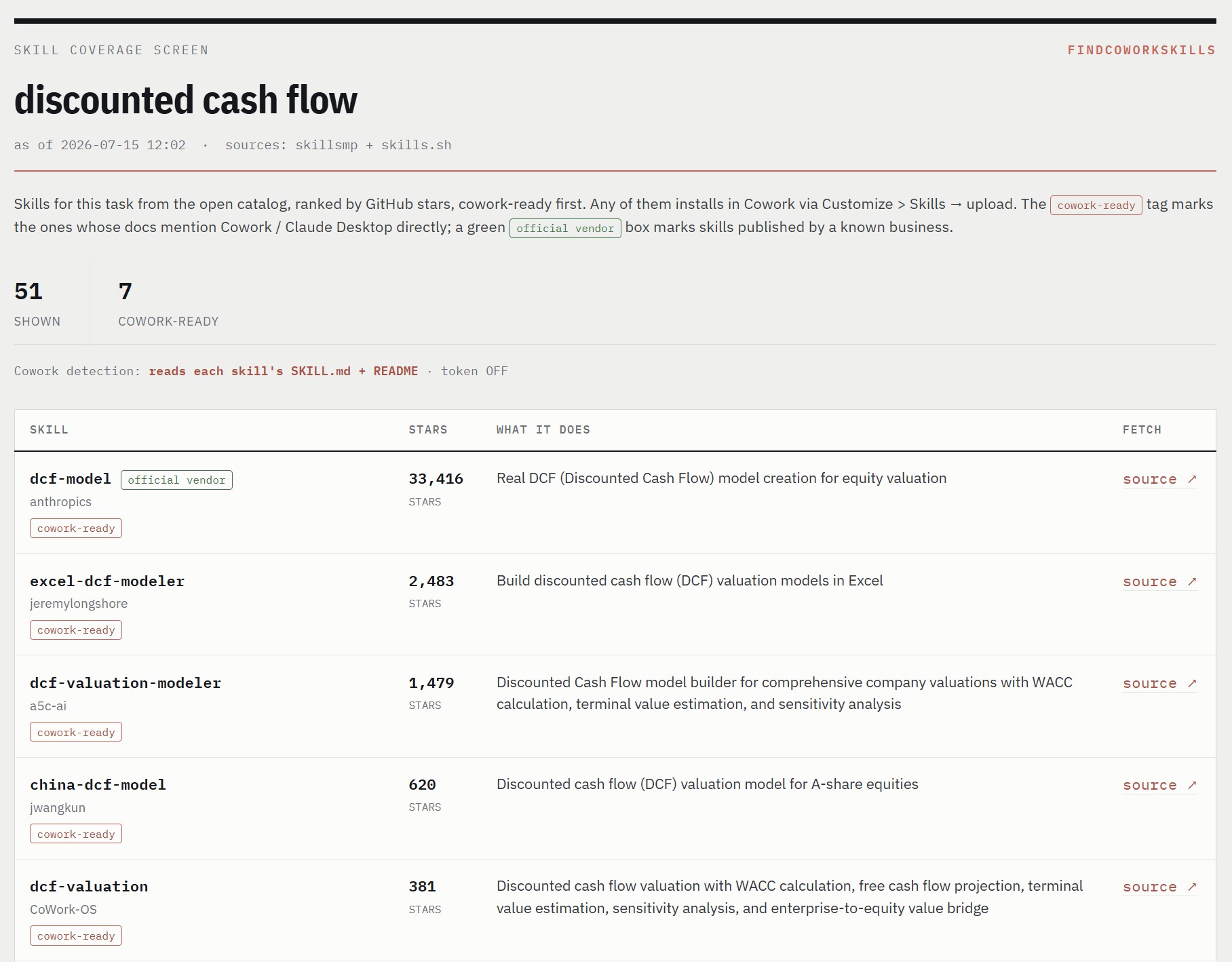
findcoworkskills is a skill for Claude Cowork (and Claude Desktop). You give it a topic. It searches the open skill catalog, reads each result's real SKILL.md to see which ones actually declare Cowork support, ranks everything by GitHub stars, and hands you one ranked HTML report. No account, no API token, no sign-up. It runs on public data over plain HTTP.
It's a coverage check. Before you build a skill, spend twenty seconds seeing what already exists.
Why this exists
The skill ecosystem got big fast. The catalog it searches lists over two million of them. That's great until you want a straight answer to a simple question: is there already a decent skill for this, and will it even run in Cowork?
Most catalogs rank by keyword and stop. They won't tell you whether a skill was written for Claude Code, leaning on hooks and slash commands that Cowork can't run, or whether it drops straight into Cowork untouched. findcoworkskills opens each skill's actual SKILL.md and checks. So the report you get back is sorted by what you can actually use, not just what matched your search.
What it does
- Searches the skillsmp.com catalog for your topic.
- Drops duplicate copies and forks, keeping the most-starred version of each skill.
- Reads each result's real
SKILL.md(and the README as a fallback) to spot the ones that mention Cowork or Claude Desktop. - Ranks by GitHub stars, cowork-ready first, and writes a clean HTML report you open in a browser.
Install it in Claude Cowork
- Download the skill. Grab the latest release ZIP, or click the green Code button above and choose Download ZIP.
- Open Claude (Cowork or Desktop) and go to Customize → Skills.
- Upload the
findcoworkskillsfolder (or the ZIP). That's it. It's installed. - Ask for it in plain English. For example:
- "find cowork skills for equity research"
- "is there already a DCF skill?"
- "what's out there for SEO before I build my own?"
Claude runs the skill and opens the report.
Run it directly (optional)
You don't need Cowork to use it. It's a standalone Python script (3.8+, standard library only, nothing to pip install):
python3 findcoworkskills.py "your topic here"
The report lands at findcoworkskills_report.html. Set FCS_OUT to send it somewhere else:
FCS_OUT=~/Desktop/skills.html python3 findcoworkskills.py "discounted cash flow"
Reading the report
- cowork-ready tag: the skill's own docs mention Cowork or Claude Desktop.
- green "official vendor" box: published by a known company (Anthropic and friends). The vendor list lives near the top of the script, so add names as you like.
- Stars: the GitHub repository's stars, the one signal every skill shares. Heads up: a big number can be the repo's stars when a skill lives inside a large project.
- Divider: splits the cowork-ready skills from the rest. The ones below still install; they just don't mention Cowork in their docs.
- Show more: the report loads 25 at a time.
Good to know
- No account, login, or token. Public data, plain HTTP.
- A run reads each result's
SKILL.md, so give it roughly 20–40 seconds for around 50 skills. - Review any third-party skill before you enable it, the same way you'd read any code you're about to run.
- Found a skill that needs tweaks for Cowork because it leans on Claude Code-only features? Paste its URL into Cowork and ask Claude to adapt it.
License
MIT. Free to use, change, and share. Keep the copyright notice and you're good.
Made by Invest With AI
findcoworkskills is free from Invest With AI, an Atomical Capital publication. Invest With AI is a newsletter about using Claude, to do real investing work.
If the skill saved you some time, the nicest thank-you is a ⭐ on the repo and a look at the newsletter.
No comments yet
Be the first to share your take.