
Engineering Docs
22 composable, auto-triggering skills that turn your coding agent into a principal engineer - from raw idea to production-ready documentation.



Why Engineering Docs?
Your coding agent is powerful, but it doesn't know your project's architecture, your users, or your constraints. Engineering Docs gives it principal-level documentation skills — so it can:
- Turn raw ideas into complete blueprints — business concept → technical spec → architecture → deployment plan
- Ask the right questions — tool-call interviews with 2-3 targeted questions per skill (no repeated questions)
- Generate production-ready documents — ISO/IEC/IEEE 29148, C4 Model, STRIDE, Google SRE standards
- Work across 14+ agents — Claude Code, Copilot, Cursor, Gemini CLI, Goose, Pi, and more
How It Works
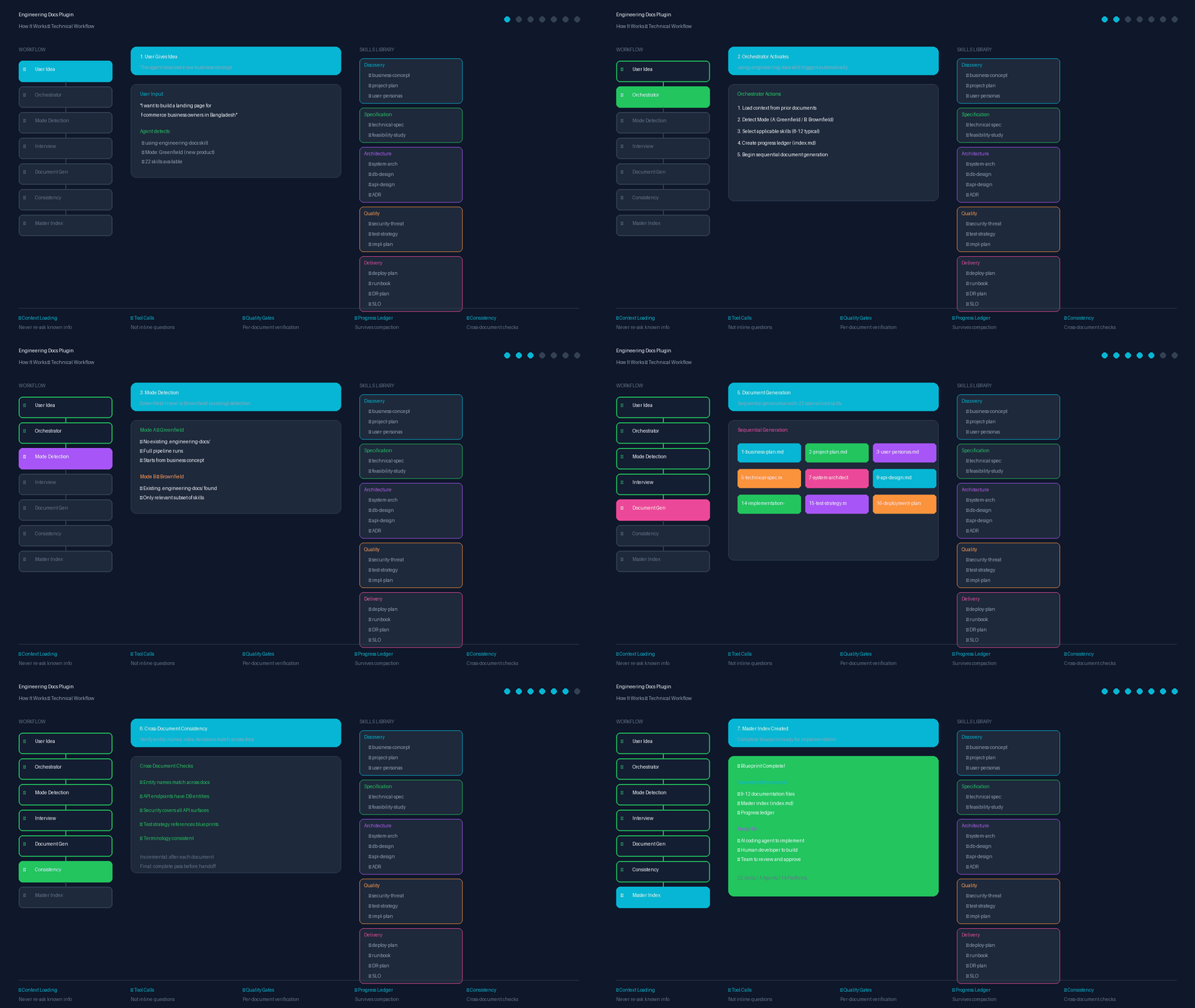
The plugin works through a structured workflow:
- User gives idea → Orchestrator skill activates automatically
- Mode detection → Greenfield (new) vs Brownfield (existing)
- Interview phase → Tool-call questions with context loading
- Document generation → Sequential generation with 22 specialized skills
- Consistency checks → Cross-document verification
- Master index → Complete blueprint ready for implementation
Quickstart
npx engineering-docs
Or install for your specific agent:
| Agent | Install Command |
|---|---|
| Claude Code | /plugin install engineering-docs@claude-plugins-official |
| Gemini CLI | gemini extensions install https://github.com/fattain-naime/engineering-docs |
| Cursor | /add-plugin engineering-docs |
| Goose | goose configure → add extension |
| Pi | pi install git:github.com/fattain-naime/engineering-docs |
| OpenCode | npx engineering-docs --opencode |
| Kilo Code | Install from Kilo Code plugin marketplace |
| Roo Code | Install from Roo Code plugin marketplace |
| Cline | npx engineering-docs --cline |
| Kimi Code | /plugins install https://github.com/fattain-naime/engineering-docs |
| Codex | Install from Codex plugin marketplace |
| Copilot CLI | npx engineering-docs --copilot |
| Factory Droid | npx engineering-docs --factory |
See Installation for detailed instructions.
How It Works
graph LR
    A[Your Idea] --> B[Orchestrator]
    B --> C[Interview]
    C --> D[Business Concept]
    D --> E[Project Plan]
    E --> F[Technical Spec]
    F --> G[System Architecture]
    G --> H[API Design]
    H --> I[Implementation Plan]
    I --> J[Test Strategy]
    J --> K[Deployment Plan]
    K --> L[Master Index]
- Give it your idea — "I want to build X"
- Answer 2-3 questions per skill — via tool calls, not inline chat
- Review each document — approve or request changes
- Get your blueprint — complete, cross-consistent documentation set
Smart features:
- Context loading — reads prior documents before asking questions (never repeats)
- Tool-call interviews — clean input capture, no conversation pollution
- Right-sizing — skips documents that don't apply to your project
- Cross-document consistency — verifies entity names, roles, decisions match
What's Inside
Skills Library (22 Skills)
Discovery & Planning
| Skill | What It Produces |
|---|---|
using-engineering-docs |
Orchestrator — routes to all other skills automatically |
business-concept |
Problem, users, value proposition, monetization, constraints |
project-plan |
Scope, milestones, RACI, timeline, work breakdown |
user-personas-behavior |
User personas, JTBD, success metrics, analytics plan |
Specification & Feasibility
| Skill | What It Produces |
|---|---|
technical-specification |
SRS/TSD with EARS syntax, traceability matrix |
technical-feasibility-study |
Go/no-go recommendation with evidence |
Architecture & Design
| Skill | What It Produces |
|---|---|
system-architecture-document |
C4 diagrams, 4+1 views, tech stack, NFRs |
architecture-decision-record |
Immutable ADR log (MADR format) |
database-design-document |
ERD, schema, indexing, migration plan |
api-design-document |
REST/OpenAPI 3.1 contract, RFC 7807 errors |
admin-access-control-specification |
RBAC matrix, audit logging, break-glass |
technical-blueprint |
Google/Stripe-quality TDD per feature |
ux-flow-specification |
User journeys, screen flows, UI states |
design-system-specification |
Design tokens, components, accessibility |
Quality & Risk
| Skill | What It Produces |
|---|---|
security-threat-model |
STRIDE analysis, attack surface, mitigations |
test-strategy-document |
Testing pyramid, CI gates, coverage targets |
implementation-plan |
Dependency-ordered build sequence, phase gates |
Delivery & Operations
| Skill | What It Produces |
|---|---|
deployment-plan |
Release strategy, go/no-go gate, rollback |
slo-error-budget-document |
SLI/SLO targets, burn-rate alerts |
technical-runbook |
On-call operations manual (Google SRE) |
disaster-recovery-plan |
RTO/RPO, backup strategy, failover |
incident-postmortem |
Blameless RCA with Five Whys |
Custom Agents (4 Agents)
| Agent | Purpose |
|---|---|
documentation-generator |
Generate comprehensive documentation for software projects |
architecture-reviewer |
Review system architecture for scalability, security, and maintainability |
api-designer |
Design RESTful APIs following best practices |
test-strategist |
Create comprehensive test strategies for software projects |
Utility Scripts
| Script | Purpose |
|---|---|
generate-dependency-graph.js |
Mermaid dependency visualization |
validate-documents.js |
Document validation |
calculate-error-budget.js |
SLO error budget calculator |
generate-test-cases.js |
Test case generator from specs |
generate-ddl.js |
SQL DDL generator from schema |
check-consistency.js |
Cross-document consistency checker |
MCP Integration
.mcp.json          # MCP server configuration
scripts/validate.js    # Validation server (validate_document_set, check_consistency, generate_index)
Hooks
hooks/hooks.json          # SessionStart hook configuration
hooks/check-progress.js   # Check for in-progress documentation
hooks/run-hook.cmd        # Windows compatibility
Eval Framework
evals/evals.json           # Test cases for orchestrator and key skills
evals/README.md            # How to run evals
evals/test-prompts/        # Sample test prompts
Plugin Structure (Claude Compatible)
engineering-docs/
├── .claude-plugin/
│   ├── plugin.json        # Plugin manifest
│   └── marketplace.json   # Marketplace manifest
├── skills/                # 22 skills (SKILL.md files)
├── agents/                # 4 custom agents
├── hooks/                 # Event handlers
├── .mcp.json              # MCP server configuration
├── scripts/               # All scripts (install, validate, test, utilities) (install.js, validate.js, test-skills.js)
├── scripts/               # Utility scripts + setup scripts
├── evals/                 # Test framework
└── integrations/          # Other agent platform configs
    ├── agents/            # Agent configs (AGENTS.md, CLAUDE.md, GEMINI.md)
    └── plugins/           # Plugin configs for 13+ platforms
Claude Guidelines Compliance:
- ✅ Components at plugin root (not inside
.claude-plugin/) - ✅ Skills in
skills/directory withSKILL.md - ✅ Agents in
agents/directory with frontmatter - ✅ Hooks in
hooks/hooks.json - ✅ MCP in
.mcp.json - ✅ Kebab-case naming
- ✅ Validation passes:
claude plugin validate .
Installation
CLI Installer (Recommended)
npx engineering-docs
Automatically detects and copies the plugin to your agent's directory.
Per-Agent Installation
Claude Code
# Official marketplace
/plugin install engineering-docs@claude-plugins-official

# Or register marketplace first
/plugin marketplace add fattain-naime/engineering-docs
/plugin install engineering-docs@engineering-docs
Gemini CLI
gemini extensions install https://github.com/fattain-naime/engineering-docs
Or clone manually:
git clone https://github.com/fattain-naime/engineering-docs.git ~/.gemini/config/plugins/engineering-docs
Cursor / Windsurf
npx engineering-docs --cursor
Extracts each skill to .cursor/rules/engineering-docs-*.mdc.
Goose
npx engineering-docs --goose
Or configure manually in ~/.config/goose/config.yaml.
Pi
npx engineering-docs --pi
Or install from git:
pi install git:github.com/fattain-naime/engineering-docs
OpenCode
npx engineering-docs --opencode
Kilo Code
npx engineering-docs --kilo
Or install from Kilo Code plugin marketplace.
Codex / GitHub Copilot
npx engineering-docs --codex
Copilot CLI
npx engineering-docs --copilot
Cline
npx engineering-docs --cline
Copies .clinerules to your project root.
Factory Droid
npx engineering-docs --factory
Roo Code
npx engineering-docs --roo
Kimi Code
npx engineering-docs --kimi
Or install inside Kimi Code:
/plugins install https://github.com/fattain-naime/engineering-docs
Cross-Platform Scripts
# Windows (PowerShell)
pwsh scripts\setup.ps1
pwsh scripts\setup.ps1 -Target gemini
pwsh scripts\setup.ps1 -Target claude

# Linux / macOS (Bash)
chmod +x scripts/setup.sh
./scripts/setup.sh
./scripts/setup.sh --gemini
./scripts/setup.sh --claude
Supported targets: gemini, claude, local, cursor, kimi, codex, goose, pi, opencode, kilo, roo, cline, factory, copilot
Safe-Write Behavior
All install methods use safe-write for agent config files:
AGENTS.md— Created only if it doesn't existCLAUDE.md— Created only if it doesn't existGEMINI.md— Created only if it doesn't existCOPILOT.md— Created only if it doesn't existGOOSE.md— Created only if it doesn't existPI.md— Created only if it doesn't exist
Your customizations are always preserved.
Multi-Agent Compatibility
| Platform | Manifest Format | Installation Path |
|---|---|---|
| Claude Code | .claude-plugin/plugin.json |
~/.claude/plugins/engineering-docs/ |
| Gemini CLI | integrations/plugins/gemini-extension.json |
~/.gemini/config/plugins/engineering-docs/ |
| Cursor / Windsurf | integrations/plugins/.cursor-plugin/plugin.json |
./.cursor/rules/engineering-docs-*.mdc |
| Kimi Code | integrations/plugins/.kimi-plugin/plugin.json |
~/.kimi-code/plugins/engineering-docs/ |
| Codex | integrations/plugins/.codex-plugin/plugin.json |
./.codex/engineering-docs/ |
| OpenCode | integrations/plugins/.opencode/plugin.json |
./.opencode/engineering-docs/ |
| Goose | integrations/plugins/.goose/GOOSE.md |
~/.config/goose/extensions/engineering-docs/ |
| Pi | integrations/plugins/.pi/PI.md |
~/.pi/packages/engineering-docs/ |
| Kilo Code | integrations/plugins/.kilo-plugin/plugin.json |
~/.kilo-code/plugins/engineering-docs/ |
| Roo Code | integrations/plugins/.roo-plugin/plugin.json |
~/.roo-code/plugins/engineering-docs/ |
| Cline | integrations/plugins/.cline/.clinerules |
./.clinerules |
| Factory Droid | integrations/plugins/.factory-plugin/plugin.json |
~/.factory/plugins/engineering-docs/ |
| Copilot CLI | integrations/plugins/.copilot/COPILOT.md |
~/.copilot/plugins/engineering-docs/ |
Testing
# Run plugin validation
claude plugin validate .

# Run skill tests
npm test

# Test MCP server
node scripts/validate.js
Philosophy
- Systemic over Ad-hoc — Rigorous, reproducible processes yield safer and cleaner software
- Traceability — Every requirement links to a business goal and a test case
- Visual-First — Complex architectures mapped with Git-trackable Mermaid diagrams
- Operational Safety — No feature is complete without deployment runsheet, monitoring, rollback
- Blameless Learning — Production failures are data points for system hardening
Contributing
We welcome community skills! Please review CONTRIBUTING.md for guidelines.
Community
- GitHub: fattain-naime/engineering-docs
- Issues: Report bugs or request features
Author
- Fattain Naime — iamnaime.info.bd
- Repository: https://github.com/fattain-naime/engineering-docs
License
MIT. See LICENSE.
No comments yet
Be the first to share your take.