
elsevier-figure-style
English | 简体中文



You already know journal figures need consistent formatting. So why does it still become last-minute rework? Requirements are scattered, writing takes months, exports change what looked correct on screen, and consistency drifts across scripts, tools, and collaborators.
- At the first plot: you want to start with the right format, but publisher guidance, journal-specific instructions, and practical checks do not live in one place.
- On every new figure: you keep rewriting figure size, fonts, line widths, legends, and export settings instead of reusing one maintained profile, especially when you are new to research.
- Months into writing: you once checked the font size, figure width, and DPI, but it is easy to miss one of them when revising an old figure or adding a new one.
- When revisiting old figures: copied scripts carry stale or inconsistent style settings, so a small data update turns into another formatting pass.
- At final export: the plotting code looks fine, yet labels become unreadable at column width or the output carries the wrong resolution, transparency, color mode, or dimensions.
- Across a team and toolchain: figures from different scripts, software, and collaborators gradually diverge in fonts, colors, line widths, and layout.
- After editorial feedback: a fix applied to one figure or response letter is not captured as a reusable rule, so the same comment can return on another figure.
- After changing journals: another target means another round of requirements to find, interpret, and apply consistently.
elsevier-figure-style turns those easy-to-forget requirements into repeatable checks throughout the paper workflow. An AI agent applies a shared profile while generating quantitative result figures, audits plotting code and export metadata during writing, and inspects the final rendering at its intended size before submission. For schematics and graphical abstracts, v0.1 audits metadata and the rendered export. The bundled manifest provides a source-backed Elsevier-style profile; replace the manifest and evidence bundle to adapt the workflow to another journal, and extend the detector when the new profile introduces a new rule type.
| Line plot | Bar chart | Scatter plot | |
|---|---|---|---|
| Before / ad hoc | 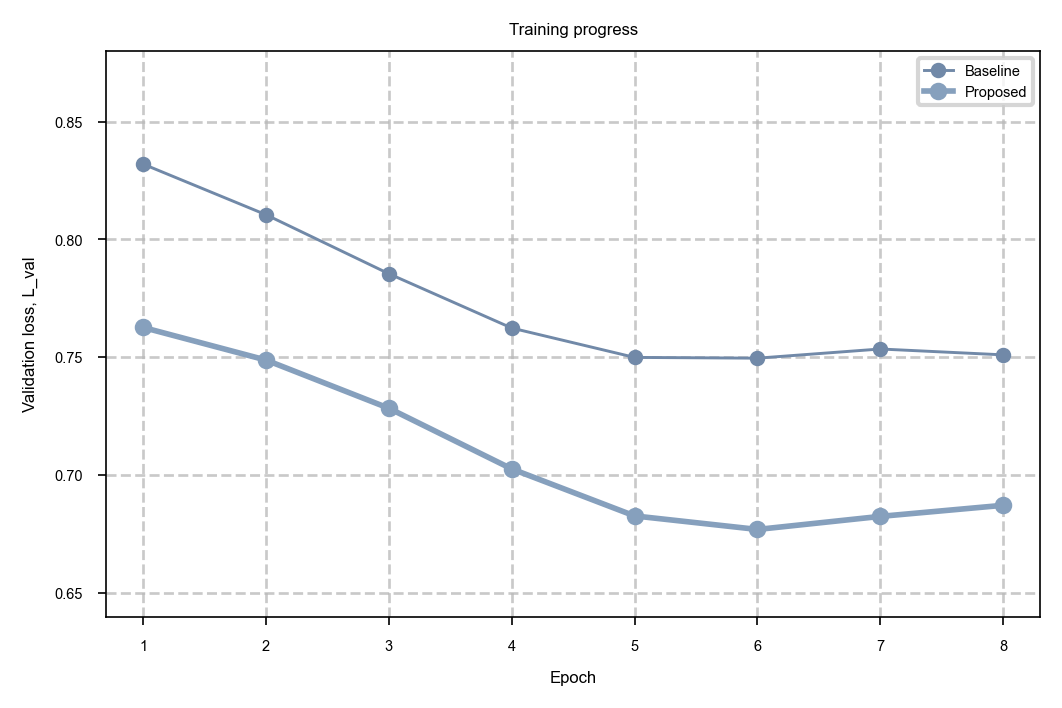 |
 |
 |
| After / profile-backed | 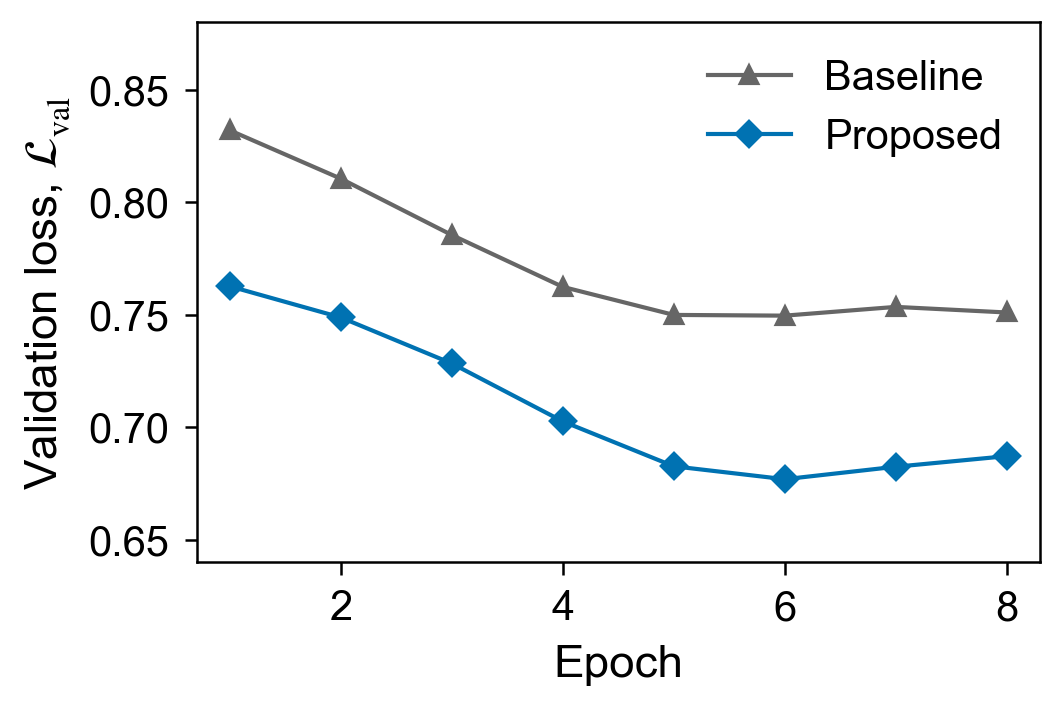 |
 |
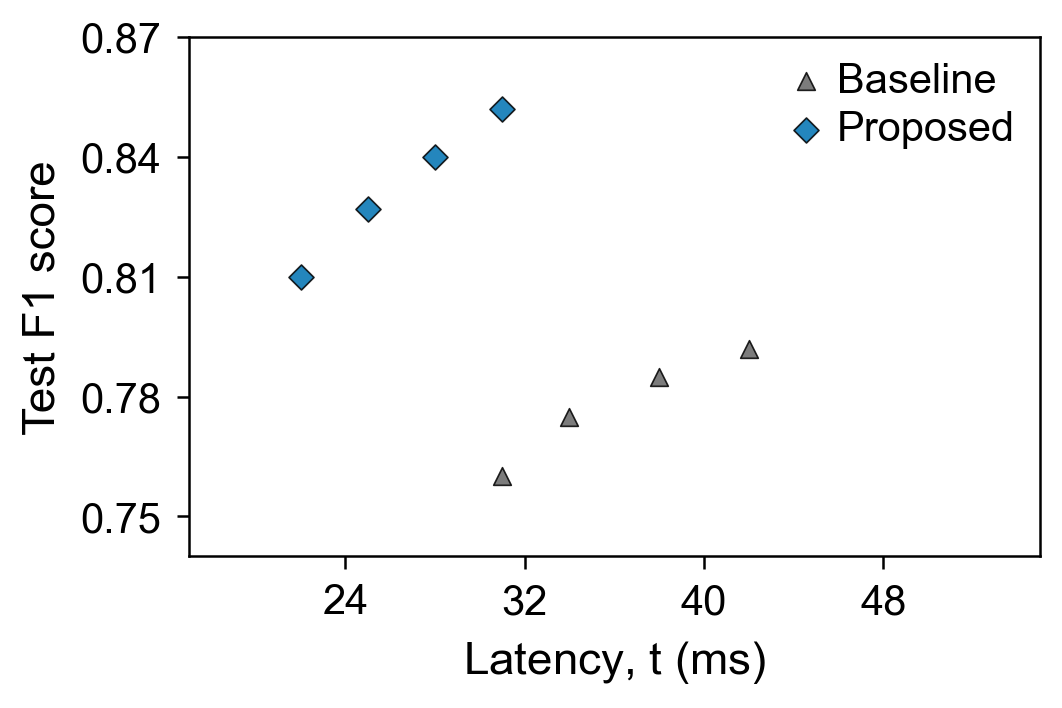 |
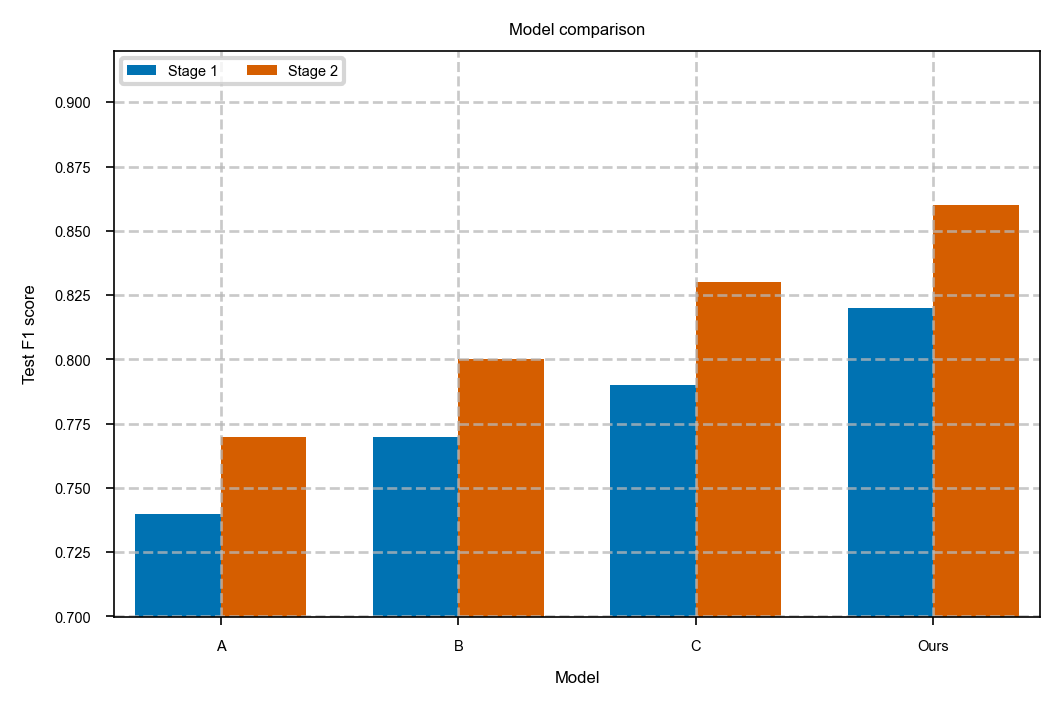
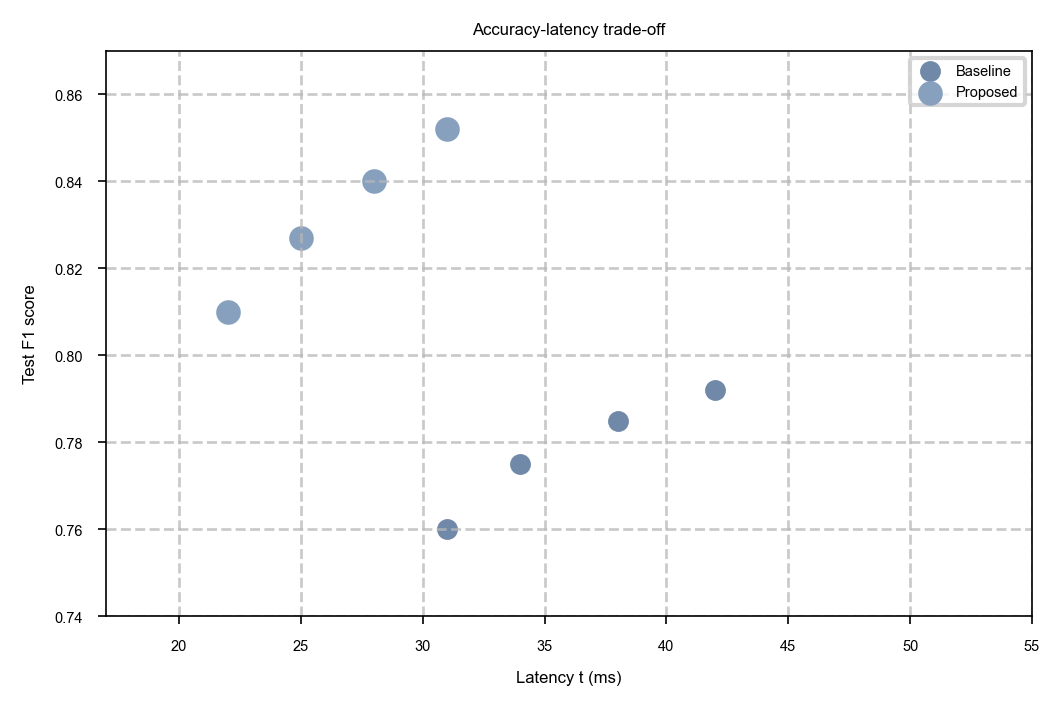
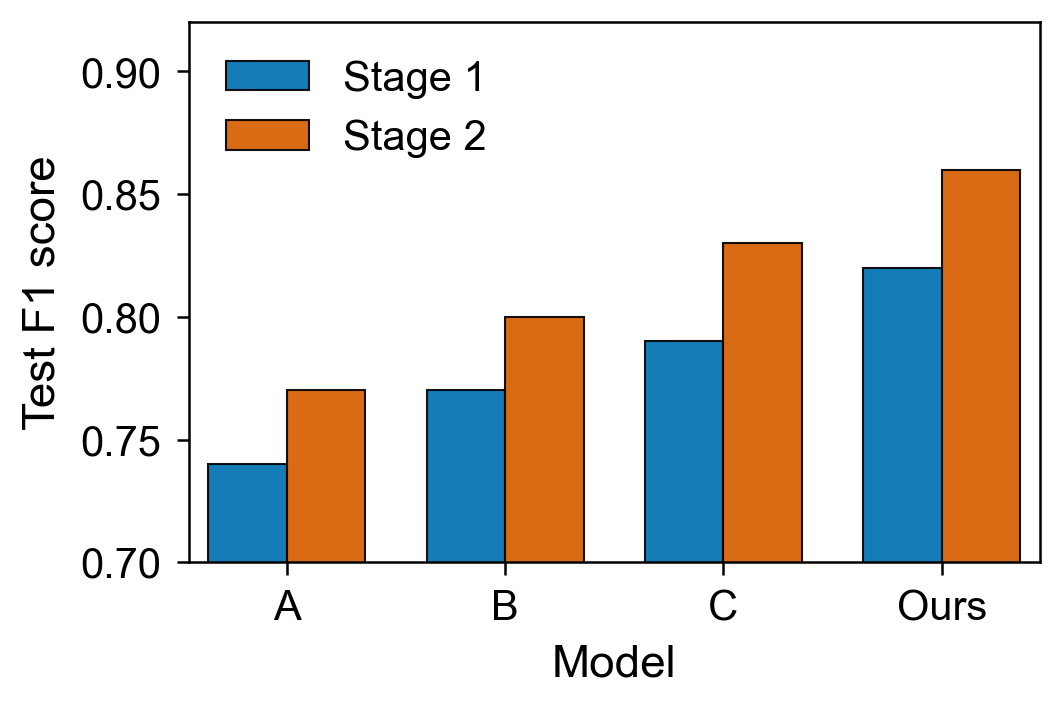
The six figures above use the same synthetic study data and axis ranges, so the line, bar, and scatter comparisons isolate formatting changes.
This comparison highlights five areas the project handles:
- Final-size readability: the profile standardizes text and graphical styling, and the Agent inspects the final export at its intended display size.
- Titles and formulas: the helper removes single-panel titles; the Agent or plotting code explicitly uses MathText for formulas.
- Layout and styling: the manifest standardizes line widths, markers, bars, and ticks, with decorative grids disabled by default.
- Series and legends: the helper provides a color-vision-friendly palette and distinct markers, while visual QA checks legends for overlap and overflow.
- Export checks: the helper produces profile-backed submission outputs and the metadata checker audits bitmaps; PDF, SVG, and EPS follow the manual visual-review route.
Regenerate and audit the examples:
python examples/readme/generate_before_after.py
python skills/elsevier-figure-style/scripts/check_exported_figure_metadata.py --path examples/outputs/readme/bitmap --figure-type result --artwork-type line --target-layout one-half --profile editor
This is an independent, unofficial project with no Elsevier affiliation or endorsement. Verify the current Guide for Authors for your target journal. The English README is canonical if translations differ.
Why This Exists
Figure requirements pass through publisher guidance, plotting code, collaborative edits, manuscript layout, and final export. Each handoff can introduce drift, and a submission-day checklist arrives too late to prevent it. elsevier-figure-style provides a continuous, source-backed review mechanism with traceable rule IDs, so every stage reuses the same profile.
It helps at four points in a paper workflow:
- During figure generation: apply one shared matplotlib or ggplot2 profile before ad hoc styles spread across scripts.
- During manuscript writing: revise result plots and inspect exported schematic figures at their intended size.
- Before submission: combine source-code checks, export metadata checks, and visual QA.
- When targeting another journal: select another versioned manifest while reusing the supported detectors and workflow.
Two Figure Tracks
Quantitative result figures
Generate, revise, and audit line plots, uncertainty bands, heatmaps, bar/barh charts, scatter plots, Pareto/frontier plots, ablation curves, and other metric-driven figures.
The Python path provides profile-backed helpers, an AST-based static checker, bitmap metadata checks, and visual QA. R/ggplot2 has profile-backed theme/export support but no static checker in v0.1.
Schematic and conceptual figures
Audit mechanism diagrams, workflows, principle illustrations, conceptual panels, and graphical abstracts for readability, overlap, alignment, panel labels, clutter, and export metadata.
The v0.1 schematic workflow covers audit. The skill must view or render the final export before reporting a visual PASS; source editing and redrawing fall outside this release scope.
One Manifest Entry Point
The default profile is controlled by:
skills/elsevier-figure-style/assets/elsevier_figure_style.json
The manifest contains the profile identity, style values, audit profiles, export thresholds, detector settings, and references to the evidence/checklist files. Python, R, and both checkers read this same file.
bundle_root is the security boundary for a profile bundle. It may be . or ..; the schema and every referenced resource must use a relative path and remain inside that boundary.
At runtime, the Python helper validates manifests with its own bundled schema; a profile's $schema reference must resolve inside the bundle but cannot replace the runtime trust schema.
Switch an existing profile bundle with one argument:
python skills/elsevier-figure-style/scripts/check_elsevier_figure_style.py --path examples/python --config path/to/journal_profile.json --profile editor
A new journal profile consists of a manifest plus its referenced evidence and checklist files. Configure existing detector thresholds, severity, profile gates, and override policy in the bundle. Implement detector code when the journal introduces a new rule class.
Rule Profiles and Evidence
official: official publisher guidance and target-journal instructions, with non-policySTYLE-*input and integration findings labeled separately.editor:officialplus authorized redacted revision evidence and core visual QA heuristics. Default.strict:editorplus public cases and the complete visual QA checklist.
Every substantive finding uses a rule ID from skills/elsevier-figure-style/references/source-basis/rule-registry.md. D-level visual checks retain an explicit heuristic label, separate from official Elsevier policy.
Quick Start
Requirements: Python 3.10 or newer. The Skill is listed on skills.sh and installs from the public GitHub repository:
npx skills add guhou-hvi/elsevier-figure-style
The skills CLI copies the Skill; install Python and R packages separately. For the default project-level Codex install, run the bundled preflight before first Python use (adjust the base directory for another Agent or a global install):
python .agents/skills/elsevier-figure-style/scripts/check_environment.py
If the preflight reports missing packages, install them in the environment where the Agent will run the scripts:
python -m pip install -r .agents/skills/elsevier-figure-style/requirements.txt
For repository development, use a virtual environment, then install the development dependencies and verify local Skill discovery:
python -m pip install -r requirements-dev.txt
npx [email protected] add . --list
Generate the synthetic examples:
python examples/python/good_line_plot.py
python examples/python/good_heatmap.py
python examples/python/good_bar.py
python examples/python/good_scatter.py
Run the Python source audit:
python skills/elsevier-figure-style/scripts/check_elsevier_figure_style.py --path examples/python --profile editor
Run an exported-figure audit with explicit artwork classification:
python examples/schematic/generate_metadata_fixtures.py
python skills/elsevier-figure-style/scripts/check_exported_figure_metadata.py --path examples/outputs/schematic_demo.tiff --figure-type schematic --artwork-type combination --target-layout single --profile editor
Both checkers return nonzero on FAIL by default. Add --format json for machine-readable results, --fail-on warn for a stricter CI gate, or --fail-on never for report-only use.
Project-Local Python Setup
Avoid machine-specific Skill paths in long-lived figure scripts. Vendor the selected helper/profile bundle into a project:
python skills/elsevier-figure-style/scripts/init_figure_style_project.py --target path/to/project --config skills/elsevier-figure-style/assets/elsevier_figure_style.json --dry-run
python skills/elsevier-figure-style/scripts/init_figure_style_project.py --target path/to/project --config skills/elsevier-figure-style/assets/elsevier_figure_style.json
The command creates path/to/project/figure_style/. Existing bundles are preserved by default; --force replaces one explicitly.
from figure_style import apply_journal_style, line_style_kwargs, save_figure

spec = apply_journal_style()
Existing apply_elsevier_style() and other v0.1 helper names remain supported.
R Quick Start
R support requires ggplot2 and jsonlite:
install.packages(c("ggplot2", "jsonlite"))
Run the synthetic demo:
Rscript examples/r/good_ggplot_demo.R
Use theme_journal(), journal_palette(), and save_journal() for shared-profile behavior. The Elsevier-named aliases remain available.
Prompt Examples
Use $elsevier-figure-style to generate a line plot from this CSV with the editor profile.
Use $elsevier-figure-style to audit this matplotlib script and exported TIFF before Elsevier submission.
Use $elsevier-figure-style to audit this mechanism diagram. Render it, check overlap and readability, and report rule IDs.
Use $elsevier-figure-style with this custom journal profile JSON and revise the result figures without changing the underlying data.
Project Layout
skills/elsevier-figure-style/
  SKILL.md
  requirements.txt
  agents/openai.yaml
  assets/
    elsevier_figure_style.json
    journal_figure_profile.schema.json
  scripts/
    elsevier_plot_style.py
    elsevier_theme.R
    check_elsevier_figure_style.py
    check_exported_figure_metadata.py
    init_figure_style_project.py
    check_environment.py
  references/
    source-basis/
examples/
tests/
docs/assets/
SECURITY.md
Source Basis
The default profile operationalizes stable parts of current public Elsevier guidance:
- Artwork and media instructions
- Artwork overview
- Artwork formats checklist
- Artwork sizing
- Artwork types
- Artwork FAQ
- Graphical abstract guidance
The bundled sources were last verified on 2026-07-10. Use the checklist before submission and the target journal's current Guide for Authors as the final authority.
Contributing
Contributions of authorized, redacted editor or reviewer figure-format comments are welcome. Share a reusable paraphrase with private correspondence, manuscript identifiers, identities, unpublished results, and confidential technical content removed. See CONTRIBUTING.md.
Report vulnerabilities through the private process in SECURITY.md.
Release Status
v0.1.0 is a public beta with the following scope:
- Python/matplotlib helpers, source checking, and bitmap metadata checks.
- Profile-backed R/ggplot2 themes and export helpers.
- Agent-assisted visual QA for exported figures.
- One built-in Elsevier-style manifest and configurable built-in detectors.
Bitmap formats receive automated metadata checks; PDF, SVG, and EPS follow the manual visual-review route. Schematic figures receive audit coverage, while new detector classes require Python implementation. Static source checking is available for Python in v0.1.
Citation
If this Skill supports your research, cite the software using the metadata in CITATION.cff. On GitHub, select Cite this repository to generate APA or BibTeX output.
@software{ji_elsevier_figure_style_2026,
  author  = {Ji, Peng},
  title   = {elsevier-figure-style},
  version = {0.1.0},
  year    = {2026},
  doi     = {10.5281/zenodo.21378649},
  url     = {https://doi.org/10.5281/zenodo.21378649},
  license = {MIT}
}
License
Copyright © 2026 Peng Ji and contributors. This project is licensed under the MIT License.
No comments yet
Be the first to share your take.