
Econ Slides Skill
Turn your economics paper into a professional Beamer talk — one that would not embarrass you at a top seminar.




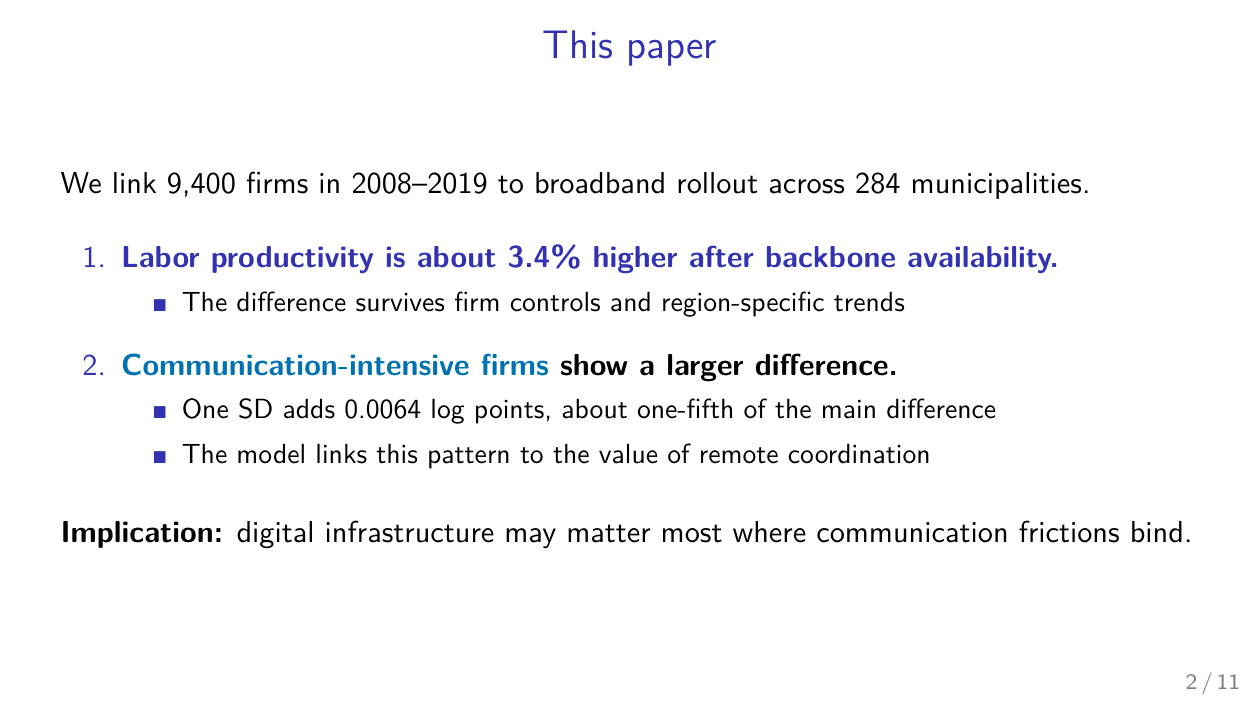
| The punchline slide | The main result table |
|---|---|
 |
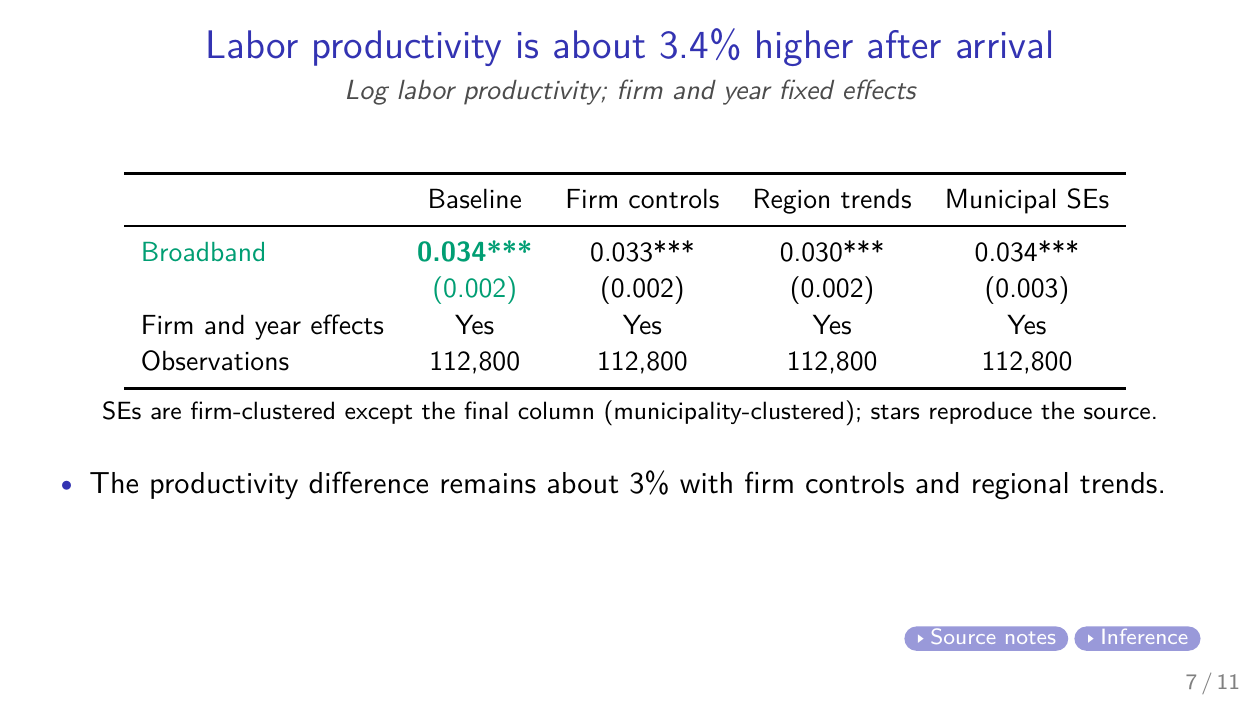 |
Two slides the skill built cold from a demonstration paper — see the full sample deck (PDF) and speaker script (PDF).
econ-slides is an Agent Skill for Claude Code and Codex. AI-generated slides
often fail twice: the layout is messy, and the talk has no argument. This
skill addresses both. It synthesizes professional presentation guidance from
leading economists, turns the paper's own dependency graph into a talk, and
verifies the result by compiling, measuring the rendered geometry, and looking
at every page before delivery.
Built for economics. Works for any research talk built on evidence, models, and regression tables.
What it does
- Paper → talk. Give it a manuscript and a total-session clock from 15 to 90 minutes. It builds the shortest audience path through the question, answer, necessary empirical or theoretical setup, evidence or proposition, interpretation, and implication. The order and frame structure remain paper-dependent.
- Speaker scripts. Add a printable rehearsal script keyed to exact frame titles, timed from the opening through the main deck, synchronized to real visual builds, and backed by conditional Q&A blocks. The default reserves 20–25% of the total session for questions and never pads prose to fill time.
- Discussant decks. A first-class genre, not an afterthought: an audience-calibrated summary and the strongest titled comments, each ending in a concrete suggestion—built to the Dallas Fed / ASHEcon discussant norms.
- Modify an existing deck. Add topic slides, appendices, discussion, or polish while treating the compiled target deck as the design contract. The workflow reverse-engineers and preserves its Beamer style rather than importing a house theme.
- Retarget a venue. The same paper at 15 and 90 minutes is two different talks, not one deck played fast. The skill keeps, compresses, moves, cuts, or deepens whole argumentative units rather than scaling every slide equally.
What makes the decks trustworthy
- Genre fidelity. A paper-to-talk request stays an author presentation. Evidence review calibrates verbs and one load-bearing limitation; it does not quietly turn the opening, title page, and conclusion into a referee report.
- Claim and number provenance. Before outlining, the skill checks prose against assignment rules, exhibits, table notes, units, and algebra. Every planned headline is classified as supported, descriptive, conflicted, or excluded; every magnitude is traced to its table and page. The script cannot turn "associated with" into "raises."
- Rendered-line discipline. Titles and bullets are rewritten to stay on one rendered line whenever the idea permits. A readable irreducible wrap is judged in the PDF rather than rejected mechanically; shrinking a whole slide is never the first fix.
- Source-first exhibits. Reuse or crop a legible source exhibit first; use a native slide table, equation, or concise text next. Rebuild or create a figure only when necessary, from traceable inputs, with individual visual QA. Regression tables are reduced to the rows and columns the talk needs.
- A real verification loop.
compile_deck.pycompiles and triages errors;check_deck.pyblocks objective failures such as edge overflow, serious overfull boxes, broken links, and navigation collisions while treating wrapping, density, columns, emphasis, and whitespace as review prompts. For a scoped edit, its baseline mode separates inherited defects from new objective regressions without waiving the visual comparison.check_script.pyaudits title order, total-session timing, Q&A separation, oral style, and real click synchronization. Both PDFs get a page-by-page visual pass.
See it
The two slides at the top of this page come from the staggered-rollout sample deck, built for a 30-minute total session. Its prepared script runs about 22.5 minutes, leaving about one quarter of the session for questions.
Browse the staggered-rollout benchmark →. It includes deck and script PDFs, LaTeX sources, and a structure plan. It uses the fictional demonstration paper from econ-paper-review-skill; see the sample's provenance notes.
The framework is also audited locally on substantively different empirical and theory papers. Third-party papers and their derived test decks remain private rather than being shipped with the skill.
Install
Requires Python 3.10+, a TeX distribution with XeLaTeX (TeX Live / MacTeX / MiKTeX), and PyMuPDF (python3 -m pip install --user pymupdf, or install it in a venv if your Python is externally managed).
Paste this into Claude Code or Codex:
Help me install the econ-slides skill from
https://github.com/hanlulong/econ-slides-skill: clone it, then link the
folder as an Agent Skill — into ~/.claude/skills/econ-slides for Claude Code
and ~/.agents/skills/econ-slides for Codex (whichever of the two I use).
Verify python3 and xelatex are available and pymupdf is installed (use
--user or a venv if pip is externally managed), then confirm the skill
loads.
macOS / Linux:
git clone https://github.com/hanlulong/econ-slides-skill.git
python3 -m pip install --user pymupdf   # or into a venv if pip is externally managed

# Claude Code (global skills directory)
ln -s "$(pwd)/econ-slides-skill" ~/.claude/skills/econ-slides

# Codex (shared agent-skills directory)
mkdir -p ~/.agents/skills
ln -s "$(pwd)/econ-slides-skill" ~/.agents/skills/econ-slides
Windows (PowerShell — use python rather than python3):
git clone https://github.com/hanlulong/econ-slides-skill.git
python -m pip install --user pymupdf
New-Item -ItemType Junction -Path "$env:USERPROFILE\.claude\skills\econ-slides" -Target "$PWD\econ-slides-skill"
New-Item -ItemType Directory -Force -Path "$env:USERPROFILE\.agents\skills" | Out-Null
New-Item -ItemType Junction -Path "$env:USERPROFILE\.agents\skills\econ-slides" -Target "$PWD\econ-slides-skill"
Both clients read the same SKILL.md; any agent that can read it can use
the skill. The scripts are plain Python (pathlib throughout, os.pathsep
for TeX paths) and run on macOS, Windows, and Linux; tests/run-tests.sh
needs bash (Git Bash or WSL on Windows).
Use it
Put your paper (PDF, plus LaTeX source if you have it) in the working directory and ask:
Use the econ-slides skill to make a 30-minute total-session conference talk
from this empirical paper, reserving 20–25% for questions.
Use the econ-slides skill to prepare exactly 20 minutes of speaking; the
organizer schedules questions separately.
Use the econ-slides skill to make a 60-minute pure-theory seminar talk.
Use the econ-slides skill to make the talk and a printable speaker script.
Use the econ-slides skill to build my discussion of the attached paper for a 15-minute total session.
Use the econ-slides skill to turn my 90-minute seminar deck into a 30-minute
total-session version for SED while preserving its Beamer style.
Use the econ-slides skill to add slides on the mechanism and a linked appendix
to my existing deck without restyling it.
The skill will show you the claim--evidence ledger and slide plan before
drafting, then deliver the deck .tex/PDF, an optional script .tex/PDF, and
a note on where every headline claim and number came from.
Themes
Three bundled looks plus a stock-theme adapter, one semantic interface — a finished deck switches themes by changing one \usepackage line:
| Theme | Look | For |
|---|---|---|
econ-slides-house (default) |
No chrome, centered message-or-object titles, Palatino math, Okabe–Ito palette | Research talks |
econ-slides-clean |
Near-monochrome, left titles over a thin rule | Zero visual signature |
econ-slides-boxed |
Navy title bar, structured blocks | Discussions, policy audiences |
econ-slides-compat |
Any stock Beamer theme you prefer | Madrid, metropolis, CambridgeUS, institutional themes |
Starting a new deck with a stock theme? \usetheme{Madrid} followed by
\usepackage{econ-slides-compat} keeps that look and adds the semantic
interface. Editing an institutional or personal deck? Keep its existing
preamble, engine, macros, spacing, and visual language. See
themes/README.md.
What's inside
SKILL.md                 the workflow: intake → read → plan → draft → verify → deliver
references/
  talk-structures.md     adaptable audience paths and 15–90 minute budgets
  discussant.md          the discussion genre: skeleton, time budgets, tone rules
  slide-rules.md         rendered layout guidance: titles, spacing, math, color
  beamer-layout-mechanics.md
                         how source edits reflow the compiled frame
  existing-deck-workflow.md
                         add, polish, discuss, or retarget without restyling
  exhibit-surgery.md     regression table → slide table; figures; number provenance
  source-integrity.md    claim↔evidence ledger; identification, model, and policy checks
  speaker-script.md      timing, oral craft, click sync, Q&A, and printable QA
  style-guide.md         themes, file engineering, build and delivery conventions
themes/                  three bundled looks + stock-theme compatibility adapter
templates/               optional empirical, theory, discussion, and script starters
scripts/
  compile_deck.py        XeLaTeX compile loop with error triage
  check_deck.py          rendered geometry audit with hard blockers + score
  check_script.py        deck/script sync, timing, oral-style, and click audit
  crop_figure.py         crop a source figure when no standalone asset exists
tests/                   cross-theme renders + negative deck/script fixtures
What it does not do
It will not write your paper's content, invent a number that is not in your materials, or promise results your paper does not contain. It also will not put a literature review on your slides — the craft corpus is unanimous on that.
Related projects
- econ-paper-review-skill — the referee-report sibling: that skill judges the paper, this one presents it
- econ-writing-skill — writing the paper in the first place
- awesome-ai-for-economists — the broader toolbox
Acknowledgments
The craft rules synthesize public guides by Jesse Shapiro, Rachael Meager, Paul Goldsmith-Pinkham, John Cochrane, Dick Startz, Marc Bellemare, Monika Piazzesi, Alex Tabarrok, David Evans, Darren Lubotsky, Donald Davis, Keith Head, and the Dallas Fed and ASHEcon discussant guides. The verification approach learns from beamer-skill (PDF-render visual auditing) and Pedro Sant'Anna's workflow (executable quality gates); TikZ placement rules adapt ideas from Scott Cunningham's MixtapeTools. The implementation is original; public guides are linked for attribution rather than bundled or reproduced.
License
MIT — see LICENSE.
If this skill saves you a slide-panic night before a seminar, star the repo so other economists find it — and if it produces an ugly or dishonest slide, open an issue. Bad slides are bugs here.
No comments yet
Be the first to share your take.