
An agent skill for extracting, structuring, and applying visual design identity as machine-readable "Design DNA" across three dimensions: design tokens, qualitative style, and visual effects.
https://github.com/user-attachments/assets/00e0a28d-42ce-4a08-a0c0-1ecf8b9f7e97
https://github.com/user-attachments/assets/80793608-930d-42ca-951f-eb21ac188d54
https://github.com/user-attachments/assets/cd4cba94-cd2c-480f-8efa-4ac86e00ae1f
Prerequisites
- Node.js environment installed
- Ability to run
npxcommands
Installation
Quick Install (Recommended)
npx skills add zanwei/design-dna
Install to Specific Agent
# Cursor only, non-interactive, global install
npx skills add zanwei/design-dna -a cursor -g -y

# Claude Code only
npx skills add zanwei/design-dna -a claude-code -g -y
Install from Local Clone
git clone https://github.com/zanwei/design-dna.git
npx skills add ./design-dna -y
List Available Skills
npx skills add zanwei/design-dna --list
What It Does
| Dimension | Role |
|---|---|
| Design System | Measurable tokens: color, typography, spacing, layout, shape, elevation, motion, components |
| Design Style | Qualitative perception: mood, visual language, composition, imagery, interaction feel, brand voice |
| Visual Effects | Beyond plain CSS: Canvas, WebGL, 3D, particles, shaders, scroll-driven motion, cursor effects, SVG animation, glassmorphism, etc. |
The skill drives a three-phase workflow:
- Structure — Surface the full schema and field meanings (see
references/schema.md). - Analyze — From screenshots, images, or URLs, produce a complete JSON profile (every field filled; conflicts noted).
- Generate — Given DNA JSON plus content, implement the design (default: self-contained HTML/CSS/JS), following
references/generation-guide.md.
Phases can be used alone or chained (e.g. Analyze → Generate).
How It Works
Pipeline at a glance (Mermaid renders on GitHub):
flowchart LR
    A["Reference designs<br/>Screenshots · URLs · images<br/><br/>Any design you admire"]
    B["Design DNA JSON<br/>Quantified spec<br/><br/>Structured profile"]
    C["Final output<br/>Faithful implementation<br/><br/>Production-ready UI"]

    A -->|"Analyze — extract every visual property"| B
    B -->|"Generate — apply DNA to your content"| C
    B -.-> D["Save · reuse · version control"]
Step 1 — Curate references. Collect screenshots, images, or live URLs of designs whose visual identity you want to capture. Multiple references can be combined; the skill identifies dominant patterns and notes variants.
Step 2 — Extract DNA. Feed the references to the agent. It inspects every visual property across all three dimensions and outputs a complete, quantified Design DNA JSON — no empty fields, no guesswork. This JSON becomes a portable, reusable design specification.
Step 3 — Generate from DNA. Provide the DNA JSON together with your own content. The agent produces implementations that faithfully reproduce the original design language while adapting to your material.
The DNA JSON is the key artifact. Once extracted, it can be committed to version control, shared across teams, reused across projects, and iteratively refined — turning subjective "make it look like that site" into a precise, reproducible specification that any agent can consume.
[!TIP] Refining visual richness. If the first pass still feels visually thin or under-detailed next to your references, run a deliberate polish iteration: re-attach the same URLs or screenshots. This narrows the gap between a workable draft and a reference-faithful, visually rich result without starting over.
Prompt: Against the reference, audit hierarchy, ornamentation, typographic rhythm, motion, materiality, and overall UI—then merge your conclusions back into the current implementation.
Deterministic Measurement (optional)
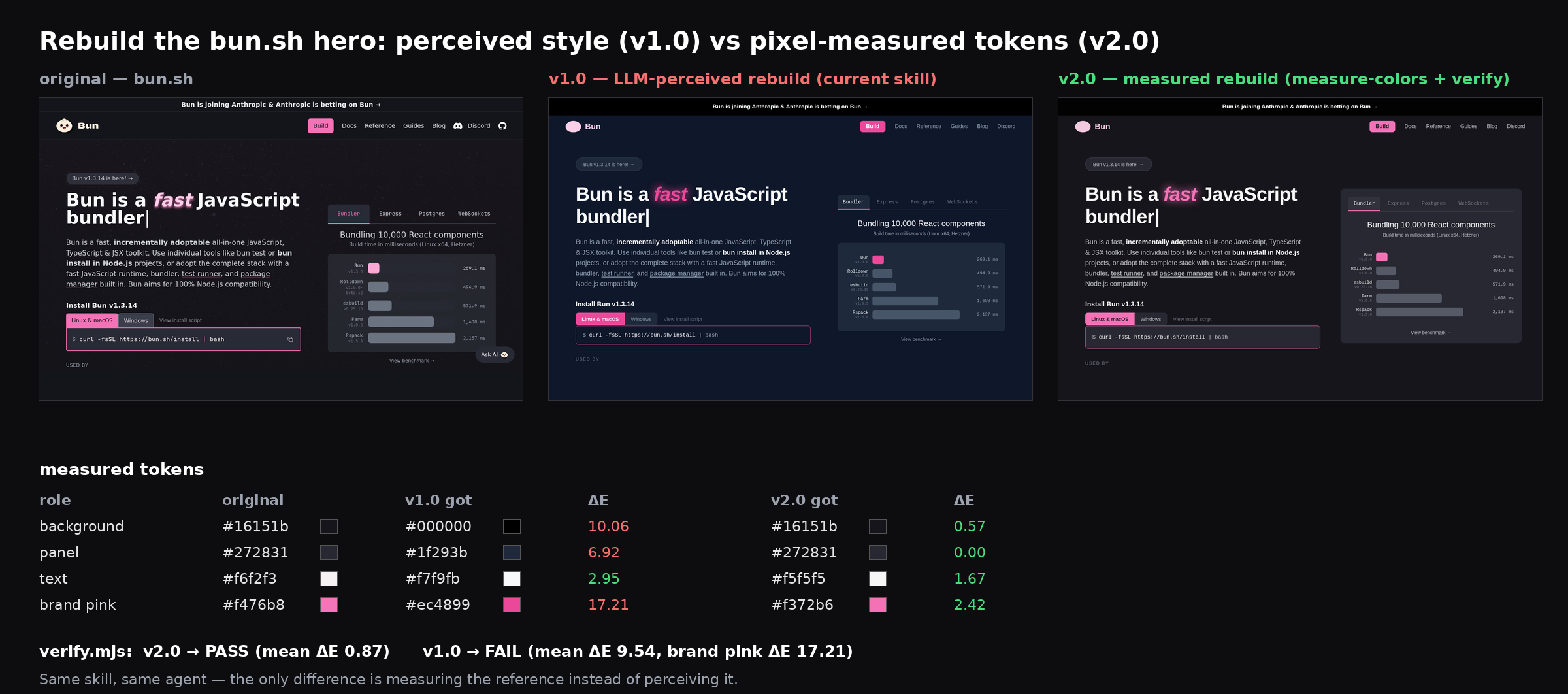
LLM color perception drifts toward familiar palette defaults — a brand pink like #ff90e8 gets "seen" as #ec4899 (ΔE ≈ 29). Two optional scripts make the Analyze and Generate phases measurable:
The manual commands below are for a local clone of this repository. Run them from the clone's root:
npm install --prefix ./scripts

# Analyze: measure the exact palette from a reference screenshot
node scripts/measure-colors.mjs reference.png > measured-colors.json

# Generate: score the implementation screenshot against the reference
node scripts/verify.mjs implementation.png measured-colors.json
When installed as an agent skill via Quick Install, the agent must resolve these scripts from the absolute directory containing the loaded SKILL.md; users do not need a scripts/ directory in their project root.
measure-colors.mjs runs deterministic k-means clustering over the actual pixels (with perceptual ΔE merging of anti-aliasing noise) and outputs exact hexes, coverage as 0..1 fractions, background/text/accent roles, and the clustering k. verify.mjs reuses the recorded k, re-measures the generated output, and reports per-color ΔE and coverage drift with PASS/FAIL thresholds, giving the agent a self-correction loop instead of relying on the user's eye. The skill instructs agents to use both automatically when references are image files; no API keys required.
Same reference (bun.sh's hero), same agent — perceived rebuild vs measured rebuild:
Compatibility
Follows the Agent Skills specification. Installable via skills CLI to all supported agents including Cursor, Claude Code, Codex, GitHub Copilot, and 39 more.
Contributing
Issues and pull requests are welcome. For substantive behavior changes, update SKILL.md and any affected files under references/ so the skill stays internally consistent.
License
MIT
No comments yet
Be the first to share your take.