
demo-video
A Claude Code skill that produces polished, ScreenStudio-style 60fps product demo videos of any web app, with a tiny dependency-light pipeline: Playwright frame capture plus a multiprocess Pillow compositor streaming straight into ffmpeg. No screen recorder, no Node, no Remotion.
The trick: instead of recording in real time, a Playwright script drives the app one small step per frame and screenshots each one. Capture can take minutes of wall-clock; playback is still perfect 60fps. A virtual camera (focus point + zoom per frame) lives in the compositor, so re-framing or re-pacing a video is a re-render, not a re-shoot.
The compositor adds the "ScreenStudio look": gradient background, rounded panel with soft shadow, a crisp vector cursor, click pulse rings, and smooth eased zoom/pan. HD=1 re-renders the same capture at retina resolution.
Takes don't have to be scripted: a bundled Chrome extension records the current tab by hand into the exact same pipeline — cursor-free frames, an auto-framed camera derived from your clicks, and full editability afterwards.
What it produces
A fully scripted storyline: chip toggles with click pulse rings, per-frame typing, a submit spinner, and an animated success state. Runs against a self-contained fixture page, so you can reproduce it locally with VIDEO_DIR=/abs/workdir python examples/feedback-form/capture.py:
https://github.com/user-attachments/assets/c242145c-ecb9-4edc-9891-8852d5e1a8fa
The multi-case "tile" pattern from example-multicase.py, showcasing five drag-reorder behaviors of Frappe Builder in one take:
https://github.com/user-attachments/assets/d1ae9ce6-27a1-4517-80f8-65e37682e152
Install
git clone https://github.com/surajshetty3416/demo-video-skill ~/.claude/skills/demo-video
Then ask Claude Code to "make a demo video of ..." and it picks the skill up automatically. It will ask you up front for the app URL, test login, and what flow to show, so have a dev server and a throwaway account handy.
Requirements
- Python 3.10+ with
pillowandplaywright(pip install pillow playwright && playwright install chromium) ffmpegon PATH- Optional:
tkinterfor the floating REC pill shown during hand-recorded takes
What's inside
| File | Purpose |
|---|---|
SKILL.md |
The skill itself: pipeline, cinematography principles, gotchas |
capture_template.py |
Copy-and-edit Playwright capture harness (camera + mouse timeline) |
compositor.py |
Multiprocess Pillow renderer, streams frames into one ffmpeg process |
example-multicase.py |
Complete working example of the multi-case "tile" pattern |
examples/feedback-form/ |
Self-contained runnable demo (fixture page + capture script), no app server needed |
editor/ |
Local web editor for interactive fine-tuning: timeline, camera blocks, holds, speed regions, re-render |
extension/ |
Chrome extension for hand-recorded takes: streams tab frames + input events to the editor server |
ingest.py |
Converts a hand recording into the standard capture bundle (60fps grid, still-collapse, auto-framing) |
Interactive editor
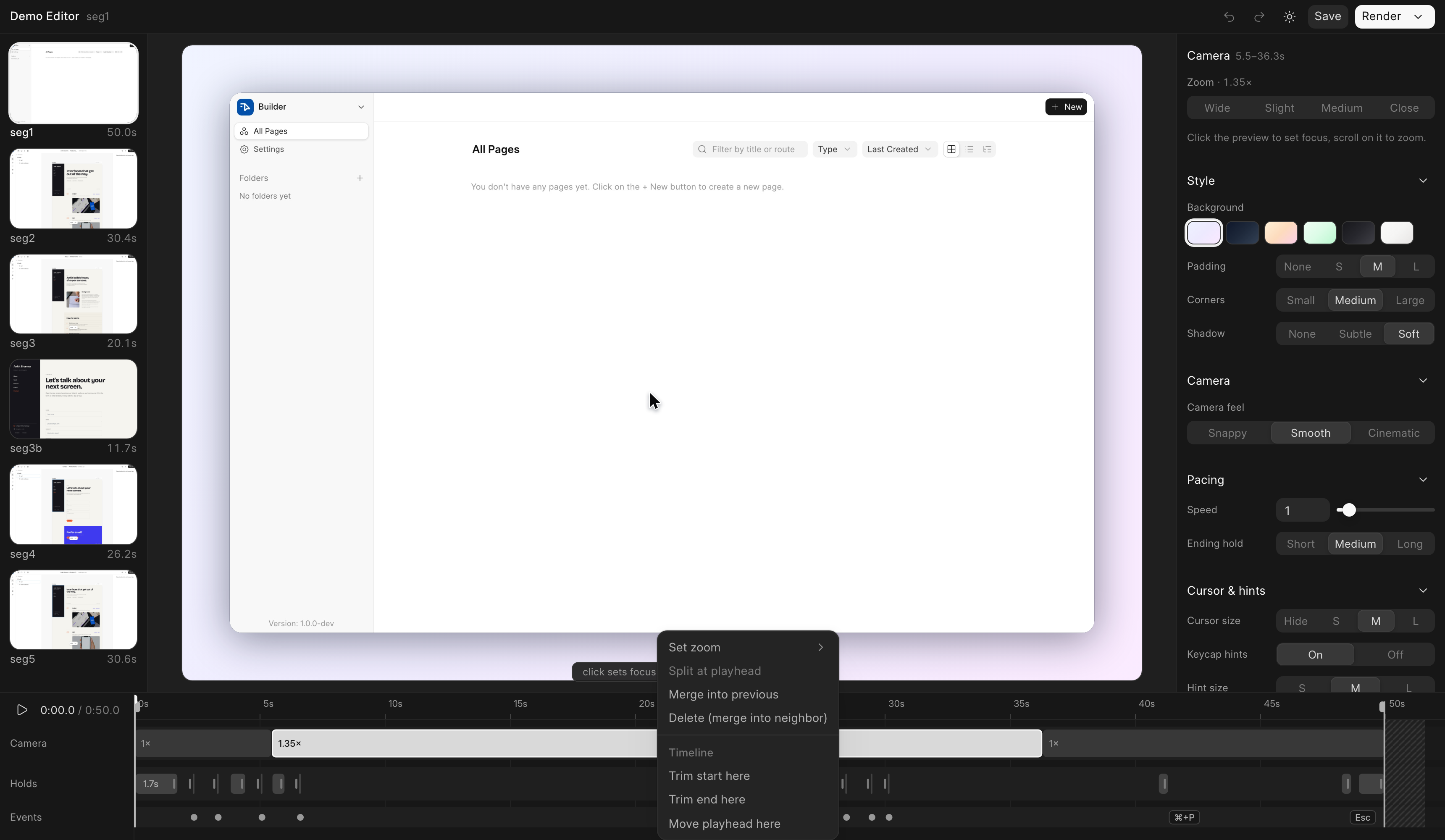
python3 editor/server.py <workdir> opens a ScreenStudio-style web editor on a capture (stdlib http server + a prebuilt Vue UI, so no Node needed at run time): a live preview that replicates the compositor exactly, a scrubbable timeline with camera blocks, stretchable holds, speed regions and event chips, preset-first inspector panels, and one-click re-render + concat across segments. Edits are saved to meta.edited.json next to the capture; the original meta.json is never touched.
Add --detach to run the server in its own session: it prints the URL + pid and logs to <workdir>/editor.log. That keeps it alive when launched from an agent shell, where plain background tasks get reaped when the session's task manager stops them. --port N pins the port (handy for the recording extension), and the segment rail picks up newly imported takes without a reload.
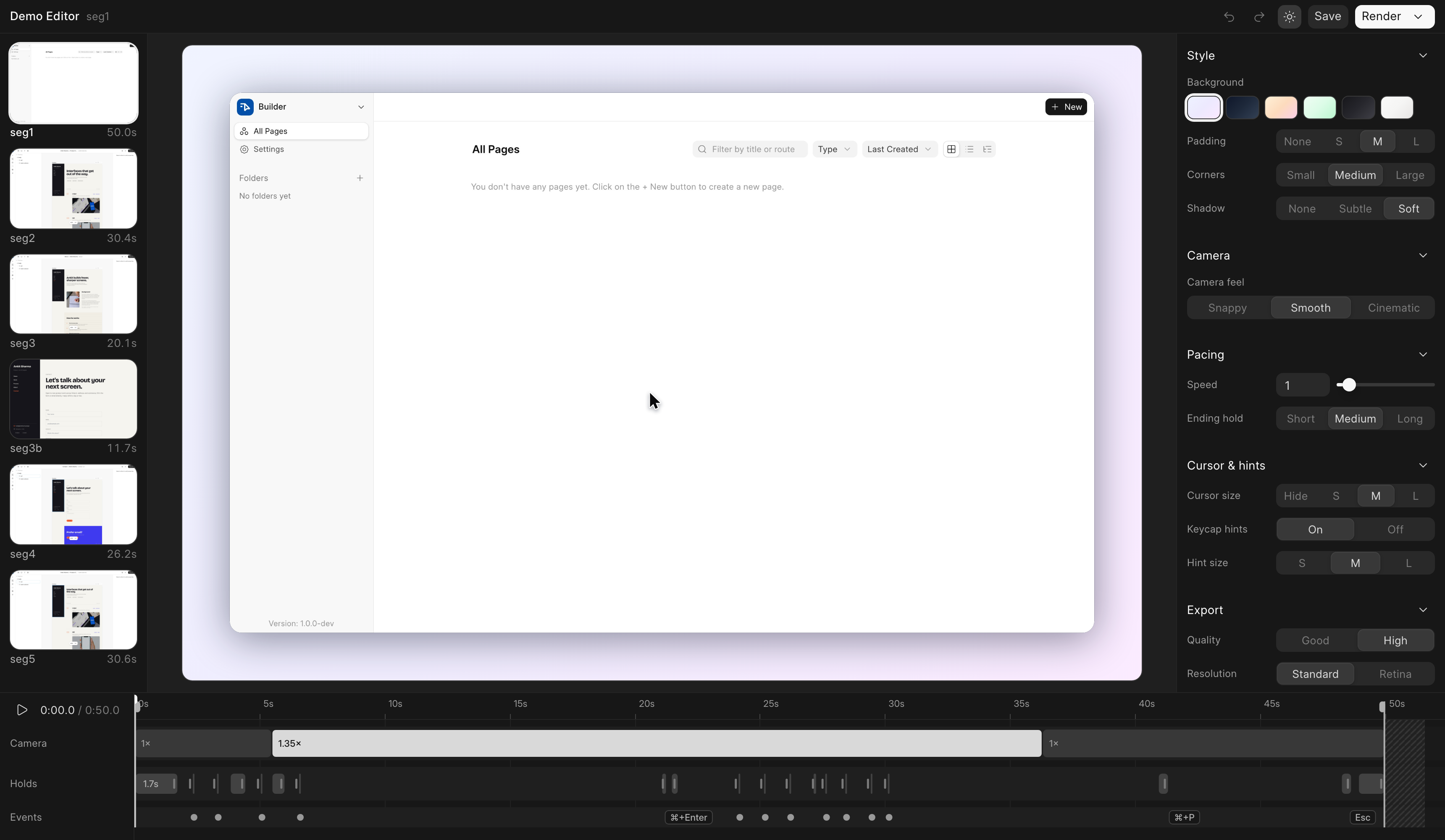
Right-click anywhere on the timeline for context actions — camera zoom stops, split/merge, trims, holds, speed regions — all undoable with ⌘Z:
Record by hand (Chrome extension)
For takes a human should drive, load extension/ as an unpacked Chrome extension and start the editor server with a pinned port (python3 editor/server.py --detach --port 8787 <workdir> — the workdir may start empty). One click records the current tab:
- Capture goes through CDP screencast, so the frames carry no OS cursor — the compositor draws its crisp vector cursor from a logged input timeline, and cursor size/visibility stay editable after the fact.
- Clicks become pulse rings, modifier shortcuts become keycap hints, and the camera comes out pre-framed from your click clusters (zoom in a beat before a click, hold through the action, release after) — reshape or flatten any of it in the editor.
- Frames and events stream to the server while you record, so stopping is near-instant and memory stays flat; idle stretches cost nothing.
- A small always-on-top REC pill shows a timer and stops the take; being a separate OS window, it never appears in the recording. When a take lands, it shows up in the editor rail automatically.
Deterministic Playwright capture is still the tool for perfectly repeatable takes; the extension covers everything that's easier to just do by hand. Setup and details: extension/README.md.
Using it without Claude Code
The scripts are plain Python and stand alone:
- Copy
capture_template.pyandcompositor.pynext to a scratch workdir. - Edit the CONFIG block (
BASE,START_URL,VIEWPORT) and write your storyline with the harness verbs (move_to,cam,hold,still,fit_zoom). VIDEO_DIR=/abs/workdir python capture_template.pypython compositor.py /abs/workdirproducesdemo.mp4(HD=1for retina).
SKILL.md documents the harness verbs, the compositor knobs, and the cinematography rules that took real iteration to get right (decouple the camera from the cursor, zoom once per shot, still() vs hold(), drag-threshold gotchas, zoom headroom vs capture resolution).
License
MIT
No comments yet
Be the first to share your take.