
Coding Wrapped




Your coding agents remember more than you think.
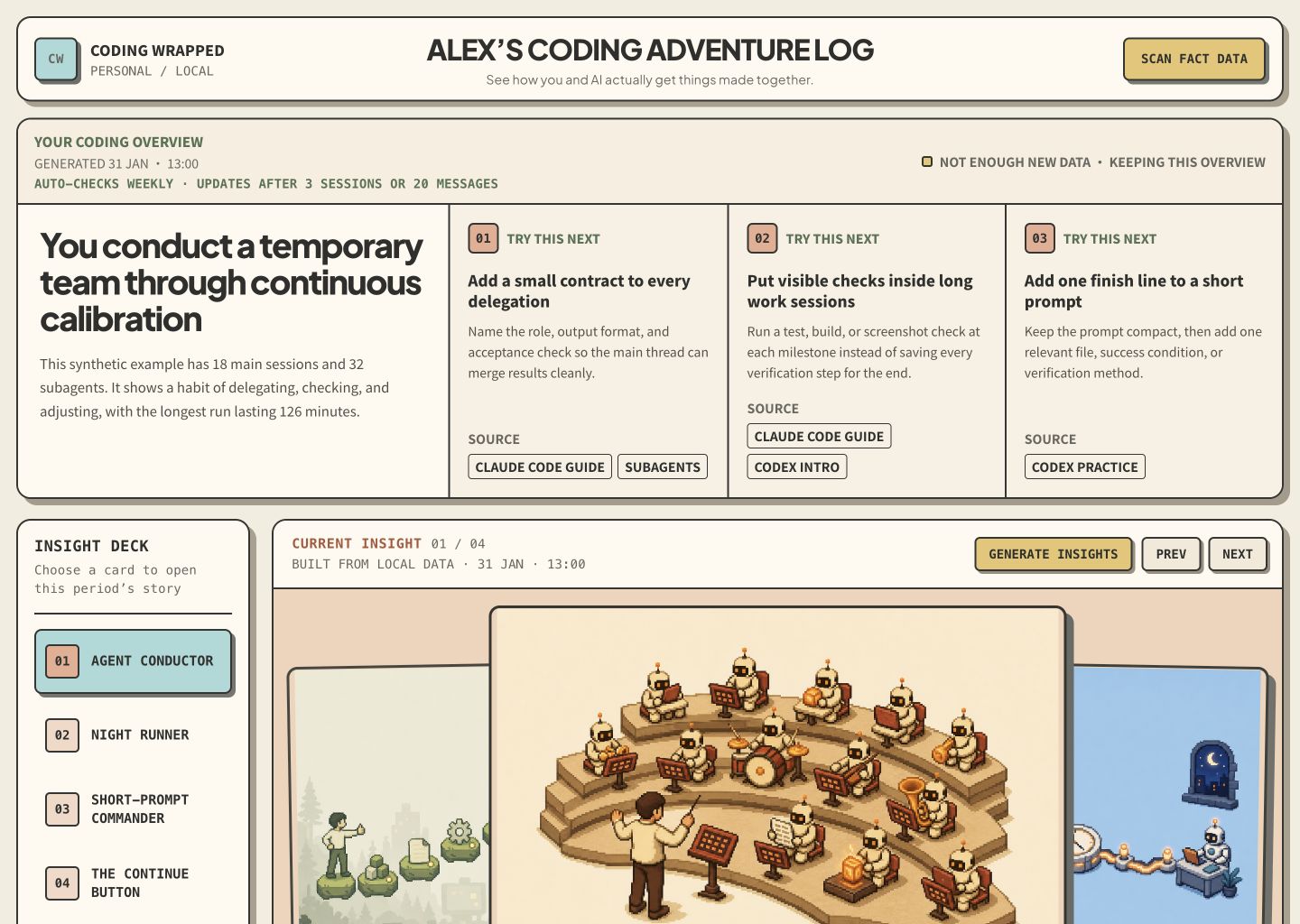
Coding Wrapped turns local Claude Code and Codex history into a private, pixel-art dashboard about how you work with AI: when you code, how you prompt, how the agent responds, and what kind of builder you are becoming.
What it makes
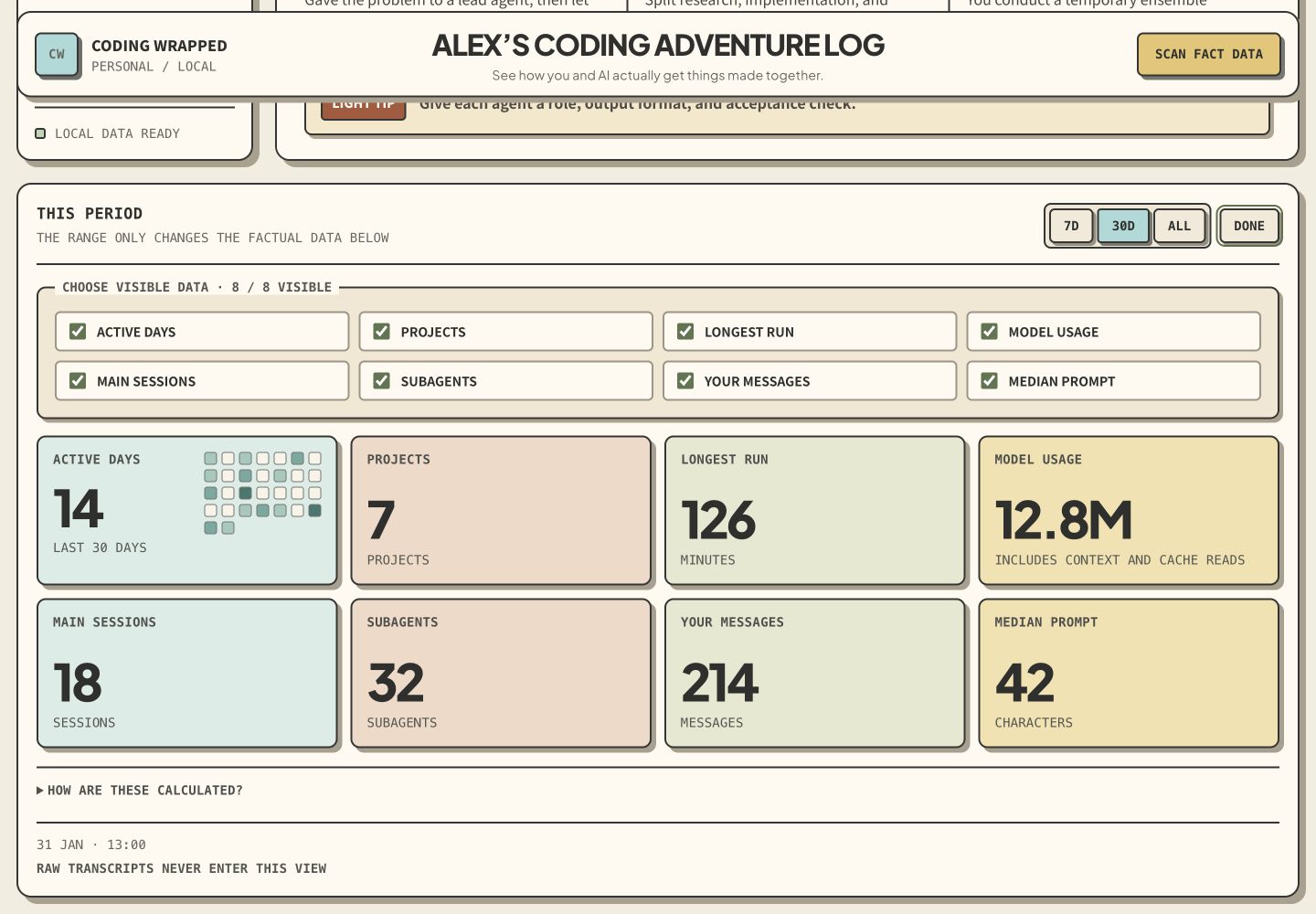
- A local dashboard with active days, sessions, projects, model mix, tool use, prompt rhythm, and longest focused run.
- A two-sentence Coding Overview built from two or three representative facts and the working pattern they reveal.
- Playful illustrated insights organized as You did / Agent did / Your style, plus one practical suggestion matched against a curated library of 40 official and practitioner-backed practices, with its sources attached.
- Four persistent insights per generation, each with a different composition but the same reference-conditioned pixel-art language.
- A portable local export you can archive or share intentionally.
It is not a transcript viewer, productivity score, employee-monitoring tool, or cloud analytics service.
See the complete experience
Every screenshot below uses deterministic synthetic data. The dashboard text is native HTML, while the pixel-art illustration is generated and stored locally.
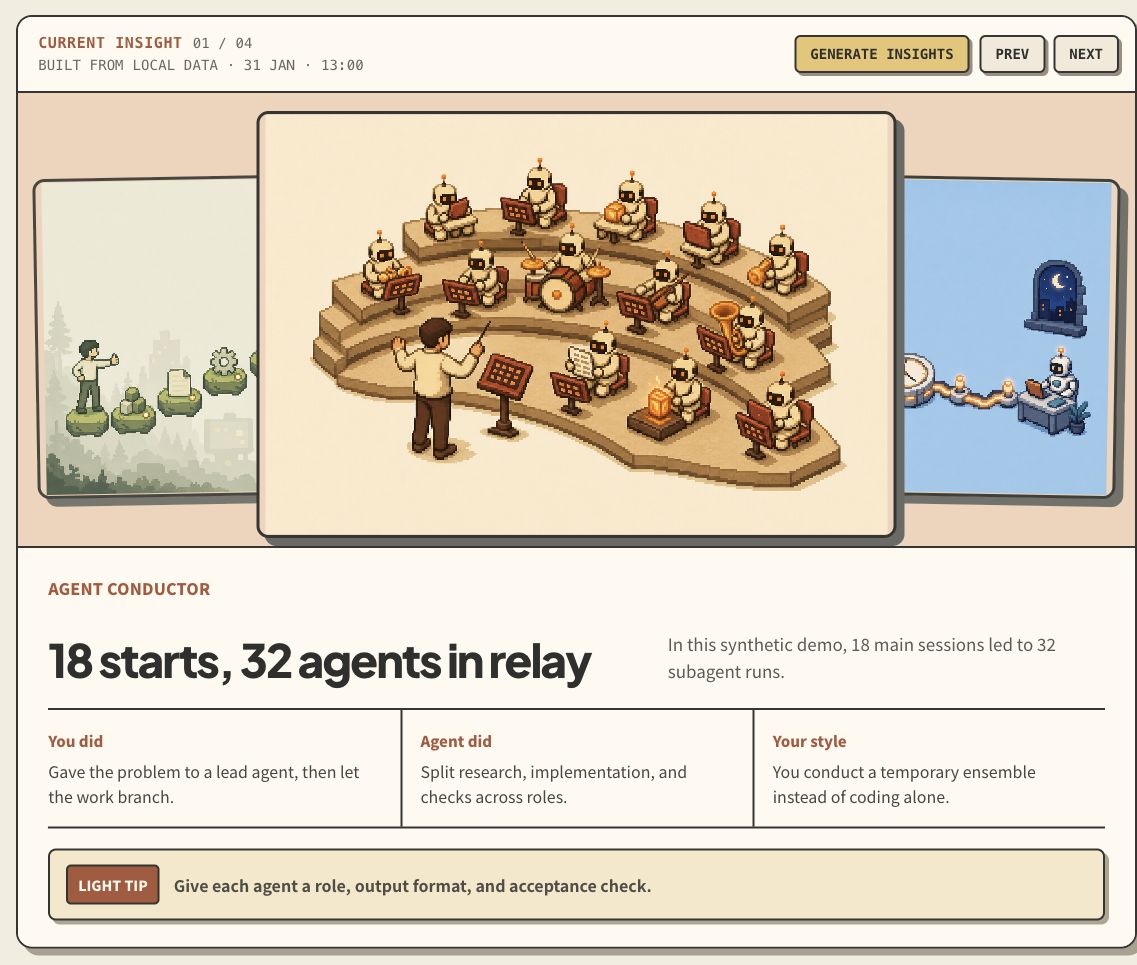
One insight, end to end
An insight is more than its illustration. Each card includes the behavior that triggered it, how the agent responded, the working style it suggests, and one practical next step.
Customizable coding behavior
The factual section can show up to eight modules. People choose which modules remain visible; the responsive grid reflows around that selection.
Four distinct visual stories

Install
Claude Code and Codex — one command
npx skills add senlindesign/coding-wrapped \
  --skill coding-wrapped \
  --agent claude-code \
  --agent codex \
  --global
The open Agent Skills package is the same on both platforms. No separate Claude and Codex logic is maintained.
Claude Code plugin marketplace
/plugin marketplace add https://github.com/senlindesign/coding-wrapped
/plugin install coding-wrapped@coding-wrapped
Manual install
Clone the repository, then copy skills/coding-wrapped to one or both folders:
~/.claude/skills/coding-wrapped
~/.agents/skills/coding-wrapped
Use
Start a fresh agent conversation and say:
Build my Coding Wrapped from my local coding history.
Chinese works too:
读取我本地的 Claude Code 和 Codex 记录,生成我的 Coding Wrapped。
The Skill infers the interface language from that prompt. On a normal first run it asks at most for a short display name and scan permission when permission was not already explicit.
It then:
- scans standard local Claude Code and Codex session folders;
- stores only safe aggregate metrics;
- writes a Coding Overview and four insights;
- opens the dashboard on
http://127.0.0.1:4173/; - gives a short built-in manual.
Later you can ask:
Refresh the facts without changing my insights.
Generate four new insights for this month.
Export my Coding Wrapped.
What stays local
The scanner reads standard session directories on your machine, but generated state excludes raw transcripts, source code, project names, file paths, email addresses, URLs, and secrets. The dashboard binds to loopback only. See PRIVACY.md for the exact boundary.
How the repository is organized
| Path | Purpose | Loaded when |
|---|---|---|
skills/coding-wrapped/SKILL.md |
Core workflow and hard rules | Whenever the Skill triggers |
skills/coding-wrapped/references/ |
Privacy, data, writing, and visual contracts | Only for the relevant phase |
skills/coding-wrapped/references/coding-best-practices.md |
Curated source-of-truth library for behavior-matched Light Tips | When writing Overview or Insight advice |
skills/coding-wrapped/scripts/ |
Deterministic scan, persistence, serve, and export logic | Executed as needed |
skills/coding-wrapped/assets/ |
Offline dashboard, fonts, and fallback illustrations | Copied into local state |
skills/coding-wrapped/assets/frontend-source/ |
Editable React and CSS source for the bundled dashboard | Only when rebuilding the UI |
.claude-plugin/ |
Claude Code plugin and marketplace metadata | Installation only |
.codex-plugin/ |
Codex plugin metadata | Installation only |
evals/ |
Synthetic privacy and behavior checks | Development and release |
There is one canonical Skill folder. Platform manifests are thin adapters, so Claude Code and Codex cannot drift into different products.
Validate and package
Python 3.9+ is the only runtime requirement.
make validate
make package
make validate checks both platform manifests, compiles every Python file,
runs the Skill evaluator, and verifies the release layout. make package
creates dist/coding-wrapped.skill.
Node.js is required only for contributors changing the Dashboard UI. Rebuild the hashed offline bundle from its checked-in source with:
npm --prefix skills/coding-wrapped/assets/frontend-source ci
make frontend
Design principles
- Local first. The most personal coding data should not require an account or hosted analytics service.
- Facts before stories. Every playful claim must be traceable to an aggregate metric.
- Fun before judgment. The point is recognition, not a score.
- Show, do not interrogate. Build a useful first version before asking the user to configure themes and metrics.
- One map, details on demand. The main Skill stays short; fragile rules and reusable assets live in the files that need them.
- One visual contract. Every generated illustration is conditioned on one of four canonical references and checked against the same pixel scale, character language, canvas, and composition rules.
Contributing
Read CONTRIBUTING.md, then run make validate before opening
a pull request.
Landing page
The public product demo lives in landing/. It is a static,
backend-free Vite app built entirely from synthetic data. Its four insight
illustrations are optimized copies of the approved fallback references; no real
session aggregate is included.
npm --prefix landing install
npm --prefix landing run dev
make landing-test
The production site is deployed as Cloudflare Workers Static Assets. From the
landing/ directory, npm run deploy:check validates the release without
publishing and npm run deploy publishes the previously built site. Cloudflare
Workers Builds should use landing/ as its root directory, npm run build as
the build command, and npm run deploy as the deploy command.
External destinations are configured in landing/src/content.js. The support
button intentionally remains inactive until a verified Buy Me a Coffee URL is
provided.
License
MIT. Bundled font licenses are listed in THIRD_PARTY_NOTICES.md.
No comments yet
Be the first to share your take.