
claude-skills-doctor


A doctor for your Claude Code agent skills — find the ones Claude silently can't see, before they cost you a session.
Install
claude-skills-doctor, runskilldoctor.
You install a skill, it looks perfect, and Claude never uses it. No error, no warning.
Claude Code loads a listing of skill names and descriptions into context so Claude knows what exists. The listing always keeps every skill name — but when it overflows, Claude Code drops descriptions, starting with the skills you invoke least. A skill with no description is a skill Claude has nothing to match your request against, so it quietly stops being chosen. Two limits squeeze that listing, and they fail differently:
- Per entry —
description+when_to_useis truncated at 1,536 characters, regardless of budget. Exact, and the same on every model. - Across the listing — the total is 1% of your model's context window, raised with
skillListingBudgetFractionor pinned withSLASH_COMMAND_TOOL_CHAR_BUDGET.
That second one is why a fixed number would mislead you: the same 11,000 characters of skills is comfortable on a 1M-token model and 37% over on a 200K one.
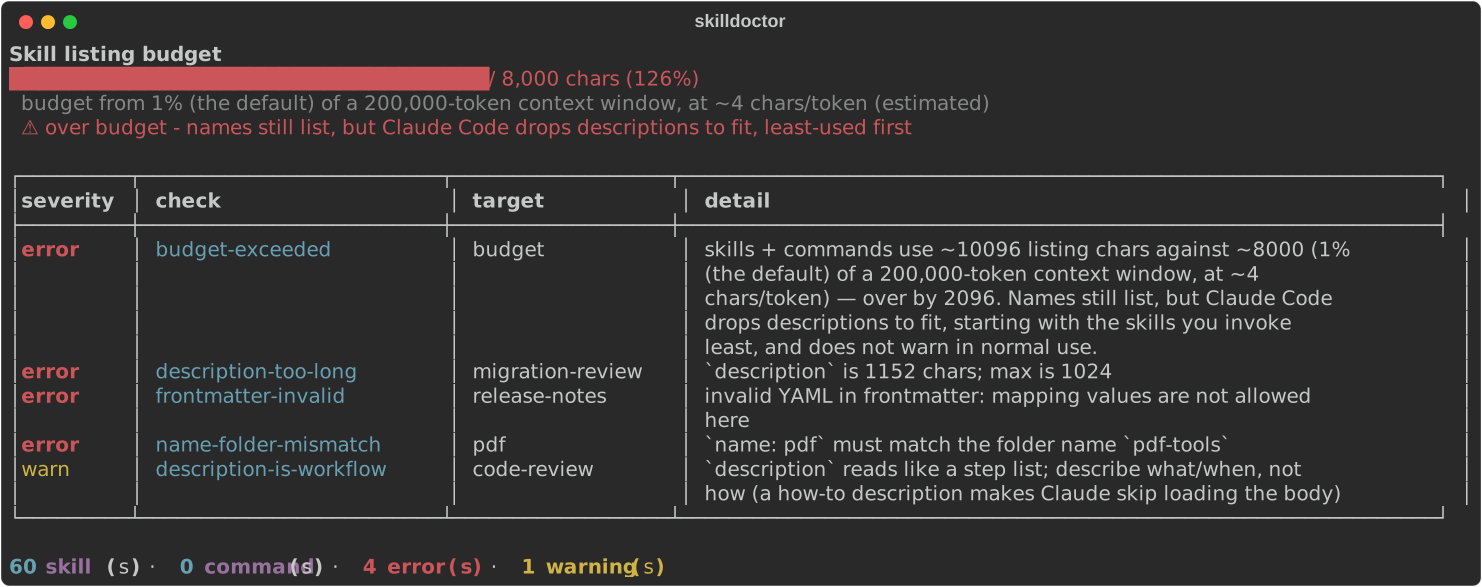
That is a real run, not a mock-up — against examples/demo-home, a deliberately sabotaged example home committed to this repo. Reproduce it yourself:
skilldoctor --home examples/demo-home --project examples/demo-home
Every finding is the tool reacting to a real mistake in that fixture: a name: that does not match its folder, a description whose unquoted colon makes the YAML invalid, one past the per-entry cap, and 60 skills whose descriptions together overflow the listing. The image is regenerated by scripts/make_demo_svg.py, so it cannot drift from what the tool prints.
It reads your actual settings rather than assuming defaults — skillListingBudgetFraction (so raising your own budget is respected), skillListingMaxDescChars, and skillOverrides (a skill you already set to name-only costs its name, and one set to off costs nothing). Pass --context-window 1000000 for your model, or --budget N to pin it exactly. The tool always says which number it used and whether it was measured or derived.
Install
uvx claude-skills-doctor            # run without installing
pip install claude-skills-doctor    # or install it
Then run skilldoctor (the command claude-skills-doctor works too).
Use
skilldoctor                 # health-check every skill Claude Code can see; exits non-zero on errors
skilldoctor --fix           # show a concrete suggested fix for each finding
skilldoctor --json          # machine-readable, for CI
skilldoctor --strict        # fail on warnings too
skilldoctor budget          # the shareable view: the bar + the biggest contributors to trim
It scans everywhere Claude Code loads from — your user skills (~/.claude/skills), the project's (.claude/skills), and installed plugins — plus slash-commands, which share the same budget.
Or ask Claude
It also ships as a Claude Code plugin, so the diagnosis lives where the problem shows up — you notice a skill isn't firing, you ask, and Claude checks:
/plugin marketplace add gulmezeren2-byte/claude-skills-doctor
/plugin install skilldoctor@skilldoctor
The plugin ships one skill and no slash command. A tool that measures the listing budget shouldn't take two slots out of it.
Authoring skills? Lint what you ship
--skills points at a skills/ directory you're writing, so you can catch problems before publishing rather than after someone installs them:
skilldoctor --skills ./skills --strict # fails on warnings too — good CI gate
This repo does exactly that to itself: CI runs skilldoctor --skills ./skills --strict against the skill it ships, and a test asserts it. If our own tool would flag our own skill, the build fails.
In GitHub Actions
- uses: gulmezeren2-byte/claude-skills-doctor@v1
  with:
    skills: ./skills     # omit to check the repo's .claude/skills
    strict: true         # fail on warnings too
Nothing to install — the action fetches the tool for you. Set json: true and the report comes back as a parseable report output; the step still fails the job when there are errors, so the exit code stays the gate and the JSON is just data. budget and version are there when you need to pin either.
What it does in your CI: installs uv, downloads this package from PyPI, reads your skill files, prints a report, exits. It reads no secrets, writes nothing to your repo, sends no telemetry, and makes no network calls beyond installing itself.
If you want it fully deterministic, pin both halves — the action by commit and the tool by version:
- uses: gulmezeren2-byte/claude-skills-doctor@<commit-sha>
  with:
    version: "0.7.0"
@v1 is a moving tag, and without version the tool resolves to the latest release, so an unpinned setup follows upstream. That's the usual trade-off: pinned is reproducible, unpinned gets fixes. The action pins its own dependency (setup-uv) by commit for the same reason. Releases are published to PyPI from CI with Trusted Publishing (OIDC) and carry attestations — there's no long-lived token to steal.
What it checks
All deterministic. No model calls, no network, no guessing — it reads your files and reports.
- Listing budget — the headline. Total skill + command listing characters against 1% of your model's context window (or
SLASH_COMMAND_TOOL_CHAR_BUDGET/--budget, which are exact). Over budget → descriptions get dropped, least-used first. - Per-entry cap —
description+when_to_useover 1,536 characters is truncated in the listing whatever the budget. Exact, model-independent, and easy to cross without noticing. - Won't load — invalid YAML frontmatter (which silently prevents loading), missing
name/description, andnamethat doesn't match its folder (required, and the one Anthropic's own validator misses). - Won't route — descriptions too thin to trigger, and descriptions written as a step-by-step how-to (which makes Claude follow the summary and skip loading the body).
- Collisions — two skills with the same
name, or near-identical descriptions that compete to trigger. - Contract & hygiene —
allowed-toolsthat doesn't cover the tools the body actually uses,</>in descriptions (prompt-injection risk), oversized bodies that belong inreferences/, reference chains more than one level deep, absolute paths, and human-facing docs (README/CHANGELOG) left inside a skill folder. - Security — scans every skill (third-party plugins included) for
hidden-instructionphrases (instruction-override / hide-from-user / prompt-extraction) in the SKILL.md and its references, andscript-network-calls insidescripts/. Because "I installed a skill — is it safe?" is a real question, and a documentation-context filter keeps skills that teach prompt-injection safety from tripping it.
Errors make it exit non-zero, so it gates a pipeline: skilldoctor && claude .... Add --fix to see a concrete suggested fix under each finding.
How it's different from a skill linter
There are per-file SKILL.md linters and validators (and Anthropic's skill-creator model-evaluates one skill you're authoring). claude-skills-doctor is the complement: a whole-system, install-time health check across every skill you actually have — and the only one that measures the cross-skill failures a single-file linter structurally can't see: the shared listing budget, duplicate names, and colliding descriptions. A linter checks a file; a doctor examines the whole patient.
Honest about the numbers
The budget is measured as each skill/command's name + description characters. That's an estimate — the real budget adds minor per-entry formatting — so treat it as close, and on the safe side, not byte-exact. It lints your own skills fully; third-party plugin skills count toward the budget but are checked only for load-breakers, so it never nags about skills you can't fix. Every finding points at a file and a reason; nothing is invented.
Related
- mcp-contract — the same idea one layer down.
skilldoctorwatches the skills an agent can see — are they under the listing budget, do their descriptions collide?mcp-contractwatches the tools it calls — did a change to a server's tool surface quietly break the callers? Both treat the text an agent routes on as a contract worth testing.
More tools by Eren Gülmez.
License
MIT
No comments yet
Be the first to share your take.