
Canonry


Agent-first AEO operating platform. Open source. Self-hosted.
- Track citations across Gemini, ChatGPT, Claude, Perplexity, and local LLMs
- Watch AI engines crawl and refer traffic via server-log ingestion — Cloud Run, Vercel, and the WordPress Traffic Logger plugin today
- Diagnose against real traffic with built-in GSC, GA4, and Bing Webmaster
- Track local AEO via Google Business Profile — search-term impressions, performance metrics, and hotel lodging + booking-CTA gaps
- Manage ChatGPT ads with OpenAI Ads Manager — connect an ad account, inspect conversion setup and performance, prepare paused campaigns, and launch only with an explicit human approval
- Discover who links to you with Common Crawl backlinks — follows Common Crawl's rolling monthly hyperlink graph, auto-syncing each new window on a schedule, queried locally with DuckDB
- Execute fixes via WordPress, JSON-LD schema, and indexing submissions
- Manage many clients declaratively — config-as-code YAML +
cnry apply - Schedule recurring visibility checks, traffic syncs, and Business Profile syncs, with webhook alerts on regressions
- Generate client-ready HTML reports —
cnry report <project> - Drive from your own agent via the MCP adapter, a native Codex or Claude Code plugin, or webhooks
- Or use Aero — Canonry's built-in agent that wakes up after every run
Every dashboard view has a matching CLI command and API endpoint. The CLI is the surface; the UI consumes the same API your agent does.
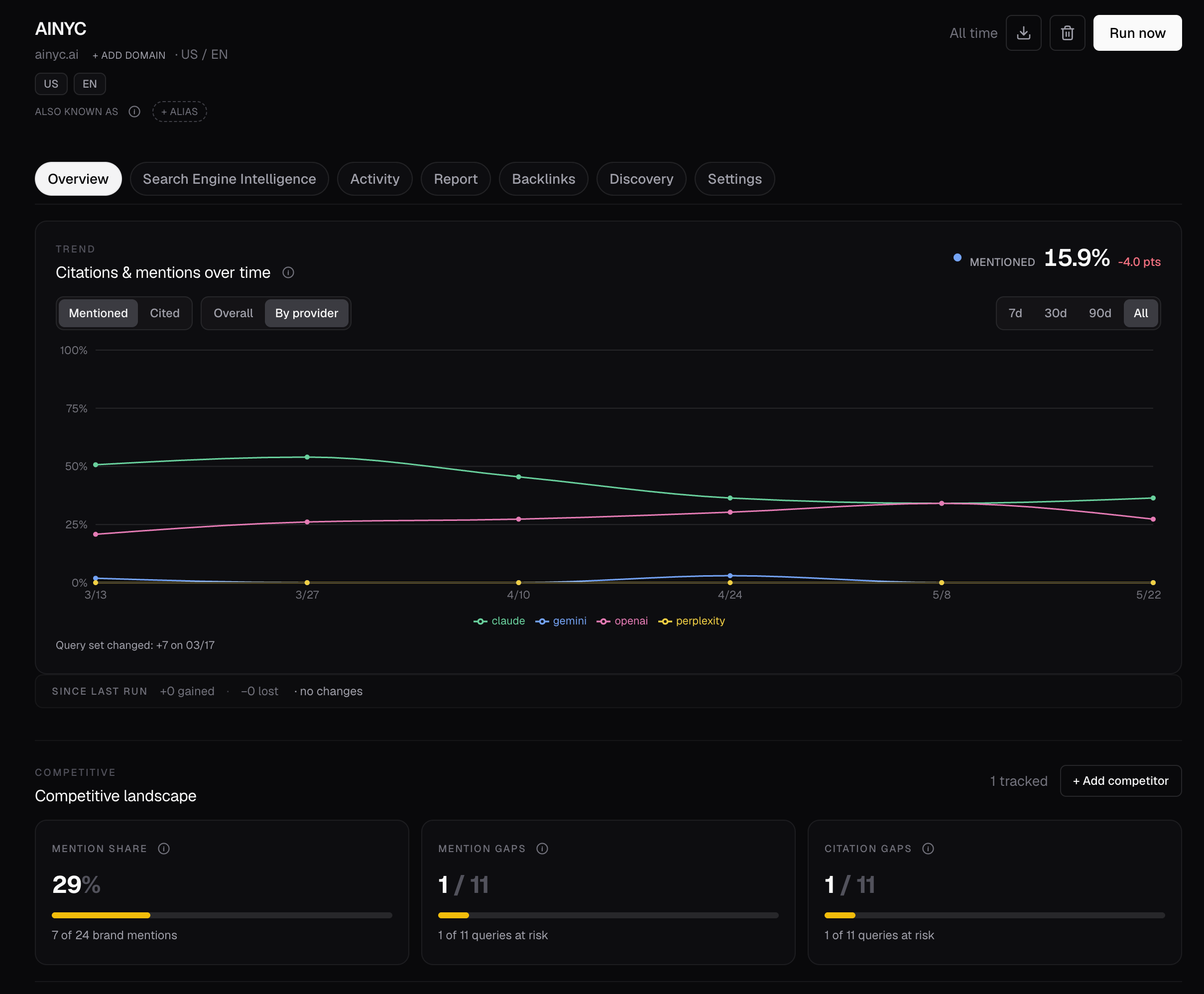
Run your first AI visibility check in 5 minutes
npm install -g @canonry/canonry
cnry init
cnry serve
The CLI installs as cnry (short form) and canonry — the two are interchangeable.
The legacy package name @ainyc/canonry is still published at the same versions for compatibility, but new installs should use @canonry/canonry.
Open http://localhost:4100/setup. A guided wizard walks you through provider keys, project setup, queries, and your first visibility check.
Prefer the terminal?
cnry project create my-site --domain example.com
cnry query add my-site "your first query" "second query"
cnry run my-site --wait
cnry evidence my-site
cnry insights my-site
Or use any shell-capable coding agent
Without the native plugin, drop this into any shell-capable agent. It keeps credential setup private and asks before each persisted or quota-consuming operation:
Set up canonry for me. Canonry is an open-source platform that tracks how AI answer engines (Gemini, ChatGPT, Claude, Perplexity) cite my site.

1. Ask me for: my domain, 3–5 queries I want to track, and which provider I want to start with (gemini / openai / claude / perplexity). Wait for my answers before proceeding.
2. Ask for approval, then run `npm install -g @canonry/canonry`.
3. Do not run `cnry init` yourself or ask me for credentials. Tell me to run `cnry init` in my own private terminal because it prompts for provider secrets and prints the new full-access API key once. Wait for me to confirm completion; never ask me to paste its output. This scaffolds config and installs the Canonry skills.
4. Read `.claude/skills/canonry/SKILL.md`, run the read-only doctor checks, and show me the exact project/domain/query changes you propose. Ask for explicit approval before creating the project or changing queries.
5. After project setup, show the provider and query count for the first sweep and ask for explicit approval for that quota-consuming run. Only then trigger it.
6. Read `.claude/skills/aero/SKILL.md` and summarize the existing mention and citation evidence. Propose the technical audit, including its page limit, and ask for separate approval before running `cnry technical-aeo run <project> --wait`; after approval, read the result with `cnry technical-aeo score <project> --format json`.
7. Open the dashboard only if I ask, then summarize what you found: mention and citation rates per provider, the top 3 gaps, and the highest-impact site issues. Ask again before drafting content, submitting URLs, editing files, publishing, or performing any other mutation or quota-consuming operation.
If you get stuck
| Problem | Fix |
|---|---|
| No provider key configured | Open /setup, or grab a free Gemini key, set GEMINI_API_KEY, and restart cnry serve. |
| Why did my first audit fail? | Run cnry doctor, then reopen /setup; it checks provider keys and setup blockers before the first sweep. |
| No results after a run | Visibility checks are async — check the Runs tab or use cnry run <project> --wait. |
| Not sure what queries to test | Setup wizard auto-generates them; expand the basket later with cnry discover run <project> --icp "..." — see the discovery methodology. |
| Want to test specific queries without tracking them | Use the Research queries workflow in Query Discovery, or run cnry research run <project> "query one" "query two" --wait. Results and sources are saved separately and never change the tracked basket. |
npm install fails on node-gyp |
Install build tools for better-sqlite3 (guide). |
Provider keys
| Provider | Key source | Env var |
|---|---|---|
| Gemini | aistudio.google.com | GEMINI_API_KEY |
| OpenAI | platform.openai.com | OPENAI_API_KEY |
| Claude | console.anthropic.com | ANTHROPIC_API_KEY |
| Perplexity | perplexity.ai/settings/api | PERPLEXITY_API_KEY |
| Local LLMs | Any OpenAI-compatible endpoint | LOCAL_LLM_URL |
Configure during cnry init, in the dashboard /settings, or as env vars.
Documentation
| Architecture & data model | docs/architecture.md · docs/data-model.md |
| Aero — built-in agent | skills/aero/SKILL.md |
| Native plugins — Codex / Claude Code | docs/plugins.md |
| MCP — Claude Desktop / Cursor / Codex | docs/mcp.md |
| Integrations | GSC · GA4 · Bing · Google Business Profile · WordPress · Server-side traffic (Cloud Run + Vercel + WordPress logs) |
| Deployment — Docker, Railway, Render, systemd, Tailscale | docs/deployment.md |
| API — 118+ endpoints | GET /api/v1/openapi.json (no auth) |
| Standalone skills bundle for Claude Code / Codex | cnry skills install (details) |
| Roadmap & ADRs | docs/roadmap.md · docs/adr/ |
| All docs | docs/README.md |
Requirements
Node.js ≥ 22.14.0. At least one provider API key.
Contributing
git clone https://github.com/Canonry/canonry.git && cd canonry
pnpm install && pnpm run typecheck && pnpm run test && pnpm run lint
See CONTRIBUTING.md.
License
FSL-1.1-ALv2. Free to use, modify, and self-host. Each version converts to Apache 2.0 after two years.
No comments yet
Be the first to share your take.