
An agent skill that designs a brand and ships the files. Vector logos in outlines · icon sets · a real brand manual · print PDFs with bleed and TrimBox.
No design software. No mockups. No images pretending to be artwork.


The problem
Ask any coding agent for a logo and you get one of three things: an SVG hand-written token by token that falls apart at small sizes, a raster image you cannot edit, or a web page showing a logo.
None of those is a deliverable. A brand handover is vector artwork in outlines, an icon set, a manual that documents the rules, and print files a printer can actually cut.
brandpress makes those files.
What it actually produces
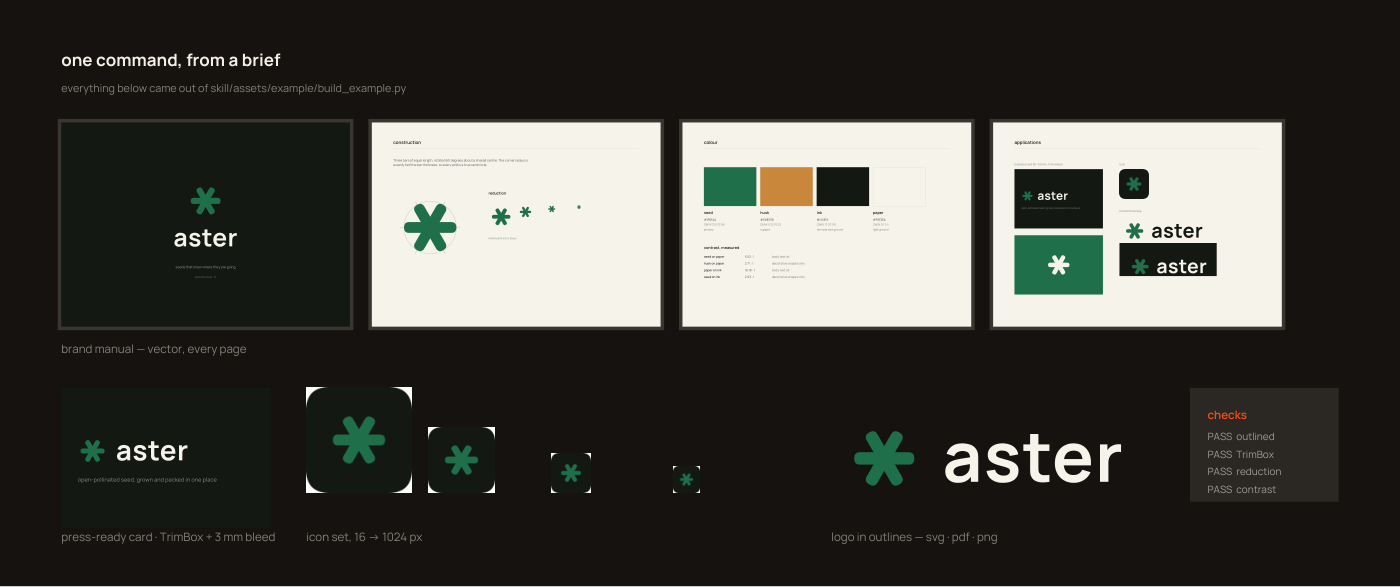
Everything above came from a single python build_example.py — including the
manual, the business card with its cut marks, and the self-checks.
Why this is different
| Other brand skills | brandpress |
|---|---|
| Prompt templates and strategy theory | A working toolkit that writes files |
| Generates an image of a logo | Generates the logo, as curves |
| "Here is a colour palette" | Measured WCAG contrast for every pair |
Logo as <text> in an SVG |
Real glyph outlines, kerned with HarfBuzz |
| A PDF | A PDF with TrimBox, BleedBox and 3 mm bleed |
| Mockups in a café | The actual print file |
| Trust the output | qa.py checks it and tells you what failed |
The logo at the top of this page was made by the skill. The file that made it is
brand/make_brand.py — 200 lines, no special cases.
Install
Claude Code
npx skills add DiegoAmorimDev/brandpress
Or by hand, into your project or ~/.claude/skills/:
git clone https://github.com/DiegoAmorimDev/brandpress
cp -r brandpress/skills/brandpress ~/.claude/skills/
Any other agent — point it at skills/brandpress/SKILL.md.
It is a markdown file and a Python package; there is nothing vendor-specific in it.
Requirements
pip install pymupdf fonttools uharfbuzz
pymupdf renders and writes PDF, fonttools handles font instancing and glyph
outlines, uharfbuzz does the text shaping. No design application, no network
beyond fetching a typeface once.
Try it in 30 seconds
git clone https://github.com/DiegoAmorimDev/brandpress
cd brandpress
pip install pymupdf fonttools uharfbuzz
python skills/brandpress/assets/example/build_example.py
checks
  [PASS] logo is outlined         no <text> in the SVG
  [PASS] card has TrimBox         (91.0, 61.0) mm sheet
  [PASS] mark survives reduction  reads down to 24 px
  [PASS] palette contrast         seed on paper 5.52:1

19 files in skills/brandpress/assets/example/output
Open the PDF. Then open build_example.py — it is one file, and it is the whole
job: symbol, lockups, icon set, a card with bleed, a four-page manual, and the
checks.
Or just ask
With the skill installed:
Design a brand for a specialty coffee roaster called Ember. Small-batch, sells to restaurants. I need the logo, an icon set, a brand manual and a business card ready for print.
The agent explores several symbol directions, renders them, argues for one, builds the system, checks its own work and writes the folder.
The toolkit
skills/brandpress/assets/pipeline/ — seven modules, no framework.
| Module | |
|---|---|
geometry.py |
polygons, corner rounding, half-plane clipping, teardrops, colour mixing, CMYK |
fonts.py |
fetch a variable font, cut static weights |
typography.py |
glyph outlines with real kerning, exact bounds, fit-to-width |
page.py |
multi-page PDF layout in millimetres |
printing.py |
bleed, TrimBox, BleedBox, effective DPI |
export.py |
SVG + PDF + PNG from one drawing |
qa.py |
contrast, outline check, TrimBox check, reduction proof |
Use it directly, without any agent, if you want. It is ordinary Python.
Things it knows that cost us real time
Every one of these produced a wrong file that looked fine until much later.
An outlined ring with three shapes at 120° is the radiation symbol. It is also
the most natural way to draw "one thing distributed into parts", which is why
payment and sharing brands walk into it constantly. Break the radial symmetry.
→ anti-patterns.md
Group opacity is silently ignored by some SVG renderers. A background mesh
set to 9% rendered fully solid. Flatten the colour yourself; live transparency in
a print file is a bad idea regardless.
SVGPathPen emits shorthand H and V commands — one coordinate each. Parse
a path as x,y pairs and your bounding box is quietly wrong. Use BoundsPen.
The Google Fonts CSS endpoint with a legacy User-Agent returns a corrupt file
for variable-only families. Plausible size, invalid magic bytes, failure much
later. Take the variable font from google/fonts and instance it.
A cracked or offset shape reads as failure. Beautiful for a demolition company, fatal for a bank.
A teardrop with a long tip is a flame. Shorten the tip, flare the shoulders earlier.
There are more, in SKILL.md.
Documentation
SKILL.md |
the skill: process, rules, traps |
anti-patterns.md |
shapes that read as something else |
geometry.md |
construction techniques |
typography.md |
outlines, kerning, letter substitution |
print.md |
bleed, boxes, DPI, colour for press |
manual.md |
what belongs in a brand manual |
Contributing
Wanted, specifically:
- Anti-patterns. You have seen a mark that accidentally read as something else. That is the highest-value contribution here — open an issue with the shape and what it read as.
- Print knowledge. Spot colours, foil, embroidery, die-cuts, imposition.
- Geometry. More primitives: stars, spirals, ribbons, true boolean ops.
- Non-Latin scripts. The shaping path supports them; the guidance does not yet cover them properly.
- Worked examples. A second
build_example.pyfor a different kind of brand teaches more than any amount of prose.
See CONTRIBUTING.md. Small PRs get merged fast.
Licence
MIT — see LICENSE.
Typefaces fetched at build time keep their own licences. The example uses Manrope under the SIL Open Font License. Ship the licence with any brand package you deliver.
No comments yet
Be the first to share your take.