
AutoCAD MCP Pro
Production-grade AutoCAD automation for AI agents — live through COM on Windows, or headless through ezdxf on any platform.





One typed MCP contract controls two execution engines. Build and edit drawings, query exact geometry, apply engineering standards (ISO 128/129/286/1101), refine quality issues inside transactions, and deliver hashed artifacts with validation evidence.
v1.4 release snapshot: 131 tools · 6 resources · 5 prompt templates · 474 collected tests. Runtime discovery through
system_aboutis authoritative.
Install in 10 seconds
pip install autocad-mcp-pro     # or: uvx autocad-mcp-pro
autocad-mcp                     # stdio MCP server, backend auto-selected
Headless (no AutoCAD required, any OS) or live AutoCAD on Windows:
AUTOCAD_MCP_BACKEND=ezdxf autocad-mcp    # portable DXF engine
AUTOCAD_MCP_BACKEND=com   autocad-mcp    # live AutoCAD (pip install "autocad-mcp-pro[com]")
Extras: [com] live AutoCAD (pywin32 + Pillow), [pdf] PDF/screenshot
rendering (matplotlib), [full] everything. Working from a checkout is the
same commands with pip install -e ".[full]" and python server.py.
Benchmarks
Every number below is generated by a script in benchmarks/
and rendered to SVG with Python (matplotlib). No hand-edited charts, no
adjectives.
The leaderboard — nine public AutoCAD MCP servers, one rubric
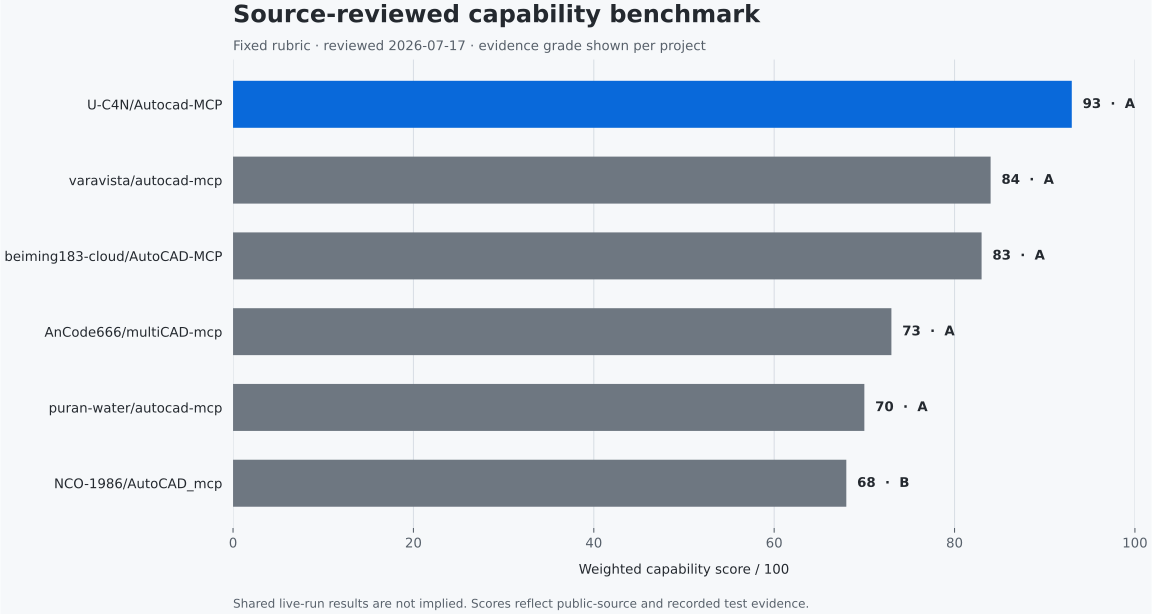
| # | Project | Score | Evidence |
|---|---|---|---|
| 1 | U-C4N/Autocad-MCP (this repo, v1.4.0) | 95 | A |
| 2 | varavista/autocad-mcp | 84 | A |
| 3 | beiming183-cloud/AutoCAD-MCP | 83 | A |
| 4 | LokmenoWer/best-cad-mcp | 74 | B |
| 5 | AnCode666/multiCAD-mcp | 73 | A |
| 6 | puran-water/autocad-mcp | 70 | A |
| 7 | NCO-1986/AutoCAD_mcp | 68 | B |
| 8 | daobataotie/CAD-MCP | 35 | B |
| 9 | zh19980811/Easy-MCP-AutoCad | 30 | C |
Fixed public 100-point rubric — CAD breadth (25), correctness and delivery
(20), backends/platforms (15), engineering production (15), tests and
maintenance (15), security and operations (10) — applied to the public source
and documentation of each project
(benchmarks/source_review.json, dated).
Stars and raw tool counts score nothing. Evidence grade A = source plus
locally executed evidence, B = deep source review without a full live run,
C = documented tool surface only. This is a source review, not a shared
live run — the lanes below are the runtime evidence.
python -m benchmarks.render_chart
1 · Live-run scores — same harness, pinned competitors
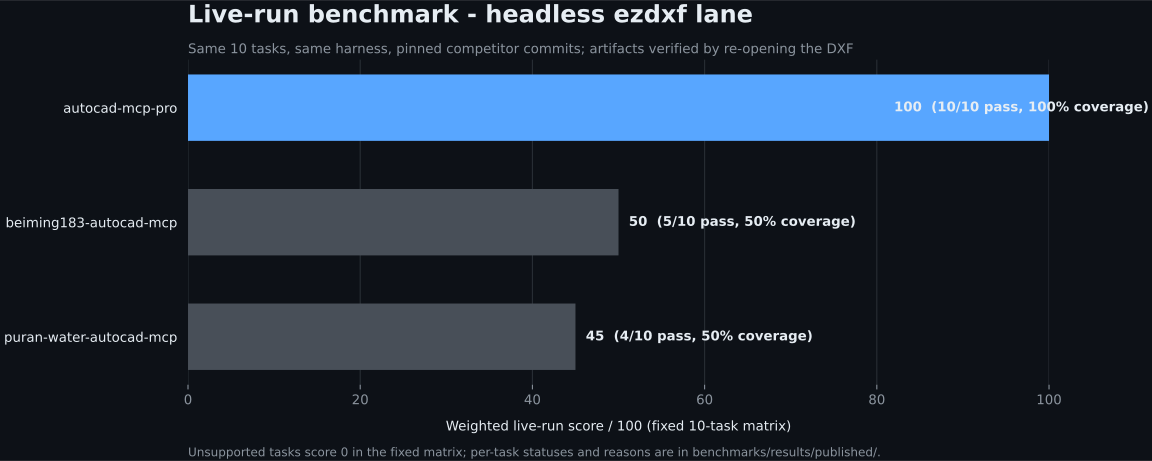
| Server | Pinned commit | Score | Pass | Coverage |
|---|---|---|---|---|
| autocad-mcp-pro (this repo) | working tree | 100.0 | 10/10 | 100% |
| beiming183-cloud/AutoCAD-MCP | 11f7c47 |
50.0 | 5/10 | 50% |
| puran-water/autocad-mcp | 95476a3 |
45.0 | 4/10 | 50% |
Ten fixed tasks, one runner, headless ezdxf lane. Competitors are driven
black-box over MCP stdio using their own documented tool contracts at the
pinned commit, and every geometry claim is verified by re-opening the exported
DXF with ezdxf inside the harness — no self-reporting. unsupported scores
zero in the fixed matrix; per-task reasons are committed under
benchmarks/results/published/. File-IPC
(live AutoCAD) lanes run locally, not in CI.
python -m benchmarks.run_competitors --server puran-water-autocad-mcp --backend ezdxf
python -m benchmarks.run_competitors --server beiming183-autocad-mcp --backend ezdxf
python -m benchmarks.render_live_chart
2 · Task matrix — where the score comes from
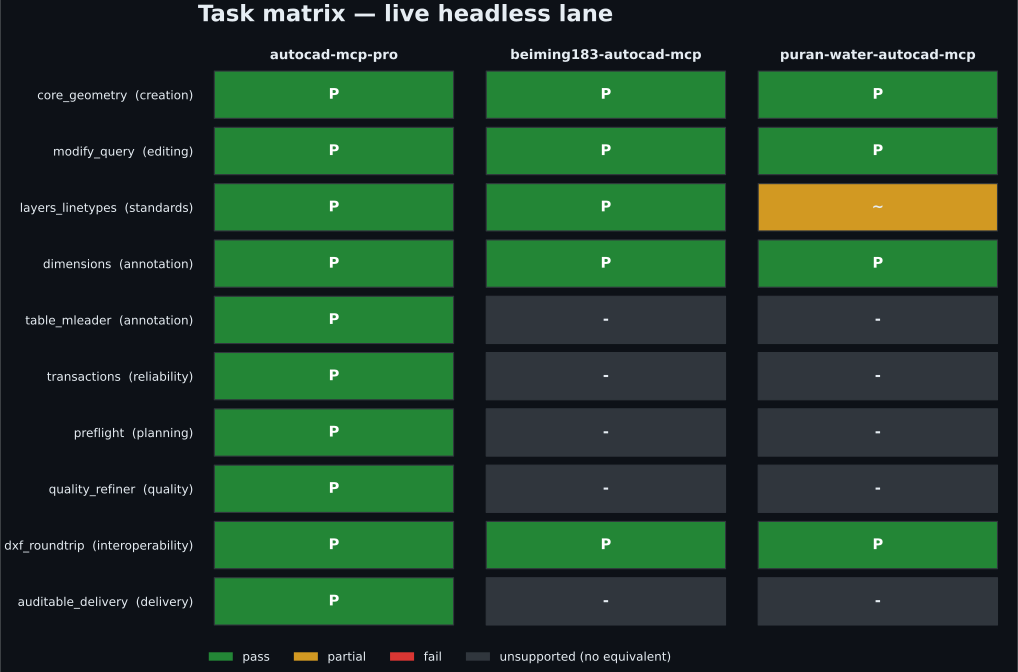
The single score hides which capabilities exist, so the matrix shows every task against every server: green = verified pass, amber = partial, gray = the server documents no equivalent (planning, refinement, TABLE/MLEADER, hashed delivery), red = attempted but failed verification.
python -m benchmarks.render_matrix_chart
3 · Headless performance — scale evidence
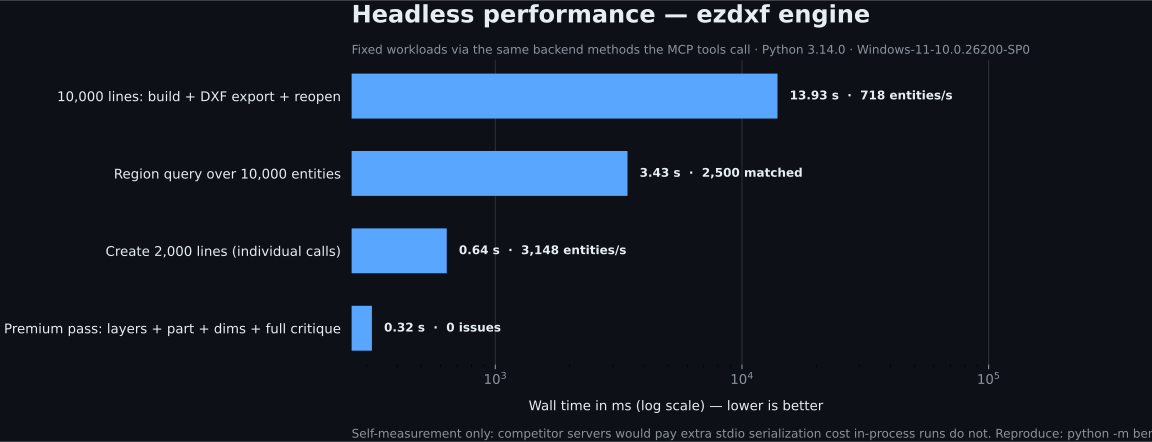
| Workload | Wall time | Throughput / result |
|---|---|---|
| Create 2,000 lines (individual calls) | 0.64 s | ~3,100 entities/s |
| 10,000 lines: build + DXF export + reopen | 13.9 s | ~700 entities/s end-to-end |
| Region query over 10,000 entities | 3.4 s | 2,500 matched |
| Premium pass (layers + part + dims + full critique) | 0.32 s | 0 issues |
Workloads call the same backend methods the MCP tools call, so server-side overhead is included. Self-measurement only — competitor servers would pay an extra stdio serialization cost that in-process runs do not, so no cross-server timing claims are made. Numbers move with hardware; the machine fingerprint is recorded in the report.
python -m benchmarks.perf_suite --out benchmarks/results/published/perf-ezdxf.json
python -m benchmarks.render_perf_chart
4 · Version A/B — every release re-proves correctness
compare_versions.py runs the same 21 deterministic, headless correctness
checks against the previous release tag and the current tree — each check in
its own subprocess, so a hard crash counts as a miss instead of killing the
run.
v1.4.0 release gate (baseline v1.3.0, report:
ab-v1.3.0-vs-v1.4.0.json):
| Version | Checks passing | Pass rate | Fixed | Regressed |
|---|---|---|---|---|
| v1.3.0 (baseline) | 21 / 21 | 100 % | — | — |
| v1.4.0 (this release) | 21 / 21 | 100 % | 0 | 0 |
v1.4.0 added CI, packaging, benchmarks, tool profiles, paper space, ISO 286 fits and opt-in 3D solids without breaking a single correctness check. For contrast, the same suite caught the v1.0.0 → v1.1.0 jump:
| Version | Checks passing | Pass rate |
|---|---|---|
| v1.0.0 (first public release) | 8 / 21 | 38.1 % |
| v1.1.0 | 21 / 21 | 100 % |
python benchmarks/compare_versions.py v1.3.0 --json ab.json
Full rubric, caveats, method and boundaries for every lane:
benchmarks/README.md.
What ships in v1.4
| Area | Tools |
|---|---|
| Drawing lifecycle | create, open, save, export DXF/PDF, audit, purge, undo/redo |
| Geometry | lines, arcs, polylines, splines, hatches, trim/extend/fillet/chamfer, handle-preserving edits |
| Annotation | ISO 129 toleranced dimensions, ISO 286 fits (fit="H7"), TABLE, MLEADER, GD&T frames + datums (ISO 1101) |
| Engineering generators | involute gears (front + section A-A), DIN 6885 keyed bores, ISO A3 titleblock |
| Paper space (new) | layout_list/create/set_current, scaled viewport_create, drawing_export_pdf(layout=...) |
| 3D solids (new, opt-in) | solid_box/cylinder/extrude/revolve/boolean on live AutoCAD (ENABLE_3D=true) |
| Quality loop | drawing_preflight → drawing_plan → drawing_critique → drawing_refine → drawing_finalize (0-100 score) |
| Delivery | drawing_deliver: DXF/PDF/PNG + SHA-256 manifest + reopen-parity checks |
| Discovery | tool profiles (new): TOOL_PROFILE=lean (~46 tools) / core / full for clients with tight tool caps |
The tool surface evolves — ask system_about for the live grouped inventory
and system_capabilities for per-backend support modes instead of copying
lists from this README.
Architecture
flowchart LR
  A[MCP host / AI agent] --> B[FastMCP server]
  B --> C[Error - audit - timing - logging middleware]
  C --> D[Typed tool contract + tool profiles]
  D --> E[COM backend]
  D --> F[ezdxf backend]
  E --> G[Live AutoCAD]
  F --> H[Headless DXF]
  E --> I[Engineering quality + delivery]
  F --> I
server.py— FastMCP surface, lifespan, middleware, resources, prompts.backends/base.py— shared typed contract + capability model.backends/com_backend.py— single-STA-thread COM executor with per-call timeouts.backends/ezdxf_backend.py—asyncio.to_thread-wrapped DXF engine with snapshot transactions.engineering/— standards-aware planning, generators, critique, scoring, fits, refinement, validation, delivery.security.py— path validation and command/AutoLISP sanitization.
Backend capabilities
| Capability | COM backend | ezdxf backend |
|---|---|---|
| Live AutoCAD document control | ✓ | — |
| Headless DXF creation and editing | — | ✓ |
| Cross-platform execution | — | ✓ |
| Transactions and rollback | ✓ | ✓ |
| Paper-space layouts + viewports | ✓ | ✓ |
| Viewport model-content rendering | ✓ | — |
| TABLE and MLEADER semantics | Native | Portable composite |
| 3D solids (opt-in) | ✓ | — (no headless ACIS) |
| Screenshots | AutoCAD window | Matplotlib render |
| Raw AutoCAD commands / AutoLISP | Opt-in | — |
system_capabilities returns this machine-readably (native, composite,
rendered, snapshot, shared, unsupported) — use it at runtime instead of
assuming.
A production drawing workflow
drawing_preflight → drawing_plan → drawing_apply_iso_layers
→ deterministic create/edit tools → dimension_auto (+ fit="H7" callouts)
→ drawing_critique → drawing_refine
→ layout_create + viewport_create → drawing_finalize → drawing_deliver
Connect an MCP client
Claude Desktop / Cursor / any stdio host
{
  "mcpServers": {
    "autocad": {
      "command": "autocad-mcp",
      "env": {
        "AUTOCAD_MCP_BACKEND": "auto",
        "ALLOWED_PATHS": "C:\\Users\\you\\Documents\\AutoCAD",
        "TOOL_PROFILE": "full"
      }
    }
  }
}
After pip install autocad-mcp-pro the autocad-mcp command is on PATH; from
a checkout use "command": "python", "args": ["path/to/server.py"]. The
model vendor is not part of the server contract.
Local HTTP
autocad-mcp --transport http --port 8000
Loopback only by default; a non-loopback bind is refused unless remote HTTP is explicitly enabled and a bearer token is configured.
Configuration
| Variable | Default | Purpose |
|---|---|---|
AUTOCAD_MCP_BACKEND |
auto |
auto, com, or ezdxf |
TOOL_PROFILE |
full |
lean (~46 curated tools), core (hides escape hatches), full |
ENABLE_3D |
false |
Expose the opt-in solid_* tools (COM backend) |
LOG_LEVEL |
INFO |
Python logging level |
ALLOWED_PATHS |
empty | Comma-separated absolute paths the server may access |
MAX_UNDO_STACK |
5 |
Maximum retained undo snapshots |
MAX_DXF_BYTES |
52428800 |
Reject larger DXF input; 0 disables |
MAX_LIST_LIMIT |
5000 |
Bound list/selection response sizes |
COM_CALL_TIMEOUT |
60 |
Per-call live AutoCAD timeout (seconds) |
DANGEROUS_COMMANDS_ENABLED |
false |
Allow blocked commands/LISP; reported as unsafe mode |
ALLOW_REMOTE_HTTP |
false |
Permit a non-loopback HTTP bind |
MCP_AUTH_TOKEN |
empty | Bearer token required for remote HTTP |
Security model
Tool input is treated as untrusted:
- every path passes traversal + allowed-root validation;
- dangerous AutoCAD commands and AutoLISP channels are blocked by default, with regression tests for known bypass patterns;
- remote HTTP requires explicit opt-in plus a bearer token;
- DXF size, response sizes, undo history and COM call duration are bounded;
- audit middleware records tool timing and failures;
system_status/system_aboutexposeunsafe_modewhen dangerous operations are enabled.
Please report vulnerabilities privately via GitHub rather than public issues.
Development
pip install -e ".[full]"
pip install pytest pytest-asyncio pytest-cov ruff build
python -m pytest              # 474 tests
python -m ruff check . && python -m ruff format --check .
python -m build
CI runs the same gates on Linux (3.11/3.12), Windows (mocked-COM suite),
plus package, Docker and MCP-registry-schema jobs. Releases are tag-driven:
git tag vX.Y.Z && git push origin vX.Y.Z builds, publishes to PyPI and cuts
the GitHub Release. See
docs/RELEASE-DISTRIBUTION.md.
Repository map:
server.py        FastMCP surface and orchestration
config.py        Environment-driven settings
security.py      Path, command, and AutoLISP guards
version.py       Canonical package version
backends/        COM and ezdxf implementations
engineering/     Standards, generators, critique, fits, delivery
benchmarks/      Runners, adapters, published reports, chart renderers
tests/           Headless, mocked-COM, contract, and security tests
Roadmap (1.5)
Screenshot overlay + handle grounding, ezdxf redo (forward snapshots), COM
block_create_from_entities, ISO 286 transition/interference hole letters
(delta rule), titleblock on paper-space layouts. Features are published when
their contracts and limitations are testable — not when they make a longer
checklist.
Contributing
Pull requests are welcome — especially reproducible competitor adapters, mocked/live COM coverage, engineering standards, and backend parity. For a large change, open an issue first so the tool contract and evidence plan can be agreed before implementation.
Author
Umutcan Edizsalan · Mechanical engineering work at Anka-Makine · GitHub @U-C4N
Built from production drawing work, then made model-agnostic through MCP.
License
mcp-name: io.github.u-c4n/autocad-mcp
No comments yet
Be the first to share your take.