
🤖 AICP – AI Consensus Protocol



AICP is a developer‑first platform that transforms local LLMs into collaborative coding teams. Create model pools (e.g., "TypeScript Squad"), let them debate, vote, and produce production‑ready code – all in real time, 100% local via Ollama.
🎯 What is AICP?
Stop trusting a single AI. Instead, assemble a team of models that discuss, critique, and vote on the best solution for your coding tasks. Whether you need a REST API, a data pipeline, or a frontend component – AICP delivers a consensus‑driven answer you can actually use.
- Model Pools – group models by specialty (TypeScript, Python, Rust, etc.).
- Real‑time code debates – watch models propose, argue, and refine code.
- Live streaming – see every token, every criticism, every vote.
- Final answer with syntax highlighting – polished markdown output ready to copy.
✨ Features
| Feature | Description |
|---|---|
| 🧠 Model Pools | Create named teams of models with a custom specialty description. Auto‑generated system prompts. |
| 💬 Code‑focused debates | Structured prompts for REASONING + CODE. Language‑agnostic. |
| ⚡ Real‑time streaming | See token‑by‑token output of arguments, rebuttals, and final code. |
| 🗳️ Democratic voting | Models vote for the best code solution (self‑votes are rejected). |
| 🎨 Markdown rendering | Syntax‑highlighted code blocks, bold, italic, lists – right in your terminal. |
| 🧠 Long‑term memory (RAG) | Past debates are stored and retrieved for context (optional). |
| 🚀 Turbo mode | Automatically optimises system resources for faster inference. |
| 📊 Reputation system | Models gain/lose reputation based on accuracy, honesty, and energy. |
| 🖥️ Modern CLI | Mouse‑friendly, keyboard‑driven menus with animations and pool count display. |
| 🍺 Homebrew ready | Install with brew tap devdanielvaldez/aicp && brew install aicp. |
⚙️ How It Works (Developer Edition)
- Create a pool – give it a name and description (e.g., “Expert TypeScript backend developers”).
- Select models – choose which Ollama models belong to the pool.
- Chat with the pool – type a coding request (e.g., “Create an Express API to convert meters to centimeters”).
- Models debate – each model proposes a solution (REASONING + CODE).
- Argument & rebuttal rounds – models critique, defend, and refine.
- Voting – models vote for the best code (cannot vote for themselves).
- Synthesis – the winning model writes the final answer with a markdown code block.
- You get the code – ready to copy, paste, and run.
All steps stream live to your terminal – you see every line of reasoning and every line of code as it’s generated.
📦 Prerequisites
- Node.js 18+ (tested with v20+)
- Ollama installed and running (ollama.ai)
- At least two models pulled, for example:
ollama pull llama3:8b
ollama pull mistral:7b
ollama pull phi3:mini
Recommendation: Use models with at least 7B parameters for best code quality. Small models (1B‑2B) may produce incomplete code.
🛠 Installation
Option 1: Homebrew (macOS – recommended)
brew tap devdanielvaldez/aicp
brew install aicp
Then run aicp from anywhere.
Option 2: From source
git clone https://github.com/devdanielvaldez/aicp-advanced.git
cd aicp-advanced
npm install
npm run build
cd packages/cli
npm run dev
Or install globally:
npm install -g ./packages/cli
aicp
🚀 Quick Start
aicp
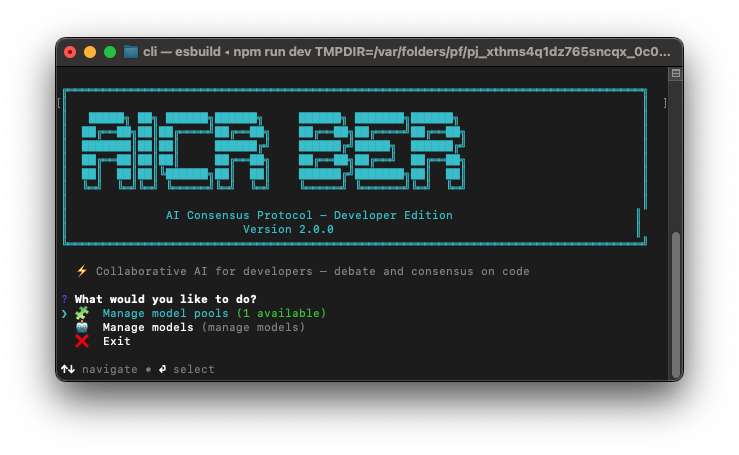
You will see the main menu with:
- 🧩 Manage model pools – create, list, edit, delete, and chat with pools.
- 🤖 Manage models – list and select which models are available for pools.
Create your first pool
- Choose Manage model pools → Create pool.
- Enter a name (e.g.,
typescript-backend). - Enter a description (e.g., “Expert TypeScript backend developers for Node.js, Express, and REST APIs”).
- Select at least two models from your installed list.
- The system auto‑generates a system prompt.
- Choose Chat with pool and start coding.
Example chat
> Create an Express API to convert meters to centimeters

🤖 Models are debating...

[llama3:8b] streaming:
REASONING: Simple, type‑safe solution with input validation...
CODE:
```typescript
import express from 'express';
const app = express();
app.use(express.json());
app.post('/convert', (req, res) => {
  const { meters } = req.body;
  if (typeof meters !== 'number') return res.status(400).json({ error: 'Invalid input' });
  res.json({ centimeters: meters * 100 });
});
app.listen(3000);
After debate and voting, the winning model streams the final answer with syntax highlighting.
📖 Detailed Usage
Model Pools
| Command | Description |
|---|---|
Create pool |
Interactive creation with name, description, and model selection. |
List pools |
Shows all pools with their descriptions and model counts. |
Show pool details |
Displays full info including the generated system prompt. |
Edit pool |
Change description, add/remove models, optionally regenerate system prompt. |
Delete pool |
Remove a pool permanently. |
Regenerate system prompt |
Re‑create the system prompt using the first model in the pool. |
Chat with pool |
Enter a REPL where you send coding requests and get final answers. |
Chat Commands
Inside a pool chat:
/verbose– toggle detailed debate logs./exit– leave the chat./help– show commands.
Configuration
All data is stored in ~/.aicp/:
pools.json– your model pools.reputation.db– model reputation scores.config.json– global settings (selected models, etc.).
🏗 Architecture
AICP is a TypeScript monorepo with three active packages (P2P is experimental and not used in the developer edition):
aicp-advanced/
├── packages/
│   ├── core/        # Consensus, reputation, vector memory, PSO (optional)
│   ├── cli/         # Interactive CLI, debate orchestrator, streaming client, pools
│   └── api/         # REST API (stub)
└── tsconfig.base.json
The core debate engine (phases.ts) is reused for pools, but with custom prompts tailored for code generation. All communication with Ollama uses HTTP streaming (/api/chat with stream: true).
🐞 Troubleshooting
| Problem | Solution |
|---|---|
Ollama is not running |
Start Ollama: ollama serve. |
| Models time out | Increase OLLAMA_HOST timeout in packages/cli/src/ollama/client.ts (default 300s). |
| Pool chat not responding | Ensure you have selected at least two models for the pool. |
| Final answer truncated | Raise TOKEN_LIMITS.synthesis in packages/cli/src/pools/debate.ts (default 65536). |
| Homebrew installation fails | Make sure you have Node.js installed (brew install node), then brew install aicp. |
🤝 Contributing
We love contributions! See CONTRIBUTING.md.
git clone https://github.com/devdanielvaldez/aicp-advanced.git
cd aicp-advanced
npm install
npm run build
cd packages/cli
npm run dev
Then open a Pull Request.
📄 License
MIT © devdanielvaldez
🙏 Acknowledgements
- Ollama – local LLM runtime
- Inquirer.js – beautiful CLI prompts
- Highlight.js – syntax highlighting for terminal
Built with ❤️ for developers who want reliable AI code assistance.
GitHub Repository – ⭐ star and fork welcome!
No comments yet
Be the first to share your take.