
Agent Skills

Skills for Claude Code, Codex, Gemini CLI, Cursor, and anything else that reads
SKILL.md. No dependencies, no API keys, no paid services.
| Skill | What it does |
|---|---|
| site-risk-check | Scan a live URL for the conditions that get sites flagged — missing policies, trackers before consent, accessibility gaps. Re-run to see only what changed. |
Install
git clone https://github.com/kobimantzur/agent-skills.git && cd agent-skills && ./install.sh
install.sh symlinks each skill folder into ~/.claude/skills, ~/.agents/skills,
and ~/.codex/skills (whichever exist) — nothing else, no downloads, no root. Read it first — it is ~20 lines and does nothing but create the symlinks.
Updates are manual and reviewable: because installs are symlinks, a later
git pull will change the code your agent runs, so treat updates like any other
dependency — read the diff before pulling, or pin to a tagged release
(git checkout v0.1.0) and update deliberately. Every skill is plain,
inspectable Python and Markdown; there are no hidden downloads and nothing runs
at install time.
Claude Code plugin install — two steps (the first only registers the marketplace, the second installs the skill):
claude plugin marketplace add kobimantzur/agent-skills
claude plugin install site-risk-check@kobimantzur
If you did it from inside a Claude Code session with /plugin, run /reload-plugins
(or restart the session) so the skill loads.
Or, without plugins at all, copy skills/site-risk-check/ into wherever your agent
reads skills from (~/.claude/skills/, ~/.agents/skills/, ~/.codex/skills/).
site-risk-check
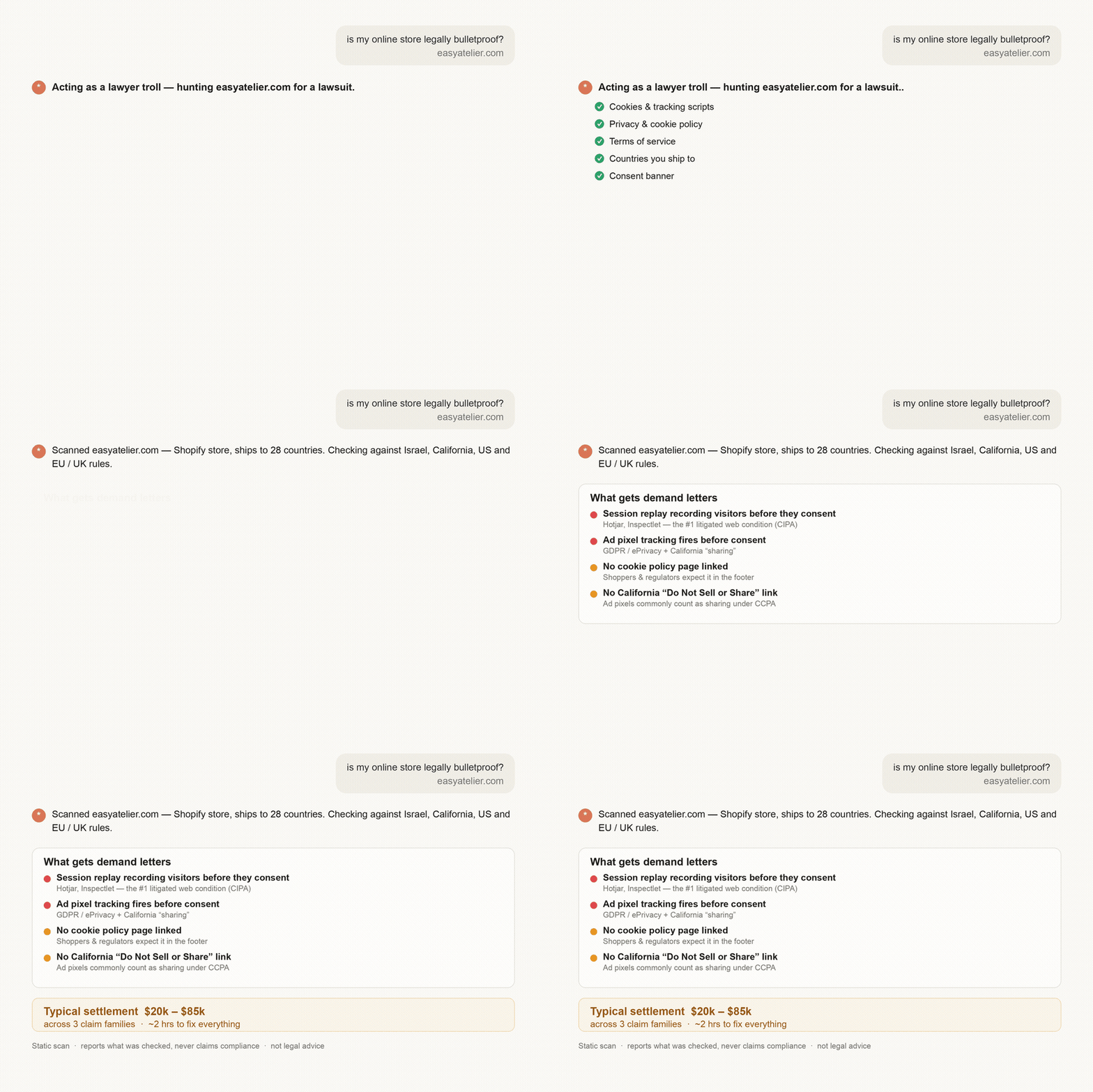
Check if your website could get you sued — before a lawyer's bot finds it first.
Point it at any URL. It runs the same scan the "ADA trolls" and privacy-demand-letter firms run — missing privacy/cookie policies, trackers and session recording firing before consent, accessibility gaps (WCAG) — figures out which countries you sell to, and tells you in plain English what to fix, how long each fix takes, and what it typically costs if you don't. The scanner itself is a local Python script (no API key, reads a public page). Note: when you run it through an AI agent, that agent sees the page content and the report — the script is local, the agent is not.
Who it's for
- Any website that makes money — if you can be sued, you can be scanned
- Shopify / WooCommerce / ecommerce stores — the #1 target for automated demand letters
- SaaS products — trackers, cookies, and consent are your biggest exposure
- Startups & founders — clear the specific defects automated scanners flag, in an afternoon, before launch or a client handoff
- Agencies — run it across every client site you ship
Covers ADA / WCAG accessibility, GDPR & ePrivacy (EU/UK), CCPA/CPRA (California), CIPA (wiretapping / session-replay claims), and Israel's IS 5568.
Run it
Ask your AI coding agent, in plain words:
check if my site is legally covered — myshop.com
Or run the scanner directly:
python3 skills/site-risk-check/scripts/scan.py https://example.com
SITE RISK CHECK — https://example.com
Scanned 2026-08-19T15:05:05+00:00  ·  static scan

FINDINGS
  [HIGH] Trackers present with no consent mechanism detected: Meta Pixel
         → Gate these behind a consent banner, or confirm the banner is
           injected client-side (this scan cannot see that).
  [MED ] 14 of 22 <img> tags have no alt attribute
         → Add alt text. Decorative images take alt="".

16 checks run  ·  1 high, 1 medium, 0 low

NOT EVALUATED
  · Contrast ratios, keyboard navigation, focus order, and whether alt text
    is meaningful all require a human or a rendered scan.
Recurring — report only what changed:
python3 skills/site-risk-check/scripts/scan.py https://example.com --state .last-scan.json
Exits 1 on any HIGH finding, so it can gate CI.
Get a shareable PDF (self-contained HTML with a homepage screenshot, printed to PDF):
python3 skills/site-risk-check/scripts/scan.py https://example.com --markets US-CA,EU --html report.html --screenshot shot.png
What it checks
Policy links (privacy, terms, cookies, accessibility, refunds, contact) ·
trackers loading without a consent mechanism · cookies set before consent ·
missing alt attributes · missing lang · unlabeled form inputs · empty
links and buttons · missing <h1> · target="_blank" without noopener ·
HTTPS and HSTS.
Client-rendered sites
Static scan is the default and needs nothing. For sites that render in the browser (React, Vue, base44, Framer…), it detects the shell and stops rather than guessing, and does a rendered scan using a browser the agent already has (Claude-in-Chrome or Playwright MCP). The skill installs no browser and no dependencies — if no browser is connected, it says so instead of guessing.
What it does not check
Static fetch only — client-rendered content is invisible. Automated testing covers a minority of WCAG success criteria; contrast, keyboard operability, focus order, and whether alt text is meaningful all need a human. It scans one page and does not crawl.
Every report states which checks ran and which could not be evaluated. It does not determine legal compliance and is not legal advice.
Security. The scanner only fetches public http(s) URLs and refuses
localhost, private, link-local, and cloud-metadata addresses (no SSRF). When a
site needs a rendered scan, it runs in a clean, anonymous browser context — never
your logged-in session — and records only cookie names and tracker hosts, never
cookie values or tokens. Nothing is exfiltrated; the report stays local.
License
MIT
No comments yet
Be the first to share your take.